Vscode: Cannot open a folder under my OneDrive folder
I can use Code to open individual files under my OneDrive folder but attempts to open folders does nothing. Attempts to open the OneDrive folder directly does not result in an open folder but creates a new Onedrive file instead.
- VSCode Version: 1.12.2
- OS Version:10.0.16204 Pro and 10.0.16202 Server
Steps to Reproduce:
There are 3 repos:
Repro 1:
- Navigate to a folder under OneDrive from a command prompt.
- Launch code via 'code .'
- Code launches but no folder is open.
Repro 2:
- Launch Code
2: Select File/Open Folder
3: Navigate to a folder under OneDrive and open it.
4: No folder is opened.
Repro 3:
1: Launch Code
2: Select File/Open Folder
3: Navigate to the Onedrive folder and select it.
4: No folder is opened but an empty 'OneDrive' file is created in the editor.
NOTE: The same occurs when running 'code .' from the OneDrive folder, an empty Onedrive file is created in the editor
 DanTravison
All 65 comments
Does it work normally with other editors?
 roblourens
on 25 May 2017
roblourens
on 25 May 2017
Please see if you can find any logged output that could help us find the source of the issue:
- run
code --verbosefrom the command line and attach the output - in Code select Help | Toggle Developer Tools and select the Console
- attach any output you see in the Console you can find
Thanks!
 bpasero
on 25 May 2017
bpasero
on 25 May 2017
I'm seeing a series of lstat errors in the console. Here are the details...
Error: EINVAL: invalid argument, lstat 'D:\OneDrive'
onError @ index.js:40
(anonymous) @ index.js:109
emitOne @ events.js:96
emit @ events.js:188
window.onerror @ C:\Program Files (x86)\Microsoft VS Code\resources\electron.asar\renderer\init.js:124
i.globals.onerror @ errorTelemetry.ts:64
index.js:43Error: EINVAL: invalid argument, lstat 'D:\OneDrive'
Error: EINVAL: invalid argument, lstat 'D:\OneDrive'
at file:///C:/Program Files (x86)/Microsoft VS Code/resources/app/out/vs/workbench/electron-browser/workbench.main.js:28:22576
onError @ index.js:43
(anonymous) @ index.js:109
emitOne @ events.js:96
emit @ events.js:188
window.onerror @ C:\Program Files (x86)\Microsoft VS Code\resources\electron.asar\renderer\init.js:124
i.globals.onerror @ errorTelemetry.ts:64
errors.ts:33Uncaught Error: EINVAL: invalid argument, lstat 'D:\OneDrive'
Error: EINVAL: invalid argument, lstat 'D:\OneDrive'
at file:///C:/Program Files (x86)/Microsoft VS Code/resources/app/out/vs/workbench/electron-browser/workbench.main.js:28:22576
 dantraMSFT
on 25 May 2017
dantraMSFT
on 25 May 2017
@dantraMSFT I just tried to reproduce with my OneDrive folder and could not. Would you be willing to try to reproduce this running out of sources? As outlined here: https://github.com/Microsoft/vscode/wiki/How-to-Contribute#build-and-run-from-source
bpasero
on 11 Jun 2017
@DanTravison @dantraMSFT @chenxizhang @kevin12314 can you please try again with our insider build from today and report back any errors you see?
You can give our preview releases a try from: http://code.visualstudio.com/Download#insiders
bpasero
on 15 Jun 2017
Doing so now.
dantraMSFT
on 15 Jun 2017
Same here (cannot open folder in OneDrive, will open a new file with the folder name)
(cannot even open a file, will just open a new empty file. Notepad works well)
No error in console. But there is a alert popup "Path doesn't exist on disk" when opening file/folder by Open File/Folder menus.

Windows Insider Preview build 16215
Visual Studio Code Version 1.14.0-insider
Commit c89a5f66c646dd8c1f6d1692d90390660c765e62
Date 2017-06-15T05:13:32.497Z
 yzhang-gh
on 16 Jun 2017
yzhang-gh
on 16 Jun 2017
I suspect Files On-Demand feature is to blame.
yzhang-gh
on 16 Jun 2017
@dantraMSFT any update trying insiders? do you have this "Files on demand" feature enabled?
bpasero
on 16 Jun 2017
Still not work correctly @bpasero
 chenxizhang
on 16 Jun 2017
chenxizhang
on 16 Jun 2017
@chenxizhang can you open the developer tools (Help > Toggle Developer Tools) and in the console type this:
require("fs").statSync("...")
Where ... is the path to the folder in OneDrive to open and send back the result?
bpasero
on 16 Jun 2017
My result:

 kevin12314
on 16 Jun 2017
kevin12314
on 16 Jun 2017
Ok thanks so it looks like there is literally nothing we can do when node already fails.
bpasero
on 16 Jun 2017
THIS SUCKS. It took me hours to find this thread after going insane. Visual Studio Code cannot "open folders" on OneDrive for me either. It looks like OneDrive got updated and broke VSCode. I cannot get back into the Files On-Demand settings in OneDrive to disable that feature. Anyone know how to get this back working again?
 ernestgwilsonii
on 17 Jun 2017
ernestgwilsonii
on 17 Jun 2017
@ernestgwilsonii suggest to contact OneDrive support to see if they have an answer.
@DanTravison @dantraMSFT @chenxizhang @kevin12314 @ernestgwilsonii just to be clear, you are all using the new OneDrive feature "Files On-demand" right?
bpasero
on 18 Jun 2017
Here are the facts from my end:
The issue with Visual Studio Code only presents itself while storing my code on OneDrive enabled locations on my PC.
My solution:
STOP using OneDrive and start using Google Drive.
Visual Studio Code is working fine now and OneDive is now in my rear view mirror.
ernestgwilsonii
on 18 Jun 2017
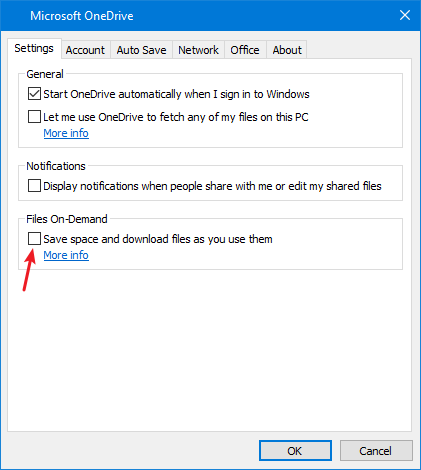
By disabling Files On-Demand, vscode works again.
(Right click the OneDrive tray icon, and click 'Settings')
yzhang-gh
on 18 Jun 2017
@neilsustc Is that option only exposed on OneDrive for Business?
I don't see that option on the latest personal version.
Version 2016 Build 17.3.6917.0607
ernestgwilsonii
on 18 Jun 2017
Not OneDrive for Business I think ... This is my version info, (I remember there is an option to manually install the latest version here)
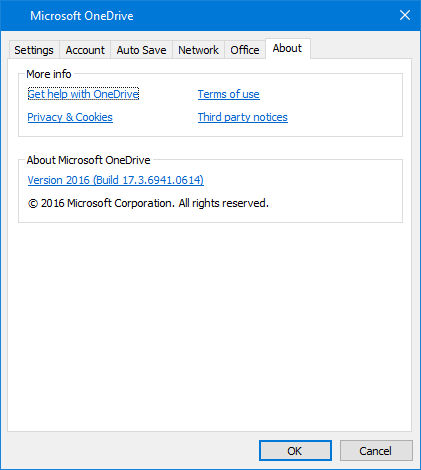
yzhang-gh
on 18 Jun 2017
@ernestgwilsonii That option is available on the consumer preview version of OneDrive that includes placeholders. I have it on my latest version 17.3.6917.0614
 EricPell
on 19 Jun 2017
EricPell
on 19 Jun 2017
This feature might also require the latest Windows insider version?
bpasero
on 19 Jun 2017
I tried latest concurrent insider builds on Windows, VS code and the OneDrive preview. No luck. I thought it might have been an issue with Cose fixed on developer builds. I, at some point, could also no access my onedrive data through WSL. That’s ok, but ALL of my work data is on OneDrive. 😫
To make it worse, turning off placeholders forced OneDrive to sync EVERY file onto my pc, even the folders I had not synced. This is more space than I havr on my Surface book 256GB model. I tried to unlink my pc, but it won't. It just keeps syncing data. I have been forced to reinstall the creators update as I was quickly running out of SSD storage with no fix insight.
If only I had the 512 GB model. Anyway…
Sent from my Windows 10 phone
From: Benjamin Pasero
Sent: Monday, June 19, 2017 2:01 PM
To: Microsoft/vscode
Cc: EricPell; Comment
Subject: Re: [Microsoft/vscode] Cannot open a folder under my OneDrive folder(#27285)
This feature might also require the latest Windows insider version?
—
You are receiving this because you commented.
Reply to this email directly, view it on GitHub, or mute the thread.
EricPell
on 19 Jun 2017
🤔 I think there is always a setting in Account tab>Choose folders
yzhang-gh
on 19 Jun 2017
I got Windows 10 Insider Build 16215. The OneDrive got update last week to version 17.3.6931.0609.
My resolution was to uninstall the update and now VS Code is back to normal.
 MaximoTrinidad
on 19 Jun 2017
MaximoTrinidad
on 19 Jun 2017
Yes. The problem is unchecking the option for file place holders immediately stars syncing your entire OneDrive to your disk. Once this starts you can not stop the sync. You have to wait for it to finish. In my case it can’t finish because I don’t have sufficient disk space. It’s a catch 22 and an additional bug that needs to get fixed.
Sent from Mail for Windows 10
From: Yu Zhang
Sent: Monday, June 19, 2017 5:33 AM
To: Microsoft/vscode
Cc: EricPell; Comment
Subject: Re: [Microsoft/vscode] Cannot open a folder under my OneDrive folder(#27285)
🤔 I think there is always a setting in Account tab>Choose folders
—
You are receiving this because you commented.
Reply to this email directly, view it on GitHub, or mute the thread.
EricPell
on 19 Jun 2017
Ah. I was on 17.3.6931.0614
Sent from Mail for Windows 10
From: Maximo Trinidad
Sent: Monday, June 19, 2017 6:56 AM
To: Microsoft/vscode
Cc: EricPell; Comment
Subject: Re: [Microsoft/vscode] Cannot open a folder under my OneDrive folder(#27285)
I got Windows 10 Insider Build 16215. The OneDrive got update last week to version 17.3.6931.0609.
My resolution was to uninstall the update and now VS Code is back to normal.
—
You are receiving this because you commented.
Reply to this email directly, view it on GitHub, or mute the thread.
EricPell
on 19 Jun 2017
I'm running Microsoft OneDrive version 17.3.6941.0614 and have "Files on Demand" enabled. While this is a great feature it doesn't seem that VS Code likes it. At least I have the same problems as above.
I've tried to use the "Always keep on this device" feature, but unfortunately this doesn't solve the problem.
I had to disable the "Files on Demand" setting in OneDrive to get VS Code working again with OneDrive. Remember to remove folders from the sync list before disabling the "Files on Demand" as this would result in making ALL files available offline (FOD enables sync of all files :-)).
It is NOT necessary to uninstall the newest OneDrive version!
 bk147
on 20 Jun 2017
bk147
on 20 Jun 2017
Thanks for the note! I think in my case, to disable "Files on Demand" it didn't seem to work. So, I decided to uninstalled the update.
:)
MaximoTrinidad
on 20 Jun 2017
I've tried todays insider build of VS Code and still have the problem. I'd prefer not to uninstall the OneDrive update, is there any update from the VS Code team on this? Is the underlying issue at least known and a fix in the works?
 davebrannan
on 20 Jun 2017
davebrannan
on 20 Jun 2017
Even after uninstalling OneDrive, rebooting several times - I cannot get those folders to open. Broke my workday completely. Yay -.-
 Szandor72
on 22 Jun 2017
Szandor72
on 22 Jun 2017
Disable the File-Ondemand Feature can work for me
But this is a bad experence
chenxizhang
on 22 Jun 2017
I am running in to this same issue. Disabling Files On-Demand and waiting about 5 minutes resolved the issue.
Another possible important note: configuring the the parent directory of a repository "Always keep on this disk" did not resolve the issue with Files On-Demand enabled.
 sgtoj
on 23 Jun 2017
sgtoj
on 23 Jun 2017
@sgtoj,
Disabling "Files On-Demand" won't bring back the original behavior. I don't want to copy all my OneDrive files to my drive ad it defeat the purpose of having everything in the cloud.
So, removing the fix will leave it so I can access my files straight from the cloud.
:)
MaximoTrinidad
on 28 Jun 2017
when Files On-Demand is enabled new file system attributes (FILE_ATTRIBUTE_RECALL_ON_OPEN, etc. see MSDN) will be returned and a reparse point tag will be visible on the files and folders. I suspect VSCode is getting confused by these, perhaps it checks them to identify symlinks or other special file system items.
 ChrisGuzak
on 1 Jul 2017
ChrisGuzak
on 1 Jul 2017
Disabling Files on Demand is not the answer or resolution here, and neither is "moving to Google Drive". I too have this issue:
Windows 10 16237 (Insiders Fast Ring)
VSCode 1.13.1
OneDrive Client 17.3.6944.0627
Files that fail to open properly in VSCode open just fine with Notepad++. The Always keep on this device option is enabled for the specific files I'm trying to edit in VSCode.
 ChrisLynchHPE
on 10 Jul 2017
ChrisLynchHPE
on 10 Jul 2017
any update? @bpasero
chenxizhang
on 11 Jul 2017
Yea still broken
Sent from my Windows 10 phone
From: 陈希章
Sent: Tuesday, July 11, 2017 12:14 AM
To: Microsoft/vscode
Cc: EricPell; Comment
Subject: Re: [Microsoft/vscode] Cannot open a folder under my OneDrive folder(#27285)
any update? @bpasero
—
You are receiving this because you commented.
Reply to this email directly, view it on GitHub, or mute the thread.
EricPell
on 11 Jul 2017
https://github.com/nodejs/node/issues/12737 might be the underlying technical issue in node.js, which is the library we are using for all file access.
bpasero
on 12 Jul 2017
Strange!!
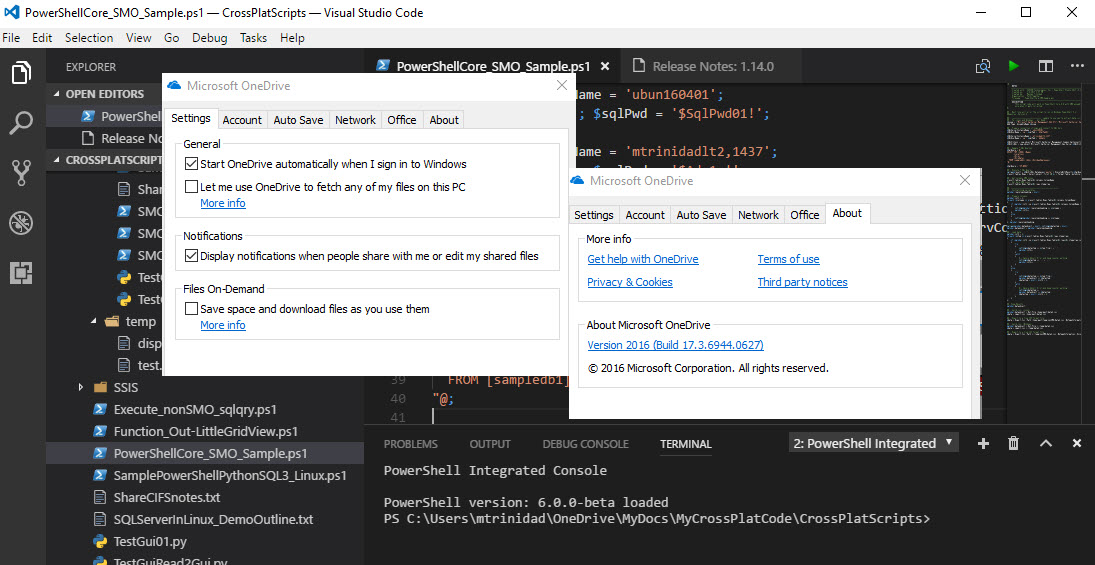
In my case, I upgrade Windows 10 Insider Build 16237, open OneDrive settings to unchecked the Files-On-Demand option.
This is on OneDrive Version 2016 (Build 17.3.6944.0627). I'm in both Code Version June 2017 version and Code Insider Version July 2017.
Now, everything seems to work fine.
MaximoTrinidad
on 12 Jul 2017
Just had an update to both Windows 10 1703 16232.10000 (slow ring) and VSCode 1.14.0
Problem:
"Path XXXXXX no longer seems to exist" error in VSCode on any OneDrive (child)path
When 'Save Space and download files as you use them' setting enabled in OneDrive (the Windows 10 variant, NOT the 'OneDrive for Business' (o365) variant)
Workaround:
- Select 'Settings' in shortcut menu in tray icon
- Optional (if drive capacity does not suffice for all OneDrive data)
a. Select 'Account' TAB
b. Choose folders - for you selection of folders - Select 'Settings' TAB
- Disable setting in OneDrive 'Save Space and download files as you use them'
This MAY break you current OneDrive setup (as it did with mine), which means you'll get the OneDrive Wizard asking for sign-in. location etc. After that, everything is "ok". At least in my case...
...and watch your processor burn up on the 'WIndows Explorer' process for a while :|
 peppekerstens
on 12 Jul 2017
peppekerstens
on 12 Jul 2017
+1 for this as an issue. This is a core function in Windows (ok, it will be from the Fall update) and will be enabled by default. At the moment it seems the answer is "use VSCode or use OneDrive but not both" - which isn't a good place to be imho. How can we help to get this fixed? Thanks.
 ChrisWarwick
on 17 Jul 2017
ChrisWarwick
on 17 Jul 2017
Noting that this is still an issue on VS Code 1.15.0-insider, Windows build 16241.rs_prerelease.170708-1800
 scratchfive
on 21 Jul 2017
scratchfive
on 21 Jul 2017
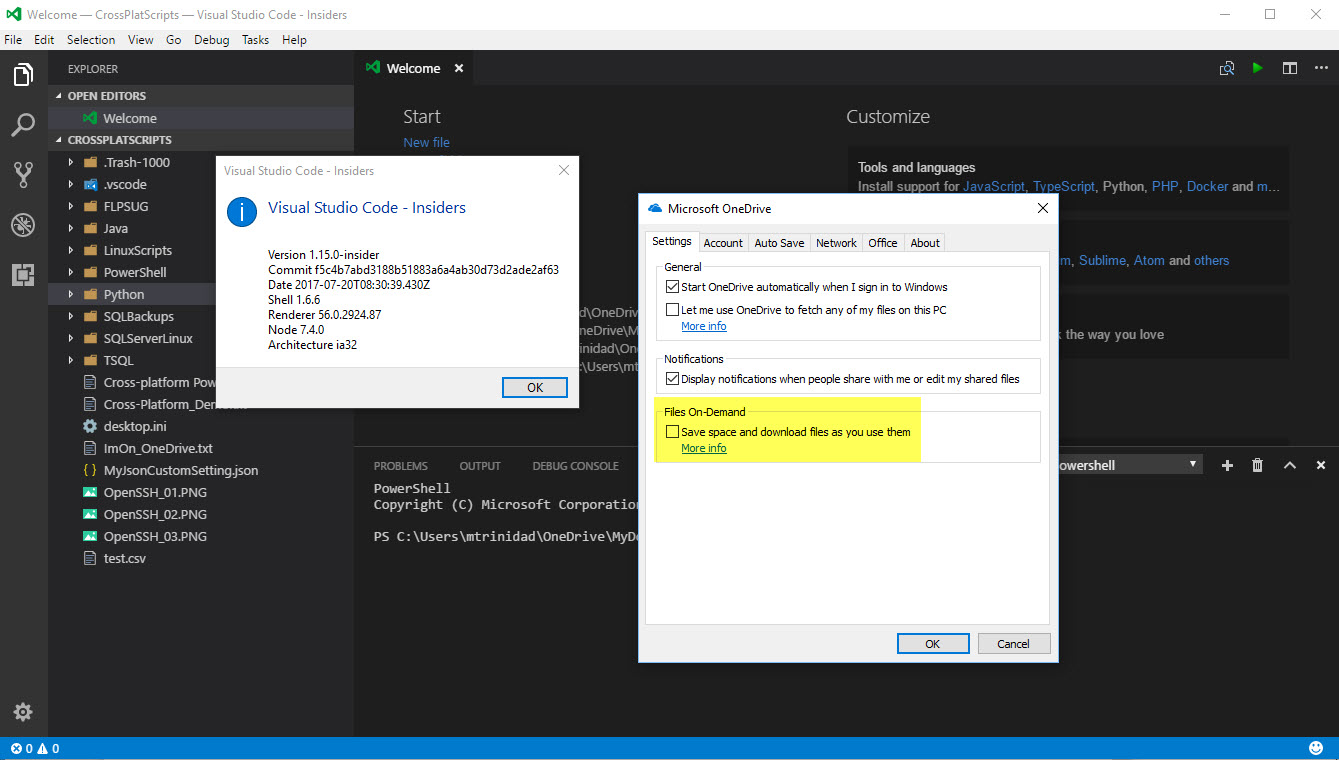
I have to disagree!
I don't have any issues with either of VS Code v1.14.2 or VS Code Insider v1.15.0.
I'm able to access my folders and files in my OneDrive account after I unselect the option under "Files-On-Demand". I can see immediate changes to my files on the internet.
OneDrive Version 2016 (Build 17.3.6944.0627)
Windows 10 Pro Insider Preview Build 16241-rs_prerelease.170708-1800
All good on my end!
MaximoTrinidad
on 21 Jul 2017
@MaximoTrinidad I don't think this is a solution. You shouldn't have to disable a soon to be core feature of Windows just to open a file.
Also of note: Atom is affected as well, though Sublime works perfectly. Since VS Code and Atom share some similarities in their underlying structure, I'm wondering if it's a node.js issue as others have suggested in this thread.
scratchfive
on 21 Jul 2017
AFAICT it is a consequent of https://github.com/nodejs/node/issues/12737
P.S. A possible fix is coming https://github.com/libuv/libuv/pull/1419, but it'll take time until it's integrated into node.js and then to Electron.
 refack
on 21 Jul 2017
refack
on 21 Jul 2017
@refack that is some great news thanks 👍 . Yes, it will take a bit until we go to a version of Electron that has this change in.
bpasero
on 21 Jul 2017
So fix on libuv has been migrated 22 days ago, any further info?
 Jack-Works
on 17 Aug 2017
Jack-Works
on 17 Aug 2017
@Jack-Works I asked Electron to backport this fix into their next release. If that is not possible we will have to wait for:
- a new libuv release with this fix
- a new node.js release with that libuv version
- a new electron release including that node.js version
bpasero
on 17 Aug 2017
- We fixed an issue resulting in Node.js (v6.9.4) not being able to run scripts stored in OneDrive or access any paths in OneDrive
Maybe this will fix vscode not opening folders on OneDrive. I haven't tried yet
 pinoelefante
on 23 Aug 2017
pinoelefante
on 23 Aug 2017
@pinoelefante wow that almost sounds too good to be true, can someone confirm?
bpasero
on 24 Aug 2017
Seems to be working for me :-)
ChrisWarwick
on 24 Aug 2017
Still not working. Win 10 16273.1000+VSCode 1.16.0 (x64)
 zhangyz1997
on 25 Aug 2017
zhangyz1997
on 25 Aug 2017
@ChrisWarwick which exact Windows version are you on? Did you verify the scenario works with the "Files on-demand" feature enabled in OneDrive?
bpasero
on 25 Aug 2017
@bpasero
Win 10 16275.1000+VSCode 1.15.1 (x86)
Still not working :(
pinoelefante
on 26 Aug 2017
Not working for me either. I disabled files-on-demand and resynced and it didn't improve the situation.
Windows 10 16273
VSCode 1.15.1 (x64)
 jeevcat
on 27 Aug 2017
jeevcat
on 27 Aug 2017
- a new libuv release with this fix
- a new node.js release with that libuv version
- a new electron release including that node.js version
The good news is the fix landed in libuv 1.14.0 (https://github.com/libuv/libuv/commit/e5024c54a1d015607698849d69882174203f8205), so 1 of 3 is done.
A version bump PR is open in node - https://github.com/nodejs/node/pull/14866
Should land soon (that'll be 2 of 3).
Then the pressure will be on Electron...
refack
on 27 Aug 2017
I just created a build of VS Code that includes Electron 1.7.7 which includes a backport of the fix in libuv (thanks for the backport @zcbenz). Can people hitting the OneDrive issue maybe give this build a try and report back if the problem is fixed?
Thanks
bpasero
on 31 Aug 2017
@bpasero is working with this build
pinoelefante
on 31 Aug 2017
Ya, it works. I tested it on Windows 10 build 16251.
Updated:
My Windows later updated to 16278.rs3, it doesn't work any more.
 linanw
on 31 Aug 2017
linanw
on 31 Aug 2017
That is good news. Unfortunately we are closing for our 1.16 release this week and it is unlikely that we would include this Electron version in the stable release. But we plan to update Electron for insiders next week asap so that people have a workaround by using VS Code insiders.
bpasero
on 31 Aug 2017
I think someone make sure to test this on the latest Windows 10 Insider Build 16257.rs3. Just in case!
The reason I'm mentioning about it is due to the fact that OneDrive gets updated in one of the recent releases.
:)
MaximoTrinidad
on 31 Aug 2017
Worked in build 16273 RS4
zhangyz1997
on 1 Sep 2017
Also works here on Windows 10 Ent build 16353.rs_prerelease and OneDrive build 17.3.6998.0830 :-)
bk147
on 6 Sep 2017
bpasero
on 8 Sep 2017
Marking as verified based on user testing.
bpasero
on 28 Sep 2017
Related issues
 sijad
·
3Comments
sijad
·
3Comments
 philipgiuliani
·
3Comments
philipgiuliani
·
3Comments
 vsccarl
·
3Comments
vsccarl
·
3Comments
 ryan-wong
·
3Comments
ryan-wong
·
3Comments
 v-pavanp
·
3Comments
v-pavanp
·
3Comments
Most helpful comment
@MaximoTrinidad I don't think this is a solution. You shouldn't have to disable a soon to be core feature of Windows just to open a file.
Also of note: Atom is affected as well, though Sublime works perfectly. Since VS Code and Atom share some similarities in their underlying structure, I'm wondering if it's a node.js issue as others have suggested in this thread.