Vscode: Add a jump back command from goto definition
This is a feature request.
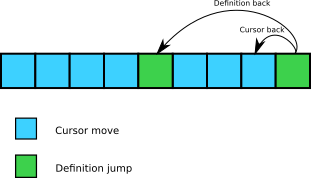
I'd like to have a command like workbench.action.navigateback but that would only take into account the go to/jump commands (go to definition, implementation, type definition, start of function, ...) and no cursor move.
For example, I could jump from a function call to the definition of the function, then move my cursor down three times. If I navigate back, my cursor will go up by one line. But instead I would like to jump back to the function definition and then to the function call.
 Khady
Khady
All 15 comments
fyi @jrieken @bpasero
 alexdima
on 29 May 2017
alexdima
on 29 May 2017
Yes please. Push/pop jump stack. :D
 ssoroka
on 8 Jun 2017
ssoroka
on 8 Jun 2017
+1 for this, I do this in vim all the time and in fact mapped them to
It's been frustrating that I'll do
 coderjz
on 10 Aug 2017
coderjz
on 10 Aug 2017
I see @bpasero made the decision to add the cursor move to history in this post
https://github.com/Microsoft/vscode/issues/11727
I would say we could provide different shortcut choice for cursor back and definition jump back, when definition jump back triggered, the interval cursor back option could be dropped.
Hi @bpasero could you tell me how to increase the history step buffer size to let me have a temporary solution for the same needs here? Thank you.
 intijk
on 13 Jan 2018
intijk
on 13 Jan 2018
Do we have a follow up on this? This would allow native use for things like ctrl-] and ctrl-[ under Vim emulation as well.
 ffledgling
on 6 Jul 2018
ffledgling
on 6 Jul 2018
@alexandrudima fyi this would require a little bit more information in the ICursorPositionChangedEvent how it was triggered. Currently I see source: "api" which seems to be too generic. If there was more types how a change happened, we could start building a history only for that. It would also help me fix another issue where upon invoking "Find > Next" many times, lots of history locations are added even though the user did not explicitly jump using the mouse/keyboard.
 bpasero
on 20 Sep 2018
bpasero
on 20 Sep 2018
We could add source arguments to the editor.setSelection, editor.setSelections and editor.setPosition APIs. We could start with the current default, api, and work from there. I have already added the source argument to setSelections, but only in the CodeEditorWidget (and not in the ICodeEditor) for now.
So I guess the work to implement this feature request should consist also of finding such callers and annotating them with a good (or better than api) source.
alexdima
on 20 Sep 2018
Great to see the effort finally started after requested for a year :+1:
intijk
on 25 Sep 2018
@bpasero Do we have any progress on this one? Keen to see it happen :disappointed_relieved:
intijk
on 3 Jan 2019
I would like this too. I really don't understand why would anyone want to jump back to the last cursor point.. Might as well just provide a setting option so we can choose the desired behavior.
 zofari
on 14 Mar 2019
zofari
on 14 Mar 2019
@zofari I agree with you , I rarely see any one really care cursor blink back.
Definition jump back is much more important feature, a fundamental feature in tools like ctags provided.
But the sad thing is, this ticket never get any importance since its creation after 22 months.
intijk
on 14 Mar 2019
so I'm not sure how this works but I have a mouse with 5 buttons and I had set one of them to simulate a backspace/back click which would work with browsers and windows explorer. and in vscode if I ctrl+click on a function definition then click that mouse button it takes me back to exactly where I came from (across files as well)
 abhyudayasrinet
on 24 Jun 2019
abhyudayasrinet
on 24 Jun 2019
Would love to see this happen. This kind of navigation is essential to my workflow.
 bakshizaki
on 2 Mar 2020
bakshizaki
on 2 Mar 2020
FTR I am using https://github.com/VSCodeVim/Vim almost only because they implemented this feature in the extension. vscode is unusable otherwise.
Khady
on 3 Mar 2020
FTR I am using https://github.com/VSCodeVim/Vim almost only because they implemented this feature in the extension. vscode is unusable otherwise.
Thanks, I didn't know VSCodeVim had that. Exactly what I was looking for.
bakshizaki
on 3 Mar 2020
Related issues
 omidgolparvar
·
3Comments
omidgolparvar
·
3Comments
 sijad
·
3Comments
sijad
·
3Comments
 biij5698
·
3Comments
biij5698
·
3Comments
 villiv
·
3Comments
villiv
·
3Comments
 philipgiuliani
·
3Comments
philipgiuliani
·
3Comments
Most helpful comment
Do we have a follow up on this? This would allow native use for things like
ctrl-]andctrl-[under Vim emulation as well.