Vscode: [html] Javascript intellisense in inline scripts from external references
This request is to provide intellisense capabilities for referenced script tags on inline javascript, for example:
<script src="myJs.js">
<script>
   myJs.IntellisenseGoesHere
</script>
Ideally typings files are also supported for an even better experience
I could not find an open issue on this so per @aeschli 's comment on the last ticket related to this #15377 , I am creating a new feature request here
 jaa1982
All 26 comments
// fyi @aeschli
 egamma
on 10 May 2017
egamma
on 10 May 2017
This is a much-desired feature. It will be great if VS code team can address this sooner rather than later. Will help a great deal in improving productivity.
 prayaggandhi1080
on 18 May 2017
prayaggandhi1080
on 18 May 2017
I understand we had this feature prior to adoption of the Salse engine . I love the improved experience while working in .js files, however for those cases where I can't separate my js from my html, it's been disappointing not to have the same experience. +10 for this
 sandipsoni
on 18 May 2017
sandipsoni
on 18 May 2017
Actually this is how I have been working on visual studio and it has been converted in a primary need to me. It will be great if this is implemented here too.
 josentiago
on 19 May 2017
josentiago
on 19 May 2017
It would be very useful the level of organization and integration that would offer this feature on VS Code. I hope it can be added soon.
 edgarrriojas
on 19 May 2017
edgarrriojas
on 19 May 2017
I wish we could just use jshint and d.ts jsdoc commenting in inline script block
 Thaina
on 11 Jul 2017
Thaina
on 11 Jul 2017
There is also the (related) error [js] Cannot find name... when using external global references not inline.
<script src="declaring-global-foo.js">
<script src="using-foo.js">
It is not about the linting, it is about the js checking.
The only workaround is filling accordingly global.d.ts.
My proposal is using the type definitions of the lib, if it is listed in package.json.
 albertosantini
on 19 Mar 2018
albertosantini
on 19 Mar 2018
No javascript support in script for exemple if i write $("#div1). there is no methods listed at all.... i'm speaking about visual studio code. Issue that i face is with jquery? Can you guys help us or?
 JasminSAB
on 9 Sep 2018
JasminSAB
on 9 Sep 2018
This functionality is just a killer feature, this is the function, the absence of which prevents developers to start using VS Code.
 vadimmos
on 23 Oct 2018
vadimmos
on 23 Oct 2018
Can anyone comment why intellisense does work with jquery even in script tag but not with any other libraries? Is there a hack done for jquery? Just to clarify - javascript intellisense works fine outside script tag for any library - in external javascript file.
 realmerx
on 3 Dec 2018
realmerx
on 3 Dec 2018
Can anyone comment why intellisense does work with jquery even in script tag but not with any other libraries? Is there a hack done for jquery? Just to clarify - javascript intellisense works fine outside script tag for any library - in external javascript file.
Hello, @realmerx I had the same issue 2-3 months ago, I can suggest you reinstall vs code etc
JasminSAB
on 3 Dec 2018
Oh. This is one of the most awaited opportunities. I will not be mistaken if I say that many developers are waiting for this functionality.
vadimmos
on 5 Mar 2019
Still no updates on this? Sadly, not even a jsconfig.json with absolute/relative pathes to the js sources makes intellisense aware of the JS files to parse.
 mpf82
on 18 Jul 2019
mpf82
on 18 Jul 2019
I just think.. maybe this feature actually possible to achieve with custom language server?
We might could rewrite language server for HTML and publish as extension?
Thaina
on 18 Jul 2019
Still no love on this one? Has anyone found any workaround or extensions? We have all our paths defined in jsconfig.json, which yields great results in regular VS, but not VS Code.
EDIT: Never mind, this seems to be resolved in latest VS Code Insiders.
I was able to get intellisense doing things like this now, hurray!
<p>I am an html svelte component.</p>

<script>
  import api from 'services/api' // jsconfig.json in project root defines path to services/etc
  api.acc... // intellisense started popping my suggestions in, beautiful
</script>
 PersonThing
on 16 Oct 2019
PersonThing
on 16 Oct 2019
It'd be cool even if vscode simply treated the inside of a <script> block as though it were a js file at the location where the html file is. Just to get auto-import support would be dreamy. Other features like refactor-extract-function, refactor-rename, etc would be great too.
If anyone knows of an extension that does something like that, let me know. Or you know how a simple extension could be thrown together that does that, any insight would be appreciated.
We're using svelte, so we basically code in an html file and put logic in a script block, so this would be super nice to have. We currently just manually type our imports out, which gets a bit tedious.
 JohnnyFun
on 17 Jan 2020
JohnnyFun
on 17 Jan 2020
Have there been any developments regarding the implementation of this feature? Intellisense for JavaScript files is not working inside of <script></script> tags within HTML documents (i.e. - not treating the <script></script> tags as a JS file). Is there a workaround that anyone has found?
I have tried going about it in a few different ways but haven't had success. Here are my attempts:
First Way
<!DOCTYPE html>
<html lang="en">

<head>
  <meta charset="UTF-8">
  <meta name="viewport" content="width=device-width, initial-scale=1.0">
  <!-- no need to directly reference index.js, but included it anyway to show it doesn't work with or without reference to it  -->
  <script src="./intellisense/index.js" type="module"></script>
  <title>Document</title>
</head>

<script >
  // this is where I am expecting intellisense to show up from the referenced file above
  someObj.someProperty
</script>

<body>

</body>

</html>
Second Way
<!DOCTYPE html>
<html lang="en">

<head>
  <meta charset="UTF-8">
  <meta name="viewport" content="width=device-width, initial-scale=1.0">
  <title>Document</title>
</head>

<script>
  // don't need to reference index.js in filepath from imports with JS (have tried it both with and without; neither work)
  import { someObj } from './intellisense/index.js';
  // this is where I am expecting intellisense to show up from the imported file above
  someObj.someProperty
</script>

<body>

</body>

</html>
Neither way seems to be working.
Thoughts?
 williamleiby
on 12 Mar 2020
williamleiby
on 12 Mar 2020
Hi Sir .
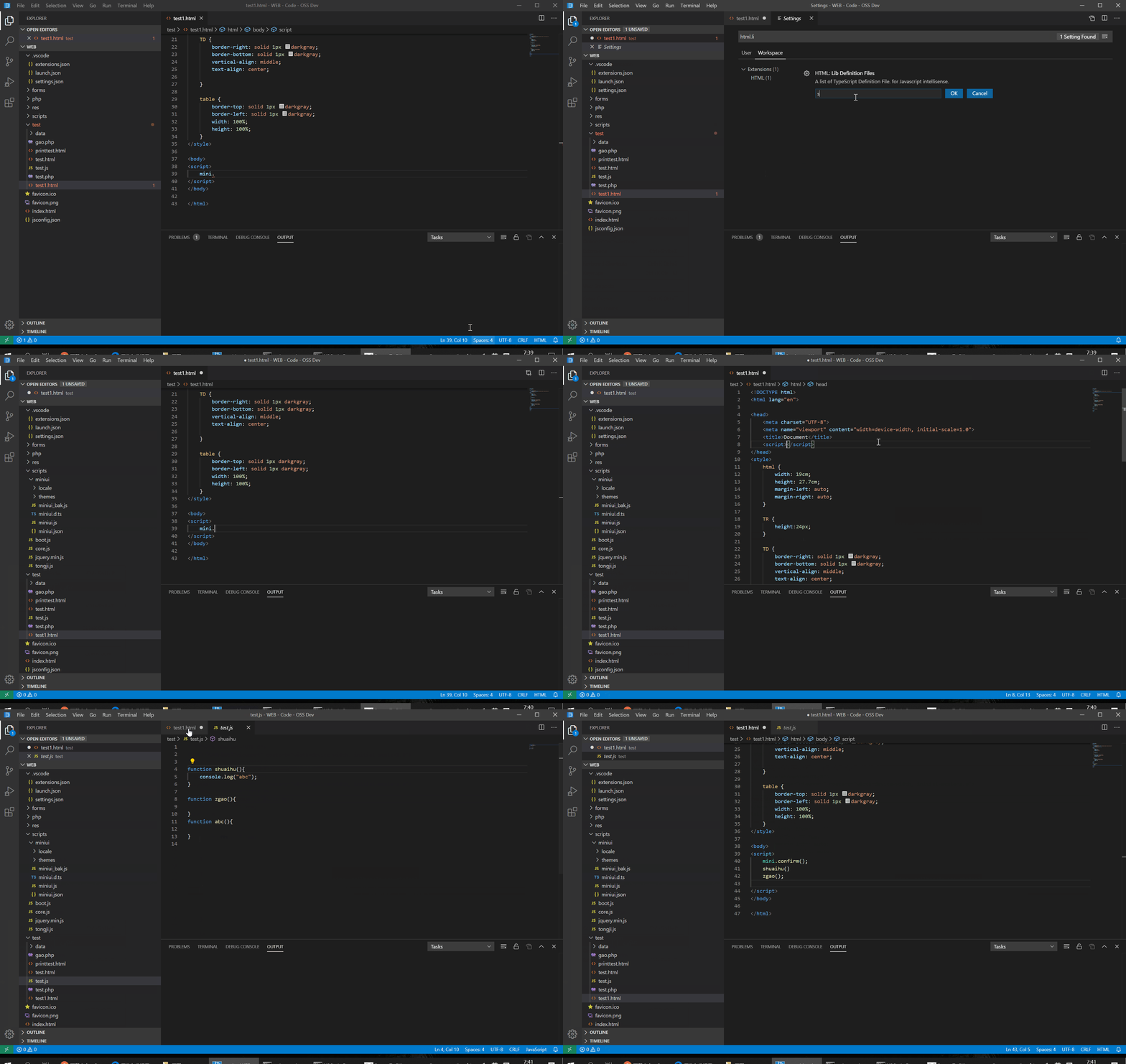
I want to solve this problem by adding a setting parameter. Now, JQUERY works well in HTML file. It's using "resources\app\extensions\html-language-features\server\lib\jquery.d.ts".
So I hope that by adding a setting parameter. let our “.d.ts" file can also work normally.
if my changes can be contributed to the code base, I will start to solve this problem tomorrow.
 shuaihuGao
on 17 Mar 2020
shuaihuGao
on 17 Mar 2020
OK .
I think it's work fine now.
shuaihuGao
on 19 Mar 2020
hi,
please help me to test and report bug.
shuaihuGao
on 21 Mar 2020
Here is packaging version.
https://github.com/shuaihuGao/vscode/releases/download/1.43.2/VSCode-win32-x64.zip
shuaihuGao
on 22 Mar 2020
I'd like to slightly expand this feature request to include IntelliSense for JS coming from external references in event attributes.
For easy reference:
| DESTINATION | SOURCE | SUPPORTED |
|---|---|---|
| Script tag | Script tag | YES |
| Script tag | External JS file | NO |
| Event attributes | Script tag | YES |
| Event attributes | External JS file | NO |
 andrecasal
on 7 May 2020
andrecasal
on 7 May 2020
I've moved this extension to a stand-alone project, which can be downloaded here if necessary.
https://gitee.com/Opencl/HtmlEmbeddedJavascript
I will maintain this version and try to keep it consistent with the build as much as possible. But I'm really hungry. I don't know how much money I can use to eat.
shuaihuGao
on 14 Aug 2020
Still not fixed?
Been an issue since 2016, if I remember correctly. Should be higher on the priority list, imo.
 ballerfuturistic
on 20 Sep 2020
ballerfuturistic
on 20 Sep 2020
@shuaihuGao Is your extension available in VS Code Marketplace? If not, can you publish it there?
 trusktr
on 24 Oct 2020
trusktr
on 24 Oct 2020
Dear VS Code team, @shuaihuGao's patch is really really small and enables a lot of functionality. Can you please adopt it?
https://github.com/shuaihuGao/vscode/commit/ad9f6a607553a618bcaab5c5bc489def602f326e
trusktr
on 24 Oct 2020
Related issues
 philipgiuliani
·
3Comments
philipgiuliani
·
3Comments
 vsccarl
·
3Comments
vsccarl
·
3Comments
 curtw
·
3Comments
curtw
·
3Comments
 sijad
·
3Comments
sijad
·
3Comments
 v-pavanp
·
3Comments
v-pavanp
·
3Comments
Most helpful comment
This is a much-desired feature. It will be great if VS code team can address this sooner rather than later. Will help a great deal in improving productivity.