Vscode: In Pascal-like languages begin-end brackets incorrectly match words containing them as parts
When defining Pascal-like language, with begin-end brackets, editor thinks, that "begin" and "end" being parts of any other words are also brackets.
I have tried to use regular expression for brackets, however, it seems that regex is not supported there.

"language-configuration.json":

- VSCode Version: 1.12.1
- OS Version: Windows 10
Steps to Reproduce:
- Copy any language extension to custom extensions folder
- In "language-configuration.json" add "begin-end" brackets
- Write in a new file "begin-end" block and "appendElem" function call inside that block
- Click on "begin" and see that it matches with function call
 Somnium7
All 13 comments
In PLSQL language we have delimiters inside others: begin..end but also if...end if
So I need to do something like this:
    "brackets": [
        ["if", "end if"],
        ["loop", "end loop"],
        ["begin", "end"]
    ],
=> It doesn't work with begin...end (it works fine with if...end if and loop...end loop)
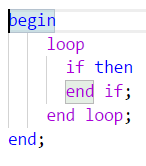
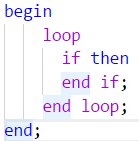
I added character ;
    "brackets": [
        ["if", "end if;"],
        ["loop", "end loop;"],
        ["begin", "end;"]
    ],
=> it doesn't work anymore, nothing is higlighted this time.
 zabel-xyz
on 28 Oct 2017
zabel-xyz
on 28 Oct 2017
Any progress on this one? Regex support will be ideal, however only checking word boundaries will be already great improvement.
Somnium7
on 18 Apr 2018
I've added checks for word boundaries via https://github.com/Microsoft/vscode/commit/91bd149bfe44b215882f843f6d0d925e40df0aab
 alexdima
on 23 Apr 2018
alexdima
on 23 Apr 2018
@alexandrudima Thanks! Checked it in Insiders. Working almost great, one minor bug:
If we have two types of brackets which differ only by opening bracket, but closing bracket is same, then in some cases bracket are not highlighted when placing cursor at closing brackets.
Take following configuration:
{
"comments": {
"lineComment": "//",
"blockComment": ["/*", "*/"]
},
"brackets": [
["(", ")"],
["recordbegin", "endrecord"],
["simplerecordbegin", "endrecord"]
],
"autoClosingPairs": [
["(", ")"],
["\"", "\""],
["'", "'"]
],
"surroundingPairs": [
["(", ")"],
["\"", "\""],
["'", "'"]
]
}
And place cursor on each bracket to see what happens. See screeshot.

Also @zabel-xyz mentioned example, where brackets contains spaces, still does not work.
Somnium7
on 23 Apr 2018
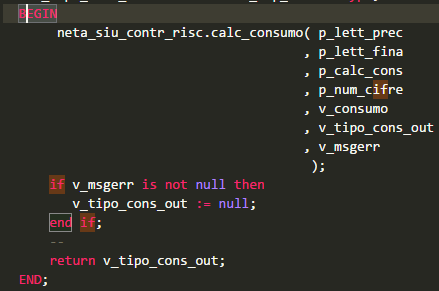
Hi, still don't work in this case:
"brackets": [
["if", "end if"],
["begin", "end"]
],
 Danieleeee
on 24 Apr 2018
Danieleeee
on 24 Apr 2018
To verify, edit one of the built-in language configuration files or create a new language if you really want to and use:
    "brackets": [
        ["if", "end if"],
        ["loop", "end loop"],
        ["begin", "end"]
    ],
Then, write some code which utilizes this, like.
  loop
    if
    end if
  end loop
end
The end should match the corresponding beginning sequence.
Please also try other variants from other comments...
alexdima
on 29 Oct 2019
@alexandrudima Thank you! I have tried in Insiders version some of examples which didn't work earlier and they all seems working now.
Somnium7
on 29 Oct 2019
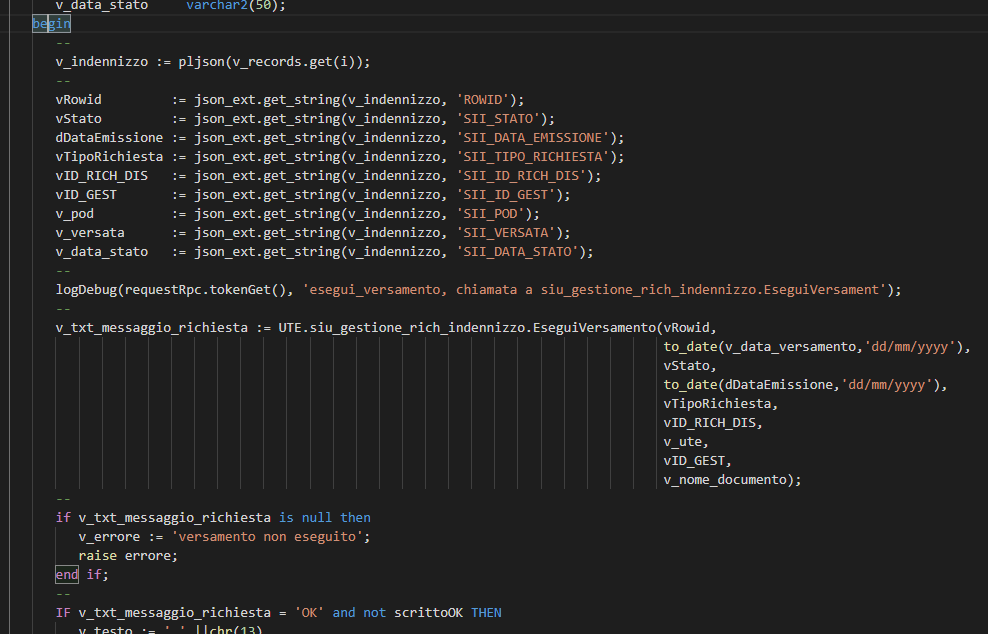
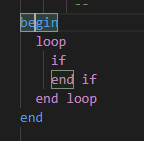
Don't work with begin - end:
Danieleeee
on 30 Oct 2019
Danieleeee
on 30 Oct 2019
@Danieleeee This only works if you also define if and end if as a bracket pair. If you define only begin and end, then the above screenshot shows reasonable behavior.
alexdima
on 30 Oct 2019
Yes.
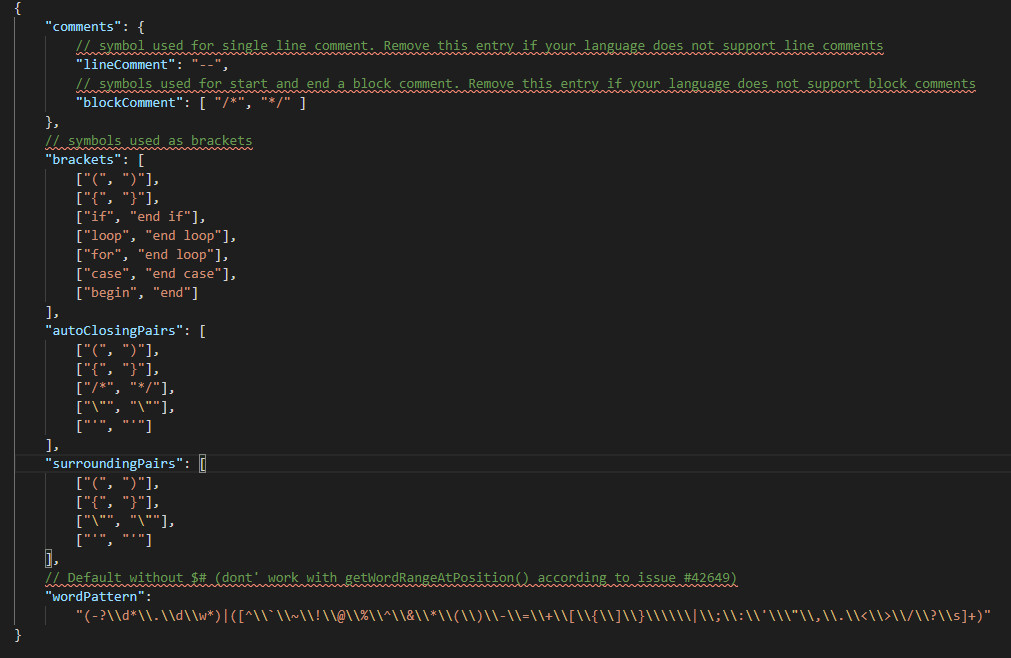
You have tried and it works ?
Danieleeee
on 30 Oct 2019
@Danieleeee Yes, I have tried when I pushed fixes for this issue. There is even a unit test that passes for this case. See here
I have tried once again with the brackets you have defined:
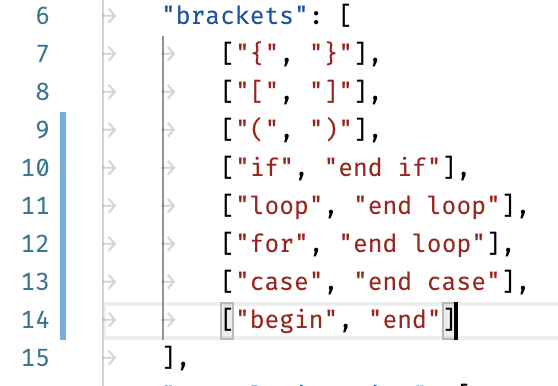
And it works for me:
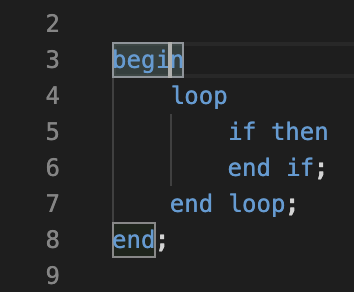
Have you tried in a VS Code build that contains the fix? i.e. an Insiders build? The 1.40 version will ship to the stable channel sometime next week.
alexdima
on 31 Oct 2019
Sorry, I don't have insiders build.
I will wait for stable version next week.
Thanks
Danieleeee
on 31 Oct 2019
Related issues
 villiv
·
3Comments
villiv
·
3Comments
 curtw
·
3Comments
curtw
·
3Comments
 borekb
·
3Comments
borekb
·
3Comments
 DovydasNavickas
·
3Comments
DovydasNavickas
·
3Comments
 vsccarl
·
3Comments
vsccarl
·
3Comments
Most helpful comment
In PLSQL language we have delimiters inside others: begin..end but also if...end if
So I need to do something like this:
=> It doesn't work with begin...end (it works fine with if...end if and loop...end loop)


I added character ;
=> it doesn't work anymore, nothing is higlighted this time.