Vscode: Extension host terminated unexpectedly. Please reload the window to recover. (Huge repo)
- VSCode Version: Code 1.11.0 (9122ec4b1068bd391e41974f46a4b54c1b9c90f9, 2017-04-05T20:52:01.201Z)
- OS Version: Darwin x64 16.5.0
- Extensions:
|Extension|Author|Version|
|---|---|---|
|swagger-viewer|Arjun|1.3.0|
|xml|DotJoshJohnson|1.7.0|
|vscode-npm-script|eg2|0.1.8|
|text-transform|florianloch|0.1.0|
|java|redhat|0.0.11|
|vscode-icons|robertohuertasm|7.3.0|
|guides|spywhere|0.7.0|
|Material-theme|zhuangtongfa|2.2.5|;
Steps to Reproduce:
1.Run any javascript file > F5.
2.Debugging. > after 1 or 2 mins.
3.Extension host terminated unexpectedly. Please reload the window to recover.
4.Reload Window.
 shaunqiu
All 69 comments
I am also experiencing same issue with VSCode 1.11.0. I have issue with projects which are local i.e. that are not linked with any github or gitlab. If I open a project which .gitignore, VSCode runs fine.
 pradeepambati
on 6 Apr 2017
pradeepambati
on 6 Apr 2017
@pradeepambati Can you open a new issue, and also try starting code with --disable-extensions to figure out whether one of your extensions is causing this issue?
 roblourens
on 6 Apr 2017
roblourens
on 6 Apr 2017
@mssky-shaun-qiu Do you have a launch.json file? Can you post it here? And is there anything particular you do while debugging that causes this message to appear?
roblourens
on 6 Apr 2017
@roblourens I didn't do any particular thing, it appears after I upgrade to the new version this 2 hours ago.
launch.json
{
// Use IntelliSense to learn about possible Node.js debug attributes.
// Hover to view descriptions of existing attributes.
// For more information, visit: https://go.microsoft.com/fwlink/?linkid=830387
"version": "0.2.0",
"configurations": [
{
"type": "node",
"request": "launch",
"name": "Launch Program",
"program": "${file}",
"cwd": "${workspaceRoot}",
"outFiles": []
},
{
"type": "node",
"request": "attach",
"name": "Attach to Process",
"port": 5858,
"outFiles": []
}
]
}
shaunqiu
on 6 Apr 2017
Can you try starting code with --disable-extensions, then debugging, to see if the issue still happens?
And what version of node are you debugging?
roblourens
on 6 Apr 2017
I don't know how to start code with --disable-extensions in OS...
Answer: open ./Visual\ Studio\ Code.app/ --args --disable-extensions
The node version:
Nevermore:trunk moo$ node -v
v6.10.0
I encountered exactly the same issue after upgraded to VS Code v1.11.0.
- OS: Windows 10
- VSCode: 1.11.0
- Node: v6.9.4 32bit
I am working on a typescript project. Everything is OK before v1.11.0. After upgraded, auto-completion is unavailable when the error occurs. And tslint prompts errors much slower.
 fuchen
on 6 Apr 2017
fuchen
on 6 Apr 2017
Disable all extensions(they are all grey), but the error come again.
@fuchen Yes, Typescript!
shaunqiu
on 6 Apr 2017
I seem to have the same issue. Also still getting the same message after disabling all my extensions.
This is a simple php project, residing in a remote shared folder.
Doesn't happen for a local clone of the project..
- OS: Windows 10
- VSCode: 1.11.0
 DrinQ
on 6 Apr 2017
DrinQ
on 6 Apr 2017
Same issue with Win10 after upgrading to VSCode 1.11.0 with a Node.js application.
Happens as well when disabling extensions.
The Git icon on the left pane is displayed with a blue watch decoration and after several minutes, the Source Control Git pane displays lots of files to be updated, even if they are not in my application folder (e.g. d:\Tmp\hello-world), but in the parent folder (e.g. d:\Tmp).
I reverted it to an earlier version so that I can continue to work.
Updated after running in --verbose mode and an exception was triggered:
[13620:0406/110959:INFO:CONSOLE(5)] "[uncaught exception]: Error: write EPIPE", source: file:///C:/Program%20Files%20(x86)/Microsoft%20VS%20Code/resources/app/out/vs/workbench/electron-browser/bootstrap/index.js (5)
[13620:0406/110959:INFO:CONSOLE(5)] "Error: write EPIPE
    at exports._errnoException (util.js:1026:11)
    at Socket._writeGeneric (net.js:706:26)
    at Socket._write (net.js:725:8)
    at doWrite (_stream_writable.js:307:12)
    at writeOrBuffer (_stream_writable.js:293:5)
    at Socket.Writable.write (_stream_writable.js:220:11)
    at Socket.write (net.js:651:40)
    at Immediate.<anonymous> (file:///C:/Program Files (x86)/Microsoft VS Code/resources/app/out/vs/workbench/electron-browser/workbench.main.js:28:176777)
    at runCallback (timers.js:574:20)
    at tryOnImmediate (timers.js:554:5)", source: file:///C:/Program%20Files%20(x86)/Microsoft%20VS%20Code/resources/app/out/vs/workbench/electron-browser/bootstrap/index.js (5)
[13620:0406/110959:INFO:CONSOLE(160)] "Uncaught Error: write EPIPE", source: events.js (160)
[13620:0406/111000:INFO:CONSOLE(28)] "Extension host terminated unexpectedly. Please reload the window to recover.", source: file:///C:/Program Files (x86)/Microsoft VS Code/resources/app/out/vs/workbench/electron-browser/workbench.main.js (28)
[13620:0406/111000:INFO:CONSOLE(29)] "Extension host terminated unexpectedly. Code: ", source: file:///C:/Program Files (x86)/Microsoft VS Code/resources/app/out/vs/workbench/electron-browser/workbench.main.js (29)
[13620:0406/111020:INFO:CONSOLE(20)] "ApplicationInsights:Sender", source: C:\Program Files (x86)\Microsoft VS Code\resources\app\node_modules\applicationinsights\Library\Logging.js (20)
 cvillerm
on 6 Apr 2017
cvillerm
on 6 Apr 2017
I am also facing same issue the only extension I have installed is Material Theme extension and I have also checked after disabling it but the error was there whereas I have uninstalled and reinstalled vscode again but still the error is persisting..

 Talhamansoor
on 6 Apr 2017
Talhamansoor
on 6 Apr 2017
I'm having this too. Not a single plugin seem to work, except the themes...
 yliaho
on 6 Apr 2017
yliaho
on 6 Apr 2017
I'm getting this too, in all of my workspaces with git repositories.
Set git to false in the preferences and error stopped.
- VSCode Version: Code 1.11.0 (9122ec4b1068bd391e41974f46a4b54c1b9c90f9, 2017-04-05T20:59:05.375Z)
- OS Version: Windows_NT ia32 6.1.7601
- Extensions:
|Extension|Author|Version|
|---|---|---|
|python|donjayamanne|0.6.0|
|vscode-autohotkey|slevesque|0.1.1|;
 connoralbright
on 6 Apr 2017
connoralbright
on 6 Apr 2017
Those seeing a busy Git icon: Does setting "git.enabled": false in the settings work around the problem? (Possibly related: #23974)
 chrmarti
on 6 Apr 2017
chrmarti
on 6 Apr 2017
That 'fixed' it for me. Thankfully with the built in terminal Git is still relatively readily available till embedded Git, 'gets' fixed.
 Sylvia-Olliff
on 6 Apr 2017
Sylvia-Olliff
on 6 Apr 2017
@mssky-shaun-qiu Does the error occur even if you don't start debugging?
@TITANJC Does your error occur when debugging? What do you observe?
@Talhamansoor Are you editing files in a network share?
 joaomoreno
on 6 Apr 2017
joaomoreno
on 6 Apr 2017
Setting "git.enabled": false is indeed avoiding the exception on my side too.
By the way, the update to the just released VSCode 1.11.1 seems to fix the problem, even if the related issue #23977 seems to still be open
cvillerm
on 6 Apr 2017
@joaomoreno I'm not sure what you are referring to. This error occurs on starting up Visual Studio regardless of anything else that I do, however it does not occur when I set git.enabled to false.
I also just updated to 1.11.1 and it has not resolved the problem for me.
Sylvia-Olliff
on 6 Apr 2017
I just updated to 1.11.1 and when I re-enable git the error comes back.
connoralbright
on 6 Apr 2017
Could someone seeing this check if enabling Git and instead Disable SCM Preview (run from Command Palette) works around the issue without losing the integrated Git functionality?
chrmarti
on 6 Apr 2017
Yes, if SCM Preview is disabled, and git is enabled, git seems to work again and I do not get the Extension Host error.
Just to confirm: If I re-enable SCM preview the error does come back.
connoralbright
on 6 Apr 2017
@joaomoreno I have reverted to 1.10.2 to keep my job :-), so I can't answer this question now.
I remember when I try to start debugging, sometime the vs code will freeze and the Git has 99+ reminder.
shaunqiu
on 7 Apr 2017
@joaomoreno No I am not editing files on network sharing. I recently got update of vscode but the error is still showing.
Talhamansoor
on 7 Apr 2017
@mssky-shaun-qiu When you click on the Git View, exactly how many changes appear in the list?
joaomoreno
on 7 Apr 2017
I have modified the error div class css .vs-dark .global-message-list{display:none} it was bothering me lot. Will update when you guys get over it.
Talhamansoor
on 7 Apr 2017
@joaomoreno I did not notice that.
shaunqiu
on 7 Apr 2017
@mssky-shaun-qiu Can you check?
joaomoreno
on 7 Apr 2017
I thought that the problem disappeared after upgrading to 1.11.1, but this isn't always the case (if I don't disable git).
I found this problem occurring when working in a project folder (e.g. D:\Tmp\hello-world) not enabled for GIT (no .git subfolder), but with a .git subfolder in the parent directory (D:\Tmp\). This wasn't an intended (and clean) setup, but I don't think that this was causing such a problem before. After removing the .git subfolder from the parent folder, the error doesn't occur any longer (VSCode not hanging figuring out what the status is for all files under the parent folder).
So, in this specific case, this was more a problem with my local setup, as VSCode was (logically?) looking for Git setup in a parent folder of my project folder.
cvillerm
on 7 Apr 2017
@cvillerm, agreed. i figured that's why they have (had?) the "allowLargeRepository" feature.
VSCode was traditionally able to grok ~it~ my large parent project. that is, i have a .git dir in ~/. it is very restrictive about what files to track.
confirmed, per @chrmarti & @cvillerm, the issue seems to pertain to a local vs ancestral .git dir.
 cdaringe
on 11 Apr 2017
cdaringe
on 11 Apr 2017
@cdaringe , that being said, I am wondering why, in case VSCode uses a .git in a parent folder (what can be ok with some kind of parent/child projects/folders structure), the list of files reported to be updated isn't restricted to files under the project folder only. This is what is making this list very large, even in case all files are up to date with GIT in the current project folder.
cvillerm
on 11 Apr 2017
We're gonna have to re-introduce the allowLargeRepository feature.
joaomoreno
on 12 Apr 2017
I am still facing the issue and also I don't have any connected git repository with vscode.
Talhamansoor
on 13 Apr 2017
I installed the last version of VSCode (1.11.2) and I can see that if I am opening a folder with no .git subfolder but a .git subfolder in the parent folder, the Git view displays the list of files to be committed not restricted to those of my working folder, but including files of the parent folder (and all its sub-folders).
cvillerm
on 14 Apr 2017
So, is there a temporary fix for this found by anyone? I tried to download the previous major release which worked just fine, but it only stays on that version for the duration of that session since it updates the software automatically.
I can't live without my intellisense on... 😞
yliaho
on 15 Apr 2017
@Yliaho Try running Disable SCM Preview from the Command Palette (Ctrl + Shift + P).
chrmarti
on 15 Apr 2017
Same problem for the last week or so running Version 1.11.2 on Mac OS X 10.11.6.
Running "SCM: Disable Preview SCM" does alleviate the issue for that current session.
 EricJammin
on 18 Apr 2017
EricJammin
on 18 Apr 2017
I can confirm all the above. Windows 10 / VS Code 1.11.2.

 sqnkov
on 19 Apr 2017
sqnkov
on 19 Apr 2017
Fixed by 0be6167d9ed4c9c67a14e0250c768f4283bf54e5. The fix imposes a limit on the number of active changes in a Git repository in Code. When that limit is reached, functionality becomes limited, but neither Code nor the extension host will crash. This is a similar behaviour as before April; but better: before the whole Git feature would just stop working.
Everyone: The real fix here is to make sure you know what you are doing. Pretty much everyone hitting this has opened a folder in Code which is in a Git repository with many many active changes. I've seen this happening to many users: they have run git init in their home folder at some point in the past, for example. To confirm this scenario:
- Open a shell,
cdto that workspace - Run
git rev-parse --show-toplevel, you'll learn where the root of the git repository is - Run
git status -u. How long does that take? Are there too many files listed? Do you really need that git repository and that many un-committed, un-ignored files?
A new insiders build will come out soon with this fix, I'll ask you guys to try it out when it does.
joaomoreno
on 19 Apr 2017
The latest insider update already has this fixed, care to give it a try?
joaomoreno
on 19 Apr 2017
Thanks @joaomoreno, I will give the insider update a try.
But for the record, this was happening without anything git related on my end. Simply opening a plain HTML or CSS file, that was not inside any directory with git, was still giving me this problem.
EricJammin
on 19 Apr 2017
Hmm, turns out I indeed had .git in my home directory for whatever reason... whoops!
Thanks @joaomoreno!
yliaho
on 19 Apr 2017
I actually just found a .git in my root directory as well, sorry for the incorrect statement earlier. THanks @joaomoreno
EricJammin
on 19 Apr 2017
Might be related:
This happens for me if I open a workspace that resides on a webdav folder, that is applied to the windows explorer as a network share using CarotDAVs "DAV server" feature.
As soon as I open that workspace (which contains a git repository), the extension host will crash.
I also have the "clock" in the git icon permanently.
I can reproduce this using Insider ans well as the regular edition.
 darkmattercoder
on 20 Apr 2017
darkmattercoder
on 20 Apr 2017
Once I updated to the version 1.11.2 of VS Code on Mac, I started getting two errors.
- Extension host terminated unexpectedly. Please reload the window to recover.
- Extension Host.ts:323 Extension host terminated unexpectedly. Code: null Signal: SIGABRT
I'm having the same problem. However, unlike those problems mentioned in the previous posts, I don't git folder in this specific project. I do not have any extensions running either.
The temporary fix of disabling git works.
I'm not trying to pile on. I just think that something happened between the releases related to the source control portion of the IDE.
 tpersaud
on 26 Apr 2017
tpersaud
on 26 Apr 2017
I just installed git, problem solved!
 MehdiRaash
on 11 May 2017
MehdiRaash
on 11 May 2017
1.13.1 here and same problem =/
 tfsantosbr
on 27 Jun 2017
tfsantosbr
on 27 Jun 2017
Having the exact same problem. Version 1.13.1
 mfaizanchaki
on 28 Jun 2017
mfaizanchaki
on 28 Jun 2017
Me too - issue happening again since update to 1.13.1, all extensions were fine in previous versions. Very annoying.
 andmill
on 28 Jun 2017
andmill
on 28 Jun 2017
I got the same issue in 1.13.1 under Windows 10.
 hantsy
on 9 Jul 2017
hantsy
on 9 Jul 2017
Same issue here. 1.13.1 Windows 10
 ctdalton
on 10 Jul 2017
ctdalton
on 10 Jul 2017
Is there anyway to hide the error message? I can't see the open tabs with this error popup in the way.
 mralanjones
on 11 Jul 2017
mralanjones
on 11 Jul 2017
@mralanjones Solo hazlo, amigo css .vs-dark .global-message-list{display:none}
Talhamansoor
on 11 Jul 2017
Issue still exists with version 1.14.0
ctdalton
on 12 Jul 2017
Yeah I'm still getting this, seems to occur whenever I Ctrl + Space for intellisense in a CSS file.
Trace from DevTools in shell.ts:
Cannot set property 'resourceStates' of undefined: TypeError: Cannot set property 'resourceStates' of undefined
at TfvcSCMProvider.onDidModelChange (C:Users\james.vscode\extensions\ms-vsts.team-1.119.2\outsrc\tfvc\tfvcscmprovider.js:128:44)
at e.invoke (c:\Program Files (x86)\Microsoft VS Code\resources\app\outvsworkbenchnode\extensionHostProcess.js:23:55860)
at e.fire (c:\Program Files (x86)\Microsoft VS Code\resources\app\outvsworkbenchnode\extensionHostProcess.js:23:57651)
at Model.(C:Users\james.vscode\extensions\ms-vsts.team-1.119.2\outsrc\tfvcscm\model.js:188:31)
at Generator.next ()
at fulfilled (C:Users\james.vscode\extensions\ms-vsts.team-1.119.2\outsrc\tfvcscm\model.js:8:58)
and then:
extensionHost.ts:169 FATAL ERROR: CALL_AND_RETRY_LAST Allocation failed - JavaScript heap out of memory
 james-gould
on 12 Jul 2017
james-gould
on 12 Jul 2017
I got the same JavaScript heap out of memory. There is also some plugins error in my VSCODE, when I opened DevTools
hantsy
on 13 Jul 2017
I removed the problematic plugins(errors caused by Typescript Toolbox), it seems ok till now.
hantsy
on 13 Jul 2017
I installed git and problem solved.... 🥇
 wali135
on 26 Jul 2017
wali135
on 26 Jul 2017
I have git and TFS installed. This only occurs when I open a massive TFS repo up using the official TFS extension. I posted this issue there but I'll keep my comments on this thread open too.
james-gould
on 26 Jul 2017
I have same problem.
VS code version 1.14.2
 natuan62
on 27 Jul 2017
natuan62
on 27 Jul 2017
I am also experiencing this issue.
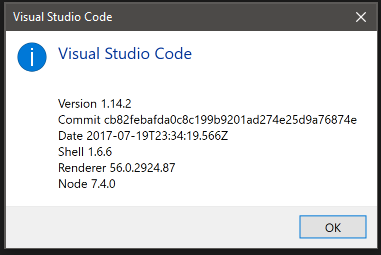
since the last update my intellisense has also decided to stop working.
 m-neill
on 11 Aug 2017
m-neill
on 11 Aug 2017
Please open new issues for the problems still in 1.15.0. This issue was closed after the original problem was fixed and we prefer separate issues for new problems even when they seem related to this.
chrmarti
on 11 Aug 2017
Same thing here in 1.15.1, I upgraded to 1.16.0 and the problem remains.
I looked into the dev tools. In my case it's caused by an extension called wallaby.js, which is dependent for quokka.js, an unnecessary yet helpful extension I been using for testing code snippets.
I disabled it globally, then reload window. problem solved (for now).
I suggest developers who encounter this problem check your dev tool and look for potential causes and report them. so our friends at vscode team could find out whether it's the extensions or vscode itself that's behind all this.
 tonghuashuo
on 17 Aug 2017
tonghuashuo
on 17 Aug 2017
I think some plugins caused this problems, when removed Codelens like git plugins, it is disappeared.
hantsy
on 17 Aug 2017
I checked again. It's not just some certain extensions. more like a problem with the latest version of vscode-Insider itself.
I've tried disable plenty of extensions mentioned in the error info, even some that I need for work. and it keeps telling me there's more. I don't think all of a sudden all these extensions made the same mistake. It has to be vscode insider itself.
Currently I switched back to stable release of vscode so I can continue my work today (with emmet unusable, so sad). Hopefully this problem can be fixed in recent insider builds.
tonghuashuo
on 17 Aug 2017
It was reactjs snippets giving me problems disabling it resolved them... would like to know when I can get them back
 AndrewStobie
on 18 Aug 2017
AndrewStobie
on 18 Aug 2017
I had this problem in VSCode 1.16.1 - But when I disabled:
- Git Extension Pack
- Git History (git log)
- Git Lens
- gitignore
The problem appeared to go away
 blachawk
on 2 Oct 2017
blachawk
on 2 Oct 2017
I've given up with VSCode and moved to WebStorm. Yes, there's a cost involved, but you don't have to deal with poor performance, mandatory plugins that fail to work and cause others to break (git), and even worse support.
In a bit Microsoft (AGAIN!)
andmill
on 2 Oct 2017
I could get rid of the error Extension host terminated unexpectedly by removing the extension "Angular Language Service". With this extension activated I got the error every ten minutes. Now it's gone. But what still remains is the listing of errors in node modules, which (as some of you have already mentioned) disappear after working a couple of minutes within visualstudio code.
 malorus
on 3 Oct 2017
malorus
on 3 Oct 2017
I installed the "Angular Language Service" and "IntelliSense for CSS class names", then the error occured. After removing the "IntelliSense for CSS class names", it looks ok now. Maybe there are some conflicts between these two extensions. My VS code version is 1.10.
 ssjzhong
on 10 Oct 2017
ssjzhong
on 10 Oct 2017
Related issues
 omidgolparvar
·
3Comments
omidgolparvar
·
3Comments
 trstringer
·
3Comments
trstringer
·
3Comments
 DovydasNavickas
·
3Comments
DovydasNavickas
·
3Comments
 sirius1024
·
3Comments
sirius1024
·
3Comments
 chrisdias
·
3Comments
chrisdias
·
3Comments
Most helpful comment
Those seeing a busy Git icon: Does setting
"git.enabled": falsein the settings work around the problem? (Possibly related: #23974)