Vscode: Terminal link detection issues
Testing #21021
linkComputer.test.ts contains a set of tests used for editor link detection. Some links that do not get fully detected in the terminal. Some do get detected, but partially or contain trailing periods, etc:
// Click here to learn more. https://go.microsoft.com/fwlink/?LinkID=513275&clcid=0x409
// Click here to learn more. https://msdn.microsoft.com/en-us/library/windows/desktop/aa365247(v=vs.85).
aspx
<!-- !!! Do not remove !!!   WebContentRef(link:https://go.microsoft.com/fwlink/?LinkId=166007, area:Adm
in, updated:2015, nextUpdate:2016, tags:SqlServer)   !!! Do not remove !!! -->
For instructions, see https://go.microsoft.com/fwlink/?LinkId=166007.</value>
For instructions, see https://msdn.microsoft.com/en-us/library/windows/desktop/aa365247(v=vs.85).aspx.</
value>
x = "https://en.wikipedia.org/wiki/Zürich";
請參閱 http://go.microsoft.com/fwlink/?LinkId=761051。
x = "file:///foo.bar";
x = "file://c:/foo.bar";
x = "file://shäres/foo.bar";
Some text, then http://www.bing.com.
 alexdima
All 29 comments
Upstream issue https://github.com/sourcelair/xterm.js/issues/583
 Tyriar
on 3 Mar 2017
Tyriar
on 3 Mar 2017
Another case from #21361:
bash-3.2$ echo "https://task.krümplr.com/signup?referral=51cfe998f397460200000001"
https://task.krümplr.com/signup?referral=51cfe998f397460200000001
bash-3.2$
Another case from https://github.com/Microsoft/vscode/issues/31460:
https://api.darksky.net/forecast/YOURAPIKEY/-23.5567497,-46.6541193'
Tyriar
on 23 Dec 2017
I also face an issue with links that contain spaces:
# works
/path/to/file.yml

# does not work and I don't expect it to
/path/to/file with spaces.yml

# does not work, but it'd be great if it worked
/path/to/file\ with\ spaces.yml

# does not work too
/path/to/file%20with%20spaces.yml
After trying various combinations of backslashes, quotes etc., I could not find any means to make a path that contains spaces highlightable and clickable. This would be useful in linting reports.
__UPD:__ Actually, supporting /path/to/file with space.yml would be probably a right thing despite that it's harder to implement – this would make the life of all command line tool developers easier.
The parser can find /path/to/file (before the first space) and then start eating forthcoming words while /path/to is a valid directory and until the eaten string matches the existing file or is too long to parse. Supporting spaces in non-file links is not necessary as this is not supported anyway.
 kachkaev
on 21 Mar 2018
kachkaev
on 21 Mar 2018
Similarly, http://1.9.0.21:99 does not work
 apechimp
on 22 Mar 2018
apechimp
on 22 Mar 2018
@apechimp that should work?

Tyriar
on 23 Mar 2018
That does work. I think it must have something to do with how the program that is outputting my url outputs it then. I'll see if I can isolate it.
apechimp
on 23 Mar 2018
I'm seeing this issue after updating to 1.27.1
Specifically relative file paths beginning with a . are no longer clickable. This is a big workflow hit for me because I often run unit tests in the integrated terminal and I rely on the links being clickable to quickly open files associated with test failures.
I've tried running code --disable-extensions and am still able to reproduce the bug. I can confirm this worked before updating to 1.27.1
 Hbbb
on 12 Sep 2018
Hbbb
on 12 Sep 2018
@Hbbb that's another issue that is fixed in 1.27.2
Tyriar
on 13 Sep 2018
Currently links on Windows don't work when the opened folder (initial cwd) has a space in the path because this regex pulls the section before the first space (https://github.com/Microsoft/vscode/issues/59052):
This doesn't appear to be easily to fix so deferring until https://github.com/xtermjs/xterm.js/issues/583
Tyriar
on 22 Sep 2018
I also have this issue with paths that wrap on 2 lines when using vertical terminal layout.
1.27.2 on Windows
 Geobert
on 23 Oct 2018
Geobert
on 23 Oct 2018
Another issue: https://github.com/Microsoft/vscode/issues/66182
https://chromium-review.googlesource.com/c/chromium/src/+/1399451

Tyriar
on 8 Jan 2019
Case from #66391: console.log("https://github.com/Microsoft/vscode-piñata");
Tyriar
on 11 Jan 2019
Here's another case on Windows that doesn't seem to work:
r:\os\src\onecore\drivers\wdm\bluetooth\drivers\bthport(onecore\drivers\wdm\bluetooth\drivers\bthport\hcidib.c)(11625) : error C4701: potentially uninitialized local variable 'status' used
 saqadri
on 11 Jan 2019
saqadri
on 11 Jan 2019
@saqadri what do you expect to happen there? That's a pretty weird output format
somefolder(<path relative to a sub folder in some folder>)(<error number?>)
On windows (using crosscompilation) I ve got output like
```In file included from /home/common/vCENSOREDngeAdapter.cpp:1:0:
/home/coCENSOREDngeAdapter.hpp:12:1: error: 'shit' does not name a type; did you mean 'wait'?
It's not clickable since on windows `_preprocessPath` checks that link should start with c:\
` if (!link.match('^' + winDrivePrefix))`
https://github.com/Microsoft/vscode/blob/73ff13f5debf91fc1d7a89a2f336543b2baa1ee5/src/vs/workbench/contrib/terminal/browser/terminalLinkHandler.ts#L261

Just for those who wants a dirty hack solution:
patch out this check changing platform comparision in the electrion minified js code
$ Microsoft VS Code$
grep -R "_preprocess" *
Binary file node.dll matches
resources/app/out/vs/workbench/workbench.main.js:if(!i)return Promise.resolve(null);var r=n.normalize(n.resolve(i)),o=t.extractLinkUrl(r);if(!o)return Promise.resolve(null);var a=s.URI.file(o),c=t.extractLineColumnInfo(e),l={startLineNumber:c.lineNumber,startColumn:c.columnNumber};return t._editorService.openEditor({resource:a,options:{pinned:!0,selection:l}})})},e.prototype._validateLocalLink=function(e,t){this._resolvePath(e).then(function(e){return t(!!e)})},e.prototype._validateWebLink=function(e,t){t(!0)},e.prototype._handleHypertextLink=function(e){var t=s.URI.parse(e);this._openerService.open(t)},e.prototype._isLinkActivationModifierDown=function(e){return"ctrlCmd"===this._configurationService.getValue("editor").multiCursorModifier?!!e.altKey:r.isMacintosh?e.metaKey:e.ctrlKey},e.prototype._getLinkHoverString=function(){return"ctrlCmd"===this._configurationService.getValue("editor").multiCursorModifier?i.localize(0,null):r.isMacintosh?i.localize(1,null):i.localize(2,null)},e.prototype._preprocessPath=function(e)
////// change 3===this._platform to 3000===this._platform
{if(3000===this._platform){
```
Hope MS will change the source code as well
 mmitkevich
on 5 Mar 2019
mmitkevich
on 5 Mar 2019
then CMD+Click will open http://localhost:8080/), the last ) is unexpected
Tyriar
on 11 Mar 2019
This seems to happen to all urls that contain the ipv6-address notation for http, e.g. http://[2001:dead:beef::1]:80/, even without a port.
Tyriar
on 24 Apr 2019
I just hit this issue when running reek. The link https://github.com/troessner/reek/blob/v5.4.0/docs/Control-Parameter.md in:
[70, 72, 74, 76]:ControlParameter: Runner#dispatch is controlled by argument 'command' [https://github.com/troessner/reek/blob/v5.4.0/docs/Control-Parameter.md]
...is being parsed as https://github.com/troessner/reek/blob/v5.4.0/docs/Control-Parameter.md], which is not a valid link.
 ariccio-learn-co-alternate
on 19 Jun 2019
ariccio-learn-co-alternate
on 19 Jun 2019
Will this be fixed anytime soon? It's very common for Windows users to have a username Firstname and Lastname. Meaning it will include spaces. Breaking Xterm.js which in term breaks the terminal that VSCode implements. A project folder in the user folder C:\Users\John Doe\Documents\Github\com.example.app would break the "clickable" path's in the terminal.
 ElleshaHackett
on 30 Sep 2019
ElleshaHackett
on 30 Sep 2019
No eta, you can :+1: the issue to help with prioritization though.
Tyriar
on 30 Sep 2019
Not sure if this is covered above (I see a similar issue mentioned on Windows, but I see this on macOS). A filename is not linked if it contains a space anywhere, even not in the part that's included in the terminal output!
Eg., I have a folder named dart-sample and I open it and run a test that outputs test/test.dart and this links:
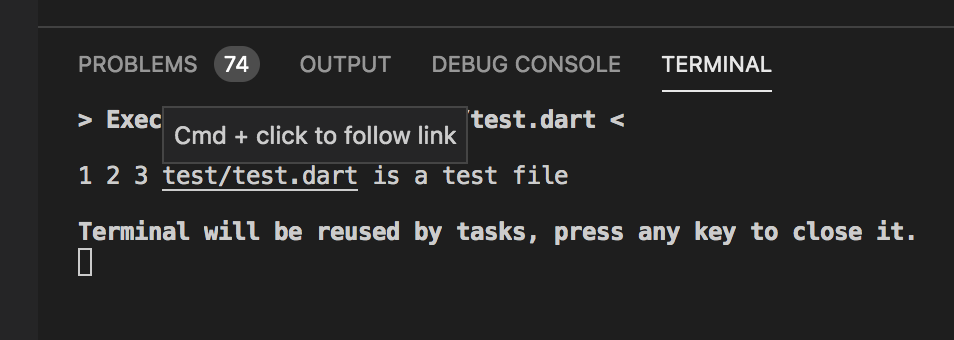
However if my folder name is dart sample (with a space), then this text is not linked - even though the space is not part of the terminal output (only part of the full path that it should link to).
 DanTup
on 18 Nov 2019
DanTup
on 18 Nov 2019
Hi,
Same problem on v1.14.1
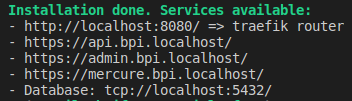
- Only the first link is clickable
- I don't expect the ·
tcp://link to be clickable
 storm1er
on 22 Jan 2020
storm1er
on 22 Jan 2020
I don't expect the
tcp://link to be clickable
The terminal could allow hooks from extensions to linkify based on a pattern, no maybe not by default but perhaps an extension could do something useful with it
 Goodwine
on 22 Jan 2020
Goodwine
on 22 Jan 2020
Just adding my 2c ( and a thumb's up ) from OSX: file paths tend to work correctly for me unless they are in the root of the current directory.
For example, anything in a subdirectory (.vscode/) correctly hyperlinks, while anything in the root ( like Rakefile ) never hyperlinks

 Fire-
on 25 Feb 2020
Fire-
on 25 Feb 2020
https://github.com/microsoft/vscode/pull/90336 just got merged which fixes the majority of web/protocol related links as it uses the same link detector as the editor. To turn on this new feature (in tomorrow's Insiders) you can set this in settings:
"terminal.integrated.experimentalLinkProvider": true
Note that while more web cases will be covered, using this setting will break all local file link detection currently. The plan is to keep this issue open until the functionality gap is closed and provider-based is the new default.
Tyriar
on 12 Apr 2020
Ok scratch that, after merging in https://github.com/microsoft/vscode/pull/95072, functionality should be just as good as with the old system. Here's a demo of what you get, notice the trailing . on the URL isn't part of the link and _any_ word can be clicked which triggers and auto-fills quick access.

Tyriar
on 13 Apr 2020
Lots of work has happened in this area recently. In stable you can turn on the new "link provider" based links in the terminal that will fix a lot of these problems, and should cover all the ones in the original issue comment as the terminal now leverages monaco's detection for web/file protocol links. I'm going to call this finished with https://github.com/microsoft/vscode/issues/96266
If there is still support missing, feel free to file issues on them, but note that for more obscure links it will soon be possible to detect links within extensions so I may close it in favor of that. See https://github.com/microsoft/vscode/issues/91290 for the API proposal (I'll be updating that issue soon).
Tyriar
on 15 May 2020
To verifier: Test the links in the original comment.
Tyriar
on 2 Jun 2020
Related issues
 chrisdias
·
3Comments
chrisdias
·
3Comments
 NikosEfthias
·
3Comments
NikosEfthias
·
3Comments
 trstringer
·
3Comments
trstringer
·
3Comments
 borekb
·
3Comments
borekb
·
3Comments
 ryan-wong
·
3Comments
ryan-wong
·
3Comments
Most helpful comment
No eta, you can :+1: the issue to help with prioritization though.