Vscode: Entering text in find widget should not clear the selection
- VSCode Version:1.8.1
- OS Version:Win 10
Steps to Reproduce:
- Select two or more lines of text
- Edit|Replace
- Type search value into "find" input box
- Weep as your selection is cleared
- Explain to boss why you miss deadline because editor hates you
 frostius
All 18 comments
@mfrost66
Is the intent to preserve the selection so that find/replace is scoped to the current selection? Then you can do so and preserve the selection using the 'Find in Selection' setting.

 egamma
on 20 Dec 2016
egamma
on 20 Dec 2016
When I enter a value in the "find" input box, it clears my current selection. Are you suggesting this is by design?

frostius
on 20 Dec 2016
@mfrost66 the find widget has received lots of input and I cannot reconstruct the history. All I wanted to point out, is that the scenario to replace inside a selection is supported.
Changing the title and assigning to @alexandrudima for further comment.
egamma
on 20 Dec 2016
@mfrost66
I'm not sure what the desire is here. The find widget is incremental by design, i.e. results are selected as the search string is typed. This is consistent with Visual Studio, where we borrowed the find widget UX from. Would you like for the find widget to not search as you type, i.e. only when you press Enter or something?
 alexdima
on 24 Apr 2017
alexdima
on 24 Apr 2017
@alexandrudima
I believe a more ideal implemention would be to _preview_ the search/replace before execution, but not to modified the actual selection. There should be a distiction between search match(es) and the user selection(s). If a selection has been made, the replace should be limited to the selection.
Specifically:
- If a selection is active when search or replace widget is launch, default to "within selection"
- highlight the search match (and/or replace results) but do not override the user selection(s)
I believe this to be standard behavior in mainstream editors. See MS excel, MS word, intellij, visual studio. Imagine if excel ignored (or modifed) your column selection when you did a search/replace. See intelli as an example of an editor that previews the match but honors the selection. Regarding visual studio, I haven't used it in several years but as of 2014, it definitely did not override or ignore my selection.
Snapshot of webstorm search/replace in selection, note the highlight of the search match

frostius
on 24 Apr 2017
@alexandrudima It looks like the Find field is only set when starting Find/Replace if the current selection does not contain a space.
How about only modifying the selection after the user clears the Find field then starts typing if the current Find is what set the selection?
Or something else, but the ideal is definitely that it should not clear the selection in the case described here.
 mbward
on 10 Aug 2017
mbward
on 10 Aug 2017
I finally figured out how to use "find in selection", here are the steps for anyone googled here:
- Use __
Ctrl+F__ (or whatever binds to search) to bring out the search popup. - __Type__ what you would like to search in the search popup. This will by default search the full document.
- Use
Escto __close__ the search popup. - __Select__ the selection where you want to search.
- Use __
Ctrl+F__ to bring out the search popup again. - Click the __"Find in selection"__ button in the search popup.
 felixhao28
on 23 May 2019
felixhao28
on 23 May 2019
Nice to have workaround for basic use case 👍, but beware that even this currently suffers several bugs:
✗ "Find in selection" toggle silently expands search and replace range of multi line selection to entire lines, so replacement can occur even outside the original selection. (#80008)

✗ Multiple (discrete) selection ranges simply do not work: "Find in selection" toggle simply discards secondary (non-primary) selections.
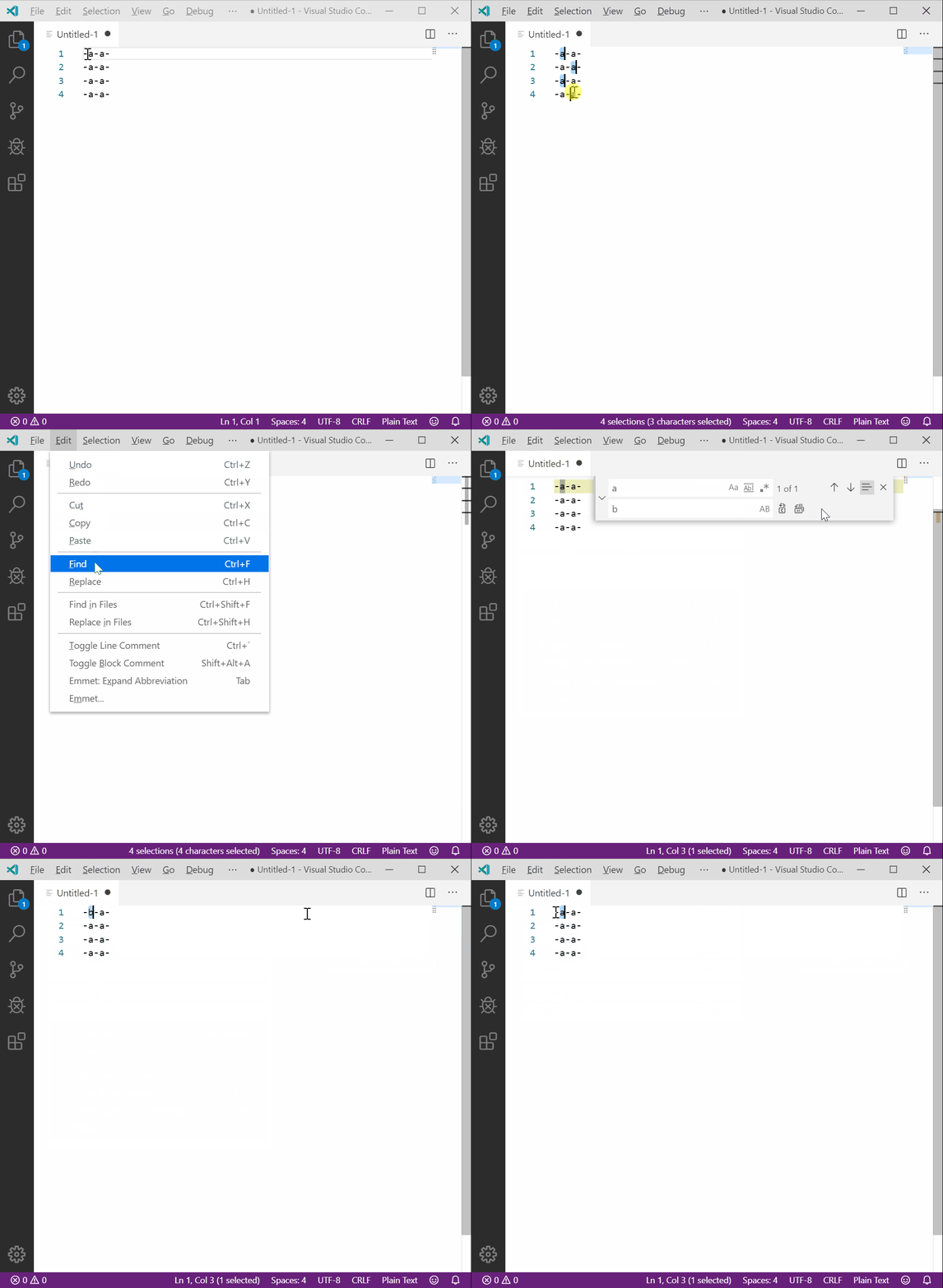
And to reiterate on this issue and unresolved issues merged here:
- ✗ Original selection is still lost after search field value change ("input")(this issue, and dupes like #39190), ~with no mean to restore it again (#26927). (Primary cursor is technically selection as well, but in this case restoring its original position is at least possible via the "Go Back" command.)~
~✗ what relates to fact, that creating and cancelling selection in general is not treated as undoable action with undo history entry. It makes sense in most cases, especially when it prevents erasing redo history, but in other cases is a nuisance.~
__↑ solved by
cursorUndo__
Overall, I think that it is a mistake to (ab)use selection as "search results highlight". FMPoV selection should be "sacred" and nothing but selection-related actions invoked by user should alter its presence and shape. Search results should be something different, and only explicit search-related commands like "Select all matches" or "Select next match" should amend the real selection.
 myfonj
on 16 Oct 2019
myfonj
on 16 Oct 2019
From @frostius:
I believe a more ideal implemention would be to preview the search/replace before execution, but not to modified the actual selection. There should be a distiction between search match(es) and the user selection(s).
From @myfonj:
Overall, I think that it is a mistake to (ab)use selection as "search results highlight". FMPoV selection should be "sacred" and nothing but selection-related actions invoked by user should alter its presence and shape. Search results should be something different, and only explicit search-related commands like "Select all matches" or "Select next match" should amend the real selection.
I made a similar comment elsewhere before finding out that this issue existed.
 jkyeung
on 7 Nov 2019
jkyeung
on 7 Nov 2019
TL;DR - set editor.autoFindInSelection to true in your settings. Upcoming version will support multiline value to only do so when the selection spans more than one line.
 mario-d-s
on 8 Nov 2019
mario-d-s
on 8 Nov 2019
🎉 cursorUndo command (#82007) newly implemented in v1.40 restores selections, so it is really viable workaround for our issues.
myfonj
on 8 Nov 2019
TL;DR - set
editor.autoFindInSelectiontotruein your settings. Upcoming version will supportmultilinevalue to only do so when the selection spans more than one line.
@mario-d-s - I used to have it set to true, but it really didn't matter, because no matter the setting, the problem is that the fundamental functionality (preserving the selection until I actively change it) is broken no matter what. And it is apparently broken by design. The new version (1.40) does nothing to help in this regard.
@myfonj - Well, it is certainly nice to have cursorUndo, but to me that is not much help. It means Find/Replace is still as broken as ever, but then if I can remember to press some keys after it screws things up, I can sort of get back to where I wanted. This is not a good workflow. Ruining the selection is jarring and mentally disrupting and having to manually fix it, even if it's just one keystroke, breaks the flow. It is actually much smoother if I just remember to never, ever, ever have a selection active when I open Find/Replace. (In most cases, if I'm just matching literal characters (i.e. no regex) and I only want the matches in a localized region, I will use the multicursor feature instead of Find/Replace.)
jkyeung
on 8 Nov 2019
@jkyeung you do have a point, haven't looked at it that way yet. For some reason I'm not struggling that much with it when I change that setting. It's not ideal for sure so I hope the Code team will indeed fix this. It is quite set apart from the rest of the product in terms of quality.
mario-d-s
on 11 Nov 2019
Another consequence of auto-selecting when doing a find is that a search with a partial but incorrect result (search for "hey" in a file that happens to have "hello") leaves a wrong partial result selected and therefore highlighted. This makes it seem like "he" in "hello" was a match for "hey".
Exact Repro:
- Have a file with content "Hello"
- Open "find"
- Type
he. The "Hello" in the document gets partially highlighted & selected as you type. This is fine. - If you then type
y, the find no longer has any matches so saysNo Results. - The
Hefrom "Hello" is _still_ selected. This makes it visually highlighted, making you think at first glance that it _was_ a match.
For more complex searches, this is very misleading. It would be nice if there was at least setting to not auto-select the find text.
 evangrayk
on 21 Dec 2019
evangrayk
on 21 Dec 2019
@evangrayk related https://github.com/microsoft/vscode/issues/60977
 dwelle
on 21 Dec 2019
dwelle
on 21 Dec 2019
Sorry for writing a comment hat is not productive. But I'd like to share that "search and replace in a selection" is an incredible source of frustration for me on a daily basis in VS Code. This current issue here seems to be _one_ of the problems that create pain for me. I come from Sublime Text 3 where search and replace in a selection simply worked intuitively for me. Maybe it can serve as an inspiration. I don't know. I get that we also cannot break the workflow of people who got used to the current behavior.
It's completely anecdotal, but I felt the need to vent about this here: https://gehrcke.de/2020/04/vs-code-i-cannot-quite-figure-out-how-to-search-and-replace-in-a-selection/.
I want to say THANK YOU to all those users creating GIFs and repros for exactly these WTF moments that probably many people around the world experience. CC @myfonj
 jgehrcke
on 1 Apr 2020
jgehrcke
on 1 Apr 2020
Sorry for minor OT, but somewhat related issue #80008 mentioned above is now asking for "👍" to be included in backlog; I think it might interest some commenters around here.
@jgehrcke thanks for appreciation, highly appreciated :]
myfonj
on 2 Apr 2020
To mitigate the problem described in this original issue, we have already added editor.find.cursorMoveOnType to allow you postpone the selection change to pressing Enter.
 rebornix
on 13 Oct 2020
rebornix
on 13 Oct 2020
Related issues
 ghost
·
234Comments
ghost
·
234Comments
 niagr
·
246Comments
niagr
·
246Comments
 Tekbr
·
191Comments
Tekbr
·
191Comments
 lw-schick
·
229Comments
lw-schick
·
229Comments
 hsdk123
·
263Comments
hsdk123
·
263Comments
Most helpful comment
When I enter a value in the "find" input box, it clears my current selection. Are you suggesting this is by design?