Vscode: CMD + Backspace while at Col 1 should remove line
- VSCode Version: 1.7.2
- OS Version: macOS 10.12.1
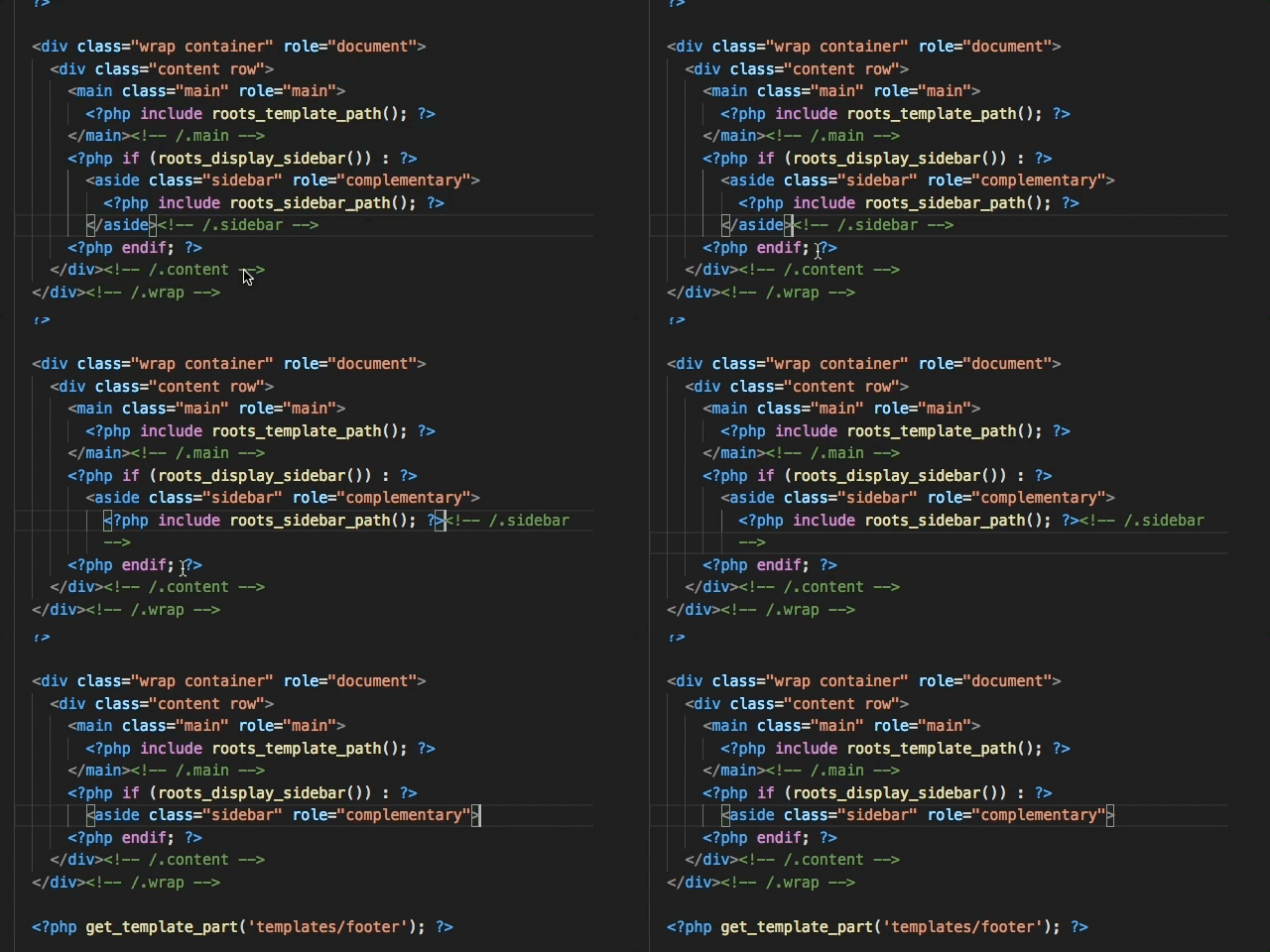
CMD + Backspace at the end of a line properly removes the characters line, leaving the cursor at Col 1. But using the same combo a second time does nothing. You have to release CMD for Backspace to remove the line. You should be able to keep CMD pressed and either remove all the characters in a line, or remove the line itself if the line is empty.
Steps to Reproduce:
- Starting at the right of a line of characters, use CMD + Backspace to remove the characters.
- Hit the same combo again, and the line isn't removed.
 WhatsThatItsPat
All 15 comments
You can use Shift+Cmd+K to delete the current line.
 chrmarti
on 5 Dec 2016
chrmarti
on 5 Dec 2016
Sure, but I think what I'm explaining is standard for other editors and text areas (like the one I'm typing in now).
WhatsThatItsPat
on 5 Dec 2016
Indeed, reopening to track as a feature request.
chrmarti
on 5 Dec 2016
+1
 atipugin
on 4 May 2017
atipugin
on 4 May 2017
I have the same issue and I am on mac. The vscode version is 1.12.2.
The cmd+backspace works fine when edit text focused. So, I added a key binding for clear all left action when terminal focus:
[
{ "key": "cmd+backspace",         "command": "deleteAllLeft",
                                     "when": "terminalFocus" }
]
However, the cmd+backspace doesn't work. What did I do wrong? Moreover, the cmd+k also doesn't work when the terminal focused.
 changkun
on 4 Jun 2017
changkun
on 4 Jun 2017
@changkun This issue is about the behavior in the text editor when the cursor is at the begin of the line. Please open a separate issue for your request (which might depend on the shell you are using).
chrmarti
on 5 Jun 2017
Any update on this? Or any short-term fix? TBH it's really the only lingering habit I have that trips me up in Code.
 lukeed
on 29 Oct 2017
lukeed
on 29 Oct 2017
I just found that Cmd + Delete (delete right of cursor) works. (But no update.)
chrmarti
on 30 Oct 2017
I see that a corresponding pull request is already merged. Can anyone tell me is this already included in release build? I still encounter this issue on the latest editor version.
 poohitan
on 18 Mar 2018
poohitan
on 18 Mar 2018
@poohitan Not sure which pull request you refer to, but the above one seems still pending.
chrmarti
on 19 Mar 2018
@chrmarti yes, I referred to the one above, I wonder how did I saw it as merged, I guess it was the lack of sleep :). Sorry.
poohitan
on 19 Mar 2018
Just switched over from Sublime, wishing this would be fixed :/
 zArubaru
on 30 Apr 2018
zArubaru
on 30 Apr 2018
Cmd + backspace is the fastest way to delete lines of code in an upward direction.
Really hoping this gets fixed!
 alastairjwright
on 12 Jun 2018
alastairjwright
on 12 Jun 2018
Similarly stymied by this after moving from Sublime, I have the following short-term fix. This is a 'close enough' fix to what I am used to, but with one caveat: It doesn't stop at the linebreak like Sublime, but always removes the line break you're up against.
- Install Macros extension
- Create new macro in your settings:
"macros": {
    "deleteLineReturn": [
        "deleteAllLeft",
        "deleteLeft"
    ]
}
- Assign key binding:
{
    "key": "cmd+backspace",
    "command": "macros.deleteLineReturn",
    "when": "editorTextFocus && !editorReadonly"
}
I went with deleteAllLeft rather than deleteLine, since you may wish to preserve what's to the right of your cursor.
 jandor64
on 30 Jun 2018
jandor64
on 30 Jun 2018
This is fixed already.
 rebornix
on 24 Oct 2019
rebornix
on 24 Oct 2019
Related issues
 VitorLuizC
·
3Comments
VitorLuizC
·
3Comments
 shanalikhan
·
3Comments
shanalikhan
·
3Comments
 biij5698
·
3Comments
biij5698
·
3Comments
 omidgolparvar
·
3Comments
omidgolparvar
·
3Comments
 mrkiley
·
3Comments
mrkiley
·
3Comments
Most helpful comment
Indeed, reopening to track as a feature request.