Vscode: Display gitignored files/folders in gray (inactive) color (in left explorer tree)
- VSCode Version: 1.7.1
- OS Version: Windows 10
Even that GIT integration is good in @code but in explorer it's not possible to see which files are marked as ignored and will not be pushed to git.
In other editors these ignored files are displayed in gray - so you know which are not relevant to edit (eg. some generated files, configs etc).
Probably best would be if icon themes for explorer will have ability to change look of this feature.
Example in phpstorm:
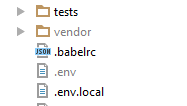
..having .gitignore:
.env
 jurosh
All 6 comments
explorer-excluded-files
 iddan
on 21 Nov 2016
iddan
on 21 Nov 2016
@aniddan that's like answer ?
You probably mean explorer-excluded-files extension, but it doesn't look like it's doing what I explained...
jurosh
on 21 Nov 2016
This issue has already been reported. Please use the search function next time before reporting an issue and/or this time if you are curious about the progress of the issue.
 bpasero
on 22 Nov 2016
bpasero
on 22 Nov 2016
Why not post link to issue directly....
But I found https://github.com/Microsoft/vscode/issues/15370 - description seems to be different, but first comment is talking about gitignore so it's probably what you mean...
jurosh
on 22 Nov 2016
@bpasero Could you at least add reference(s) to the other issue(s)?
 pedzed
on 23 Apr 2017
bpasero
on 23 Apr 2017
pedzed
on 23 Apr 2017
bpasero
on 23 Apr 2017
Related issues
 shanalikhan
·
3Comments
shanalikhan
·
3Comments
 chrisdias
·
3Comments
chrisdias
·
3Comments
 lukehoban
·
3Comments
lukehoban
·
3Comments
 sirius1024
·
3Comments
sirius1024
·
3Comments
 trstringer
·
3Comments
trstringer
·
3Comments
Most helpful comment
Why not post link to issue directly....
But I found https://github.com/Microsoft/vscode/issues/15370 - description seems to be different, but first comment is talking about gitignore so it's probably what you mean...