Vscode: Set environment variable before starting a terminal
- VSCode Version: 1.7.1
- OS Version: Win 10 Pro
Add an option to set environment variables before starting the terminal.
Something like:
"terminal.integrated.envVars.windows": ["DEBUG=1", "LANG=C"],
Or maybe you want to split variable and value something like:
"terminal.integrated.envVars.windows": {
    "DEBUG": "1",
    "LANG": "C"
}
Obviously the same goes for Linux and Mac
 ffes
ffes
All 19 comments
I'm curious what your use case is for wanting this in VS Code but not in Windows?
 Tyriar
on 4 Nov 2016
Tyriar
on 4 Nov 2016
Here are some use cases (first two from personal experience):
- Different paths to libs per workbench
- Test your application with different languages/translations.
- It would also have made a much better work-around for #13834
You just don't want to set set the right vars every time you open a terminal.
ffes
on 6 Nov 2016

how should i fix this problem @ffes
 pandaTerminator
on 16 Nov 2016
pandaTerminator
on 16 Nov 2016
@pandasjw If you are asking because I mentioned #13834 in my previous comment, I have no idea about that issue. That one is not my bug report.
I just ran into that issue when I was searching around if the request I wanted to submit was not a dup.
ffes
on 16 Nov 2016
Its not hard to see in the Python context an app needing a specific PYTHON_PATH, and other languages needing class paths/library paths. My thoughts here is that the tasks may be the workaround - a task can have associated env vars - and a make/rake/grunt/gulp/fabfile or something could be used to set it all up for your project.
 dannystaple
on 18 Jan 2017
dannystaple
on 18 Jan 2017
I would love to see that too. For me it's about setting workspace env variables to be used with node gyp. Like OPENCV location
 farfromrefug
on 22 May 2017
farfromrefug
on 22 May 2017
How does one configure this on the Insiders build?
 rfgamaral
on 11 Jul 2017
rfgamaral
on 11 Jul 2017
It will be in the next build of Insiders, you will be able to use the new settings:
terminal.integrated.env.linux
terminal.integrated.env.osx
terminal.integrated.env.windows
I can confirm that it works great for me, i now use it in almost all my projects
Thanks!
farfromrefug
on 19 Aug 2017
UPDATE Again: Just found go.gopath :man_facepalming:

UPDATE: DOH! I just realized .vscode/settings.json works. God I love this editor! Amazing job.
Is there any way to make this project specific? I am using this now for GOPATH but would love if it changed to the current working directory, which the integrated terminal seems to be aware of when it starts up. Maybe there is a variable I could set the envs to that contains the same value used by the starting terminal.
 rwxrob
on 12 Oct 2017
rwxrob
on 12 Oct 2017
@robmuh Anything in .vscode/settings.json is already specific to the root folder that is open in VS Code. This is called the Workspace settings.
 ramya-rao-a
on 12 Oct 2017
ramya-rao-a
on 12 Oct 2017
how to specify the GOPATH env variable inside the integrated terminal to be the same as the one inside your .vscode/settings.json ?
I am trying this on 1.17.1 and does not seem to work:
    "go.gopath": "$HOME/gopath",
    "terminal.integrated.env.osx": {
        "GOPATH": "$HOME/gopath"
    },
 Mistobaan
on 13 Oct 2017
Mistobaan
on 13 Oct 2017
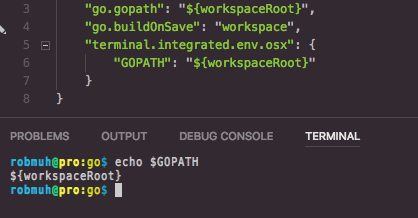
Thanks @Mistobaan but in my case the following is what I'm after, but doesn't seem to be working. The go.gopath use of the variable seems to work fine because it stops the underlined errors in code related to gopath, but the env var on the terminal still is bork. I'm mostly good because I also setup an install task that works. Now if I could only get that to buildOnSave like the libraries do correctly so things would compile automatically on changes (which I realize many would not like).
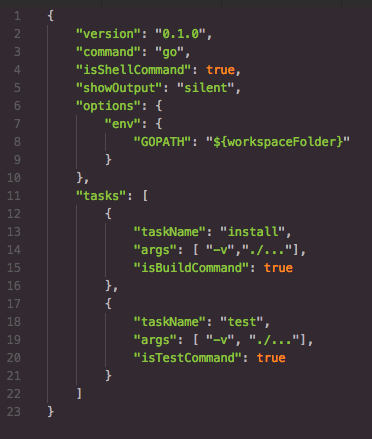
By the way, here is an (old) task that works. But, it is interesting that everyone has different variable names for the same thing (workspaceFolder v.s. workspaceRoot):
rwxrob
on 13 Oct 2017
@Mistobaan @robmuh You are using $workspaceRoot in the env var for the terminal.integrated.env.osx which doesnt get resolved.
@Tyriar Should we add resolution of such variables when using the terminal.integrated.env.* setting?
@robmuh For workspaceFolder vs workspaceRoot see https://code.visualstudio.com/updates/v1_17#_workspacefolder-in-launchjson-and-tasksjson
ramya-rao-a
on 17 Oct 2017
Resolving variables in the setting is tracked in https://github.com/Microsoft/vscode/issues/34337
Tyriar
on 23 Oct 2017
After upgrading from 1.17 to 1.18, the setting doesn't work anymore (OS Version: OSX High Sierra)
version 1.18:

version 1.17:

 rucciva
on 15 Nov 2017
rucciva
on 15 Nov 2017
Just tried on my Mac, it works as expected.
One thing to keep in mind is that the env vars will not affect terminals that were created before the env vars were added to the setting.
Can you create a new terminal and check there?
ramya-rao-a
on 15 Nov 2017
it was indeed on a new terminal after the env was added. I've retried it on two high sierra machines recently.
rucciva
on 16 Nov 2017
I tried on a co-worker's high sierra machine. Works there as well.
Can you try on our Insiders? https://code.visualstudio.com/insiders
Can you try with extensions disabled?
ramya-rao-a
on 17 Nov 2017
Related issues
 v-pavanp
·
3Comments
v-pavanp
·
3Comments
 lukehoban
·
3Comments
lukehoban
·
3Comments
 NikosEfthias
·
3Comments
NikosEfthias
·
3Comments
 villiv
·
3Comments
villiv
·
3Comments
 ryan-wong
·
3Comments
ryan-wong
·
3Comments
Most helpful comment
It will be in the next build of Insiders, you will be able to use the new settings: