Vscode: Keep previously opened files when opening a single file instead of clearing all files
- VSCode Version: 1.6.1
- OS Version: Windows 10 x64
The issue at hand is when you close VSCode and you've had open tabs in it, opening a new file through windows explorer by double clicking it will cause VSCode to not restore your previous session on launch. Alternatively, if you closed VSCode, and then launch it normally without opening a file, it WILL restore your previous session. (I can make a video if my steps to reproduce are unclear).
Steps to Reproduce:
Use the following User settings
// Place your settings in this file to overwrite the default settings
{

    "workbench.editor.enablePreview": false,
    "window.openFilesInNewWindow": false,
    "window.reopenFolders": "all"
}
- Open a few files in new tabs
- Close the window
- Double click any file (.txt, .js, .html) from Windows explorer and open it with VSCode.
- You will notice that your past tabs are cleared and your only tab is the file you opened
This ONLY happens if you launch VSCode by opening a new file (IE double clicking file in explorer, or right click open with, etc), if you simple click on VSCode it will restore your previous session.
 Jonatino
All 23 comments
Might need an option, just changing this might cause people to file bugs to get the current behaviour back.
 bpasero
on 31 Oct 2016
bpasero
on 31 Oct 2016
@bpasero agreed.
Jonatino
on 31 Oct 2016
@bpasero do you have any updates regarding this issue? Been over 1yr now.
Jonatino
on 30 Nov 2017
Jonatino
on 1 Dec 2017
Any update on resolving this issue? I've been caught out a few times by this.
 Eldaw
on 10 May 2018
Eldaw
on 10 May 2018
Is the issue resolved?
 maximseshuk
on 3 Nov 2018
maximseshuk
on 3 Nov 2018
@maximseshuk no its not fixed yet.
Jonatino
on 9 Nov 2018
When will it be fixed?
 DoCode
on 7 Mar 2019
DoCode
on 7 Mar 2019
Ok, please fix this annoying behavior!
DoCode
on 19 Mar 2019
Any news here?
DoCode
on 31 Mar 2019
Has there been any movement on this incident? This behavior is very annoying and shouldn't be too hard to fix as other editors are able to do this. Check out Notepad++ and SublimeText for examples.
 kruug
on 13 Jun 2019
kruug
on 13 Jun 2019
BUMP!
 widgetcollector
on 8 Oct 2019
widgetcollector
on 8 Oct 2019
Can this be fixed rift now please! It's horrible to lost the workspace when not open VS Code before doubleclick on files!
DoCode
on 10 Feb 2020
It's in a backlog of thousands of issues, I think we will need to patch this ourselves
widgetcollector
on 10 Feb 2020
A question to users following this issue: wouldn't the solution for https://github.com/microsoft/vscode/issues/15949 also help here? In https://github.com/microsoft/vscode/issues/15949 probably a new setting would be added that will make sure all windows from the previous session restore together with a new window for the file or folder that was double clicked on. I think that pretty much matches what browsers do when you configure them like this:
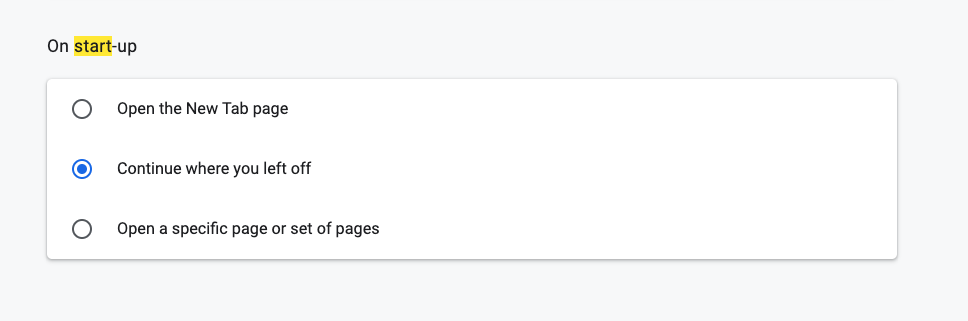
How are people feeling about that? Is there a case I am missing where you would still loose all the tabs from the previous session?
PS: one thing I did not fully understand is how the tabs are lost when you had a folder or workspace open in the last session. We always keep opened editors for the workspace around and restore them next time you open the workspace again. So the only thing you "lost" was the windows you had opened, but all the tabs/editors should always restore.
bpasero
on 6 Nov 2020
@bpasero I think it sounds like that should solve the problem. When double-clicking a file in File Explorer when VS Code is not currently open, I believe that the correct thing that VS Code should do is open up as if it had been opened by clicking its shortcut, opening up whatever windows/workspaces were open previously, and then open the file that was double-clicked in File Explorer. That way, nothing is lost.
The problematic situation as it currently exists, is like this:
- You have a single VS Code window open, with multiple (saved) files open in multiple tabs.
- You then close VS Code.
- You then double-click a file in File Explorer.
- VS Code only opens that file (the one from File Explorer) and discards all the tabs for saved files that were previously open.
Eldaw
on 6 Nov 2020
@Eldaw to clarify, this would mean opening a file while VSCode is not running would by default simply open in the window that was last active as a new tab besides all the other open ones? To give another example, if VSCode is configured as Git editor and you type a git command that requires a git editor, instead of seeing VSCode open with just that file, it may potentially open your last workspace and open the git editor as a new tab besides your other opened files?
An alternative would be to enforce that a file always opens in its own window. For example the Chrome browser seems to be doing just that: when I open a link, I get a new separate window for that link but I also get my other windows restored.
The problematic situation as it currently exists, is like this
That is only true for a window where you did not have a folder or workspace open right? If you do this flow, all your tabs should restore right?
- open a folder
- close vscode
- double click on a file
- an empty window opens showing the file
- select File > Open Folder and pick the folder again from the previous session
=> all your tabs restore again
bpasero
on 6 Nov 2020
@bpasero Regarding the first part, where you've provided 2 possible options, I think either could work. Whether the file that's double-clicked in File Explorer opens as a new tab alongside the other tabs in the last active window, or whether the file that's double-clicked in in File Explorer opens in its own in a separate window, I don't have a strong preference either way. But in the case of the second possibility, where the file opens in its own window, it's important that the other windows that were open at the moment when VS Code was last closed are re-opened, and their tabs restored as they were.
Regarding the second part, where you've asked about my example scenario, yes, that refers to a situation involving only a bunch of unrelated open files. Not an open folder/workspace. The way I use VS Code currently is that I usually have a few different files from different locations open, and I don't use the folder/workspace functionality. But several times I've been bitten where I've had a few files open that I care about, then I've closed the VS Code window, and then double-clicked on something in File Explorer, losing the state of where I was and what I had open previously.
Eldaw
on 6 Nov 2020
@Eldaw thanks for confirming. The way I see it currently, opening that file in a separate empty window would be much easier to implement for me and I think also matches behaviour I see in other apps, so I think it would be more explicit. The advantage is that the file you open stands out much more (because it has its own window) and does not alter the session you had before (i.e. a git editor does not make sense to open alongside other project files you had opened from the last session).
I am currently struggling to find a good setting name for it. We already have window.restoreWindows but this would be a new setting that basically enables this mode:
- on: restore previous windows even when opening a single file or folder explicitly
- off: behave as today
bpasero
on 6 Nov 2020
@bpasero Sounds good.
Regarding the option, I wonder if a new one really is required. If I read the description of the existing setting of 'all' for 'window.restoreWindows' (which says "Reopen all windows"), it sounds to me like it already should incorporate what we've just been discussing.
To put it another way, I wonder if anybody opening VS code by double-clicking a file, and who has specifically chosen 'all' as their setting for what windows should be restored, would expect that their previously opened windows should not be opened just because VS Code is being launched as a result of double-clicking a file rather than by clicking on its shortcut.
Eldaw
on 6 Nov 2020
@Eldaw careful, window.restoreWindows: all is actually the default setting since a while. Changing this behaviour would change it for almost everyone. And don't want to go there without a way to making this configurable.
bpasero
on 7 Nov 2020
Actually I think opening the new file as part of the window that was last active or contains the file might end up easier to do as opposed to what I initially had thought...
bpasero
on 9 Nov 2020
Duplicate of https://github.com/microsoft/vscode/issues/15949
bpasero
on 12 Nov 2020
Related issues
 mrkiley
·
3Comments
mrkiley
·
3Comments
 omidgolparvar
·
3Comments
omidgolparvar
·
3Comments
 sirius1024
·
3Comments
sirius1024
·
3Comments
 NikosEfthias
·
3Comments
NikosEfthias
·
3Comments
 chrisdias
·
3Comments
chrisdias
·
3Comments
Most helpful comment
Has there been any movement on this incident? This behavior is very annoying and shouldn't be too hard to fix as other editors are able to do this. Check out Notepad++ and SublimeText for examples.