Vscode: Toggle Integrated Terminal keyboard shortcut not working (backtick vs single apostrophe)
- VSCode Version: Code 1.5.3 (5be4091987a98e3870d89d630eb87be6d9bafd27, 2016-09-22T08:40:08.699Z)
- OS Version: Ubuntu 16.04 Linux x64 4.4.0-38-generic
- Keyboard layout: English UK / GB
Steps to Reproduce:
- Press
CTRL+P - Type
>view integrated terminal - Observe the keyboard shortcut for this command. It appears to be `CTRL+`` (note backtick not single apostrophe)
- Execute listed keyboard shortcut
Expected result:
Listed keyboard shortcut toggles the integrated terminal
Actual result:
Listed keyboard shortcut does not do anything (anything visible??). Instead I found the keyboard shortcut, CTRL+' works (single apostrophe not backtick).
 mezpahlan
All 29 comments
Could the following be of interest? Seems to suggest a difference between UK and US keyboard character codes for backticks.
https://bugs.chromium.org/p/chromium/issues/detail?id=421304
Please let me know if I'm barking up the wrong tree here.
mezpahlan
on 26 Sep 2016
Some more info on my particular set up that might help debugging:
Using the W3 Key tester website the backtick key produces a keycode event of 223 and the single apostrophe 192.
Given terminal.contribution.ts it looks like we are mapping KeyMod.CtrlCmd | KeyCode.US_BACKTICK to ToggleTerminalAction.
And given keyboardEvent.ts we are mapping the event to keycode as KEY_CODE_MAP[192] = KeyCode.US_BACKTICK;
Would this then suggest that, at least in my particular set up (UK QWERTY keyboard layout), because my keyboard sends 192 for the single apostrophe key it is treated by VSCode as a baktick and hence this is why the keyboard shortcut for toggle terminal works?
mezpahlan
on 26 Sep 2016
Moving key binding related question to @alexandrudima
 Tyriar
on 28 Sep 2016
Tyriar
on 28 Sep 2016
A similar problem occurs to me: the _ctrl+_ shortcut did not work on my keyboard (_German keyboard, Gnome/Mutter window manager_), it works likectrl++` : it increases the font size of the editor.
Therefore I've tried a new keybinding. keybindings.json:
{
    "key": "ctrl+alt+t",
    "command": "workbench.action.terminal.toggleTerminal"
}
But this one opens an external terminal, not the very cool and useful internal terminal. Ironically the command for Integrated Terminal in the _menu -> view_ tab is marked with the very same shortcut ctrl+alt+t and works perfectly.
Environment:
Version 1.6.1
Commit 9e4e44c19e393803e2b05fe2323cf4ed7e36880e
Date 2016-10-13T15:43:46.054Z
Shell 1.3.7
Renderer 52.0.2743.82
Node 6.5.0

Linux as Ubuntu: 14.04
Kernel: 4.4.0-42-generic
Gnome: 3.8.4
 BairDev
on 25 Oct 2016
BairDev
on 25 Oct 2016
@mezpahlan @BairDev May I kindly ask that you:
clone https://github.com/Microsoft/node-native-keymapnpm install -g node-gypnode-gyp configurenode-gyp buildnpm test
Post the output here or somewhere.
That is the native node module we use to ask the OS what each key code produces. It is the source of the UI labels. I believe for your OS / keyboard layouts this produces incorrect results.
 alexdima
on 25 Oct 2016
alexdima
on 25 Oct 2016
Hi @alexandrudima here's the output from my test this morning.
mezpahlan
on 25 Oct 2016
I don't know if it is significant, but I have recently updated my OS since filing this issue.
Ubuntu 16.10 Linux x86_64 4.8.0-26-generic
mezpahlan
on 25 Oct 2016
BairDev
on 25 Oct 2016
Thank you for the mappings.
Some context:
In VSCode we symbolically refer to the backtick key code using KeyCode.US_BACKTICK. The value of the enum does not hold any inherent meaning.
When we receive a keydown event with the keycode = 192 we consider that KeyCode.US_BACKTICK was pressed. Relevant mapping. Notice how 192 === 0xC0 (so the world makes sense).
Most of the rest of the world (including Chromium sources) refers to the backtick key code symbolically using VK_OEM_3

We have written a C++ utility node module that under linux creates XKeyEvents for all interesting key codes and modifier combos and reports what visible characters that key code + modifier combo produces. That is the node-native-keymap you've already ran.
@mezpahlan Keyboard layout: English UK / GB
  { key_code: 'VKEY_OEM_3',
    value: '`',
    withShift: '¬',
    withAltGr: '|',
    withShiftAltGr: '|' }
So this reports that on your system, when pressing VKEY_OEM_3 you get the character ``` produced. This seems consistent with this picture:
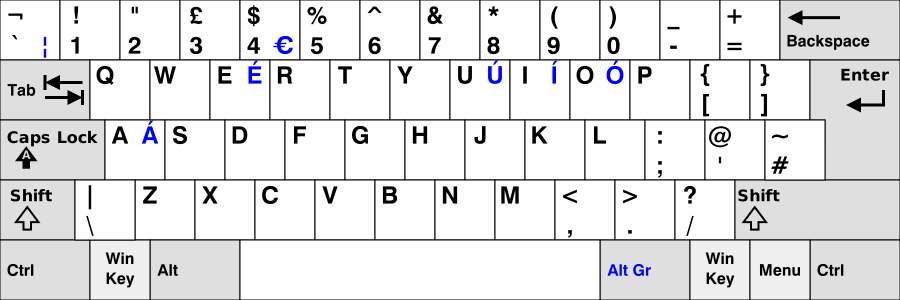
I can also guess that on the key VKEY_OEM_3 you have the printed. Therefore, in the UI, when we need to generate a label for `KeyCode.US_BACKTICK` we will produce as a label. This to me so far seems correct.
What I think is the root problem here is the following:
Using the W3 Key tester website the backtick key produces a keycode event of 223 and the single apostrophe 192.
This is a nasty surprise. Chromium is messing with your pressing VKEY_OEM_3 and giving us a massaged (?) keyCode (223 instead of 192).
Between, you can test what keyCode we are getting in VSCode by clicking on Define Keybinding and hovering over the input box:

Long story short, I am not sure what the fix would be, it appears keyCode is broken in Chromium and does not equal to the code of the key you pressed. I am not sure if the change you link to is what introduced this broken behaviour or not.
@BairDev German keyboard, Gnome/Mutter window manager
I couldn't really paste here, the text looks garbled, most likely because for your keyboard layout, the VKEY_OEM_3 key appears to be a "dead" key that produces a combining accent of some sort. Is this correct? Are the following the symbols that get produced when you press VKEY_OEM_3?:

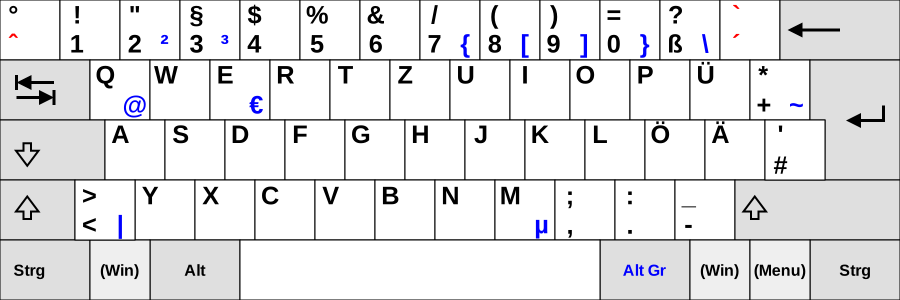
When we render a label for KeyCode.US_BACKTICK in the UI we most likely use this combining accent and the combining accent by itself probably renders garbled (like in the screenshot I included). Can you please show a screenshot of how we render toggleTerminal in the F1 list. I am thinking it is not but the accent that appears to be looking like the.
I think the root cause for you is that we render the combining accent but the rendering of the combining accent without anything to combine with makes it appear like a backtick
alexdima
on 25 Oct 2016
TL;DR
@mezpahlan what is Firefox doing for your keyboard layout in the w3c key tester page. There isn't a lot of hope at this point we can fix this on our side.
@BairDev are you sure we render `ctrl+`` as the keybinding and not the combining character that gets garbled. Please include a screenshot. There is some hope that we can fix this through better rendering of combining accents.
alexdima
on 25 Oct 2016
@alexandrudima Thank you very much for the long and interesting explanation. Yes you are right, the ` is not a backtick, but a combined character, an accent, on the German keyboard. I/we use it for _à la_ for example (there are no accents in German). We need to press the key twice in order to get the _tick_ alone. Your assumption is true:
I think the root cause for you is that we render the combining accent but the rendering of the combining accent without anything to combine with makes it appear like a backtick
Here is the F1 list: 
As you can see, there is also a conflict in my keybindings with a Markdown extension.
Are the following the symbols that get produced when you press VKEY_OEM_3?
{
    key_code: 'VKEY_OEM_3',
    value: '̂',
    withShift: '°',
    withAltGr: '′',
    withShiftAltGr: '″'
}
This is a weird output. Because it is a combined charackter/keycode/whatever (I'm not very familiar with this stuff) nothing happens, when I press the key in question. When I press it twice this appears: `. This is what I get from the W3 key test page when I'm trying to get a backtick:

So you are right again, keyCode 0, is is kind of a _dead key_.
I think the window manager does not have any impact here. I've mentioned this information because this one (Gnome/Mutter) overrides some shortcuts for various applications.
I'm almost more interested in the fact, that the ctrl+alt+t shortcut opens an external terminal, but the command in the menu and the command from the F1 list work(s) correctly.
BairDev
on 25 Oct 2016
@BairDev I have created a separate issue to begin tracking your issue -- #14431
Since they have different root causes, let's leave this issue for OP @mezpahlan.
alexdima
on 25 Oct 2016
Hi @alexandrudima thanks for all of this! Really great stuff. I have some screen grabs for you. With all of them: Backtick on the left, single apostrophe on the right.
Chrome W3 Key Test:

Firefox W3 Key Test:

VSCode define keybinding:

mezpahlan
on 25 Oct 2016
@mezpahlan Thank you, this confirms that Chromium generates invalid values for keyCode under your keyboard layout. There is not much I can do on my side to work around this issue, may I ask that you create an issue with Chromium and link to it from here.
I suggest to also mention the IMHO correct behaviour of Firefox and the lack of workarounds on our side, since we're not getting the actual keyCode in the keydown event.
alexdima
on 25 Oct 2016
I've added a comment on an existing upstream bug:
https://bugs.chromium.org/p/chromium/issues/detail?id=421304
This is the same bug I mentioned in the original comment. Seems to be me that they are aware of the issue but haven't fixed it for a number of years. I didn't think opening a new one was appropriate just yet given that the linked bug is still open and awaiting a fix.
mezpahlan
on 25 Oct 2016
@mezpahlan what version of Chrome are you on? I'm on Chrome v54 on Ubuntu 16.04 and I switched to English (UK) layout and I see 192 for backtick on https://www.w3.org/2002/09/tests/keys.html, I can reproduce the issue in VS Code with this setup though which indicates to me maybe it was fixed in Chrome 53 or 54?
Tyriar
on 25 Oct 2016
Hi @Tyriar! Chrome Version 55.0.2883.21 beta (64-bit) Ubuntu 16.10. Hmm that is interesting.
mezpahlan
on 25 Oct 2016
The bug you've referenced (https://bugs.chromium.org/p/chromium/issues/detail?id=421304) is marked as fixed. The current behaviour in Chrome is deliberate I think and if it was changed it would break existing apps eg jsBeeb (so I'm sure Google won't change that now).
What's wrong with this solution?
if (isFirefox) {
        keyCodes.SEMICOLON = 59;
        // #~ key (not on US keyboard)
        keyCodes.HASH = 163;
        keyCodes.APOSTROPHE = 222;
        keyCodes.BACK_QUOTE = 192;
        keyCodes.MINUS = 173;
        keyCodes.EQUALS = 61;
    } else {
        // Chrome
        keyCodes.SEMICOLON = 186;
        // #~ key (not on US keyboard)
        keyCodes.HASH = isUKlayout ? 222 : 223;
        keyCodes.APOSTROPHE = isUKlayout ? 192 : 222;
        keyCodes.BACK_QUOTE = isUKlayout ? 223 : 192;
        keyCodes.MINUS = 189;
        keyCodes.EQUALS = 187;
    }
 murkle
on 2 Nov 2016
murkle
on 2 Nov 2016
I have validated that we now (i.e. after PR #22894 aka #17521 -- in today's/tomorrow's Insiders build) appear to behave correctly for this keyboard layout

Toggle terminal is advertised as being bound under ctrl+` and pressing ctrl + [Backtick] does indeed toggle the terminal for me.

alexdima
on 24 Mar 2017
I am having this issue on Mac OS X since the march update
 jonathan-fielding
on 10 Apr 2017
jonathan-fielding
on 10 Apr 2017
Since the march update vscode detects my backtick key (`) as [intlBackslash]. I have to press ctrl+§ to activate the ctrl+backtick combo. The keyboard works as expected outside of vscode. I am on macOS Sierra.
 gpluta
on 10 Apr 2017
gpluta
on 10 Apr 2017
Ah ok, thats exact same issue I have, ctrl + § works for me too,
jonathan-fielding
on 10 Apr 2017
Same issue here. After the last update, I need to press ctrl + § instead of ctrl + `
 yaronlevi
on 17 Apr 2017
yaronlevi
on 17 Apr 2017
Same here. Ctrl + § toggles the terminal, even though the keyboard listing shows ctrl + `.
If I assign a new shortcut to Toggle Integrated Terminal and I press ctrl + `, it shows as ctrl + [intlBackslash], it shows as ctrl + § in the keybinding list, and pressing ctrl + ` now works as "expected".
 richmeij
on 17 Apr 2017
richmeij
on 17 Apr 2017
Ditto. Ctrl + § for me too.
 jolora
on 19 Apr 2017
jolora
on 19 Apr 2017
This ticket has been closed so not sure we will get a response here, has anyone raised a new one
jonathan-fielding
on 20 Apr 2017
To clarify, ctrl+§ on your keyboard layouts is ctrl+altgr+s?
@alexandrudima do you know what's happening here?
Tyriar
on 20 Apr 2017
Sorry everyone, I did all my testing on a mac mini + a standard "101" keyboard (https://w3c.github.io/uievents-code/#keyboard-101). The [IntlBackslash] and [Backslash] appear to be somehow swapped in the readings we get from the C++ node module when using an Apple keyboard.
alexdima
on 27 Apr 2017
Since this issue is about Linux, let's track in #24527 which is about mac.
alexdima
on 27 Apr 2017
Related issues
 mrkiley
·
3Comments
mrkiley
·
3Comments
 VitorLuizC
·
3Comments
VitorLuizC
·
3Comments
 curtw
·
3Comments
curtw
·
3Comments
 sirius1024
·
3Comments
sirius1024
·
3Comments
 philipgiuliani
·
3Comments
philipgiuliani
·
3Comments
Most helpful comment
Since the march update vscode detects my backtick key (`) as [intlBackslash]. I have to press ctrl+§ to activate the ctrl+backtick combo. The keyboard works as expected outside of vscode. I am on macOS Sierra.