Vscode: Suggestion: Automatically show the Problems panel if problems exist (and hide similarly)
- VSCode Version: 1.4.0
- OS Version: macOS 10.11.6
I often work with the Problems panel open, as listing the problems that way is a very good visual indication of what needs some work. However, when I don't have any current problems, it'd be nice if the Problems panel could automatically hide (giving some more screen real estate). Then, when problems come up, it could automatically show again.
A little bit of auto-sizing based on the current number of problems would also be nice, but is less important, in my opinion.
 dahjelle
All 22 comments
Thanks for the suggestion.
We have an indicator in the status bar which lets you know when there are any errors or warnings in your code. Have you found this to be useful?
I'm reluctant to open the panel automatically when we already have an indicator in the status bar. Opening the panel automatically could be quite a disruptive experience and could interrupt the developer's workflow unexpectedly. I'd much rather leave the developer in control of their environment.
From: Johannes Riekenmailto:[email protected]
Sent: 11/08/2016 10:14
To: Microsoft/vscodemailto:[email protected]
Cc: Steven Clarkemailto:[email protected]; Mentionmailto:[email protected]
Subject: Re: [Microsoft/vscode] Suggestion: Automatically show the Problems panel if problems exist (and hide similarly) (#10400)
Assigned #10400 to @stevencl.
You are receiving this because you were mentioned.
Reply to this email directly or view it on GitHub:
https://github.com/Microsoft/vscode/issues/10400#event-752401311
 stevencl
on 11 Aug 2016
stevencl
on 11 Aug 2016
I technically know the indicator exists, but I can't say I ever look at it. I must be fairly arrogant: I assume my code is correct until I'm shouted at. :-D I really do prefer a pretty obnoxious warning in this case.
Opening the panel automatically could be quite a disruptive experience and could interrupt the developer's workflow unexpectedly. I'd much rather leave the developer in control of their environment.
I definitely wouldn't do it as the default behavior! It does seem like it could be a configuration option. Or, alternatively, perhaps it's best as a plugin. I haven't looked—is the API sufficient to enable this kind of behavior?
For reference, I was previously using Atom and Atom-Linter. You can see how their error pane can (optionally) hide and show itself in their screenshot (down at the bottom of the screen). They are also optionally showing errors inline there, though I always preferred the list at the bottom of the screen:

dahjelle
on 11 Aug 2016
I also do not like the panel showing / hiding automatically when there is an error created / removed while editing. This will be annoying.
I think currently we create squiggles to inform user that there is an error. You can hover on it to see what error is about. This is something which catches user eyes while editing. Is this not helping?
 sandy081
on 15 Aug 2016
sandy081
on 15 Aug 2016
I don't find the red squiggles all that helpful. If I have a lint error, I'd like to know immediately and without further interaction the details of the lint error. This way, I can fix (or ignore) the problem without interruption to my flow.
While the red squiggles show that a lint error exists, the only way to find out what the error is is to:
- Hover over the squiggle with the mouse.
- Position the cursor in the proper place and use the "Show Hover" command.
- Open the "Problems" pane to see a list of problems and find the current one.
- (my current solution) Keep the "Problems" pane open and empty until I have a lint error, so I can immediately see the details of the error when I write it.
- others?
I'm not that unhappy with the current approach in Code, but I really did like the workflow I had in Atom. :-)
Thanks again for all your work on Code. I've really, really been enjoying using it.
dahjelle
on 24 Aug 2016
Would love to get this, can it be a setting?
 Stanzilla
on 5 Mar 2017
Stanzilla
on 5 Mar 2017
@stevencl wrote:
I'm reluctant to open the panel automatically when we already have an indicator in the status bar. Opening the panel automatically could be quite a disruptive experience and could interrupt the developer's workflow unexpectedly. I'd much rather leave the developer in control of their environment.
It should definitely live behind a bool, but I think providing the option does exactly what you're proposing - gives the developer control over behaviour. Requiring key-combos or (worse) mouse clicks to repeatedly toggle the panel is cumbersome. Huge bonus points if the auto-toggle sizes the panel to fit the current problem list count, to preserve screen real-estate and maximise information delivery (probably needs a (configurable?) maximum line count to avoid taking over the screen).
@sandy081 wrote:
I think currently we create squiggles to inform user that there is an error. You can hover on it to see what error is about. This is something which catches user eyes while editing. Is this not helping?
I really miss this feature from vim/atom, it's something I wouldn't knock unless you've tried it, though obviously it won't be for everyone. The vscode 'problem squiggles' just don't really convey anything useful without using the mouse, and that's painful (both figuratively _and_ literally for some).
An additional/alternative change might be to automatically display the inline problem popup when navigating/typing within the buffer using the keyboard. This wouldn't help for cross-file problems though, so if added I think it would need to be in addition to (optionally) popping the problems panel.
 pdf
on 5 May 2017
pdf
on 5 May 2017
I also do not like the panel showing / hiding automatically when there is an error created / removed while editing. This will be annoying.
I agree - I probably wouldn't want this to happen for errors that are reported by diagnostics / while typing. What I do want it for is errors from compilation (running a task).
 Gama11
on 18 May 2017
Gama11
on 18 May 2017
This is very important for compiler based languages: once the build task is finished, you should be able to directly get to the Problems panel (like Visual Studio is doing for C/C++ BTW) without having to click or use hotkey.
Maybe a simple way would be to add a showProblems : true to the task description that would automatically show the problems panel if the tasks has exit with a not 0 error code?
 ncannasse
on 23 Jun 2017
ncannasse
on 23 Jun 2017
For this feature to be truly convenient and useful, some more configuration options are needed. Like, limit the problems view to the current file or even limit the problems view to the current line.
That way, we could quickly see the fresh problems without being distracted by the problems in other files (and sometimes out of our control or interest at the moment).
That's what I've been using in Atom, and it worked great there: the status bar shows the errors for the entire project, the panel shows errors only for the current file, and it is automatically shown and hidden when errors appear and are resolved.
I've opened a separate feature request for the entire overhaul of the problems view here #30038.
 vvs
on 3 Jul 2017
vvs
on 3 Jul 2017
coming from Atom, I found this useful for flow errors, since you can change a type definition in one file and cause multiple flow errors in files not open, so you don't see any squiggly lines. Obviously, it would need to be an opt-in configuration or exposed by an extension, but still really useful for some workflows.
 jaredh159
on 26 Aug 2018
jaredh159
on 26 Aug 2018
Is there some way to completely disable the Problems panel? It pops up from time to time and I don't use it, I have to close it every time.
 dotpointer
on 13 May 2019
dotpointer
on 13 May 2019
We are doing issue grooming this month and while we understand the desire for this feature request, I don't believe that this is something that we will be able to look at in the near term. I believe that it is a bit more complex than a simple change. Any time we make changes to common interactions, even if they are guarded by a setting, there are often side effects, or other additional work that needs to be done to get the behaviour just right. As mentioned in the iteration plan, we will be doing some UI polish work early in 2020 so we will look at those items that can be achieved then and that have generated a lot of interest and feedback.
stevencl
on 7 Oct 2019
How do you revisit issues that have been 'groomed'? Is there an internal list, or some sort of process? I'm always wary of legitimate issues being closed in the interest of cleaning up the tracker.
pdf
on 7 Oct 2019
I agree with @pdf, closing this will cause it to be forgotten - which maybe is what is desired here. The Problems panel pop up behavior is very irritating when it happens from time to time.
dotpointer
on 7 Oct 2019
Sorry, I'll reopen it to ensure it won't be forgotten (which definitely wasn't my original intent).
stevencl
on 7 Oct 2019
@stevencl Thanks. :smile:
dotpointer
on 7 Oct 2019
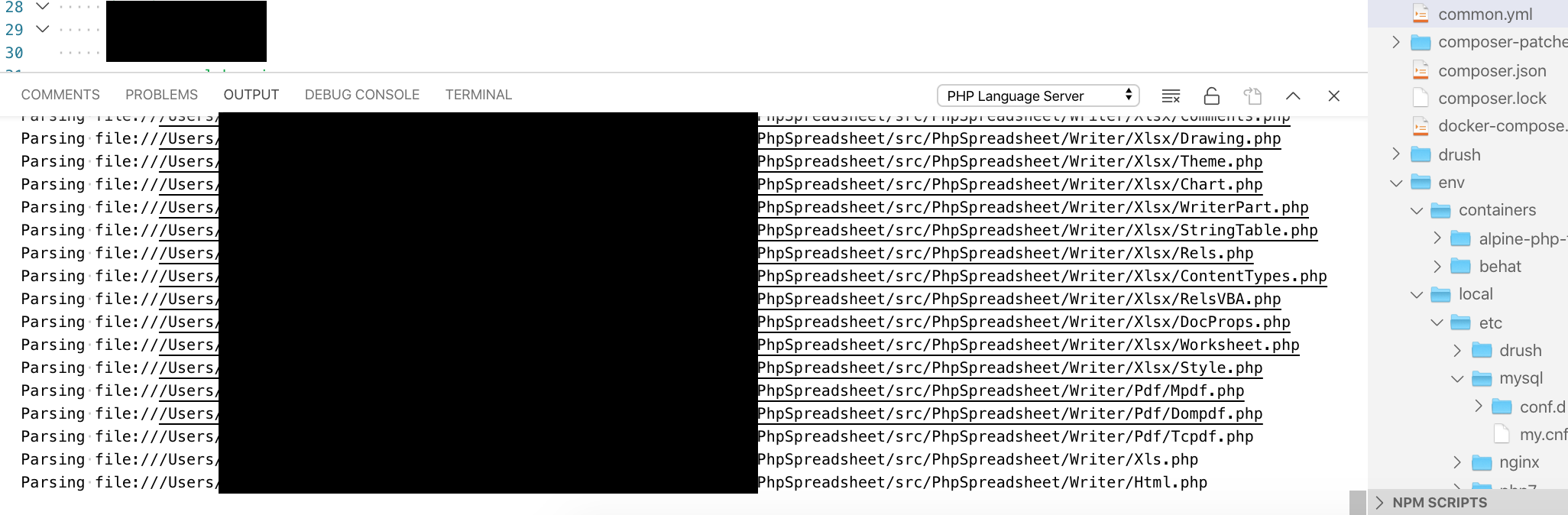
Looking at version 1.39.2, this feature seems to be in actually and I find it very annoying. Working on a couple of rather large PHP projects, I have to manually close the problems pane around 20 to 30 times a day, because VSCode thinks that I want to know it's parsing files. I couldn't find an option to permanently disable this, nor did any of the different ways of closing/hiding the pane prevent it from reopening soon after. I also couldn't identify an event that triggers this, so I assume it's done in some kind of scheduled way behind the scenes.
Anyway of permanently disabling this? Even disabling the whole panel would work for me, as I have other tools to look at the problems and use VSCode really only as a code editor, no need for a built-in terminal and the rest of the things in that panel.
 berliner
on 31 Oct 2019
berliner
on 31 Oct 2019
@berliner Are you sure you're talking about the problems panel, not the terminal? I don't think this feature is even implemented yet.
Gama11
on 31 Oct 2019
@Gama11 Not sure what it's called exactly, but it sounded about right, see the screenshot
berliner
on 31 Oct 2019
That's the output panel. Could be some extension (PHP?) opening that, but definitely not related to this issue.
Gama11
on 31 Oct 2019
@Gama11 Ah, ok. I was googling my fingers of to come across an issues that seemed at least related, but ok, I'll continue searching. The output probably comes from intellisense, but I assumed that VSCode probably had a setting somewhere to control the panel as a whole, given that I can close it as a whole too, independently on which tab is currently open in there.
berliner
on 31 Oct 2019
:slightly_smiling_face: This feature request received a sufficient number of community upvotes and we moved it to our backlog. To learn more about how we handle feature requests, please see our documentation.
Happy Coding!
![vscodebot[bot] picture](https://avatars2.githubusercontent.com/in/2406?v=4&s=40) vscodebot[bot]
on 16 Jan 2020
vscodebot[bot]
on 16 Jan 2020
Related issues
 biij5698
·
3Comments
biij5698
·
3Comments
 VitorLuizC
·
3Comments
VitorLuizC
·
3Comments
 vsccarl
·
3Comments
vsccarl
·
3Comments
 ryan-wong
·
3Comments
ryan-wong
·
3Comments
 trstringer
·
3Comments
trstringer
·
3Comments
Most helpful comment
I technically know the indicator exists, but I can't say I ever look at it. I must be fairly arrogant: I assume my code is correct until I'm shouted at. :-D I really do prefer a pretty obnoxious warning in this case.
I definitely wouldn't do it as the default behavior! It does seem like it could be a configuration option. Or, alternatively, perhaps it's best as a plugin. I haven't looked—is the API sufficient to enable this kind of behavior?
For reference, I was previously using Atom and Atom-Linter. You can see how their error pane can (optionally) hide and show itself in their screenshot (down at the bottom of the screen). They are also optionally showing errors inline there, though I always preferred the list at the bottom of the screen: