Vscode: code-completion doesn't replace expected text when cursor is not at the end of name
- VSCode Version: 1.4.0
- OS Version: Windows 10
Steps to Reproduce:
- Create a method called
methodOne - Write some code that calls this method as
methodTwo() - Place the cursor between the
dandTand invoke completion - Select
methodOnefrom the completion list
You would expect methodTwo to be replaced with methodOne but you end up with methodOneTwo.
 DanTup
All 75 comments
@jrieken is there anything special I need to do to achieve this?
 dbaeumer
on 8 Aug 2016
dbaeumer
on 8 Aug 2016
If it helps, my Dart extension seems to handle this correctly:
https://github.com/DanTup/Dart-Code/blob/master/src/dart_completion_item_provider.ts#L41
You can provide a textEdit property on the CompletionItem with a Range to replace. The Dart language service I'm using already returned the correct length here so it just worked out of the box. I guess in your MyCompletionItem class you may need to set up the textEdit (assuming you have all the necessary info from the service).
DanTup
on 8 Aug 2016
I don't :-(. I can reconstruct this using may be model API but I was hoping not being forced to do this and @jrieken knows a better way.
If we need this information to handle cases like this then it should IMO come from the tsserver since he has the full knowledge about the context of the code complete.
dbaeumer
on 8 Aug 2016
When a completion item doesn't specify a text edit we construct one with the word range _until_ the current position. So, you can achieve the behaviour using a different range or we just change our default - tho that makes it sound more like a user option cos I am not sure if overwrite after is always the right thing to do?
 jrieken
on 8 Aug 2016
jrieken
on 8 Aug 2016
Changing the default is not a good thing to do since we will break others. I will see if I can recompute this for now and make a request against the tsserver to better provide this info.
dbaeumer
on 8 Aug 2016
You can always ask for the word range at position. That's usually a pretty good guess
jrieken
on 8 Aug 2016
Agree.
dbaeumer
on 8 Aug 2016
@jrieken and I discussed that again over lunch and we agreed that we should investigate into a language neutral solution to not have to many language specific settings. Moving to September and adding @jrieken as an owner.
dbaeumer
on 26 Aug 2016
Related to #4878 ?
 ramya-rao-a
on 27 Apr 2017
ramya-rao-a
on 27 Apr 2017
Any chances this feature to be implemented?
 MichalMichalak
on 3 May 2018
MichalMichalak
on 3 May 2018
Please make this feature language agnostic. We can get around the excess with more keybinds (for me [Shift] + [Alt] + [Right], then [Del]). The problem is most manifested with fuzzy search.
 sirgru
on 17 Jul 2018
sirgru
on 17 Jul 2018
@sirgru I think this is just a bug in the TypeScript implementation; other languages should be able to handle it correctly (we do in Dart).
DanTup
on 23 Jul 2018
@DanTup it works for Typescript by default in WebStorm. I guess it is not related to language itself in any way.
 ODushyn
on 24 Jul 2018
ODushyn
on 24 Jul 2018
@ODushyn I mean in the TypeScript VS Code extension. The language extension can tell VS Code exactly what selection of code to replace (see comment from @jrieken above: "So, you can achieve the behaviour using a different range").
VS Code can't decide which characters after the cursor to replace because it doesn't understand how the language work (it can guess, but that's not reliable, hence this bug). This information should come from the language extension (and this is already supported).
DanTup
on 24 Jul 2018
@DanTup got your point, if VS code does not support TypeScript out the box then it's completely up to extension to fix this. However, what VS code docs says: "Visual Studio Code includes TypeScript language support" (https://code.visualstudio.com/docs/languages/typescript). For other languages, like java it says "The Java support in VS Code is provided through extensions". If it does include TypeScript support at first place why not to add this feature as well?
ODushyn
on 24 Jul 2018
Just to clarify: "Visual Studio Code includes TypeScript language support" in less marketing speech means: "Visual Studio Code includes a TypeScript extension by default - an extension which is no different to other extensions in what it can do or how it is implemented"
jrieken
on 24 Jul 2018
@ODushyn Sorry if my comment was confusing. The comment from @sirgru was asking for this to be solved in a "language agnostic" way, but IMO this is just a bug in the TypeScript extension (which lives in this repo and ships in Code) - at least, that was my intention when I opened it. VS Code's APIs already provide what's required for a language to implement this correctly and while VS Code can change what it defaults to (eg. using something like getWordRangeAtPosition) that's not guaranteed to be reliable so shouldn't be relied upon.
If you've seen this issue in other languages extensions, the best thing is to encourage them to provide the range to VS Code with their completions.
DanTup
on 24 Jul 2018
This has been one of the most annoying bugs in VS Code. I think most people expect it to do a replace instead of insert. Especially for those that came from Visual Studios.
 Lamester
on 28 Jul 2018
Lamester
on 28 Jul 2018
I find this behavior quite unpleasant. What can we do about it? :)
 enzy
on 14 Feb 2019
enzy
on 14 Feb 2019
This also affects snippets:
Pulling a Python example from #26012. The root cause there was that snippets and auto closing pairs don't play nice together.
Snippet:
{
    "listcompPy": {
        "prefix":"[x for x in",
        "body":[
            "[x for x in range(1,20) if x%2==0 ]"
        ]
    }
}
typing [x results in a single extra bracket at the end:
[x for x in range(1,20) if x%2==0 ]]
 TylerLeonhardt
on 28 Aug 2019
TylerLeonhardt
on 28 Aug 2019
Also a PowerShell example where ] is not at the end:
{
    "PSCustomObject": {
        "prefix":"[PSCustomObject",
        "body":[
            "[PSCustomObject] @{ Key = Value }"
        ]
    }
}
Gives:
[PSCustomObject] @{ Key = Value}]
@DanTup I just tried this and it seems to work. Can you confirm?
 escamoteur
on 13 Sep 2019
escamoteur
on 13 Sep 2019
@DanTup I just tried this and it seems to work. Can you confirm?
Not sure exactly what you're asking, but this issue I opened was for TypeScript rather than Dart (Dart does "the right thing" IMO but TypeScript does not). Dart provides the exact edit ranges to VS Code so its behaviour is defined by Dart. For TypeScript, it does not, so VS Code has to infer what the replacement range is.
My interpretation is that the TS server should do better (and give VS Code the exact ranges), though based on the number of other languages with this issue, having VS Code be smarter about the range it picks if the server does not provide a range could work too.
Honestly, this issue is kinda infuriating when writing TS and I'm surprised it's still not fixed... it's second only to TS projects not being able to reliably give errors across a whole project without opening files 😞
DanTup
on 16 Sep 2019
VS Code: 1.39-insider
Currently, auto suggest work in the following way:
Say, we have 2 variables some_ONE_variable and some_TWO_Variable
Case 1
- we start typing
som, then the suggestions show up - we chose the suggestion and end up with
somsome_ONE_variable(som + some_ONE_variable)
For further illustration:
Case 2
- we have
some_ONE_variablealready and we want to replace it with the other one - we remove the 'ONE' with the backspace (some__variable) and the suggestions show up
- we chose the required one, and we end up with
some_some_TWO_variable_variable(it inserts the suggestion where the cursor is, instead of replacing the word
Very irksome after a point - we need to input first few letters to narrow down the suggestions, and then cursor left and backspace...
 DibyodyutiMondal
on 30 Sep 2019
DibyodyutiMondal
on 30 Sep 2019
The default behavior should be to replace all text after cursor until a
text separator is found (imagine like editing a txt file) that means space,
linebreak, comma, dot, etc.
For all other specific implementations it's up to the language extension to
handle it.
Le lun. 30 sept. 2019 à 03:44, DibyodyutiMondal notifications@github.com
a écrit :
VS Code: 1.39-insider
Currently, auto suggest work in the following way:
Say, we have 2 variables some_ONE_variable and some_TWO_VariableCase 1
- we start typing som, then the suggestions show up
- we chose the suggestion and end up with somsome_ONE_variable (som +
some_ONE_variable)For further illustration:
Case 2
- we have some_ONE_variable already and we want to replace it with
the other one- we remove the 'ONE' with the backspace (some__variable) and the
suggestions show up- we chose the required one, and we end up with
some_some_TWO_variable_variable (it inserts the suggestion where the
cursor is, instead of replacing the wordVery irksome after a point
—
You are receiving this because you are subscribed to this thread.
Reply to this email directly, view it on GitHub
https://github.com/microsoft/vscode/issues/10266?email_source=notifications&email_token=AFLIBIYI4YZSBDHEUMUIWQLQMFKYNA5CNFSM4CLZ6CV2YY3PNVWWK3TUL52HS4DFVREXG43VMVBW63LNMVXHJKTDN5WW2ZLOORPWSZGOD74FDTQ#issuecomment-536367566,
or mute the thread
https://github.com/notifications/unsubscribe-auth/AFLIBIYESZEBDZKDGPG2DODQMFKYNANCNFSM4CLZ6CVQ
.
 ypapouin
on 30 Sep 2019
ypapouin
on 30 Sep 2019
It's been 3 YEARS! This is THE worst, most annoying BUG of VS Code.
Lamester
on 30 Sep 2019
The default behavior should be to replace all text after cursor until a text separator is found
On TAB, yes. On ENTER it should just insert what you want which is how it works now.
I agree that it should be default behavior for any word and language agnostic. How languages plugins want to leverage this is up to the developers of those plugins.
MichalMichalak
on 30 Sep 2019
How to disable this behavior ? I want always insert and never replace. I can't find any settings to do that.
 beati
on 4 Oct 2019
beati
on 4 Oct 2019
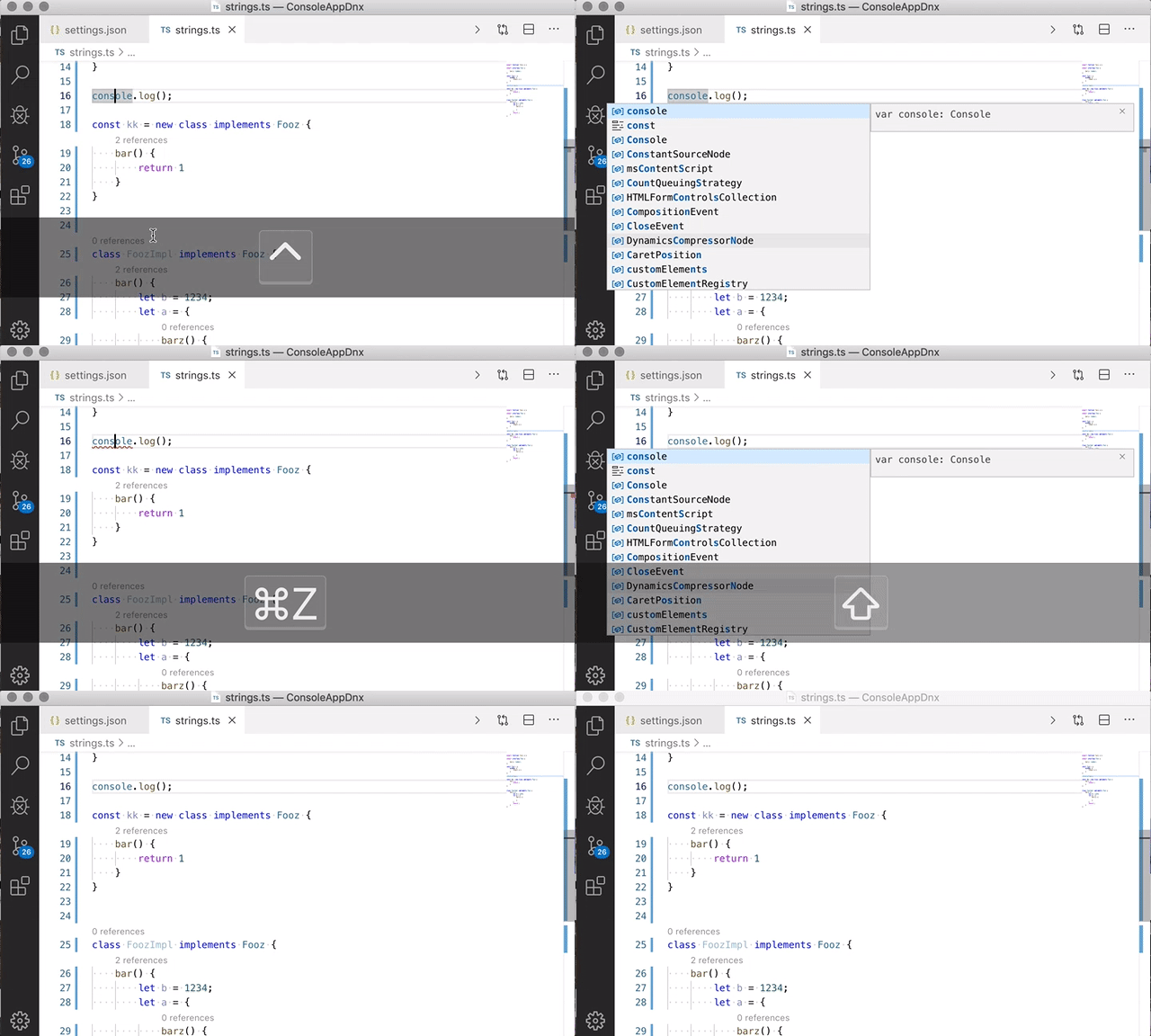
I have pushed a change so that shift+tab and shift+enter overwrite word suffixes when inserting completions:
jrieken
on 10 Oct 2019
We can also turn it around, e.g tab/enter overwrite word suffixes and the shift variants do what we are doing today. That would align nicer with extensions (like dart) that current support this but it will likely confuse users because a default changed... Or add yet another setting.
jrieken
on 10 Oct 2019
Pushed another change that makes the default accept-gestures like enter, tab, or mouse down overwrite the word suffix. Using shift+tab or shift+enter doesn't overwrite. Also, when an extension doesn't provide a suffix to overwrite then vscode defaults to the current word range.
jrieken
on 10 Oct 2019
@jrieken could you clarify what this means for extensions like Dart that provide the range? Is it:
<enter>does what it always does (eg. replaces the range supplied by the extension - which will typically include the characters following the cursor)<shift+enter>will insert the completion without replacing the following characters?
If so, how is the second achieved - will VS Code take the range on the completion item and just truncate it to the current cursor position?
DanTup
on 10 Oct 2019
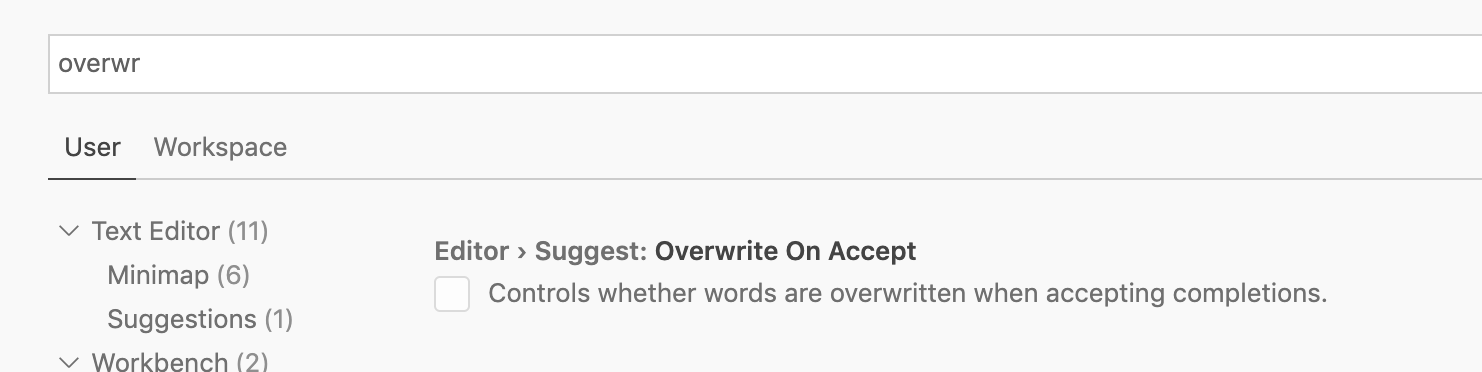
This is now behind this setting: editor.suggest.overwriteOnAccept (default is false). This is how it works:
overwriteOnAccept: false+ Tab (or enter) ➡️ insertoverwriteOnAccept: false+ Shift+Tab (or shift+enter) ➡️ overwriteoverwriteOnAccept: true+ Tab (or enter) ➡️ overwriteoverwriteOnAccept: true+ Shift+Tab (or shift+enter) ➡️ insert
When overwriting the overwrite-range from completion items is used, when missing the (language specific) word definition is used to compute the overwrite-range. Inserting works by truncating potential longer ranges at the current cursor position.
jrieken
on 17 Oct 2019
This default feels like a bit of a step backwards for all language servers providing ranges. I opened this issue because TS behaves badly, and now the default is that Dart will also behave badly unless people change their settings (I try to avoid overriding settings, because they're not discoverable to users and cause confusion, but the number of defaults that result in worse experiences is increasing).
Is there a reason the default can't be true? That will avoid breaking things for language servers that were doing the right thing, and provide the (generally accepted) better functionality by default for everyone else.
DanTup
on 17 Oct 2019
The reasoning is twofold. Users tend to react strongly to changes in default behaviour because it breaks their habits and I have received this feedback online and offline. Secondly, the overwrite behaviour has some downsides and can be confusing in places, e.g requires to insert a space first (also discussed here https://github.com/Dart-Code/Dart-Code/issues/1991)
jrieken
on 17 Oct 2019
Users tend to react strongly to changes in default behaviour because it breaks their habits and I have received this feedback online and offline.
Right, but this change is changing the default for all languages that were correctly providing ranges. It seems likely that replacing is the common desire, so it seems strange to deliberately break the people that had the good behaviour to avoid giving other people the better behaviour.
Secondly, the overwrite behaviour has some downsides and can be confusing in places
Sure, but that's the exception and why you've added the shift modifier. It's only ever come up once that I know of and I'm fairly certain that this change is going to result in many more bugs raised and I suspect we'll end up overriding it. It seems a little confusing to resolve a feature request by turning off that feature by default for the languages that already had it 😔
DanTup
on 17 Oct 2019
Right, but this change is changing the default for all languages that were correctly providing ranges.
Do you know how many languages that are? I only know of dart.
jrieken
on 17 Oct 2019
Do you know how many languages that are?
I don't, nor do I know an easy way to find out. However since it's the behaviour that's documented (and honestly expected given the API), I'd be very surprised if Dart was the only one. It feels a bit weird for VS Code to ask servers for a range and then just slice it up just because some language servers aren't providing a range - the language servers providing the better information are being negatively affected while those that provide less information are not.
DanTup
on 17 Oct 2019
I have just tried with vscode-dev-containers and this is the current state of replace vs insert
replace- dart, cpp, javainsert- c#, go, js, ts, php, python, rust, swift, R
So, I learnt that this affects also cpp and java. Changing the default for all others (including word-based completions which is the default for all languages) seems risky because of the aforementioned reasoning. The easiest for extension authors that don't want to change existing behaviour is to use the configurationDefault-contribution point, e.g.
"configurationDefaults": {
    "[MY_LANG]": {
        ""editor.suggest.overwriteOnAccept": true"
    }
},
/cc @testforstephen for Java and @bobbrow for C/CPP. Generally, I'd like suggest for all languages to behave the same and users should customise things like replace vs insert. However, I understand that users for certain languages are used to existing (non default) behaviour and hence the above suggestion to contribute a default configuration value.
jrieken
on 17 Oct 2019
The only issue with setting the configurationDefaults like that is that it's not very discoverable to the user. We use this to set default indent settings for Dart (the Dart SDK formatter only supports 2 spaces) and people often complain we're forcing 2 spaces on them because they don't realise that they need to set them specifically for Dart to override this.
I agree it would be better for all languages to be consistent - though I'd generally assumed that the majority of people want this behaviour by default (and that they don't get it seems like a bug). I know I may be tainted by writing a lot of Dart and being frustrated by TS though (FWIW, I could swear it's how VS worked for C# - though I can't verify from my Mac).
Another option would be to set the default based on whether the language provided a range. That way everyone gets to keep their current defaults and just has a modifier few the new behaviour. Sure, it's not consistent - but if we just force the option as suggested above then the behaviour isn't consistent either.
DanTup
on 17 Oct 2019
@jrieken, C++ already does full word replacement if completion is invoked in the middle of an identifier, so the original request at the top of the issue should already be working for C++ (IOW, we'd be fine with overwriteOnAccept defaulting to true).
How would this setting affect what we return from the completion request? Are extensions expected to account for this setting in their responses, or was VS Code going to handle it for us?
 bobbrow
on 17 Oct 2019
bobbrow
on 17 Oct 2019
I think most would agree that this started as an outright bug... which has turned into a "feature" that people had to work around.
Who in their right mind wants to search for a suggestion, only to have that suggestion inserted into the middle of the original code, which makes the result always 100% incorrect. You'd need addition action to correct it.
Please, please just change the current default behavior!
Lamester
on 17 Oct 2019
The only issue with setting the configurationDefaults like that is that it's not very discoverable to the user. We use this to set default indent settings for Dart
This sounds like good feedback and it should be relatively simple to fix (at least from where I stand). We already show a hint when a user setting is being edited and also defined as workspace setting. IMO we should do the same for resource specific issues. fyi @roblourens and @sandy081 - just in case this issue does not yet exist.
As already explained, we are not going to change the default. The cpp, java, and dart extensions can use configuration defaults (see https://github.com/microsoft/vscode/issues/10266#issuecomment-543217382) which exists for this purpose.
For all users, there is now editor.suggest.overwriteOnAccept setting which works as described here https://github.com/microsoft/vscode/issues/10266#issuecomment-543104017.
Closing because no more work is planned.
jrieken
on 18 Oct 2019
@jrieken can you explain what language servers need to change to support this setting? There is no information in the LSP that I know of that will tell us the difference between TAB and SHIFT+TAB being used to accept the completion. Or is this new feature going to ignore what the extension sends back in the CompletionItem.textEdit.range?
bobbrow
on 18 Oct 2019
@bobbrow There is nothing that you need to change because c/cpp (see https://github.com/microsoft/vscode/issues/10266#issuecomment-543217382) uses the full word range, while most languages only use the word range till the current position. Tho, having the setting also means that for your extension the default has changed and you can use configuration default (also see https://github.com/microsoft/vscode/issues/10266#issuecomment-543217382) to restore the old behaviour for c/cpp users
jrieken
on 21 Oct 2019
Re-opening this as it seems to be a little bit more complicated. There are cases like https://github.com/microsoft/vscode/issues/82874 which don't replace just words but more complex content and cropping isn't the right this to do here. An idea is to add a new flag to CompletionContext which expresses if the user wants insert or replace behaviour. It's then up to extensions to honour this - making it naturally harder to get uniform behaviour across languages...
jrieken
on 21 Oct 2019
@jrieken if changes to that are unlikely to make the next stable release, what will behaviour be in the stable release - will the change be shipped as-is or reverted?
DanTup
on 21 Oct 2019
idea
range?: Range | { insert: Range, replace: Range };
Sounds reasonable. What would the default behaviour be (eg. if you only supply range)? Same as today? So extensions would opt-in before getting any change?
If it is opt-in, would you consider revisiting the default? It wouldn't break anybody (nobody is opted-in) but the default behaviour would be what (I believe) most users would expect so extensions don't have to use configurationDefaults (which has frustrated my users in the past, because they believed I was overriding settings that they had no way to change).
DanTup
on 21 Oct 2019
The default behaviour becomes more complex but also gives extensions the chance to overrule our defaults. My current thinking is the following
- range is of type
object-> use it as given, extension author as adopted this API and made up his mind. We would validate that an insert range is a prefix of a replace range - range is
undefined-> We would fill the word range for replace and the cropped word range for insert (the latter already happens today) - range is of type
Range-> use range for insert range and replace. Q: try to use word range defaults when the given range matches word ranges? Q: log a message for extension devs to update?
The configuration value (editor.suggest.overwriteOnAccept) will make us use the insert or replace range when inserting a suggestion and the default will stay insert.
jrieken
on 22 Oct 2019
Q: try to use word range defaults when the given range matches word ranges?
I'm not sure what this means - if the range matches the word range, they would be the same? I would prefer when given a range you use it as-is though. Trying to be smart will likely result in quirks (like found in TS above, and in issues like https://github.com/microsoft/vscode/issues/63129 - which is await a response FWIW :-)).
Q: log a message for extension devs to update?
I don't know if you usually do that for new features extensions can take advantage of - though it could be useful. If you do do this, it should only write once-per-session or something.. code completion is invoked a lot and whever it goes could be really spammy if it happens every time.
DanTup
on 22 Oct 2019
I'm not sure what this means - if the range matches the word range, they would be the same? I would prefer when given a range you use it as-is though.
Very simple sample: with fo|oo default ranges would select fo for insert, and fooo for replace. Now, if an extension provides one them as range we could detect that it's either replace or insert, infer the other range, and assign them correctly. That's btw what the TS issue fix does. I believe that's reasonable and goes away as soon as an extension jumps onto the new API.
jrieken
on 22 Oct 2019
Oh, I see. My concern with that is that it's a breaking change before the extension has opted in to anything. I think it would be better to preserve existing behaviour until the extension opts-in, so they can set the configurationDefault (if they choose) and avoid users getting a change in behaviour, and then having it change back later (since if I understand correctly, there's no way an extension could ship the fix in advance).
DanTup
on 23 Oct 2019
(since if I understand correctly, there's no way an extension could ship the fix in advance).
Unfortunately not - tho I think we should only ship this feature/setting when the API has been finalised for vscode.d.ts and for LSP. Anything else would be unfair towards extension authors
jrieken
on 23 Oct 2019
In that case - if you ship the API change first, then change behaviour in a future version so I can ship the fix, I'm not against the above (though it's worth ensuring the other two languages that behave this way are aware they need to do the same).
It would definitely help if extensions configurationDefaults were more obvious at the same time - it was briefly mentioned above. Should I file an issue about it? (I thought there was one, but I can't find it now).
DanTup
on 23 Oct 2019
@jrieken it looks like snippets are not honoring editor.suggest.overwriteOnAccept.
{
        // python snippet
    "listcompPy": {
        "prefix":"x for x in",
        "body":[
            "[x for x in range(1,20) if x%2==0 ]"
        ]
    },
        // powershell snippet
    "PSCustomObject": {
        "prefix":"PSCustomObject",
        "body":[
            "[PSCustomObject] @{ Key = Value }"
        ]
    }
}
Is that intentional?
TylerLeonhardt
on 26 Oct 2019
fyi - we are holding back with this feature to give extensions enough time to prepare the adoption of the proposed API. that means for 1.40 we won't have the new setting and commands (see https://github.com/microsoft/vscode/issues/10266#issuecomment-543104017) but that we are delaying until 1.41 so that 3rd and also our own extensions have enough time to adopt
jrieken
on 29 Oct 2019
@jrieken is there an action item you're looking from language servers?
TylerLeonhardt
on 29 Oct 2019
dbaeumer
on 30 Oct 2019
@TylerLeonhardt for snippets adoption work is required, see https://github.com/microsoft/vscode/issues/83834. Since you seem v e r y interested in this, how about doing a PR?
For LSP see https://github.com/microsoft/vscode/issues/10266#issuecomment-547885214, tho completion items without a range a covered by a reasonable default and only completion items that provide a range need to be adopted
jrieken
on 1 Nov 2019
range?: Range | { insert: Range, replace: Range };
I have a case where the inserted text will be different depending on whether insert or replace is desired. When suggesting methodTwo for method|One($param), parentheses and a command to trigger parameter hints may be included in the CompletionItem. If the intention to insert or replace is sent in CompletionContext this would work, but providing multiple ranges would not be useful.
 bmewburn
on 7 Nov 2019
bmewburn
on 7 Nov 2019
When suggesting methodTwo for method|One($param), parentheses and a command to trigger parameter hints may be included in the CompletionItem.
I don't understand why that yields to a different insert text for insert vs replace cases? We dropped the CompletionContext approach because most editors (and so will VS Code) allow to change between insert and replace when accepting a completion, e.g Enter vs Shift+Enter, and that approach would prohibit this.
jrieken
on 8 Nov 2019
Insert methodTwo at method|One($some, $long, $arg, $list) might be newText of methodTwo($0) giving methodTwo($0)One($some, $long, $arg, $list) whereas replace might be
newText of methodTwo to give methodTwo($some, $long, $arg, $list) and preserve the argument list.
Maybe the former case is never desirable, though? As I understand it, to prevent an outcome of methodTwo($0)($some, $long, $arg, $list) I'd always have to drop the parentheses in the newText in such cases.
bmewburn
on 8 Nov 2019
@jrieken I thought the new object format would be available in v1.40, though looks like that's not the case. Can you confirm that (to avoid behaviour changes in languages like Dart), we should just ship:
"editor.suggest.overwriteOnAccept": true
in configurationDefaults. Then once the API is finalised there will be no behaviour change?
Also - if our immediate plan for insert would be only to truncate at the current location, can we just leave that for VS Code to do? (eg. we just stick with providing a Range and that the range will be applied as-is by default, and truncate by VS Code if the user presses shift - eg. there's no need for us to switch to using the new object interface?). If I understand correctly, we only need to provide our own insert if truncating would not be correct (for ex. in cases like https://github.com/microsoft/vscode/issues/82874).
DanTup
on 19 Nov 2019
@DanTup https://github.com/microsoft/vscode/issues/10266#issuecomment-547510902
jrieken
on 19 Nov 2019
@jrieken ah, I missed that - though I don't think it confirms what I was asking. Is shipping the configurationDefault prior to 1.41 the correct thing for us to do, so that when 1.41 launches there is no change in behaviour (for extensions that are doing replacement today) for users?
(my understanding is that if we do nothing and you ship that setting in 1.41, VS Code will start truncating our edit range by default if the user doesn't hold shift?)
DanTup
on 19 Nov 2019
Your understanding is wrong - when extensions provide a range nothing will change.
jrieken
on 19 Nov 2019
Ok, then I'm confused - why hold it back? It sounds like rolling it out will have no change in behaviour at all, and a change will only come when extensions update to the new API (which they can't do until after you ship it)?
DanTup
on 19 Nov 2019
We wanted to make sure that at least the extensions that ship with VS support this. Otherwise we should ship a setting that's not doing anything.
jrieken
on 19 Nov 2019
Got it, thanks 👍
DanTup
on 19 Nov 2019
@bmewburn re https://github.com/microsoft/vscode/issues/10266#issuecomment-551992439. This is good feedback and wrt insert I would say that it's OK to end up with invalid code, e.g having con|sole and insert-accepting const simply results in constsole and I feel that this logic shouldn't change when accepting a suggestion that includes the invocation part. Tho, having said that - the API is designed to allow extensions to say "nah, in this case only replace or insert makes sense". Eg. your extension can provide insert and replace ranges for variable name suggestions but only replace ranges for invocation suggestions. We won't massage anything onto the ranges in that case and the UI will only offer one way of inserting. What we have planned here is to make it visible what is going to replaced, e.g rendering some background treatment.
jrieken
on 19 Nov 2019
We not gotten enough feedback to finalise this API and will push things out for another milestone. Tho, the setting and the default behaviour will ship.
jrieken
on 2 Dec 2019
isnt this covered with "editor.suggest.insertMode": "replace"
 ctf0
on 20 Dec 2019
ctf0
on 20 Dec 2019
@ctf0 that functionality only works if the language extension provides two ranges to VS Code. There's an issue tracking handling that for TS at https://github.com/microsoft/vscode/issues/87091.
DanTup
on 23 Dec 2019
Hello when will this work. It is SO ANNOYING.
it was and is still so backwards !!!
How can you live with so an annoyance. I type Enum.Value1, then I move to the period Ctrl-Space to show the other values now what Tab, Enter Mouse click all of them insert and leave me with
Enumb.Value3Value1 on the screen.
Now what? I tried "editor.suggest.insertMode" set to replace same behavior Yuck
 AlGantori
on 29 Feb 2020
AlGantori
on 29 Feb 2020
Related issues
 trstringer
·
3Comments
trstringer
·
3Comments
 shanalikhan
·
3Comments
trstringer
·
3Comments
shanalikhan
·
3Comments
trstringer
·
3Comments
 chrisdias
·
3Comments
chrisdias
·
3Comments
 mrkiley
·
3Comments
mrkiley
·
3Comments
Most helpful comment
This has been one of the most annoying bugs in VS Code. I think most people expect it to do a replace instead of insert. Especially for those that came from Visual Studios.