Vscode: Not all rulers are being displayed when using zoom level less than 0
- VSCode Version: 1.4.0-insider (2016-07-22T05:07:03.113Z)
- OS Version: Windows 7
Steps to Reproduce:
- In settings, setup editor.rulers to [71, 99]
- Setup window.zoomLevel to -1
- Setup editor.fontSize to 13
- Reload Window
- Open any file
- Open split editor window (ctrl+)
After above, most of the time the 2nd ruler at the left window does not show up. This only started manifesting on newer version (no problem with older version)
 johncruise
All 11 comments
It seems that there are general issues with multiple rulers when the zoom level is -1 depending on how wide an editor is.

 kieferrm
on 25 Jul 2016
kieferrm
on 25 Jul 2016
Thank you for confirming. The show-and-tell screenshot is very informative RE: how to get around this. Unfortunately, in my environment the left pane doesn't show the other ruler no matter how I resize the width. What I end up doing (to get a side-by-side code experience) is open the 3rd/last editor pane and minimize the width of the left most. Ugly solution but it works.
Please keep the bug open until there's a permanent fix. Thanks for the support.
johncruise
on 25 Jul 2016
I think this is how Chromium deals with a 1px vertical line when it is zoomed below 100%. My recommendation is to not use window.zoomLevel.
 alexdima
on 16 Aug 2016
alexdima
on 16 Aug 2016
Not using window.zoomLevel as a solution is not enticing in my case. The reason why I use it is because all the window component of vscode are a tad big for my taste (icons, folder or solution view, etc) and although I like to see them all the time so I can navigate through my files, they are just taking too much space.
I will only go back to 100% zoom level if there's a way for me to customize font size of the other elements of the window that is not tied up to the editor window's font.
Nevertheless, thanks for the follow up.
johncruise
on 17 Aug 2016
:+1: I would also like a way to customize the font size of other elements of the window. Please create an issue for that so I can upvote it :). The zoom level is a cheap trick that causes multiple problems, such as this one, or breaking antialising, etc.
alexdima
on 17 Aug 2016
I'll create one. Thanks for the recommendation.
johncruise
on 17 Aug 2016
Here is @johncruise's followup ticket: https://github.com/Microsoft/vscode/issues/10605. How do you guys feel about allowing the ruler width to be styled via themes? Could be a quick fix for the relatively small group of users who are affected by this.
 eldarshamukhamedov
on 26 Nov 2016
eldarshamukhamedov
on 26 Nov 2016
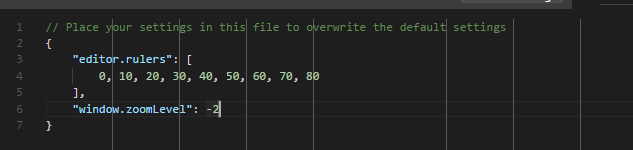
The same happens when using for example the Zoom Level on Windows to something like 125%. Some rulers are 1px wide and some are 2px wide depending on how the rulers align with the screen pixels:
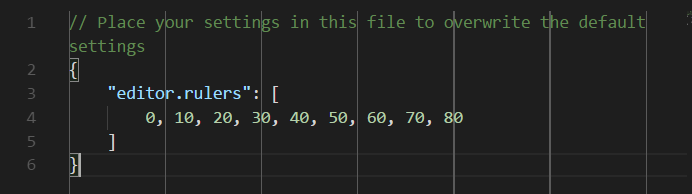
When Windows is set to 125% and window.zoomLevel: -2:
Thanks to the help from @fj128 in discussions in #28542 , we have a plan on how to workaround this.
alexdima
on 14 Jun 2017
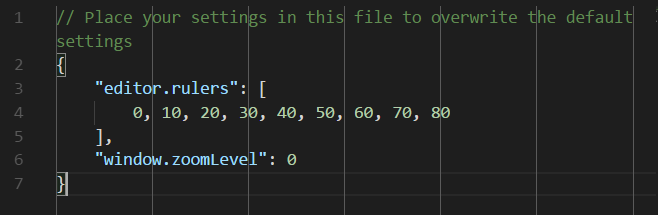
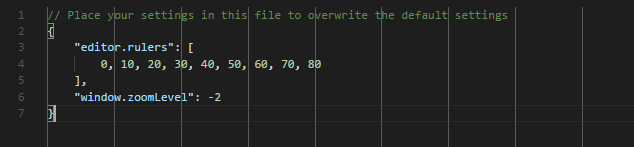
With the technique discussed in #28542:
When Windows is set to 125% and window.zoomLevel: 0:
When Windows is set to 125% and window.zoomLevel: -2:
alexdima
on 14 Jun 2017
Why is this closed? I have no idea what to do about this. Is it possible to configure the thickness of the ruler?
 KernelDeimos
on 2 Jul 2017
KernelDeimos
on 2 Jul 2017
Not a maintainer, but from what I understand, it is closed because it has
been fixed and now we just wait for the next release.
On 3 Jul 2017 12:11 am, "Eric Dubé" notifications@github.com wrote:
Why is this closed? I have no idea what to do about this. Is it possible
to configure the thickness of the ruler?—
You are receiving this because you were mentioned.
Reply to this email directly, view it on GitHub
https://github.com/Microsoft/vscode/issues/9634#issuecomment-312517200,
or mute the thread
https://github.com/notifications/unsubscribe-auth/AASzj7CQCu5cRubzM7fuYBsDyBCxu9AKks5sKAeHgaJpZM4JTAaI
.
 fj128
on 3 Jul 2017
fj128
on 3 Jul 2017
Related issues
 shanalikhan
·
3Comments
shanalikhan
·
3Comments
 philipgiuliani
·
3Comments
philipgiuliani
·
3Comments
 trstringer
·
3Comments
trstringer
·
3Comments
 biij5698
·
3Comments
biij5698
·
3Comments
 sijad
·
3Comments
sijad
·
3Comments
Most helpful comment
Not using
window.zoomLevelas a solution is not enticing in my case. The reason why I use it is because all the window component of vscode are a tad big for my taste (icons, folder or solution view, etc) and although I like to see them all the time so I can navigate through my files, they are just taking too much space.I will only go back to 100% zoom level if there's a way for me to customize font size of the other elements of the window that is not tied up to the editor window's font.
Nevertheless, thanks for the follow up.