Vscode: autoClosingBrackets and bracket surround should be two features
I'd like to use the bracket surround functionality, where you select a word and enter a bracket-like character ' " ( { and the word becomes surrounded by these characters. VScode does this already, but only if you have autoClosingBrackets enabled. I find the other behaviors of autoClosingBrackets really annoying (it swallows closing bracket characters if you type one which often leads to mistakes when using a multi-cursor edit). It would be nice if we could have finer control over these behaviors.
 assumptionsoup
All 11 comments
To amplify the OP's suggestion, this is better left to something like #1307, where it's (1) a separate feature and (2) more generalizable to other delimiters.
 jkyeung
on 22 Sep 2017
jkyeung
on 22 Sep 2017
Since #1307 has been closed without really providing a solution, I wanted to at least post the solution I came up with for this type of problem. This took me forever to figure out, so hopefully this helps others. I am coming from Sublime Text and needed to find a solution to this in order to feel like I could actually make the move to VScode.
In my case I wanted to be able to make a selection (or multiple selections) and when I hit any of the characters ", ', *, `, the selected text will be wrapped with that character.
My solution was to add the following in my keybindings.json file:
{
// wrap a selection with single quotes (')
"key": "'",
"command": "editor.action.insertSnippet",
"when": "editorHasSelection && editorTextFocus",
"args": {"snippet": "'$TM_SELECTED_TEXT'"}
},
{
// wrap a selection with double quotes (")
"key": "shift+'",
"command": "editor.action.insertSnippet",
"when": "editorHasSelection && editorTextFocus",
"args": {"snippet": "\"$TM_SELECTED_TEXT\""}
},
{
// wrap a selection with back ticks (`)
"key": "`",
"command": "editor.action.insertSnippet",
"when": "editorHasSelection && editorTextFocus",
"args": {"snippet": "`$TM_SELECTED_TEXT`"}
},
{
// wrap a selection with stars (*)
"key": "shift+8",
"command": "editor.action.insertSnippet",
"when": "editorHasSelection && editorTextFocus",
"args": {"snippet": "*$TM_SELECTED_TEXT*"}
}
These are just examples, but the same approach can be used for other character wrapping scenarios.
In searching for a solution to this, I have seen a LOT of ideas, but no real good solution. I also wanted to have a global solution that would work in all languages (including plain text) without having to manage a solution in every single language.
I hope this helps other people...
 swill
on 21 Nov 2017
swill
on 21 Nov 2017
A small update to this. I did some more tweaking to improve this approach.
In my initial implementation I did not like:
- The selection was not preserved.
- The cursor was placed outside the wrapping characters after insertion.
I have updated the snippet to solve those problems.
// ...
    {
        // wrap a selection with single quotes (')
        "key": "'",
        "command": "editor.action.insertSnippet",
        "when": "editorHasSelection && editorTextFocus",
        "args": {"snippet": "'${0:${TM_SELECTED_TEXT}}$0'"}
    },
// ... the same concepts apply to all previously defined snippets ...
The selection is defined as the placeholder piece of the format ${0:placeholder}. If you wanted the wrapping characters (single quotes in this case) to be part of the final selection, you could move them inside this construct.
The final cursor location is placed with the $0 code. In this case, I wanted the cursor to be placed inside the wrapping characters at the end of the selection.
This makes this implementation feel a lot more like how the [], {} and () wrapping functionality behaves.
Enjoy...
swill
on 22 Nov 2017
This was the exact solution I was hoping for and it works just as expected. Thank you.
 NeuralNeurosis
on 2 Aug 2018
NeuralNeurosis
on 2 Aug 2018
@swill Have you disabled any default behavior to make the key bindings work? I followed your instructions, but only the * is properly working. When I use ", ' and (backtick), the selected word is replaced with one of the the signs. (i.e test with " becomes """)
It looks like the editor is auto-completing the first sign. However I couldn't find a way to override it. I saw issue #52634, but looks like editor.autoClosingQuotes still a WIP.
 ronalson
on 3 Aug 2018
ronalson
on 3 Aug 2018
Hey @ronalson,
I just tested in a brand new VScode deployment the following addition to the keybindings.json file and everything works exactly as expected.
// Place your key bindings in this file to overwrite the defaults
[
    {
        // wrap a selection with single quotes (')
        "key": "'",
        "command": "editor.action.insertSnippet",
        "when": "editorHasSelection && editorTextFocus",
        "args": {"snippet": "'${0:${TM_SELECTED_TEXT}}$0'"}
    },
    {
        // wrap a selection with double quotes (")
        "key": "shift+'",
        "command": "editor.action.insertSnippet",
        "when": "editorHasSelection && editorTextFocus",
        "args": {"snippet": "\"${0:${TM_SELECTED_TEXT}}$0\""}
    },
    {
        // wrap a selection with back ticks (`)
        "key": "`",
        "command": "editor.action.insertSnippet",
        "when": "editorHasSelection && editorTextFocus",
        "args": {"snippet": "`${0:${TM_SELECTED_TEXT}}$0`"}
    },
    {
        // wrap a selection with stars (*)
        "key": "shift+8",
        "command": "editor.action.insertSnippet",
        "when": "editorHasSelection && editorTextFocus",
        "args": {"snippet": "*${0:${TM_SELECTED_TEXT}}$0*"}
    }
]
Maybe you are putting the config in the wrong place or there is a typo or the like?
If you send me the contents of your keybindings.json file, I can review and see if I can find the problem.
swill
on 8 Aug 2018
Hi @swill, I just copied your snipped into my keybindings.json, but the behavior I mentioned above still the same.
Here it's a GIF showing that:
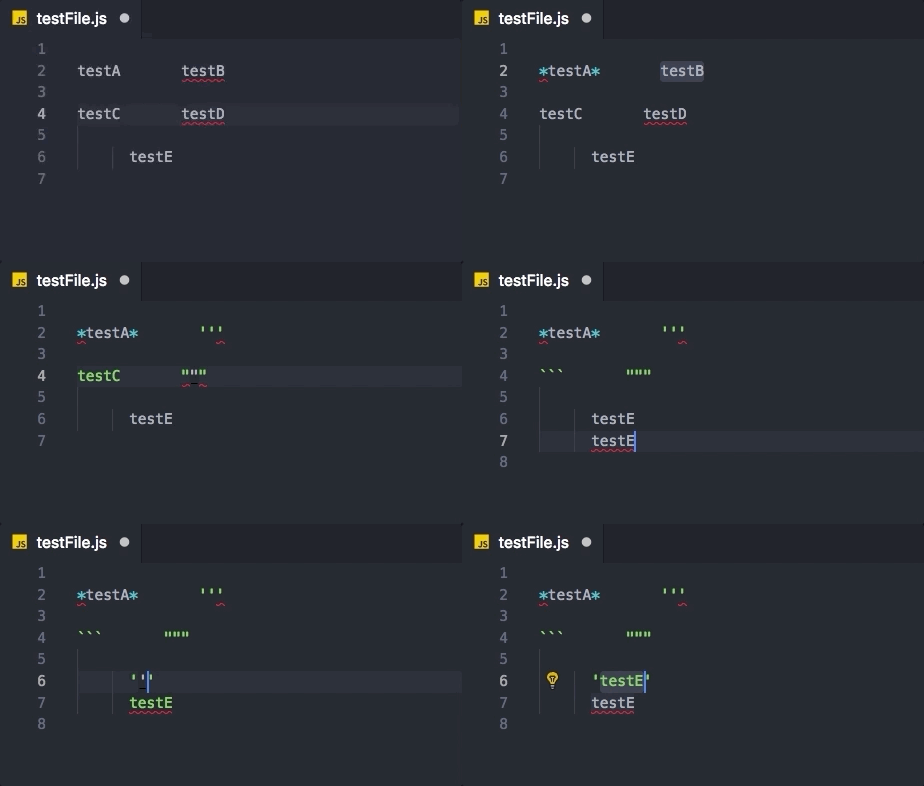
Notice that after testE is turned into ''' I can get the proper result performing a cmd + z.
Additional info: for this test I've disabled both plugins auto-close-tag and auto-rename-tag.
ronalson
on 10 Aug 2018
Since cmd + z is giving you the correct value, it looks like the snippet is working correctly, but it looks like you have an auto closing extension of some kind installed which is inputting a second symbol which is removing the selected text and replacing it with that last input character.
Can you try the following snippet and see what the output is:
{
        // wrap a selection with single quotes (')
        "key": "'",
        "command": "editor.action.insertSnippet",
        "args": {"snippet": "'${TM_SELECTED_TEXT}$0'"},
        "when": "editorTextFocus && editorHasSelection"
}
This should result in the single quote being placed around the text and the cursor being placed inside the single quote. In this case, I am removing the preservation of the selection as I believe it is being replaced after. If my theory is correct, you have an extension installed (or something like that) which is auto closing the ' when you type it. Because of this, I expect you to have two ' symbols on the closing end of the quoted string.
Let me know if that gets us further in the troubleshooting.
Cheers...
swill
on 10 Aug 2018
I did some digging here and found this other issue #26820. I turns out there is a weird behavior with US International keyboard (I'm from Brazil) that was only partially fixed - the auto-closing for selected words still a thing.
Fortunately, mixing your solution with @victor-hugo's keybindings, I managed to get it working as expected.
The solutions was to bind (backticks) and ' with alt key - which is not ideal, but is fine as I use it to perform the word selection.
Thanks for the help!
Solution:
[
    {
        // wrap a selection with double quotes (")
        "key": "shift+'",
        "command": "editor.action.insertSnippet",
        "when": "editorHasSelection && editorTextFocus",
        "args": {
            "snippet": "\"${TM_SELECTED_TEXT}$1"
        }
    },
    {
        // wrap a selection with single quotes (')
        "key": "alt+'",
        "command": "editor.action.insertSnippet",
        "when": "editorHasSelection && editorTextFocus",
        "args": {
            "snippet": "'${TM_SELECTED_TEXT}$1'"
        }
    },
    {
        // wrap a selection with back ticks (`)
        "key": "alt+`",
        "command": "editor.action.insertSnippet",
        "when": "editorHasSelection && editorTextFocus",
        "args": {
            "snippet": "`${TM_SELECTED_TEXT}$1"
        }
    }
]
For me, simply this did the trick:
[
  {
    "key": "`",
    "command": "editor.action.insertSnippet",
    "when": "editorHasSelection && editorTextFocus",
    "args": {
      "snippet": "`${TM_SELECTED_TEXT}$1"
    }
  }
]
Note: single, double quotes and all brackets already work out of the box for me, nothing to do here. Just wanted to have the backtick for JS string literals
 axe312ger
on 12 Aug 2018
axe312ger
on 12 Aug 2018
In the latest Insiders you'll find two new settings, and a change in the inputs accepted for the existing setting:
  // Controls whether the editor should automatically close brackets after the user adds an opening bracket.
  //  - always
  //  - languageDefined: Use language configurations to determine when to autoclose brackets.
  //  - beforeWhitespace: Autoclose brackets only when the cursor is to the left of whitespace.
  //  - never
  "editor.autoClosingBrackets": "languageDefined",

  // Controls whether the editor should automatically close quotes the user adds an opening quote.
  //  - always
  //  - languageDefined: Use language configurations to determine when to autoclose quotes.
  //  - beforeWhitespace: Autoclose quotes only when the cursor is to the left of whitespace.
  //  - never
  "editor.autoClosingQuotes": "languageDefined",

  // Controls whether the editor should automatically wrap selections.
  //  - always
  //  - brackets: Wrap with brackets but not quotes.
  //  - quotes: Wrap with quotes but not brackets.
  //  - never
  "editor.autoWrapping": "always",
Note that these will all be overridden by editor.autoClosingBrackets if it is set to false, so be sure to update that to use the new schema.
 JacksonKearl
on 23 Aug 2018
JacksonKearl
on 23 Aug 2018
Related issues
 trstringer
·
3Comments
trstringer
·
3Comments
 ryan-wong
·
3Comments
ryan-wong
·
3Comments
 biij5698
·
3Comments
biij5698
·
3Comments
 DovydasNavickas
·
3Comments
DovydasNavickas
·
3Comments
 omidgolparvar
·
3Comments
omidgolparvar
·
3Comments
Most helpful comment
A small update to this. I did some more tweaking to improve this approach.
In my initial implementation I did not like:
I have updated the snippet to solve those problems.
The selection is defined as the
placeholderpiece of the format${0:placeholder}. If you wanted the wrapping characters (single quotes in this case) to be part of the final selection, you could move them inside this construct.The final cursor location is placed with the
$0code. In this case, I wanted the cursor to be placed inside the wrapping characters at the end of the selection.This makes this implementation feel a lot more like how the
[],{}and()wrapping functionality behaves.Enjoy...