Vscode: Default font on Ubuntu looks terrible (should we ship a font with vscode?)
- VSCode Version: 1.0
- OS Version: Ubuntu 16.04
Ubuntu 16.04 (Xenial Xerus) no longer carries Droid Sans Mono, this causes font to be rendered with Courier New if Linux desktop user installed MS core fonts (more than likely). Given Ubuntu still carries open source fonts such as DejaVu Sans Mono or Liberation Mono, which are better for LCD than Courier New, consider:
- Adding those to the font list
- Remove
Courier Newfrom font list - let the OS decide
 leonyu
All 20 comments
I see uses of this font in editor, git and debug land. Starting with editor.
 bpasero
on 25 Apr 2016
bpasero
on 25 Apr 2016
I bumped into this today, after updating to insiders 1.2.0. I'm on Ubuntu 16.10. For now, workaround by manually overriding the font family:
"editor.fontFamily": "'Monaco', sans-serif",
Either way, I see no sense in giving "Droid Sans" as a first option, even on Linux. If the user has the MS fonts installed, they should be used.
 use-strict
on 30 May 2016
use-strict
on 30 May 2016
I also noticed this. I installed "fonts-noto" package from the repositories because some people say Noto font family is similar to Droid.
"editor.fontFamily": "'Noto Mono', 'Courier New', monospace",
 ruverav
on 25 Aug 2016
ruverav
on 25 Aug 2016
I solved this by simply installing the font from https://fonts.google.com/specimen/Droid+Sans+Mono.
 computerwizjared
on 2 Oct 2016
computerwizjared
on 2 Oct 2016
@alexandrudima this is somewhat related to https://github.com/Microsoft/vscode/issues/10144 which has similar issues for the UI font. The real fix here is to lean on Chromium to pull in the system monospace font from the OS if it's available (a system-ui font was proposed in https://bugs.chromium.org/p/chromium/issues/detail?id=654679).
Is there any reason just monospace is not used? Also why is Courier New there at all?
 Tyriar
on 26 Oct 2016
Tyriar
on 26 Oct 2016
@Tyriar for no good reason except version-to-version stability.
 alexdima
on 26 Oct 2016
alexdima
on 26 Oct 2016
I only just became aware of this but it's a pretty big issue imo. If I remove my editor.fontFamily on Ubuntu 16.10 it falls back to Courier New which really affects readability because of its weight and the fact it's a serif font. If this was what I saw as my first impression I'd be kind of turned off by the default font.
Hack:

Courier New:

Sure it can always be changed but we can't rely on people knowing or bothering to do that.
Also on this PC monospace seems to fall back on Courier New.
Tyriar
on 27 Oct 2016
My honest suggestion is to ship VSCode with a cool font such as Hack or Inconsolata and have one of those be the default. IMHO too many folks are left with ugly monospace fonts.
alexdima
on 27 Oct 2016
I just read your comment but I'll post this anyway since we agree :stuck_out_tongue:
@alexandrudima have you considered bundling a standard monospace font that looks good on all platforms with the distributable? The developer of Hack reached out to me a couple of months ago and asked if we'd be interested in doing that, gzipped the 4 font variants are only ~700kb.
Tyriar
on 27 Oct 2016
Yeah, I've mentioned this to @chrisdias and @seanmcbreen a couple of times already. Not sure about the legal implications, but IMHO that would be a smart move for us.
alexdima
on 27 Oct 2016
Here's the expression of interest I mentioned from the developer of Hack https://twitter.com/csimpkins/status/766377209078611968
Tyriar
on 27 Oct 2016
The real fix here is to lean on Chromium to pull in the system monospace font from the OS if it's available
Is there a reason why monospace couldn't be that alias for the system monospace font?
 jhasse
on 15 Feb 2017
jhasse
on 15 Feb 2017
This now also affects Debian Stretch. After upgrading the Courrier New font is displayed because the fonts-droid is not in the repositories anymore.
Debian maintainers recommend switching from fonts-droid to fonts-noto.
I have followed the recommendations and have installed fonts-noto and replaced 'Droid Sans Mono' with 'Noto Mono' in "editor.fontFamily" which in my opinion looks very good.
Setting the default to monospace on Debian results in a very ugly result. I changed the default monospace font in Gnome Tweak Tool and in fontconfig to Noto Mono.
$ fc-match "monospace"
NotoMono-Regular.ttf: "Noto Mono" "Regular"
as you can see it is not taken into account:
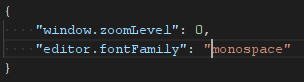
Until a font is bundled with VSCode, could we add 'Noto Mono' in the default values for Linux, and perhaps add 'fonts-noto' as a suggested package in the Debian package?
fonts-noto is in the main section in Debian repositories. Unfortunately it is in the universe section in the Ubuntu repositories, thus users must activate it before being able to install the package, this is why I suggest to added as a suggested package instead of a recommends/depends.
 adaxi
on 2 Jul 2017
adaxi
on 2 Jul 2017
Setting the default to
monospaceon Debian results in a very ugly result.
Isn't this a Debian bug then?
I changed the default
monospacefont in Gnome Tweak Too
AFAIK you can't change the monospace font in gnome-tweak-tool. It will only set a dconf value, not the monospace alias which is configured via fontconfig.
jhasse
on 2 Jul 2017
AFAIK you can't change the monospace font in gnome-tweak-tool.
Note that I have also defined Noto Mono as the monospace font in fontconfig by defining an alias in:
.config/fontconfig/fonts.conf
<?xml version='1.0'?>
<!DOCTYPE fontconfig SYSTEM 'fonts.dtd'>
<fontconfig>
    <alias>
        <family>monospace</family>
        <prefer><family>Noto Mono</family></prefer>
    </alias>
</fontconfig>
As you can see NotoMono is returned as the maching font for monospace.
$ fc-match monospace
NotoMono-Regular.ttf: "Noto Mono" "Regular"
And I confirm that the monospace font is now rendered using Noto Mono on other applications running on my system, except Visual Studio Code where it seems to default to Courrier New. I don't think there is a bug in Debian because other application seem to behave correctly.
I agree that the correct and clean solution would be to define monospace as the only font listed in editor.fontFamily. Although:
- In my opinion on many systems the default monospace font is ugly.
- If we really want to use
monospaceas a default then we need to find out why themonospacefont is rendered asCourrier Newon some systems whenmonospaceis defined as another font.
adaxi
on 3 Jul 2017
except Visual Studio Code where it seems to default to Courrier New.
Could be a Chromium/Electron bug then. Can you try <p style="font-family:monospace;"</p> in Chromium/Chrome?
In my opinion on many systems the default monospace font is ugly.
IMHO that's a bug of those systems and will never be fixed, if applications work around it.
jhasse
on 3 Jul 2017
I have interesting results. I have crafted the following html page:
<html>
        <body>
                <p style="font-family: monospace;">This is monospace.</p>
                <p style="font-family: 'monospace';">This is 'monospace'.</p>
                <p style="font-family: 'Noto Mono';">This is 'Noto Mono'.</p>
                <p style="font-family: 'Courier New';">This is 'Courier New'.</p>
                <p style="font-family: 'DejaVu Sans Mono';">This is 'DejaVu Sans Mono'</p>
        </body>
</html>
And got the following results.
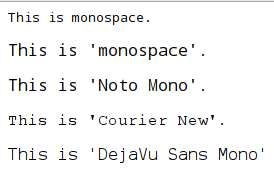
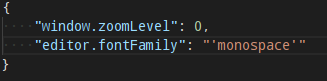
I noticed that adding quotes around the monospace word would yield different results. I have changed monospace to 'monospace' in VSCode and it is now rendered correctly:
adaxi
on 3 Jul 2017
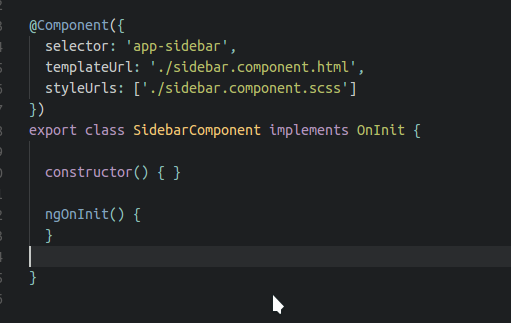
Try Ubuntu Mono. Monaco is good one but personally, I like Ubuntu Mono.
 prasanthnv
on 9 Sep 2017
prasanthnv
on 9 Sep 2017
Hi, everybody!
Replace 'Droid sans mono' by 'Ubuntu mono' looks good to me. I didn't download any font pack.
{
  editor.fontSize: 15,
  editor.fontFamily: "'Ubuntu Mono', monospace",
}
 leojnxs
on 27 Oct 2017
leojnxs
on 27 Oct 2017
@leojnxs there was another issue a while ago discouraging the use of Ubuntu Mono as then it's picked up as the default on non-Ubuntu Linux distros 😄. Ideally we would pick up whatever the display manager configures as the default monospace font, but monospace often doesn't give us that.
Tyriar
on 28 Oct 2017
Related issues
 omidgolparvar
·
3Comments
omidgolparvar
·
3Comments
 lukehoban
·
3Comments
lukehoban
·
3Comments
 shanalikhan
·
3Comments
shanalikhan
·
3Comments
 chrisdias
·
3Comments
chrisdias
·
3Comments
 villiv
·
3Comments
villiv
·
3Comments
Most helpful comment
I solved this by simply installing the font from https://fonts.google.com/specimen/Droid+Sans+Mono.