Vscode: Improve git partial staging discoverability
In Git GUI, you can right click a tracked & changed file and stage just the selected lines, or just the current hunk. It's the UI version of git add -p This is extremely useful when splitting up lots of code changes in to several commits. It would be nice to have this partial stage functionality in this app.
 factormystic
All 28 comments
Well, whad'ya know!

 joaomoreno
on 1 Mar 2016
joaomoreno
on 1 Mar 2016
Okay, I see that there is extremely basic functionality that I missed initially, thank you. However, this highlights additional limitations:
- obscure, unlabelled menu instead of available via context menu (like git gui) or command palette
- no "hunk" staging
- no partial unstage by line/hunk
factormystic
on 1 Mar 2016
Fair enough
joaomoreno
on 1 Mar 2016
Would it be possible to enable a shortcut command for this? For those of us that use the feature frequently, the mouse-menu movement gets pretty tedious. :weary:
 tdhsmith
on 8 Mar 2016
tdhsmith
on 8 Mar 2016
Absolutely. @isidorn wanna create a global workbench action for this?
joaomoreno
on 9 Mar 2016
I wanted to even put it in the context menu of the diff view
Yeah I will make this awesome feature more discoverable 🐩
 isidorn
on 9 Mar 2016
isidorn
on 9 Mar 2016
@joaomoreno did this functionality move? I can't replicate your screencap in 1.3.1
factormystic
on 15 Jul 2016
cc @bpasero, the actions are a bit hidden now
joaomoreno
on 15 Jul 2016
They moved back to the "..." dropdown when tabs are enabled.
 bpasero
on 15 Jul 2016
bpasero
on 15 Jul 2016
Which "..." dropdown? All I see have on the "..." on the tab is "Move left" "Move right" and "Clear all". The "..." dropdown on the git tab has git commands, but nothing related to staging lines in a diff.
factormystic
on 15 Jul 2016
@factormystic: I just found it: you right-click the _tab header_ of the diff tab and the dropdown includes "Stage Selected Lines". But I confim it's definitely not in the "..." dropdown (which is where they used to be).
If anything the recent update was a regression on the discoverability here. I didn't even know the tabs had their own context menus (or that the diff one would be unique from others) until I became frustrated with the disappearing stage command...
tdhsmith
on 15 Jul 2016
With the tab work we had to do work on the editor actions location and discoverability. One of the challenges we faced was where to put the editor specific actions in light of having many tabs open, which reduces the amount of space in which to put the actions.
You can find the discussion here: https://github.com/Microsoft/vscode/issues/7666 and you can try out the current behavior using the Insiders build. We would love to get feedback.
All of this this doesn't address this specific issue, but it does start to address the discoverability issues with the editor actions.
 chrisdias
on 18 Jul 2016
chrisdias
on 18 Jul 2016
@joaomoreno thanks for the GIF explanation! The current VSCode still makes committing selected code lines and hunks just as obscure. I wouldn't have gone for the three-dot-menu intuitively had I not known it were there.
 preslavrachev
on 6 Mar 2017
preslavrachev
on 6 Mar 2017
This is now a global workbench command -> closing
isidorn
on 13 Apr 2017
What are those global workbench commands?
factormystic
on 13 Apr 2017
@factormystic that's the list of commands you get after typing F1, or ctrl + p >
isidorn
on 24 Apr 2017
Yes, and what are the partial staging commands, specifically? All I'm seeing that's relevant to this thread is "Stage Selected Ranges" and "Unstage Selected Ranges". Anything else?
Also, it's unclear what types of file views these commands apply to. I tried to use "Unstage Selected Ranges" for a line via the "Source Control: Git" panel, for a file under the "Staged Changes" section, but it had no effect in either the left hand or right hand panels of the diff. Nor did it have any effect in the original editable file view.
Also, it is not clear if these new palette commands can be attached to a right click menu.
Also, there's still no automatic hunk computation as with git add -p and in git gui.
factormystic
on 24 Apr 2017
I appreciate the intent here, but I feel like with each change this is getting less and less discoverable. I can also confirm that while staging a range appears to work, unstaging does not.
 jpeddicord
on 26 Apr 2017
jpeddicord
on 26 Apr 2017
This would be much more discoverable if it were on the right click context menu. Like it is in the git GUI:

 laggingreflex
on 27 Apr 2017
laggingreflex
on 27 Apr 2017
@laggingreflex Totally agree: #25541
joaomoreno
on 27 Apr 2017
Related: https://github.com/Microsoft/vscode/issues/26642 & https://github.com/Microsoft/vscode/issues/26571
factormystic
on 16 May 2017
factormystic
on 25 May 2017
With further improvements to partial staging, I would also like the diff view to get some improvements.
Currently, when you look at the changes, you start with a diff between the HEAD version and the working directory. Then, when you stage some changes, that view is not updated, so you still see the changes you just staged as actual changes.
When doing partial staging, the diff view should update to be a diff between the index and the working directory. This would also match what you are going to see once you close the current diff view and reopen it again from the pending changes list. Obviously, the view should also update on every new stage action and not require you to close and reopen it again.
 poke
on 19 Jun 2017
poke
on 19 Jun 2017
Nobody has mentioned GitHub Desktop partial commits UI so far. I find it very convenient.
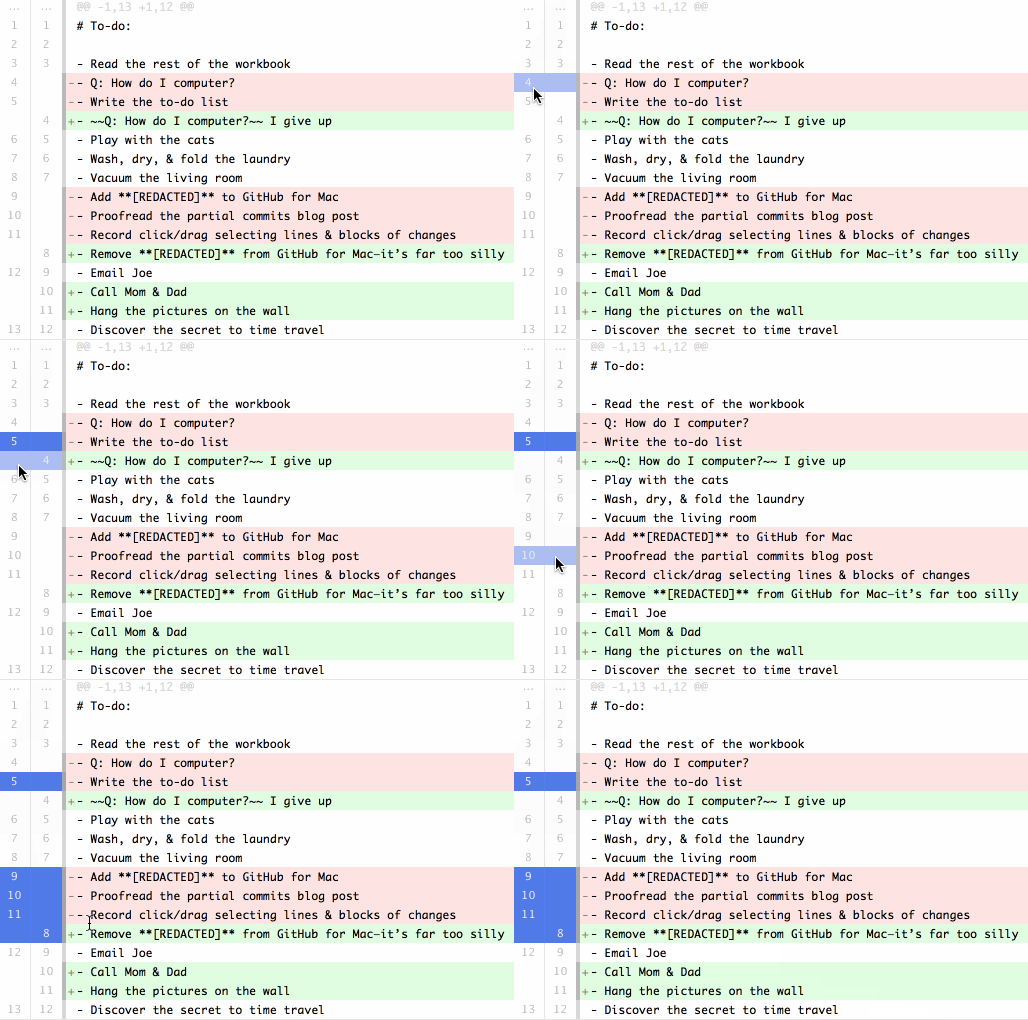
Notice that you can easily select individual lines or the whole hunk with a single click. Or a range of lines by dragging.
(GitHub Desktop also doesn't present staging area concept to the user. I used staging area a lot when I was committing from command line. But now I simply use GitHub Desktop partial commits and - if necessary - undo-commit button. But this is probably too large of a change to suggest here or to #25541.)
 shamrin
on 10 Jul 2017
shamrin
on 10 Jul 2017
I really miss a friendly implementation for this feature as well, and basically this is the only reason I still switch away from VS Code to a git GUI app. Until I found this issue, I didn't know this was possible in VSCode. Anyway, to add something to the discussion, here's a gif of my favourite implementation from gitup:

Notice how the commit button changes from "stage file" to "stage lines"
 marcohamersma
on 24 Aug 2017
marcohamersma
on 24 Aug 2017
 auchenberg
on 11 Sep 2017
auchenberg
on 11 Sep 2017
I always do git add -p, git reset -p, and git checkout -p as well. I really love vs code's merging functionality (use incoming, use current, etc...) and think that adding links similar to that for staging in the workspace view would be extremely useful. I used to use the CLI for everything but I have been keeping my workflow within Vs code a lot more lately and would love to be able to do everything within vs code. @auchenberg that looks pretty good. will continue comments there.
 SgtPooki
on 5 Nov 2017
SgtPooki
on 5 Nov 2017
I'm using version 1.18.0 on a Mac running High Sierra and I just can't make this work, even after spending over an hour trying to figure it out. Right click on the tab does not offer this option, nor do any of the three dot menus. I see it in the command palette (cmd-shift-p) but it does not work.
If I select a line with the mouse, enter the palette and select "Git: Stage Selected Ranges" there is no indication whatsoever that it did anything. I confirmed it with the command line git tools.
Is this how it's supposed to work or am I doing something wrong?
 jimarcher
on 9 Nov 2017
jimarcher
on 9 Nov 2017
Related issues
 lw-schick
·
229Comments
lw-schick
·
229Comments
 jsftw86
·
361Comments
jsftw86
·
361Comments
 mariusa
·
219Comments
mariusa
·
219Comments
 niagr
·
246Comments
niagr
·
246Comments
 Tyriar
·
204Comments
Tyriar
·
204Comments
Most helpful comment
Okay, I see that there is extremely basic functionality that I missed initially, thank you. However, this highlights additional limitations: