Vscode: [Suggestion] Git Blame info in gutter
Several other editors, either natively or through extensions, can quickly display information returned from git blame, which is a great tool to have while tracking down bugs or conflicts. It would be excellent if VS Code could imitate Atom or the IntelliJ Platform IDEs and have an option to toggle git blame info on in the gutter of a version-controlled file (Atom version shown below).

 berwyn
All 19 comments
This is a good extensions solution.
I started on a basic extension called Git Blame. You can find it here. PRs or recommendations are much appreciated.
 waderyan
on 25 Jan 2016
waderyan
on 25 Jan 2016
I had actually missed that one, that's certainly useful! That said, it'd be nice if more than one line could be viewed and if it could be in the gutter. I would recommend this for the extension, but it's my understanding that the only UI an extension is allowed to modify is the status bar -- hence the feature suggestion on the editor itself.
berwyn
on 25 Jan 2016
:+1:
 tbroyer
on 11 Feb 2016
tbroyer
on 11 Feb 2016
:+1:
 obrejla
on 24 Feb 2016
obrejla
on 24 Feb 2016
:+1:
 VladimirSemenyuk
on 25 Feb 2016
VladimirSemenyuk
on 25 Feb 2016
:+1:
 fatbrain
on 28 Apr 2016
fatbrain
on 28 Apr 2016
@waderyan is this extension still working? nothing shows up in my gutter even though it's installed
 carlkenne
on 20 May 2016
carlkenne
on 20 May 2016
@carlkenne that extension sadly does not show the blame status in the gutter, but in the status bar like this

 nesheroj
on 20 May 2016
nesheroj
on 20 May 2016
👍
 kavehv
on 26 May 2016
kavehv
on 26 May 2016
Does anyone know if it is possible to add text to the gutter? If not we should create a separate feature request for that. This should then probably be moved to https://github.com/waderyan/vscode-gitblame and reference the extension API request.
 Tyriar
on 26 May 2016
Tyriar
on 26 May 2016
I can't see anything in my status bar? Only information about line number and branch name and so on... Are there any way to debug this?
carlkenne
on 9 Jun 2016
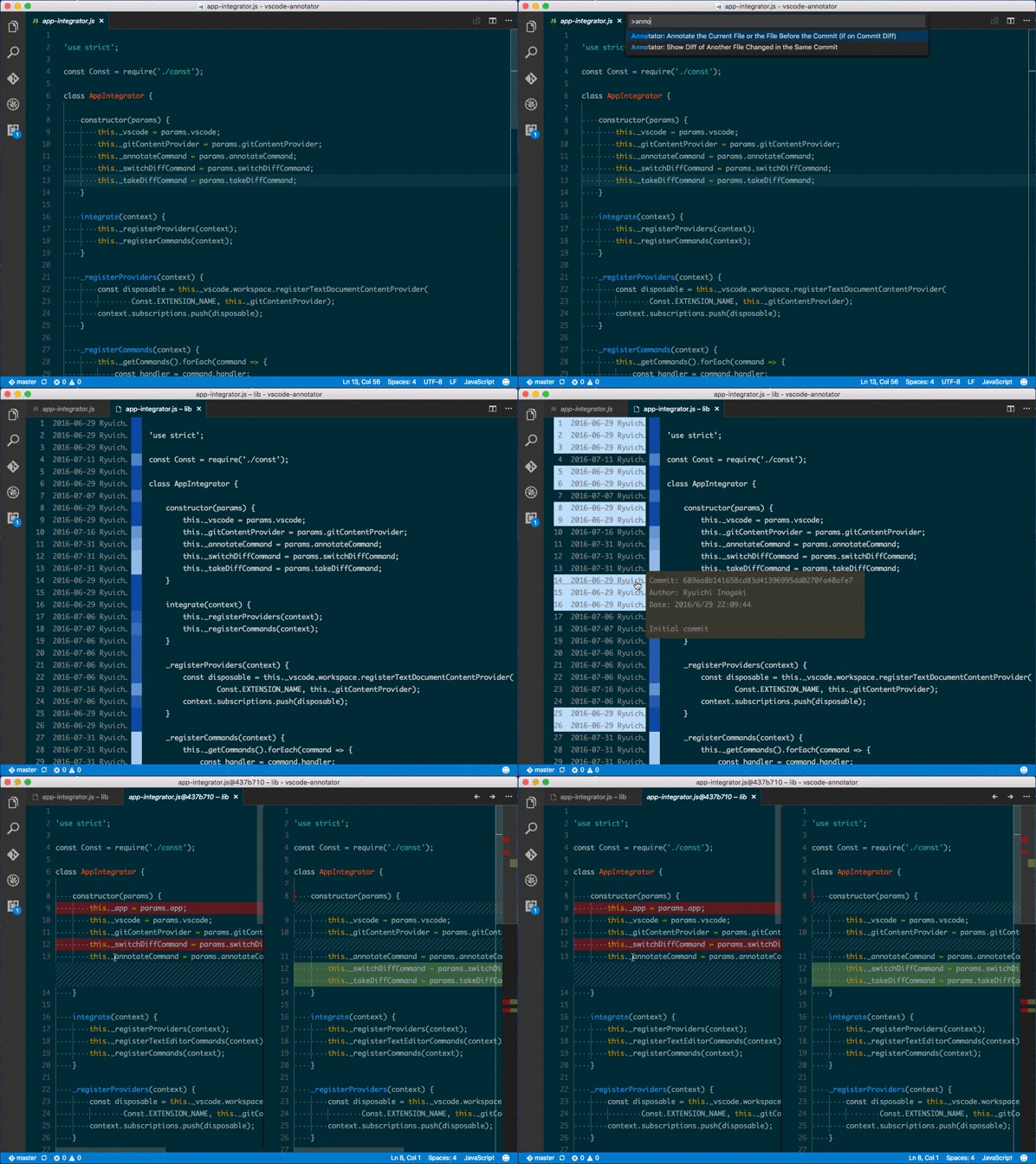
I also wanted to see git blame info inside the editor; so developed an extension called Annotator.
As it doesn't open a gutter in a current editor to show blame info and open a new html view instead, it's got its own limitations like no syntax highlighting on the blame view, but I still find it very useful. Happy to hear suggestions or feedback :)
https://github.com/ryu1kn/vscode-annotator
 ryu1kn
on 7 Sep 2016
ryu1kn
on 7 Sep 2016
👍 I currently miss this from NetBeans very much, can the API be adapted at least so extensions can improve this? Very useful feature.
 razvanphp
on 10 Oct 2016
razvanphp
on 10 Oct 2016
Yep this is one of the few things I regularly find myself missing in VS Code. With Git support built-in, a natural evolution would be a right-click "Git blame" option that opens blame in the gutter. Probably ought to be on the roadmap.
 jez9999
on 7 Nov 2016
jez9999
on 7 Nov 2016
I'd love to recommend to anyone missing this functionality, the extension GitLens is pretty much what I wanted and I've been using it for a while now.
nesheroj
on 7 Nov 2016
GitLens does everything I could ever want and more.
 ehartford
on 12 Jan 2017
ehartford
on 12 Jan 2017
Adding this configuration for GitLens will give you the desired behavior.
    "gitlens.blame.compact": false,
    "gitlens.blame.format": "${date|10} ${author|8}",
    "gitlens.blame.dateFormat": "YYYY-MM-DD",
    "gitlens.blame.highlight.locations": [
        "gutter",
        "overview"
    ]
 sandervalstar
on 27 Jun 2018
sandervalstar
on 27 Jun 2018
We try to keep VS Code lean and we think the functionality you're asking for is great for a VS Code extension. Maybe you can already find one that suits you in the VS Code Marketplace. Just in case, in a few simple steps you can get started writing your own extension. See also our issue reporting guidelines.
Happy Coding!
![vscodebot[bot] picture](https://avatars2.githubusercontent.com/in/2406?v=4&s=40) vscodebot[bot]
on 17 Sep 2018
vscodebot[bot]
on 17 Sep 2018
We suggest to use GitLens! :+1:
 joaomoreno
on 17 Sep 2018
joaomoreno
on 17 Sep 2018
Related issues
 sirius1024
·
3Comments
sirius1024
·
3Comments
 VitorLuizC
·
3Comments
VitorLuizC
·
3Comments
 chrisdias
·
3Comments
chrisdias
·
3Comments
 ryan-wong
·
3Comments
ryan-wong
·
3Comments
 sijad
·
3Comments
sijad
·
3Comments
Most helpful comment
I also wanted to see git blame info inside the editor; so developed an extension called Annotator.
As it doesn't open a gutter in a current editor to show blame info and open a new html view instead, it's got its own limitations like no syntax highlighting on the blame view, but I still find it very useful. Happy to hear suggestions or feedback :)
https://github.com/ryu1kn/vscode-annotator