Hello there, we are writing a VSCode extension for Telerik NativeScript projects and one of the biggest requirements from our customers is to enable Intellisense for the UI declarations which are written in XML files. We have a schema declared on the root Page element, but it seems to be ignored at the moment.
Is this something that is supposed to work, or are we missing something.
Here is a sample of an XML file (taken from our repo - https://github.com/NativeScript/template-hello-world):
<Page xmlns="http://schemas.nativescript.org/tns.xsd" loaded="pageLoaded">
  <StackLayout>
    <Label text="Tap the button" class="title"/>
    <Button text="TAP" tap="{{ tapAction }}" />
    <Label text="{{ message }}" class="message" textWrap="true"/>
  </StackLayout>
</Page>
Thanks for any help!
 valentinstoychev
All 39 comments
Sorry, this is not supposed to work. VS Code currently only supports JSON schema based intellisense/validation.
 egamma
on 18 Dec 2015
egamma
on 18 Dec 2015
Thanks @egamma! Is there an extension point or services where we can possibly contribute in order to enable this?
valentinstoychev
on 18 Dec 2015
@valentinstoychev absolutely and extension with XML support would be highly welcome.
Pls see the extension docs and there in particular the language API.
egamma
on 18 Dec 2015
@egamma Yes, we are aware of these. We thought you guys might've provided somewhat tighter setup for validation. XML is not a strict language, hence the language API is not an exact fit...
 ErjanGavalji
on 18 Dec 2015
ErjanGavalji
on 18 Dec 2015
@egamma By the way, the autocomplete-plus package atom.io provide is exactly what we need. Can it get built for Visual Studio Code? As far as I found, the API is not rich enough, but I hope I might've been mistaken...
EDIT:
With it we will be able to do something like autocomplete-xml
ErjanGavalji
on 18 Dec 2015
We thought you guys might've provided somewhat tighter setup for validation. XML is not a strict language, hence the language API is not an exact fit...
Can you help me to understand the above better?
@ErjanGavalji did you compare the CompletionProvider interface with Autocomplete-plus. Can you elaborate what you are missing. CompletionProvider doesn't make assumptions about the language.
egamma
on 18 Dec 2015
+1 for this requirement. XML validation (and intellisense) via xsd is a huge hole in vscode from our perspective.
 kpturner
on 5 Jan 2016
kpturner
on 5 Jan 2016
+1 from me too! Huge requirement for us to switch to code
 BenElliottBV
on 25 Feb 2016
BenElliottBV
on 25 Feb 2016
+1
 PeterStaev
on 29 Feb 2016
PeterStaev
on 29 Feb 2016
+1
 skarlatov
on 22 Mar 2016
skarlatov
on 22 Mar 2016
Yes, schema-based auto-complete would be awesome. And perhaps a schema-validation function as well.
 kwaazaar
on 4 Apr 2016
kwaazaar
on 4 Apr 2016
For me fully featured XML editor (IntelliSense, validation, formatting, go to definition) is most important missing feature in Code. Would it be possible to reuse (or port to TypeScript) XML language support from Visual Studio?
 vojtechhabarta
on 25 Apr 2016
vojtechhabarta
on 25 Apr 2016
+1 very important to me!
 ayongw
on 27 Apr 2016
ayongw
on 27 Apr 2016
+1
 Meir017
on 3 May 2016
Meir017
on 3 May 2016
+1
 doronguttman
on 6 May 2016
doronguttman
on 6 May 2016
+1 would be extremely helpful
 ruabmbua
on 11 May 2016
ruabmbua
on 11 May 2016
ya +1
 maeni70
on 29 May 2016
maeni70
on 29 May 2016
+1
 gustajz
on 8 Jun 2016
gustajz
on 8 Jun 2016
+1
 DeChrist
on 30 Jun 2016
DeChrist
on 30 Jun 2016
+1
 khvn26
on 4 Aug 2016
khvn26
on 4 Aug 2016
+1
 ssougnez
on 8 Aug 2016
ssougnez
on 8 Aug 2016
+1
 brspnnggrt
on 8 Aug 2016
brspnnggrt
on 8 Aug 2016
+1
 NormanMann
on 13 Oct 2016
NormanMann
on 13 Oct 2016
+1 A MUST
 pmunin
on 26 Oct 2016
pmunin
on 26 Oct 2016
+1 PLEASE!!!
 artem-korolev
on 9 Nov 2016
artem-korolev
on 9 Nov 2016
@artem-korolev Please show you're support for this issue by clicking the thumbs up on the first post. +1 Comments are not helpful and unnecessarily send an E-Mail to all participants.
 marvinhagemeister
on 9 Nov 2016
marvinhagemeister
on 9 Nov 2016
It would be so nice to see a full XML assistance in VS Code or at least a XML schema validation and intellisence for the given XSD.
 sw11500
on 22 Nov 2016
sw11500
on 22 Nov 2016
Yes, perhaps the initiative to support the XAML/XML -like csproj in asp.net core could be much less painful if we had more interactive development of the .csproj file. I had been looking at venturing to build this, something that crossed REST client to api.nuget and used XML schema to create a very smooth yeoman-like experience, but with intellisense on available attributes and applicable versions of a package. Been looking for an excuse to try at a vscode extension and Typescript 2.1
 nteague22
on 31 Jan 2017
nteague22
on 31 Jan 2017
Hi there,
I am currently working on an extension for ui5, which also heavily depends on xml files. I started to integrate a simple xml language server.


Status
I have so far a (very) simple autocompletion for elements and attributes and a simple validation via parser by xml2js and xmlchecker using xml schemas from a storage. It is not much, but better than nothing!
Problems
I would like to extend xmlcheck, as it does seem to incorrectly validate xml when the namespace is used in the same tag as it is defined:
<myns:MyElement xmlns:myns="http://path-to-my-ns"/> = Error
but I don't know much about peg/peg.js syntax.
Furthermore, I just tested it to fulfill my needs on the ui5 xml xsd's, which may or may not cover the whole bandwidth of xsd definitions. I planned to test it on xsd definitions by W3C the next weeks.
Contribution
I am just putting this here, in case someone is planning to write an xml linter or something else to let them know that I would appreciate, if we could join forces on that. I would like to exclude the xml linting part to either the xml tools extension (who I did not contact so far, but will do now) or a standalone extension, but for that it should have a minimum standard.
How to get
Here is my repo with the language server:
https://github.com/apazureck/openui5vscodeTypescriptTools
Follow the tutorial on the custom language server to get it started for now. I plan to release my extension to the marketplace in the coming week or so. I'll post an update here, if it's out. So if you just want to try it, you can download it then from vscode marketplace.
UPDATE
I published my extension. Feel free to try it with your own xml / xsd files. Make sure to add it to the internal storage by using the command xml add xsd schema(s) to storage for now. You have to reference local xsd files.
What will work for sure is the check for valid xml synthax, as it is checked by parsing the file so far. The error output is not that good, but - as I said - better then nothing. Saved me a lot of validating externally so far.
 apazureck
on 20 Feb 2017
apazureck
on 20 Feb 2017
Ah, wish I'd seen this issue sooner; I built a managed language server for MSBuild intellisense which could be customised to provide generic XML intellisense:
https://github.com/tintoy/msbuild-project-tools-vscode
See the LanguageServer.SemanticModel.Xml project for details. Also, see HoverHandler and CompletionProviders.
It can handle malformed XML, too (uses Microsoft.Language.Xml).
I don't particularly need generic XML intellisense myself, but I'm happy to collaborate in building it if anyone else is interested :)
 tintoy
on 11 Sep 2017
tintoy
on 11 Sep 2017
This issue has been closed because it is not within the scope of the core product, but could be addressed by an extension. The VS Code Marketplace shows all existing extensions and you can get started writing your own extension in a few simple steps. See also our issue reporting guidelines.
Happy Coding!
![vscodebot[bot] picture](https://avatars2.githubusercontent.com/in/2406?v=4&s=40) vscodebot[bot]
on 20 Nov 2017
vscodebot[bot]
on 20 Nov 2017
Hello, we just released an extension to integrate VS Code with a XML language server: https://marketplace.visualstudio.com/items?itemName=IBM.XMLLanguageSupport
Features
- Structural XML validation
- XML Schema Definition (XSD) validation
- OASIS XML Catalog support
- File name based schema association
Here is an example screenshot of the validation
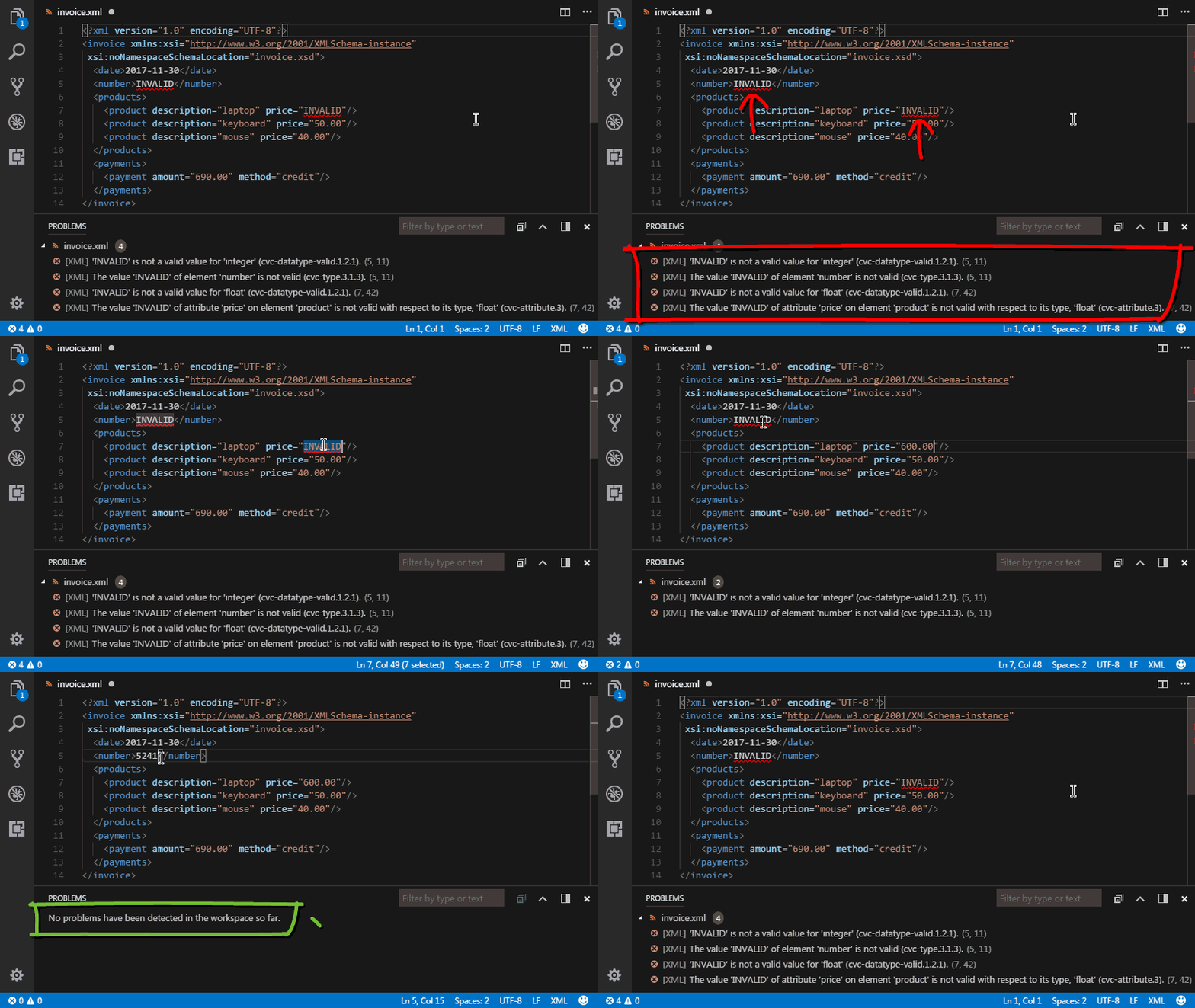
Give it a try and feel free to open issues or things you'd like to see via our github: https://github.com/microclimate-devops/xml-language-server
 sghung
on 15 Dec 2017
sghung
on 15 Dec 2017
@sghung
It requires Java? I'm hoping for something that runs as native JS.
Even if it used something like node-jvm.
 ghost
on 15 Dec 2017
ghost
on 15 Dec 2017
@errorx666
This extension leverages the Language Server Protocol (https://langserver.org/). The server component was specifically developed in Java in order to provide complete support for the XML Schema specification. All JS based XML tools we evaluated provided only partial support, limiting the type and complexity of XML Schemas that can be used. This extension, on the other hand, can handle any schema you throw at it, including complex structures like nested imports and includes. In addition to this, the extension also supports the XML OASIS XML Catalog specification. If you happen to be concerned about performance, rest assured that this has been one of our main priorities. The extension performs exceptionally fast.
sghung
on 15 Dec 2017
This looks really interesting although I'm also loathe to install Java just for this.
Do you support direct selection of a XSD file to use to validate the current XML document?
 Colizobble
on 15 Dec 2017
Colizobble
on 15 Dec 2017
@Colizobble Java version 8 actually installs fairly quickly. We think that supporting the complete XML schema specification outweighs the Java installation inconvenience. With regards of your question, we do support direct selection of an XSD file to validate against an XML document through a feature called “File association”. You simply have to add an entry in .vscode/settings.json with the file name (or pattern) and the systemId, which would be the path to the XSD file, or optionally an entry in the XML Catalog (if you happen to be using one). Here is an example of how the association would look like:
“xmlLang.xmlAssociations”: [
{
“fileNamePattern”: “/file_association/invoice_.xml”,
“systemId”: “file_association/invoice.xsd”
}
]
You can find a working version of the sample above in the examples.zip file that is included in the readme.
Establishing the file association this way makes it far more convenient than having to manually invoke validation from the command window. Once the association is set, as soon as any XML file that matches the pattern is opened, the diagnostics will automatically appear. As you make changes to the document, the diagnostics will automatically update in real time.
sghung
on 15 Dec 2017
Thank you. Having played around with this, I'm sure I will find it very helpful. I still think the ad-hoc association of the open file with a schema would be useful, even if it is just a front-end to your xmlAssociations settings (e.g. select file and optionally save setting for future use).
Colizobble
on 15 Dec 2017
I've noticed that your extension doesn't validate or provide intellisense for XSLT/XSL or XSD files automatically. I've therefore used the file association facility with the following settings, using the schemas supplied with Visual Studio Mac. However, I noticed a few issues. Firstly .XSL and .XSD files aren't treated as XML by your extension, unless the language is set manually. Second, although the xsl namespaced elements seem to get validation and intellisense, other xml namespaced elements fail validation, even with an explicit schema declaration. Finally, I get a schema file error with the XMLSchema.xsd file, so can't validate XSD documents.
I realise this may be going beyond what you initially intended for the language extension, but hope you might be able to address this. Most of my xml work is defining XSL transforms and writing and checking XSD definitions, as well as then using those XSDs to validate the resulting xml documents.
Thank you
"xmlLang.xmlAssociations": [
{
"fileNamePattern": ".xsl",
"systemId": "/Applications/Visual Studio.app/Contents/Resources/lib/monodevelop/AddIns/Xml/schemas/xslt.xsd"
},
{
"fileNamePattern": ".xsd",
"systemId": "/Applications/Visual Studio.app/Contents/Resources/lib/monodevelop/AddIns/Xml/schemas/XMLSchema.xsd"
}
]
Colizobble
on 16 Dec 2017
@Colizobble
Thank you for the feedback. I agree that being able to run validation against a schema from within the document being edited is convenient, especially if the option to establish the association at that time is provided. We can definitely explore into adding this feature. The scope for this first version of the language server was set to XML. Adding support for XSL and XSD is something we have certainly thought about for future versions. Once support is in place, you wouldn't need to create XSL/XSD file associations and things like the schema for schema would be built in within the extension.
 gindik
on 16 Dec 2017
gindik
on 16 Dec 2017
Related issues
 trstringer
·
3Comments
trstringer
·
3Comments
 vsccarl
·
3Comments
vsccarl
·
3Comments
 lukehoban
·
3Comments
lukehoban
·
3Comments
 shanalikhan
·
3Comments
shanalikhan
·
3Comments
 sijad
·
3Comments
sijad
·
3Comments
Most helpful comment
+1 for this requirement. XML validation (and intellisense) via xsd is a huge hole in vscode from our perspective.