Vscode: There is no confirmation window while drag-dropping project files in the "Explore" panel.
Without confirmation window on drag-dropping files in the Explore panel there is a chance to accidentally move project files to another directory.
 Egorrr
All 15 comments
@bpasero IMO not asking for confirmation is what I expect. Normal OS explorers behave the same. However they allow me to undo such changes. So I would expect undo in VSCode as well.
 dbaeumer
on 17 Dec 2015
dbaeumer
on 17 Dec 2015
:+1:
 bpasero
on 17 Dec 2015
bpasero
on 17 Dec 2015
I'm not sure is its correct comparison, but for example in Jetbrains Webstorm when I drag-drop files there I see a confirmation window, which protects from accidentally moving some files from one directory to another. Otherwise, you can somehow drag files with your mouse and not even notice that.
Egorrr
on 21 Dec 2015
I have had this problem many times and even had a plugin in Visual Studio .NET that did this for me: Here's a user-voice post for this same feature: https://visualstudio.uservoice.com/forums/293070-visual-studio-code/suggestions/11312763-ask-before-moving-files-in-solution-explorer-tree
 Matthijs-Wessels
on 5 Jan 2016
Matthijs-Wessels
on 5 Jan 2016
Hi @dbaeumer, I think could be (and perhaps _should be_) different features:
- Showing a confirmation window (with _do not ask me anymore_ option maybe)
- Undo changes in the Explore panel
Recently I had to look at "git status" and figure out which file I moved accidentally, and it's really a pain.
 gaguirre
on 12 May 2016
gaguirre
on 12 May 2016
+1, I just did this and had a Visual Studio PTSD response.
 jamietre
on 28 Jun 2016
jamietre
on 28 Jun 2016
Fyi for July (or insiders) https://github.com/Microsoft/vscode/issues/4842 is pushed and allows to disable DND in the explorer.
bpasero
on 5 Jul 2016
PR welcome.
bpasero
on 11 May 2017
Hi! I'd like to work on this. This is something that's annoyed me for a while now.
 snhardin
on 30 Jun 2017
snhardin
on 30 Jun 2017
Its very annoying when a folder goes (i dont even know where and what) by accident. Especially when using touchpad.
The worst thing is when working on others directory and dont know the actual structure.
 patwaswapnil
on 21 Aug 2017
patwaswapnil
on 21 Aug 2017
+1
there should be either a confirmation dialog or an undo functionality
 a-eid
on 22 Aug 2017
a-eid
on 22 Aug 2017
+1
 andypotts
on 5 Sep 2017
andypotts
on 5 Sep 2017
+1
Is there anything like cmd+Z for this?
 BrennerSpear
on 8 Sep 2017
BrennerSpear
on 8 Sep 2017
+1. It's specially painful to move node_modules, or accidentally moving your mouse and not even having an idea of what has been moved to where.
 jfconde
on 15 Sep 2017
jfconde
on 15 Sep 2017
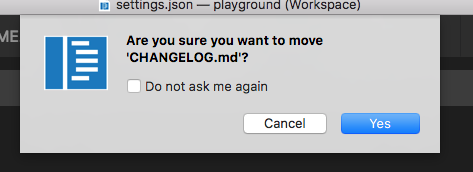
I added a new setting "explorer.confirmDragAndDrop": true which is enabled by default and shows a confirm dialog that provides a checkbox to quickly change this setting to no longer show a confirmation:
bpasero
on 6 Oct 2017
Related issues
 v-pavanp
·
3Comments
v-pavanp
·
3Comments
 borekb
·
3Comments
borekb
·
3Comments
 trstringer
·
3Comments
trstringer
·
3Comments
 VitorLuizC
·
3Comments
VitorLuizC
·
3Comments
 biij5698
·
3Comments
biij5698
·
3Comments
Most helpful comment
@bpasero IMO not asking for confirmation is what I expect. Normal OS explorers behave the same. However they allow me to undo such changes. So I would expect undo in VSCode as well.