Vscode: Link to a file position in Output Channel
_From @ArtemGovorov on October 19, 2015 2:0_
As mentioned in this issue, output channel supports link rendering. I'd like to append a link to a workspace file position (by providing a file name, line and column in some form). If it's already possible, could you please paste an example on how to do it?
_Copied from original issue: Microsoft/vscode-extensionbuilders#41_
 seanmcbreen
All 21 comments
_From @bpasero on October 19, 2015 6:15_
You should be able to link to a file line and column with the syntax <path>:<line>:<column>.
seanmcbreen
on 24 Nov 2015
_From @ArtemGovorov on October 19, 2015 6:36_
Thanks, I have been trying the syntax, didn't work for me with a relative path. Only works with a full path.
Is it possible to make it work with paths relative to the opened project/folder?
Also, is it possible to supply a custom text, but still render it as a file position link?
seanmcbreen
on 24 Nov 2015
_From @bpasero on October 19, 2015 7:5_
I see. We have a limited set of default patterns that we use to match against the output to show links. Currently relative paths are not in there.
@dbaeumer can also comment maybe. I think it is possible to contribute patterns from a task to control links in the output, but I might be wrong?
seanmcbreen
on 24 Nov 2015
_From @dbaeumer on November 16, 2015 10:34_
@bpasero: no the task framework doesn't contribute any link patterns. There is no API to do so.
seanmcbreen
on 24 Nov 2015
Is there any news on this?
I really need this. I would be ok writing an extension to handle this. But we would need an API to interact with the output.
 farfromrefug
on 20 Aug 2016
farfromrefug
on 20 Aug 2016
Thanks so much for your interest in this issue! It is currently assigned to the backlog. Every month we pick items from the backlog to plan for the current iteration. Please see https://github.com/Microsoft/vscode/wiki/Issue-Tracking#planning for more information.
Since we are a small team of developers, there is only so many feature requests and issues we can work on for one milestone. Nevertheless we always welcome pull requests and are happy to accept them if they meet our quality standards.
 bpasero
on 20 Aug 2016
bpasero
on 20 Aug 2016
How is this not maximum priority? O_0
And how is it that there isn't a sea of complaints here... there must be some workaround that people are using?
 TurkeyMan
on 19 Sep 2016
TurkeyMan
on 19 Sep 2016
We are using the vscode.languages.registerDocumentLinkProvider for this. Like this:
vscode.languages.registerDocumentLinkProvider({language: 'wallaby-output'}, {
        provideDocumentLinks: doc => {
          ...
        }
});
where the wallaby-output is our output channel language name, but for now unfortunately we have to apply it for all output channels (using "text/x-code-output" mimetype):
"contributes": {
    ...
    "languages": [
      {
        "id": "wallaby-output",
        "mimetypes": [
          "text/x-code-output"
        ]
      }
    ],
    ...
  },
Once this feature request is implemented, and specifying a language for an output channel is allowed, one could simply add any custom link provider to custom output channels.
 ArtemGovorov
on 20 Sep 2016
ArtemGovorov
on 20 Sep 2016
Links don't seem to work for me even when I format them <path>:<line>:<column> with abs path
Example:
/Users/jonas/Documents/mm/Project/src/classes/MyClass.ts:9:1
 ChuckJonas
on 3 Nov 2016
ChuckJonas
on 3 Nov 2016
Could we consider this to be taken out of the backlog please?
The different golang tools create relative paths, for example
./server_test.go:45: undefined: newServer
 GarethLewin
on 3 Feb 2017
GarethLewin
on 3 Feb 2017
I find out that on Unix <path>:<line>:<column> this pattern works while on Windows is <path>#<line>
 wayou
on 2 Mar 2017
wayou
on 2 Mar 2017
+1
 FrankCai
on 19 Mar 2017
FrankCai
on 19 Mar 2017
Can apply the same on the debug and terminal? manipulate the output
 linw1995
on 6 Apr 2017
linw1995
on 6 Apr 2017
There are many extensions currently using the path#line format, and this appears to be broken across the board on Mac right now.

 andy-wood
on 12 Apr 2017
andy-wood
on 12 Apr 2017
I wonder if this issue can be prioritised during planning for the next iteration?
It seems that at least 5 issues were consolidated into this with 12 participants at this stage.
Linking the output window to the place in the code is one of the nicest features in eclipse for example. It works there simply by defining a problem matcher. Thank you for all the hard work. I believe this update could really make vscode eclipse other editor! (sorry, couldn't resist :) )
 hendrics
on 21 May 2017
hendrics
on 21 May 2017
I'm on linux, apparently the pattern <file>#<line> works.
Version:
VS: 1.14.2
Shell: 1.6.6
Node 7.4.0
So I had to put:
todohighlight.toggleURI to true
 felocru
on 3 Aug 2017
felocru
on 3 Aug 2017
On MAC. There is an error

 dostrog
on 19 Oct 2017
dostrog
on 19 Oct 2017
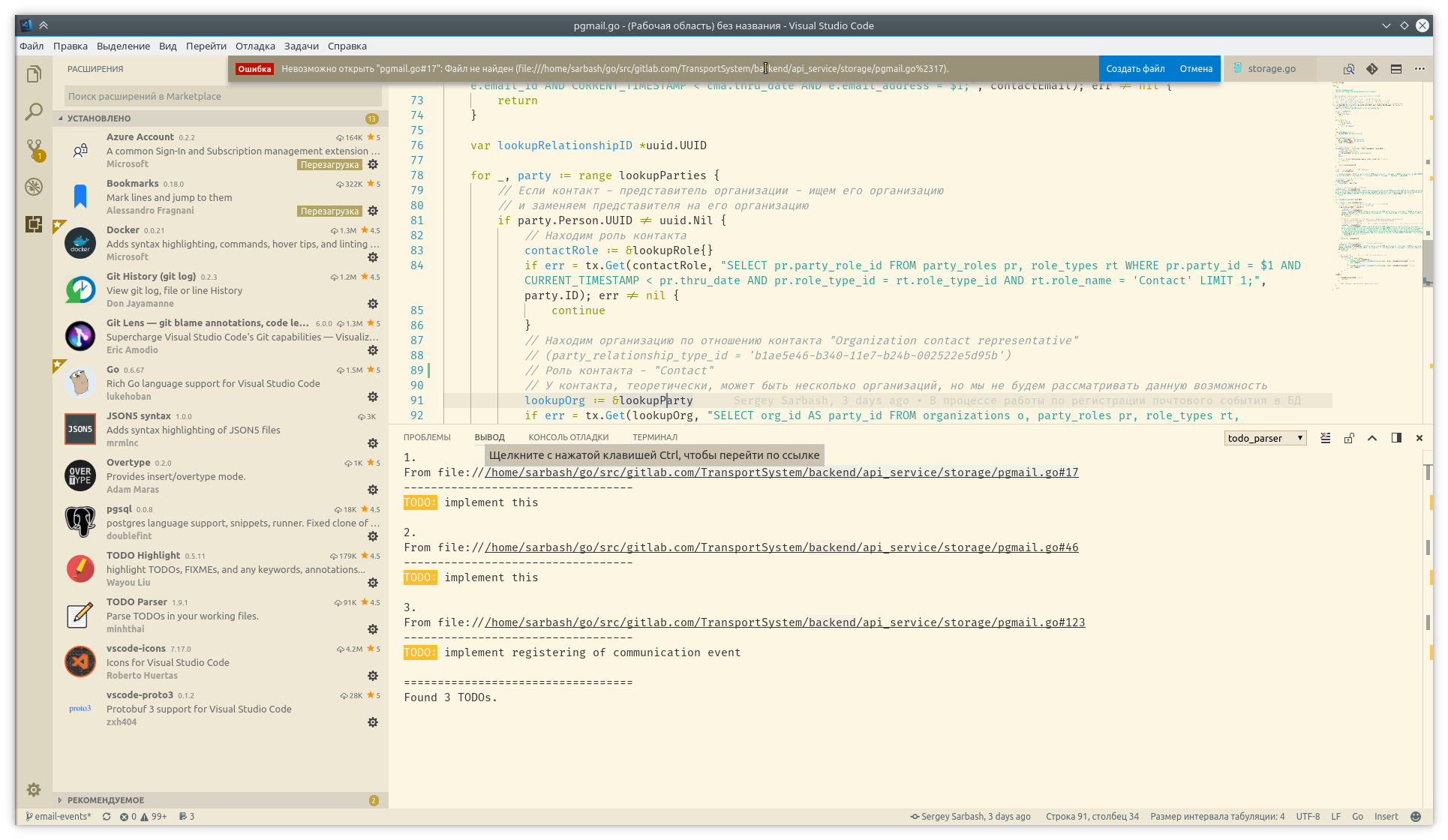
I have the same trouble on Linux with the latest code version (1.18.0)
As in the home as in the work.
As on Debian as on Ubuntu.
Links in the output panel of "TODO Parser" plugin don't work.
I've switched from path:file:line:char to path#file#line#char forth and back with no success.
 sarbash
on 13 Nov 2017
sarbash
on 13 Nov 2017
If the file path has a space in the file name. VSCode treats link only until the space is found. Is there a way to get around this problem?
How to handle links in output channel with space in the filename?
 Apoorva-GA
on 15 Dec 2017
Apoorva-GA
on 15 Dec 2017
Are there working workarounds for this right now for OSX?
 AustinW4t1qbit
on 17 Jan 2018
AustinW4t1qbit
on 17 Jan 2018
Even though this issue has been closed already, I didn't get how to implement what'd been said under
https://github.com/Microsoft/vscode/issues/586#issuecomment-159401495 in order to achieve the desired output:
Where do I have to insert "
"~/path/script.py in project_variable_return(..), line 66" I can jump directly to via Ctrl + Left-click, instead of having (in my case the default) output where only the file is clickable, but not the line mentioned in the error output:
~/path/script.py in project_variable_return(..)
64 blabla = "bla"
65 if not os.path.exists(blabla):
---> 66 os.mkdir(blabla)
Thanks in advance for stating more clearly how (or WHERE) to implement "
 AndreasLuckert
on 17 Sep 2019
AndreasLuckert
on 17 Sep 2019
Related issues
 Perkovec
·
191Comments
Perkovec
·
191Comments
 stoffeastrom
·
380Comments
stoffeastrom
·
380Comments
 Tyriar
·
204Comments
Tyriar
·
187Comments
Tyriar
·
204Comments
Tyriar
·
187Comments
 mariusa
·
219Comments
mariusa
·
219Comments
Most helpful comment
How is this not maximum priority? O_0
And how is it that there isn't a sea of complaints here... there must be some workaround that people are using?