Vscode-yaml: Autocompletion not showing up with conditional subschemas
The following keywords can be used to conditionally apply subschemas as of JSON v7
if,then,else,allOf,anyOf,oneOf
The validation components seem to be working just fine, but I'm not getting any autocomplete prompts on conditional schemas
Here's a couple inlined examples and a github repo with all the source files
In settings, I'll apply the same schema file to both a *.json and *.yaml file to compare the two
.vscode/settings.json
{
  "yaml.schemas": {
    "controls.schema.json": "controls.yml"
  },
  "json.schemas": [
      {
          "fileMatch": ["controls.json"],
          "url": "./controls.schema.json"
      }
  ]
}
And here's a trivial file of each to validate
controls.json
{
    "controlType":"dropdown"
}
controls.yml
controlType: dropdown
Here's a starting point for our JSON schema validation which has a "controlType" and "options" property:
controls.schema.json
{
  "$schema": "http://json-schema.org/draft-07/schema#",
  "type": "object",
  "properties": {
    "controlType": {
      "type": "string",
      "enum": ["button", "dropdown"]
    },
    "options": {
      "type": "array",
      "items": {"type": "string"}
    }
  }
}
However, in this case, we really only need options if the controlType value is dropdown. We can use subschema logic to conditionally require options, but also we can use the same logic to only apply options to certain schemas in the first place, so it doesn't even show up as an option for button values.
Here's a schema that uses oneOf (or anyOf) to conditionally add and require the options property
controls.schema.json
{
  "$schema": "http://json-schema.org/draft-07/schema#",
  "type": "object",

  "properties": {
    "controlType": {
      "type": "string",
      "enum": ["button", "dropdown"]
    }
  },

  "oneOf": [
    {
      "properties": {
        "controlType": {"const": "dropdown"},
        "options": {
          "type": "array",
          "items": {"type": "string"}
        }
      },
      "required": ["options"]
    },
    {
      "properties": {
        "controlType": {"const": "button"}
      }
    }
  ]

}
The logic is definitely getting picked up because the validation engine detects that options is now required
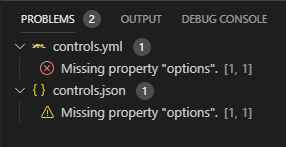
However, the property doesn't show up like normal in autocomplete (whereas it does for the json file)
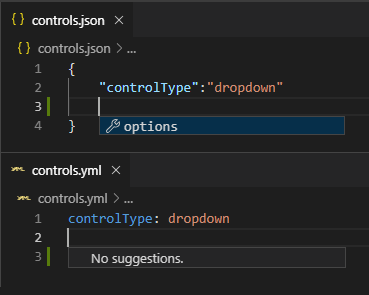
The same results also happen when we try to conditionally apply schema using if...then like this:
controls.schema.json
{
  "$schema": "http://json-schema.org/draft-07/schema#",
  "type": "object",

  "properties": {
    "controlType": {
      "type": "string",
      "enum": ["button", "dropdown"]
    }
  },

  "if": {
    "properties": {
      "controlType": {"const": "dropdown"}
    }
  },
  "then": {
    "properties": {
      "options": {
        "type": "array",
        "items": {"type": "string"}
      }
    },
    "required": ["options"]
  }

}
Other Links and stuff
 KyleMit
>All comments
Should be working as of 0.7.0 with both of those schemas!
 JPinkney
on 19 Feb 2020
JPinkney
on 19 Feb 2020
Related issues
 tracker1
·
5Comments
tracker1
·
5Comments
 opsarno
·
5Comments
opsarno
·
5Comments
 miqm
·
4Comments
miqm
·
4Comments
 Deilan
·
6Comments
Deilan
·
6Comments
 riker09
·
5Comments
riker09
·
5Comments
Most helpful comment
Should be working as of 0.7.0 with both of those schemas!