Vscode-vsce: Can't publish extension (ERROR read ECONNRESET)
Lately I'm having issues publishing extension. It's been going on for few days. Yesterday I managed to get it published after maybe 20 tries.
It times out after a while with
ERROR read ECONNRESET
VSCE 1.75.0
Node v14.0.0
 knopp
knopp
All 20 comments
Are you behind a proxy? Can you reproduce in another machine? In the same machine but a different network, in case it's a laptop?
 joaomoreno
on 6 May 2020
joaomoreno
on 6 May 2020
No proxy. I also tried with VPN from different locations so it shouldn’t be a routing problem. Weird thing is that it works occasionally (maybe one in 20 tries).
knopp
on 6 May 2020
I'm having the same problem
Publishing [email protected]...
ERROR  read ECONNRESET
Times out after 1m10.037s
 s0kil
on 6 May 2020
s0kil
on 6 May 2020
I have downgraded Node.js version to 13.14.0 from 14.2.0 and was able to publish the extension.
s0kil
on 6 May 2020
@knopp Can you check @s0kil's workaround, whether that fixes it for you as well?
joaomoreno
on 11 May 2020
I'm having the same issue today! I am on node v14.2.0 and was able to publish yesterday! same theme extension and some changes, I can't publish today, above that I think the versions are messed up as well.
I am not behind any proxy, same env as last publish.
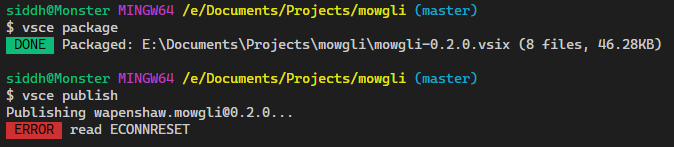
$ node -v
v14.2.0
$ vsce -V
1.75.0
@joaomoreno Hi, I finally gave up and installed nodeJS version 13.14.0 and I was able to publish without any issue. I just used NVM for windows to switch versions and it worked like a charm.
 wapenshaw
on 15 May 2020
wapenshaw
on 15 May 2020
I'm encountering the same issues.
 musm
on 10 Jun 2020
musm
on 10 Jun 2020
@knopp @musm Does downgrading Node work for you?
joaomoreno
on 11 Jun 2020
I wasn't able to reproduce this recently. Seems intermittent.
knopp
on 11 Jun 2020
Oddly I also now can't reproduce it.
musm
on 11 Jun 2020
👍 Let me know if it comes back.
joaomoreno
on 15 Jun 2020
I've been having this issue past the 24 hours. Not being able to publish a new version of the extension.
❯ node -v
v14.7.0
❯ vsce -V
1.78.0
Publishing [email protected]...
 ERROR  read ECONNRESET
edit: I ended up downgrading node as well, which worked
 kahole
on 12 Aug 2020
kahole
on 12 Aug 2020
Same issue here. sudo n 13.14.0 worked for me.
 orhun
on 19 Aug 2020
orhun
on 19 Aug 2020
Had the same issue on Arch Linux, downgrading from 14.9.0-1 to 12.18.3-1 (LTS nodejs-lts-erbium) solved the problem.
 caasi-dev
on 2 Sep 2020
caasi-dev
on 2 Sep 2020
Also having this issue on Arch Linux:
$ node -v
v14.12.0
$ vsce -V
1.80.0
$ vsce package
Executing prepublish script 'npm run vscode:prepublish'...

> [email protected] vscode:prepublish [snip]/vscode-teraterm-lang-2
> npm run compile


> [email protected] compile [snip]/vscode-teraterm-lang-2
> tsc -p ./

 DONE  Packaged: [snip]/teraterm-lang-2/vscode-teraterm-lang-0.1.0.vsix (16 files, 26.49KB)
$ vsce publish
Executing prepublish script 'npm run vscode:prepublish'...

> [email protected] vscode:prepublish [snip]/vscode-teraterm-lang-2
> npm run compile


> [email protected] compile [snip]/vscode-teraterm-lang-2
> tsc -p ./

Publishing [email protected]...
 ERROR  read ECONNRESET
As @caasi-dev says, downgrading to 12.18.3-1 (LTS nodejs-lts-erbium) fixes the problem.
 comalice
on 29 Sep 2020
comalice
on 29 Sep 2020
I encounter this problem whit node 14.9.
I fixed this with nvm use 12.18.4
 WLyKan
on 23 Oct 2020
WLyKan
on 23 Oct 2020
For the record, I also encountered the same issue today with the LTS version of node 14. I was able to publish multiple extensions during the previous weeks (and yesterday) with the same version. And today, ECONNRESET all the way...
Moving to node 15 solved the issue, but left a strange taste in the mouth :) Good luck on finding the root cause, it seems a nasty issue.
 AurelienRibon
on 5 Nov 2020
AurelienRibon
on 5 Nov 2020
I am encountering this issue on two separate machines. Each running vsce 1.81.1 and node 14.15.0. When I use 'vsce publish', it spends a bit of time trying to publish before returning 'ERROR read ECONNRESET'.
I upgraded to node 15.2.0 on one machine and it then worked fine.
 SimchaYork
on 13 Nov 2020
SimchaYork
on 13 Nov 2020
Been working fine for weeks. Wouldn't work for last two days. Upgraded to node v15.9.0 and it worked instantly.
 ArturoDent
on 19 Feb 2021
ArturoDent
on 19 Feb 2021
I had the same issue with Node v14.15.2. Followed @ArturoDent's suggestion and updated to v15.12.0, it then worked just fine. I recommend only adding node v15 in the extension folder instead of updating it globally, to keep working with the LTS.
Just go into the folder/repository of the extension you want to publish with vsce, run npm install node without the -g flag and then run your vsce publish.
 Noxdor
on 4 Apr 2021
Noxdor
on 4 Apr 2021
Related issues
 Jakobud
·
4Comments
joaomoreno
·
4Comments
joaomoreno
·
6Comments
Jakobud
·
4Comments
joaomoreno
·
4Comments
joaomoreno
·
6Comments
 vfonic
·
6Comments
vfonic
·
6Comments
 brandoncc
·
6Comments
brandoncc
·
6Comments
Most helpful comment
I am encountering this issue on two separate machines. Each running vsce 1.81.1 and node 14.15.0. When I use 'vsce publish', it spends a bit of time trying to publish before returning 'ERROR read ECONNRESET'.
I upgraded to node 15.2.0 on one machine and it then worked fine.