Vscode-vsce: Get `Personal Access Token` error
I am facing a issue when publish a new version of a extension. I am not sure whether it is an issue or a question. I use vsce publish -p xxxx command to update an extension version but got below error
Error: Invalid Resource

You're likely using an expired Personal Access Token, please get a new PAT.
Does this mean I need to update a new personal token each time on publishing?
 zhaoyi0113
All 39 comments
Why do you use -p? -p is useful for providing the PAT as an argument. Remove it and you're good.
 joaomoreno
on 3 Aug 2018
joaomoreno
on 3 Aug 2018
-p is the personal token parameter. I used that for the first version publish. Otherwise where should I specify the token?
zhaoyi0113
on 3 Aug 2018
The tool will ask you for it.
joaomoreno
on 3 Aug 2018
I just tried your approach and got the same error:
$ vsce  publish
Publishing [email protected]...
Error: Invalid Resource

You're likely using an expired Personal Access Token, please get a new PAT.
More info: https://aka.ms/vscodepat
@joaomoreno I have tried a new token but still get the same error. Do you have any idea on what's going on?
zhaoyi0113
on 5 Aug 2018
Try vsce login to save a new PAT.
Also check https://code.visualstudio.com/docs/extensions/publish-extension#_common-questions
joaomoreno
on 6 Aug 2018
@joaomoreno I have tried that but it doesn't seem to work. See below output:
192-168-1-2:mongodb-runner joeyzhao$ vsce login JoeyYiZhao
Publisher 'JoeyYiZhao' is already known
Do you want to overwrite its PAT? [y/N] y
Personal Access Token for publisher 'JoeyYiZhao': ****************************************************

vsce publishAuthentication successful. Found publisher 'Joey Yi Zhao'.
192-168-1-2:mongodb-runner joeyzhao$ vsce publish
Publishing [email protected]...
Error: Invalid Resource

You're likely using an expired Personal Access Token, please get a new PAT.
More info: https://aka.ms/vscodepat
Are you sure you're setting All scopes in the token permissions?
joaomoreno
on 7 Aug 2018
Yes I did. And this is the token I used to publish the first version of this extension. The version of vsce I am using is 1.45.1.
zhaoyi0113
on 7 Aug 2018
I also tried to generate a new token but get the same result
zhaoyi0113
on 7 Aug 2018
cc @viradhamMS @pkuma-msft for more insights
joaomoreno
on 7 Aug 2018
Thanks for open this issue, below is the versions I am using:
192-168-1-2:~ joeyzhao$ node --version
v8.9.4
192-168-1-2:~ joeyzhao$ npm --version
6.2.0
192-168-1-2:~ joeyzhao$ uname -a
Darwin 192-168-1-2.tpgi.com.au 17.7.0 Darwin Kernel Version 17.7.0: Thu Jun 21 22:53:14 PDT 2018; root:xnu-4570.71.2~1/RELEASE_X86_64 x86_64
192-168-1-2:~ joeyzhao$ vsce --version
1.45.1
@zhaoyi0113 one more question. While creating a PAT, there is 'Accounts' dropdown. Can you please confirm that you selected 'All accounts' in that dropdown while creating the PAT. Please refer to the below image:

Also, I see that your extension has been successfully updated. How did you update it?
 gaurav42
on 7 Aug 2018
gaurav42
on 7 Aug 2018
Finally I found the issue. There is a 18M gif in my repo. It works fine after I remove this file. It would be great if you can fix the misleading error message. There is nothing wrong with the token.
zhaoyi0113
on 7 Aug 2018
Thanks @zhaoyi0113 for letting us know the details.
@joaomoreno this is an issue in vsce tool. Can you please track it via GitHub issue?
gaurav42
on 8 Aug 2018
@gaurav42 Actually, vsce prints the error message: Error: Invalid Resource? Does the service return more specific error codes?
joaomoreno
on 8 Aug 2018
@joaomoreno this error is not returned directly by our service. I am checking whether this is by .NET or Vssf framework. However, I was talking about the 'PAT error' which vsce displays.
I saw that PAT error message was added since we had seen similar errors before due to expired PATs. But I think there are other scenarios which can also cause 'Invalid Resource' error.
Is there a way to point vsce to local environment instead of PROD or get vsce requests logged by fiddler so that I can debug this issue better?
gaurav42
on 8 Aug 2018
There are more scenarios for sure, but this message already helped out many users since this specific error was the most common one. It would be great to get a finer grained error message from the service.
You can overwrite it here: https://github.com/Microsoft/vscode-vsce/blob/master/src/util.ts#L19 Let me know if you want me to publish a VSCE version which lets you change it via an environmental variable.
joaomoreno
on 8 Aug 2018
VSCE version customizable via environment variable will be really helpful.
In case that is a time taking process, point me to the instructions to build and use the vsce tool locally. I couldn't find those instructions in vsce repo.
gaurav42
on 8 Aug 2018
@gaurav42 I've published [email protected] which should respect the env variable VSCE_MARKETPLACE_URL as the marketplace URL. The default value is https://marketplace.visualstudio.com.
joaomoreno
on 8 Aug 2018
I tried to repro the issue on local environment, but couldn't succeed.
@zhaoyi0113 can you please confirm that your extension publish is working consistently since you have removed the gif file. Ideally, it should not have relation to the error you were getting.
Also, you first opened the issue on 3rd August. Looking at your repo, you didn't have 18M gif that time. But you still got 'Invalid Resource' error. But you eventually succeeded in publishing the extension. What did you change that time to successfully publish the extension?
gaurav42
on 10 Aug 2018
I was running into the same issue with [email protected]. Downgrading to [email protected] fixed it for me
 arjunattam
on 13 Aug 2018
arjunattam
on 13 Aug 2018
@joaomoreno @zhaoyi0113 this was the slow network issue. We see that package upload request for the extension was timed out and 503 HTTP error was returned. That's the reason why reducing the package size fixed the issue.
@joaomoreno exception thrown from gallery was RequestCanceledException and exception message was TF400733: The request has been canceled: The request has exceeded request timeout, please try again. I hope this information helps you to decide what error message to display in vsce tool.
gaurav42
on 14 Aug 2018
@gaurav42 thanks for checking that. What I expect is to give a reasonable messages for the errors. It doesn't make sense to response with a token error if there is a network issue.
zhaoyi0113
on 14 Aug 2018
@gaurav42 Being a user of vso-node-api, it would be great if that library provided better error codes via their Error objects. Is there documentation on any of that?
I don't want to push a fix for the timeout, nor do I want to stop telling people to update their PAT in case of any server error. The right fix here is to show a user-facing error message which comes directly from the service. The vso-node-api library should provide that to its consumers.
joaomoreno
on 17 Aug 2018
@joaomoreno I checked vsce code. It is using old version of vsts-node-api (6.1.2-preview). This version uses typed-rest-client node library's old version which throws Invalid Resource error in case it fails to parse the response. You have pointed this out in issue #247 . The latest version of typed-rest-client doesn't throw this error. But will instead return null in result.
However, I see it will not be possible to migrate vsce to using latest vsts-node-api since they have removed the support for gallery api. From our end, it's not straightforward to fix the response which gets sent. We need to discuss internally whether and how it can be fixed.
Do you see any other possibility to handle this scenario?
gaurav42
on 17 Aug 2018
@gaurav42 Not without ditching vsts-node-api and implementing everything in VSCE. The right fix is to get proper error codes in vsts-node-api, so a PR on that project would make much sense.
joaomoreno
on 17 Aug 2018
Hi, I'm facing the same issue here, I tried the method you guys mentioned above but still got the same Error: Invalid Resource
vsce version: 1.47.0
npm version: 6.1.0
node version: 10.5.0
Do you see any other possible reasons would cause this issue?
 ArvinH
on 4 Sep 2018
ArvinH
on 4 Sep 2018
I think this is being caused by the ongoing Azure downtime[1]. Unfortunately the error message is misleading
arjunattam
on 4 Sep 2018
@ArvinH marketplace is facing an issue due to Azure outage in SCUS region. (Please refer this azure status page.) Our service is down due to which you won't be able to perform any action via vsce tool as of now. Sorry for the inconvenience.
gaurav42
on 4 Sep 2018
We have upgraded to azure-devops-node-api. This should be fixed by now. @gaurav42 Can you double check?
joaomoreno
on 3 May 2019
@joaomoreno I'm having a really rough time getting this to work as well. Anyway you can help out? MS has so many ways to login that I think it's created extra accounts. I'm just trying to use my publisher ID of jonkwheeler which I've used in the past but my personal access token expired.
I had to create an Azure Dev login (jonkwheeler0502 randomly assigned), and get a personal access token there (adding the Marketplace checks). Logged in through the console, worked. However, vsce publish returns Error: Access Denied: Jon Wheeler needs the following permission(s) on the resource /jonkwheeler/styled-components-snippets to perform this action: Make changes to, share, or view certificate of an existing extension.
 jonkwheeler
on 5 May 2019
jonkwheeler
on 5 May 2019
@jonkwheeler - Please send a note to [email protected]. We might need to map your new login to your existing publisher
 viradhamMS
on 6 May 2019
viradhamMS
on 6 May 2019
After contacting the [email protected], the issue ended up being that I had 2 different accounts (I had an idea about this). Once support told me the details of the account I needed, I was able to login, create a new personal access token, and publish my extension updates. Thanks so much!
jonkwheeler
on 6 May 2019
@jonkwheeler
Hello! I've sent the mail to you, hope you will respond! e-mail: rediffusion@**.ru
Best regards!
 rediffusion
on 22 Jan 2020
rediffusion
on 22 Jan 2020
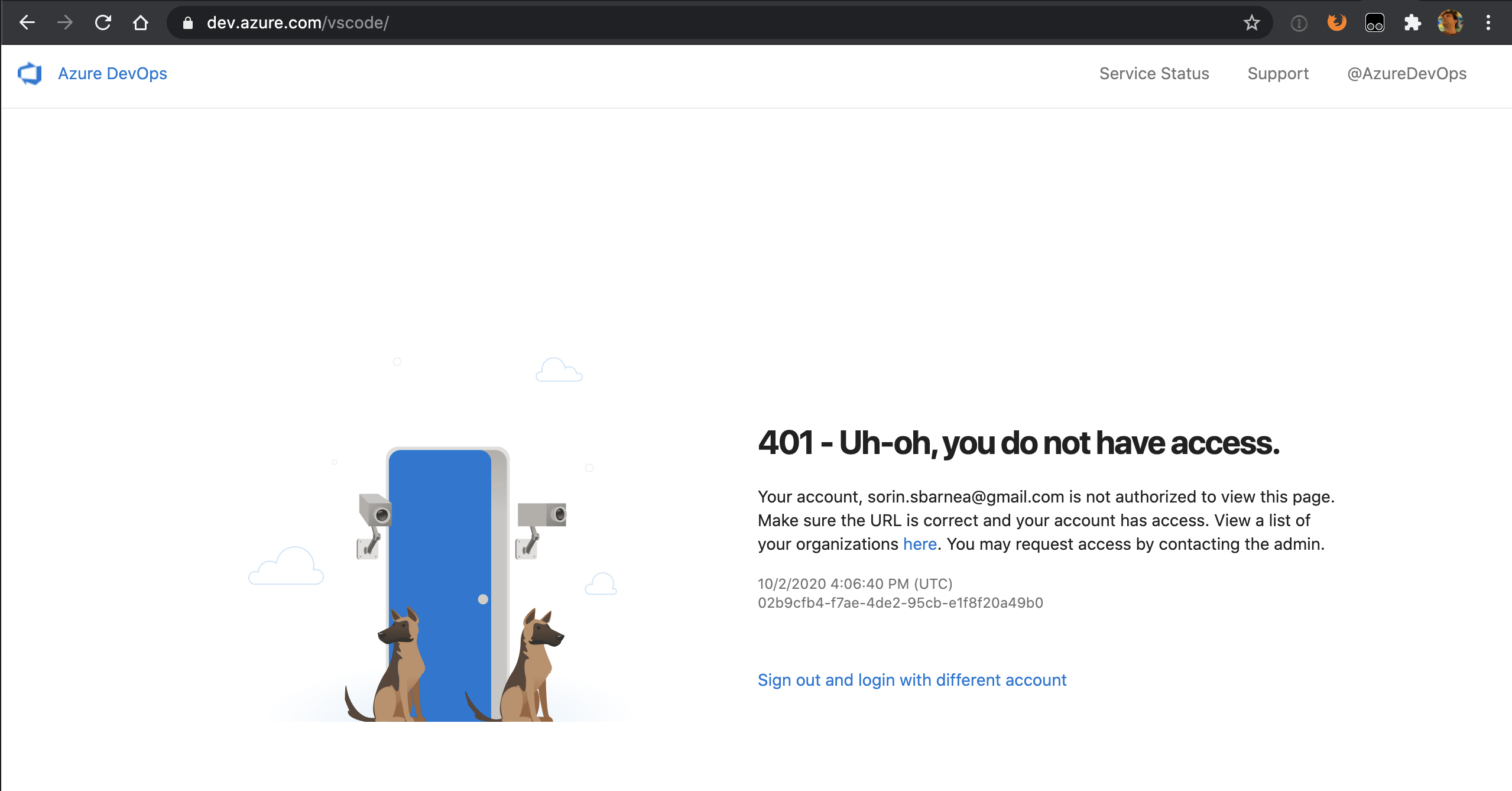
I am hitting my head to a wall: cli asking for a token without any hints around how to generate it. On web interface there is no clue about it either.

Update: that's a total nonesene, i found some documentation that mentioned to login to: and after being redirected between ten different domains I endup with a new poster:
 ssbarnea
on 2 Oct 2020
ssbarnea
on 2 Oct 2020
@ssbarnea Does this help? https://code.visualstudio.com/api/working-with-extensions/publishing-extension#get-a-personal-access-token
joaomoreno
on 5 Oct 2020
@joaomoreno Not at all, the https://dev.azure.com/vscode link is the one that produced that confusing 401 page in the first place.
ssbarnea
on 5 Oct 2020
First, make sure you have an Azure DevOps organization.
In the following examples, the organization's name is vscode. From your organization's home page (for example: https://dev.azure.com/vscode), open the User settings dropdown menu next to your profile image and select Personal access tokens:
That org is just an example. You're not supposed to use it. Did you create an Azure DevOps organization, as the first sentence mentions?
joaomoreno
on 5 Oct 2020
Related issues
 SamVerschueren
·
5Comments
joaomoreno
·
4Comments
SamVerschueren
·
5Comments
joaomoreno
·
4Comments
 jkeech
·
4Comments
jkeech
·
4Comments
 equinusocio
·
4Comments
equinusocio
·
4Comments
 vfonic
·
6Comments
vfonic
·
6Comments
Most helpful comment
@jonkwheeler - Please send a note to [email protected]. We might need to map your new login to your existing publisher