Vscode-terraform: Syntax Highlighting Still Broken
The following block of code still breaks syntax highlighting. If I remove the = sign after config syntax highlighting goes back to normal. The same happens if I remove the trailing " here key = "${var.vpc_tf_state_key}/terraform.tfstate". This is happening in version 2.2.0, 2.2.1, 2.2.2, and 2.2.3 as well. The latest fixes seem not to fix this specific case.
// Modify vpc, subnets and security group data

data "terraform_remote_state" "vpc" {
  backend = "s3"

  config = {
    bucket = var.backend_bucket
    key    = "${var.vpc_tf_state_key}/terraform.tfstate"
    region = var.backend_region
  }
}

data "aws_ssm_parameter" "dev_db_username" {
  name = "/testoapp/dev_db_username"
}

data "aws_ssm_parameter" "dev_db_password" {
  name = "/testapp/dev_db_password"
}

locals {
  // Remove `Name` tag from the map of tags because Elastic Beanstalk generates the `Name` tag automatically
  // and if it is provided, terraform tries to recreate the application on each `plan/apply`
  // `Namespace` should be removed as well since any string that contains `Name` forces recreation
  // https://github.com/terraform-providers/terraform-provider-aws/issues/3963

  name_prefix = "${var.name}${var.delimiter}${var.environment}${var.delimiter}${var.namespace}"
  tags = merge(
    map("Environment", var.environment),
    map("DeployedBy", "terraform"),
    map("Namespace", var.namespace),
    var.tags
  )
}
- Syntax Highlighting Broken

- Syntax Highlighting Not Broken (After removing
=sign right afterconfig)

 rodrigoechaide
All 13 comments
Im getting bear ninimum syntax highlighting, no autocomplete and no code validation :/
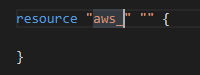
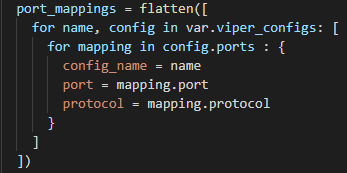

Tried to download the latest terraform-ls and terraform-lsp and using them as language servers instead, but no changes
Never got this plugin to work... Sad that i have to use IntelliJ as an edtitor for Terraform
 murillio4
on 4 Sep 2020
murillio4
on 4 Sep 2020
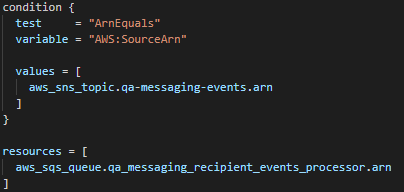
Syntax highlighting in 2.2.3 mostly works for me unlike 2.2.0, but I'm still seeing a few weird things:
- Interpolation inside strings seems to catch some symbols before the ${, like the dash and forward slash in this example are highlighted blue despite being just a literal character in the string

- In the example above, the "local" part of local values inside the interpolation is colored orange as though it's interpreted literally, even though it's not.
- Sometimes resources inside a list are entirely highlighted in blue, but not always?
When I remove the list:
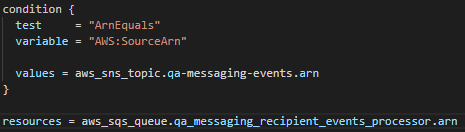
- Also as you can see above, hyphens in resource names seems to break something. I hate using hyphens in resource names anyway, but here we are.
 rhanger-halo
on 9 Sep 2020
rhanger-halo
on 9 Sep 2020
While I don't have an immediate fix for the official Terraform vscode extension, I went ahead and created a vscode extension a while back to solve some syntax highlighting issues of my own: https://marketplace.visualstudio.com/items?itemName=pjmiravalle.terraform-advanced-syntax-highlighting.
I actually just spent my lunch break working through y'alls issues, and wrapped it into v1.1.0 of my extension (which is now live!). I'm working on integrating my code into the official Terraform extension, but in the meantime I highly recommend trying out my extension to see if it solves your syntax highlighting problems. :)
I'll be fairly active on here, and can offer further assistance if you still run into any problems! Please note that the fixes below are using the Dark+ Visual Studio Code Theme.
@rodrigoechaide here's how your code looks with my fixes in place:

@murillio4 here's how your code looks with my fixes in place:

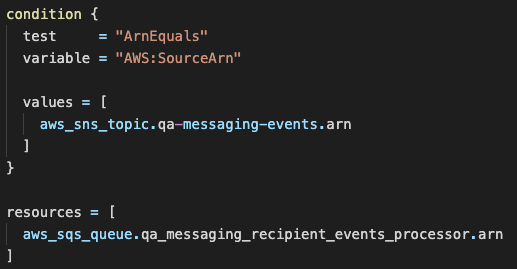
and finally @rhanger-halo here's how your code looks with my fixes in place:
- Note that I wasn't able to solve the syntax highlighting for resource names that use dashes instead of underscores. I'll have to address this in a separate release (when I have more time!).
 pjmiravalle
on 22 Sep 2020
pjmiravalle
on 22 Sep 2020
@rhanger-halo just spent another lunch break working through the remaining issue I brought up yesterday, and I got that working for you as well.
I'm pushing the following features into v1.2.0 of the Terraform Advanced Syntax Highlighting extension now, and I encourage you to check it out! https://github.com/pjmiravalle/vscode-terraform-advanced-syntax-highlighting/releases/tag/v1.2.0
- Resource names with dashes are now supported
- Improved the syntax highlighting for negative integers
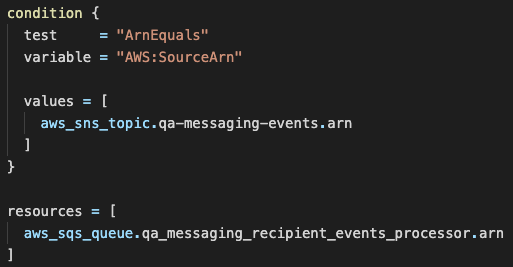
Here is how your code looks in v1.2.0:
pjmiravalle
on 23 Sep 2020
Hi @pjmiravalle, many thanks for the work in this new plugin. I have tried it out and it works like a charm! I also wanted to add that the problem I was having was using Windows as an OS. Now I switched to WSL2 and using just vscode terraform plugin I do not have the syntax highlighting issue anymore. It seems that the issue is related to vscode terraform plugin and windows.
rodrigoechaide
on 27 Sep 2020
Glad to hear @rodrigoechaide !
pjmiravalle
on 28 Sep 2020
@pjmiravalle I tried your plugin and it doesn't seem to fix the issue I'm seeing, which is very similar to what @rodrigoechaide was seeing:

The embedded /${var.cluster_name} in "kubernetes.io/cluster/${var.cluster_name}" is screwing up the quote highlighting. I noticed after the recent plugin/ls update this problem was introduced.
 cmamigonian
on 14 Oct 2020
cmamigonian
on 14 Oct 2020
@cmamigonian thank you for bringing this up. I'll try to replicate this issue when I have some free time next week. I'll keep you posted!
pjmiravalle
on 16 Oct 2020
@pjmiravalle have you had any time to look into this?
cmamigonian
on 5 Nov 2020
@cmamigonian I unfortunately have not yet, it's been an extremely busy few weeks. :( I'll keep you posted once I have some free time to dig into this deeper!
pjmiravalle
on 6 Nov 2020
I was having this problem, but then I realized that I have two vs code extensions that were trying to syntax highlight my terraform. HCL extension and the official HashiCorp Terraform extension. VS Code was prioritizing the HCL extension (which has not been updated in a very long time) and when I disabled it this issue was no longer appearing. I recommend that everyone double check that they only have one extension trying to syntax highlight their terraform.
 fishfood34
on 6 Nov 2020
fishfood34
on 6 Nov 2020
@pjmiravalle are you the only one working on this plugin for that? If so, take your time! :-)
it's totally okay to get busy. Goodness knows I've been neglecting a few personal project GH PR's for personal apps, that I haven't had time to deal with.
 jpatrick-ztel
on 6 Nov 2020
jpatrick-ztel
on 6 Nov 2020
I was struggling with this problem for months and I confirm that disabling the HCL extension solves the problem (if your case was similar) 👏
 sickill
on 5 Jan 2021
sickill
on 5 Jan 2021
Related issues
 brodster2
·
5Comments
brodster2
·
5Comments
 vfab
·
4Comments
vfab
·
4Comments
 avinashkavi447
·
7Comments
avinashkavi447
·
7Comments
 fcatacut
·
5Comments
fcatacut
·
5Comments
 tillig
·
4Comments
tillig
·
4Comments
Most helpful comment
I was having this problem, but then I realized that I have two vs code extensions that were trying to syntax highlight my terraform. HCL extension and the official HashiCorp Terraform extension. VS Code was prioritizing the HCL extension (which has not been updated in a very long time) and when I disabled it this issue was no longer appearing. I recommend that everyone double check that they only have one extension trying to syntax highlight their terraform.