Vscode-terraform: Broken highlighting with curly brackets
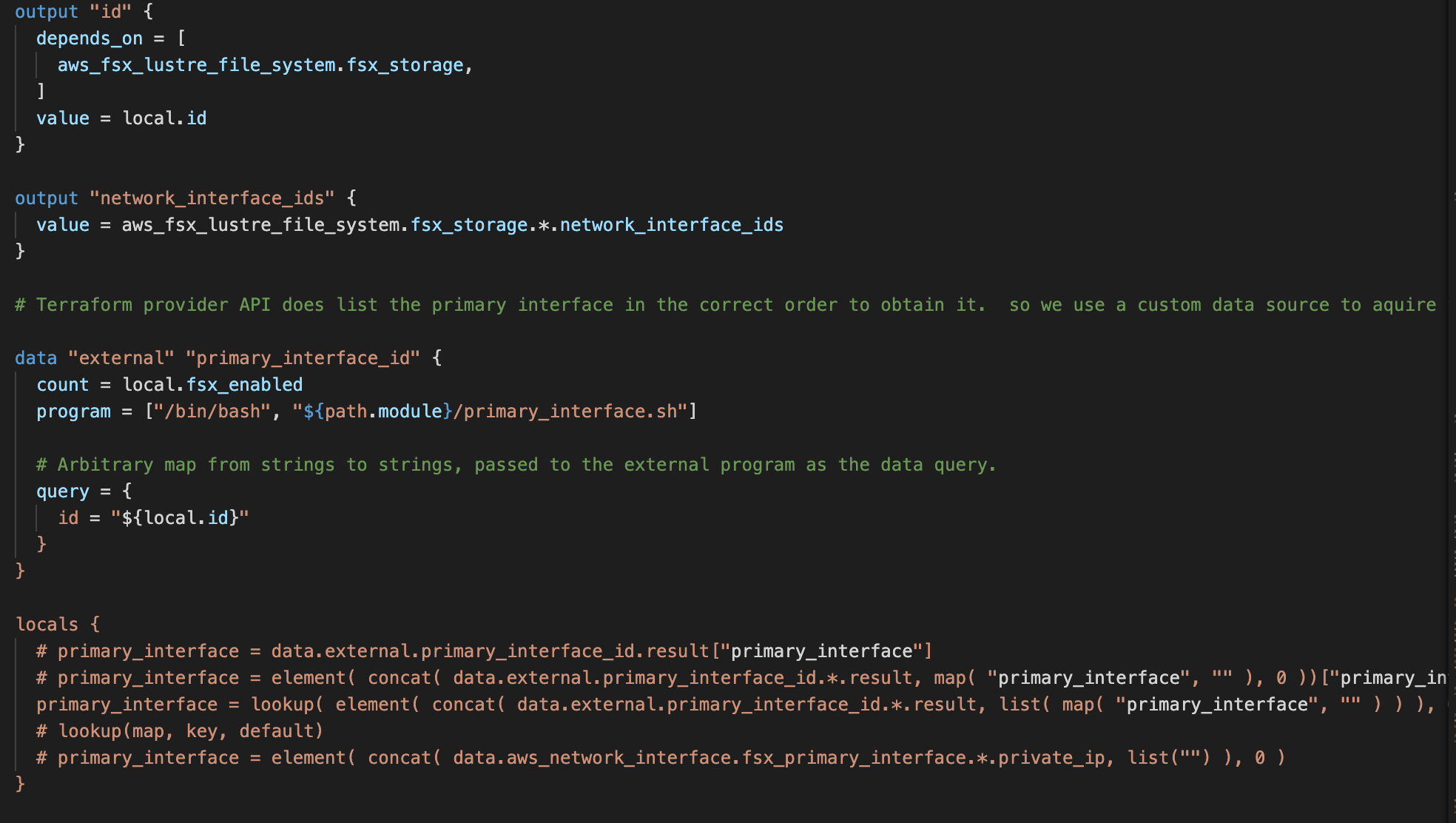
You can see here below 'id' which should be a string, the highlighting persists as a string for the rest of the document.
 queglay
All 9 comments
This is another example of broken syntax highlighting in a different scenario.

queglay
on 23 Aug 2020
Downgrading to 2.1.1 fixes both problems.
queglay
on 23 Aug 2020
I think this is a duplicate of #466 ?
 joshsleeper
on 23 Aug 2020
joshsleeper
on 23 Aug 2020
I think this is a duplicate of #466 ?
Yes it is! Remove the equal sign after "query" and the highlighting would work instantly - though breaking the code.
These are similar and potentially related, thought this seems to be more about everything following the curly brackets (see the code for locals) while #466 is breaking already within the curly brakets.
 DenWin
on 24 Aug 2020
DenWin
on 24 Aug 2020
Hi, I've had the same issue, and as pointed @queglay, downgrading to 2.1.1 fixed the issue (in my case because using /* as a suffix in the ARN).
The steps that I followed to downgrade (I followed this guide):
- Download the 2.1.1 manually (click on the link) https://hashicorp.gallery.vsassets.io/_apis/public/gallery/publisher/hashicorp/extension/terraform/2.1.1/assetbyname/Microsoft.VisualStudio.Services.VSIXPackage
- Rename the file to use the file extension
VSIXonly (withoutPackage). - In VS Code, open the Command Menu (
Cmd+Shift+Pon Mac OS X), and search forInstall from VSIXand select the file that was downloaded/renamed.
I hope that this helps someone :)
 patoroco
on 25 Aug 2020
patoroco
on 25 Aug 2020
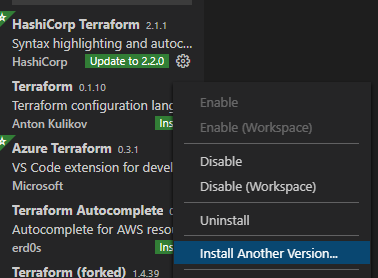
It's a lot easier to just use the built in feature to install previous versions. Simply go to the extensions manager in VS Code, search for the extension, click the cog icon and select "Install another version"
 ruankr
on 25 Aug 2020
ruankr
on 25 Aug 2020
Oh, thanks @ruankr!
I didn't know about this way (actually, it was the first time I needed to install a non-the-last version), but this is pretty easier!
patoroco
on 25 Aug 2020
I think this is the same as #466, going to merge them together. We are currently investigating the syntax issues and plan to publish a hotfix once resolved.
 paultyng
on 25 Aug 2020
paultyng
on 25 Aug 2020
I'm going to lock this issue because it has been closed for _30 days_ ⏳. This helps our maintainers find and focus on the active issues.
If you have found a problem that seems similar to this, please open a new issue and complete the issue template so we can capture all the context necessary to investigate further.
![hashibot[bot] picture](https://avatars.githubusercontent.com/in/8332?v=4&s=40) hashibot[bot]
on 9 Oct 2020
hashibot[bot]
on 9 Oct 2020
Related issues
 vfab
·
4Comments
vfab
·
4Comments
 LogicNinja
·
3Comments
LogicNinja
·
3Comments
 QuinnStevens
·
6Comments
QuinnStevens
·
6Comments
 brodster2
·
5Comments
brodster2
·
5Comments
 vazkarvishal
·
5Comments
vazkarvishal
·
5Comments
Most helpful comment
It's a lot easier to just use the built in feature to install previous versions. Simply go to the extensions manager in VS Code, search for the extension, click the cog icon and select "Install another version"
