Vscode-terraform: `tags = {` breaks syntax highlighting
Not sure if this belongs here or at hashicorp/terraform-ls, but the following block appears to break any subsequent stanzas:
resource "aws_instance" "test" {
  tags = {
    A = "thisisfine"
    B = "this is not fine"
    C = "neither.is.this"
  }
}

resource "aws_instance" "test2" {
    tags = {}
}
Expected result:
Proper syntax highlighting with "this is not fine" and "niether.is.this" being highlighted as strings and the next block being highlighted normally.
Actual Result:
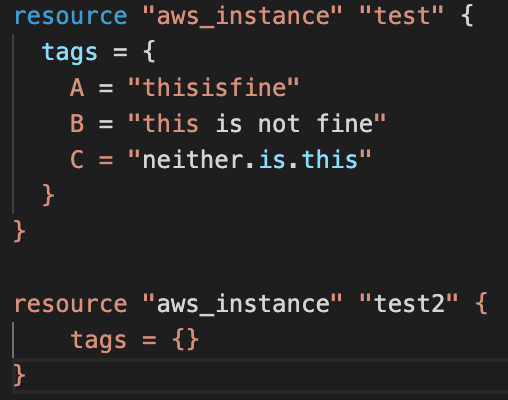
Removing only B = or C = lines still gives a broken block, each of those lines appears to break the parser. Removing both lines and never having anything but [a-z0-9] in the tag value appears to be the only "fix".
 tresni
All 17 comments
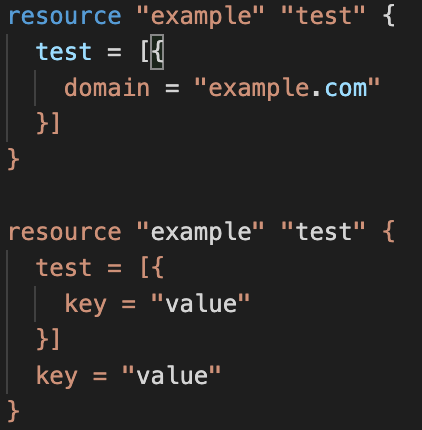
Adding some examples i've run into:
resource "example" "test" {
  test = [{
    key = "valu-e"
  }]
}

resource "example" "test" {
  test = [{
    key = "value"
  }]
}

resource "example" "test" {
  test = [{
    domain = "example.com"
  }]
}

resource "example" "test" {
  test = [{
    key = "value"
  }]
  key = "value"
}
 trotman23
on 21 Aug 2020
trotman23
on 21 Aug 2020
What seems to break the highlighting is xxx = {
I have the same issue with for example:
config = {
path = ""
}
If I write
config {
}
it works.
tags {
}
works as well. But of course is not correct.
 phil737
on 21 Aug 2020
phil737
on 21 Aug 2020
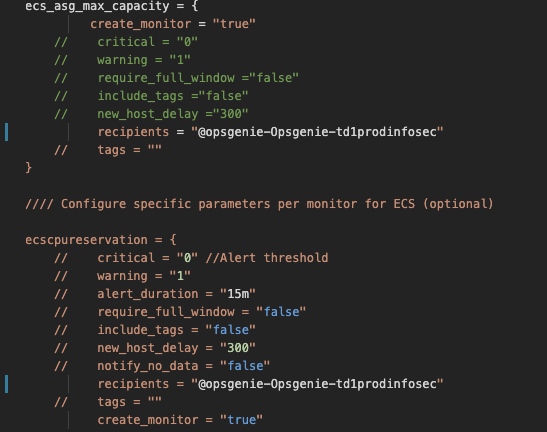
I have the same issue on my end
 StefanMihail
on 21 Aug 2020
StefanMihail
on 21 Aug 2020
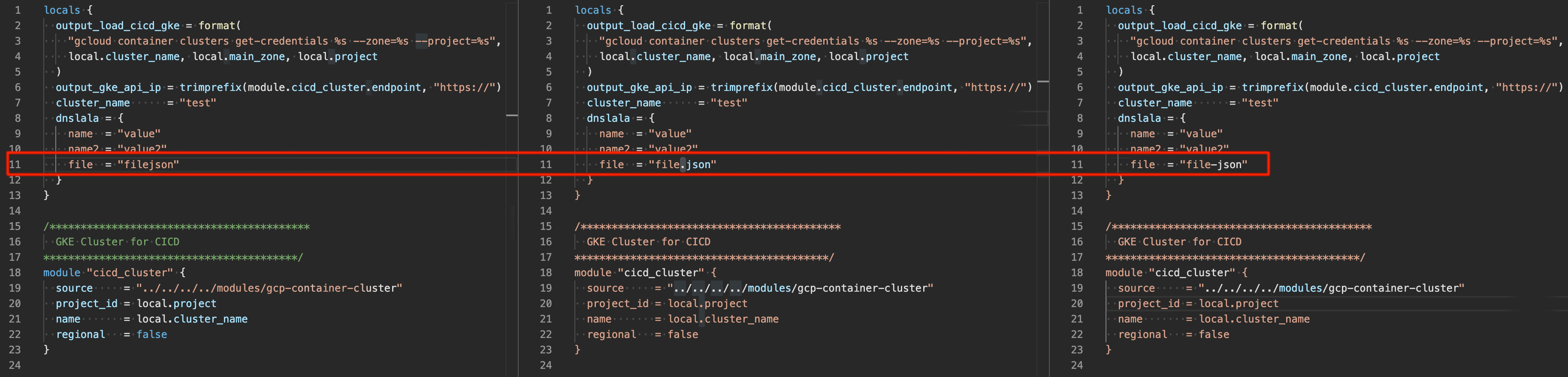
Just reverted to 2.1.1 because of this issue.
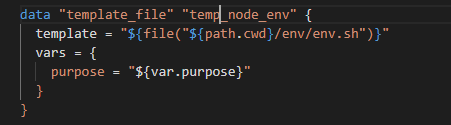
This is what I get:
 msgongora
on 21 Aug 2020
msgongora
on 21 Aug 2020
We are also experiencing this issue

 svb-cyberseceng
on 21 Aug 2020
svb-cyberseceng
on 21 Aug 2020
Some issue here when using vars:
 giovannifl
on 21 Aug 2020
giovannifl
on 21 Aug 2020
Same issue is observed on our end but using packer HCL2 where the syntax layout is broken due to the tag block.
example:
  tags = {
    Environment = "ECS Cluster"
    Team = "Platform"
    Approved = "no"
    Base_AMI_Name = "{{ .SourceAMIName }}"
    Base_AMI_ID = "{{ .SourceAMITags.TagName }}"
  }
Reverting back to version 2.1.1 fixes the issue and the layout is restored.
Thanks,
 olegTarassov
on 21 Aug 2020
olegTarassov
on 21 Aug 2020
Smells like a regression from #462 (meant to fix #442 which is distressingly similar to this issue)
 mgabeler-lee-6rs
on 21 Aug 2020
mgabeler-lee-6rs
on 21 Aug 2020
Also encountered this issue in 2.2.0 running in WSL; fixed by reverting to 2.1.1
 sc2pyro
on 21 Aug 2020
sc2pyro
on 21 Aug 2020
Yes, I had the same problem. I just had to roll back to 2.1.1 to resolve this.
 PaulDMendoza
on 22 Aug 2020
PaulDMendoza
on 22 Aug 2020
The problem can be drilled down to the equal sign in front of the curly bracket:

 DenWin
on 24 Aug 2020
DenWin
on 24 Aug 2020
Smells like a regression from #462 (meant to fix #442 which is distressingly similar to this issue)
Line 452 in terraform.tmGrammar.json to be precise. If one would revert this line back to 2.1.1 everything works fine!
DenWin
on 24 Aug 2020
Ugh. v2.2.0 really wasn't well road tested.
As per above I've had to rollback to v2.1.1 as the latest release is completely unusable.
data "terraform_remote_state" "a_terraform_remote_state" {
  backend = "remote"

  config = {
    organization = "org_name"

    workspaces = {
      name = "how-sweet-are-workspace"
    }
  }
}
is but one example of things that broke syntax highlighting.
 jufemaiz
on 25 Aug 2020
jufemaiz
on 25 Aug 2020
@jufemaiz thanks for the tip, for anyone else that needs to downgrade the v2.1.1 package is available via
curl -o /path/to/vsix/hashicorp.terraform.2.1.1.vsix https://hashicorp.gallery.vsassets.io/_apis/public/gallery/publisher/hashicorp/extension/terraform/2.1.1/assetbyname/Microsoft.VisualStudio.Services.VSIXPackage
Then just uninstall the v2.2.0 version, restart, install the new package, restart VSCode again and works a charm.
 ryderdain
on 25 Aug 2020
ryderdain
on 25 Aug 2020
@ryderdain There is an easier method:
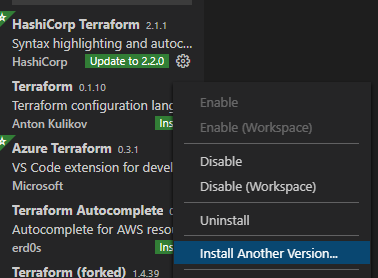
Just chose the version you wanna have.
DenWin
on 25 Aug 2020
We are currently working on a fix for this, but for now the best option is to downgrade. We hope to have a hotfix out as soon as we resolve the issue.
 paultyng
on 25 Aug 2020
paultyng
on 25 Aug 2020
I'm going to lock this issue because it has been closed for _30 days_ ⏳. This helps our maintainers find and focus on the active issues.
If you have found a problem that seems similar to this, please open a new issue and complete the issue template so we can capture all the context necessary to investigate further.
![hashibot[bot] picture](https://avatars.githubusercontent.com/in/8332?v=4&s=40) hashibot[bot]
on 9 Oct 2020
hashibot[bot]
on 9 Oct 2020
Related issues
 QuinnStevens
·
6Comments
QuinnStevens
·
6Comments
 bnm22
·
6Comments
bnm22
·
6Comments
 okgolove
·
4Comments
okgolove
·
4Comments
 chrisgallivan
·
4Comments
chrisgallivan
·
4Comments
 brodster2
·
5Comments
brodster2
·
5Comments
Most helpful comment
Line 452 in terraform.tmGrammar.json to be precise. If one would revert this line back to 2.1.1 everything works fine!