Vscode-terraform: Language server requires `serve` argument to start up, differs from previous language server
After upgrading to v2.0.1 the language server crashes permanently.
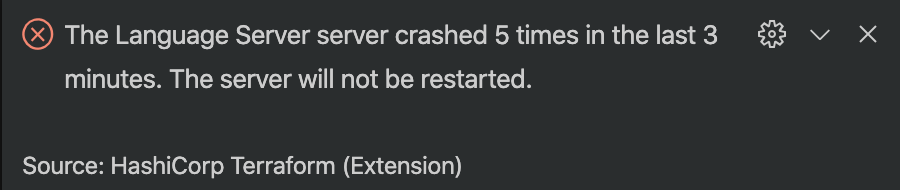
VS-Code v1.46.0 is running on MacOS 10.15.5.
 tantweiler
All 7 comments
Work around that worked for me is to put in (in settings.ini)
```
"pathToBinary": "/Users/xxx/.vscode/extensions/hashicorp.terraform-2.0.1/lsp/terraform-ls",
 jenshonkan84
on 11 Jun 2020
jenshonkan84
on 11 Jun 2020
Same issue, same versions
- Terraform plugin 2.0.1
- VS Code 1.46.0
- MacOS 10.15.5
Log from output window:
Launching language server: /Users/tillig/.vscode/extensions/hashicorp.terraform-2.0.1/lsp/terraform-ls
Usage: terraform-ls [--version] [--help] <command> [<args>]
Available commands are:
completion Lists available completion items
serve Starts the Language Server
[Info - 6:47:11 AM] Connection to server got closed. Server will restart.
Usage: terraform-ls [--version] [--help] <command> [<args>]
Available commands are:
completion Lists available completion items
serve Starts the Language Server
[Info - 6:47:11 AM] Connection to server got closed. Server will restart.
Usage: terraform-ls [--version] [--help] <command> [<args>]
Available commands are:
completion Lists available completion items
serve Starts the Language Server
[Info - 6:47:11 AM] Connection to server got closed. Server will restart.
Usage: terraform-ls [--version] [--help] <command> [<args>]
Available commands are:
completion Lists available completion items
serve Starts the Language Server
[Info - 6:47:11 AM] Connection to server got closed. Server will restart.
Usage: terraform-ls [--version] [--help] <command> [<args>]
Available commands are:
completion Lists available completion items
serve Starts the Language Server
[Error - 6:47:11 AM] Connection to server got closed. Server will not be restarted.
 tillig
on 11 Jun 2020
tillig
on 11 Jun 2020
I do see the default args in my settings.json:
{
"terraform.languageServer": {
"external": true,
"args": [
"serve"
]
}
}
But I also see that I should be seeing a line that says something like:
Launching language server: /.../terraform-ls serve
That is, the args should be there because they should be getting read from config but I don't see the serve arg in the log. I'm guessing something is messed up with the configuration reading...?
tillig
on 11 Jun 2020
Oh, I figured my issue out, maybe the same for others:
In my workspace I had a .vscode/settings.json file left over from the previous extension. It had - you guessed it - language server setting overrides.
{
  "terraform.languageServer": {
    "enabled": true,
    "args": []
  }
}
So... yeah, empty arg array. Removing the settings.json from the workspace got the language server working for me. I gather the previous language server didn't require default args.
tillig
on 11 Jun 2020
Going to close this since it seems to just be a config mismatch. I re-titled it to improve discoverability, I'll also update the README with default configuration.
 paultyng
on 26 Jun 2020
paultyng
on 26 Jun 2020
Update added in d9f1b5a86b8eb6c4fdb3330fdd6bd93c333006de
paultyng
on 26 Jun 2020
I'm going to lock this issue because it has been closed for _30 days_ ⏳. This helps our maintainers find and focus on the active issues.
If you have found a problem that seems similar to this, please open a new issue and complete the issue template so we can capture all the context necessary to investigate further.
![hashibot[bot] picture](https://avatars.githubusercontent.com/in/8332?v=4&s=40) hashibot[bot]
on 26 Jul 2020
hashibot[bot]
on 26 Jul 2020
Related issues
 chrisgallivan
·
4Comments
chrisgallivan
·
4Comments
 domenjesenovec
·
6Comments
domenjesenovec
·
6Comments
 avinashkavi447
·
7Comments
avinashkavi447
·
7Comments
 mdschweda
·
3Comments
mdschweda
·
3Comments
 jacobisaliveandwell
·
3Comments
jacobisaliveandwell
·
3Comments
Most helpful comment
Oh, I figured my issue out, maybe the same for others:
In my workspace I had a
.vscode/settings.jsonfile left over from the previous extension. It had - you guessed it - language server setting overrides.So... yeah, empty arg array. Removing the
settings.jsonfrom the workspace got the language server working for me. I gather the previous language server didn't require default args.