Vscode-terraform: Red linting 0.12 code
When I use 0.12 syntax I always end up with 'red' error linting that suggests there is a syntactically error with the code? The code is syntactically correct as per 0.12 rules, is this just me or are others also finding this behaviour?

 sdcscripts
All 29 comments
Turn off indexing in your settings. That's for tf 0.11, so that 0.12 syntax is failing and causing the error marks.
"terraform.indexing": {
        "enabled": false,
        "liveIndexing": false
}
 tenwit
on 17 Mar 2020
tenwit
on 17 Mar 2020
Hi,
Thanks, that seemed to change where the red text lands but now it is underlining references to resources that are found in other .tf files in the directory. For instance, I have a network.tf which references a resource group in nsg.tf in the same directory. It's suggesting the resource group is not there, even though it is. It also thinks the resource is a variable. The configurations all apply fine still.

Cheers
sdcscripts
on 17 Mar 2020
Have you enabled the language server for 0.12?
 haodeon
on 18 Mar 2020
haodeon
on 18 Mar 2020
I have the same issue.


 matt-canty-dragon
on 18 Mar 2020
matt-canty-dragon
on 18 Mar 2020
Have you enabled the language server for 0.12?
How do you enable the language server? nothing seems to be in the readme?
 dking3876
on 18 Mar 2020
dking3876
on 18 Mar 2020
@dking3876 only documented in the change log -> https://github.com/mauve/vscode-terraform/blob/master/CHANGELOG.md#140
matt-canty-dragon
on 18 Mar 2020
Enabling the language server fixes this issue.
 VihanAgarwal97
on 18 Mar 2020
VihanAgarwal97
on 18 Mar 2020
Hi,
I have the language server enabled and I still have this issue. It doesn't recognise resources such as resource groups that are defined in adjacent terraform files. The code is syntactically correct and runs just fine, but I just have lots of red everywhere.
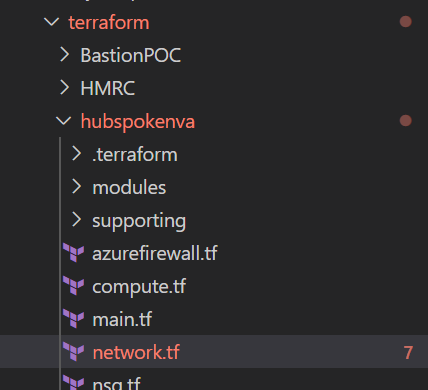
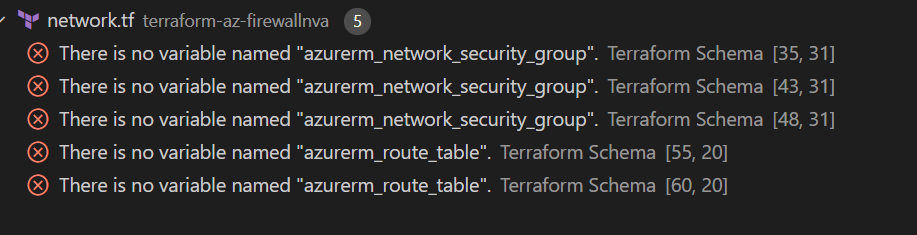

My settings show language server enabled:

and language server is working:

 shcrouch
on 19 Mar 2020
shcrouch
on 19 Mar 2020
Same here. Identical settings to the one shown above, language server enabled.
 mwawrusch
on 19 Mar 2020
mwawrusch
on 19 Mar 2020
bump.....still not working and getting warning / errors in VS
 jasonrberk
on 19 Mar 2020
jasonrberk
on 19 Mar 2020
I am getting this issue as well. Seems to only occur as far as I can tell when in a module and the resource or data object is initially created in a different file.
File A: contains resource
File B: references resource in File A with error
If the reference is in the same file it doesn't have an issue finding it (both in File A, or both in File B).
Doesn't seem to be an issue in outputs.tf files though.
 codephobia
on 22 Mar 2020
codephobia
on 22 Mar 2020
I have this exact same issue. Language server installed and indexing set to false.
Now i'm getting errors all over my configuration and string interpolation warnings everywhere. However when i change these to the 0.12 way, its still seen as an error.
 TechnicallyJoe
on 23 Mar 2020
TechnicallyJoe
on 23 Mar 2020
Same issue. My resource group is in a file called "resourcegroup.tf". I have a virtual network in a file called "virtual-network-spoke2.tf". The VNET is deployed into the resource group but because the resource group is in a different file it gives me this syntax error:
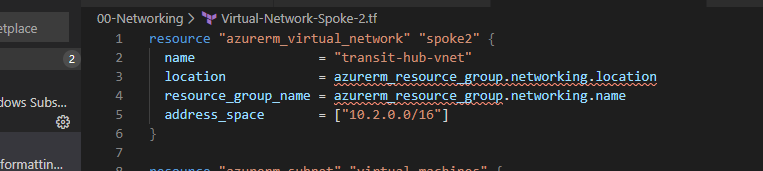
Paging @juliosueiras as this seems to be a bug in the language server.
 liamfoneill
on 23 Mar 2020
liamfoneill
on 23 Mar 2020
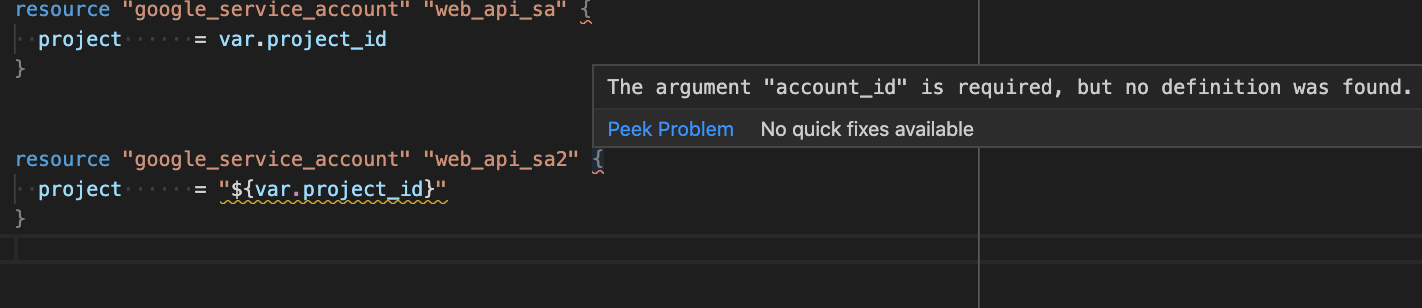
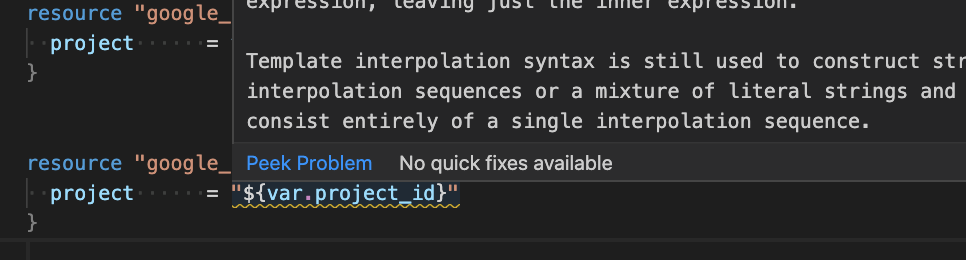
I had been seeing the same issue even with the identical settings as above users until I rebooted vscode and installed/updated the Language Server.
Settings
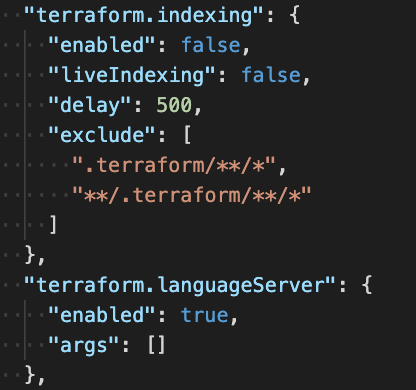
Install/Update Language Server via Command Palette (cmd+shift+P)


Displaying various errors correctly
 conanza
on 26 Mar 2020
conanza
on 26 Mar 2020
Hi, this deals with interpolation warnings, but not the issue as reflected above by users where resource groups are defined in one file and then referred to in another file, that still incorrectly errors as per:
Same issue. My resource group is in a file called "resourcegroup.tf". I have a virtual network in a file called "virtual-network-spoke2.tf". The VNET is deployed into the resource group but because the resource group is in a different file it gives me this syntax error:
Paging @juliosueiras as this seems to be a bug in the language server.
sdcscripts
on 26 Mar 2020
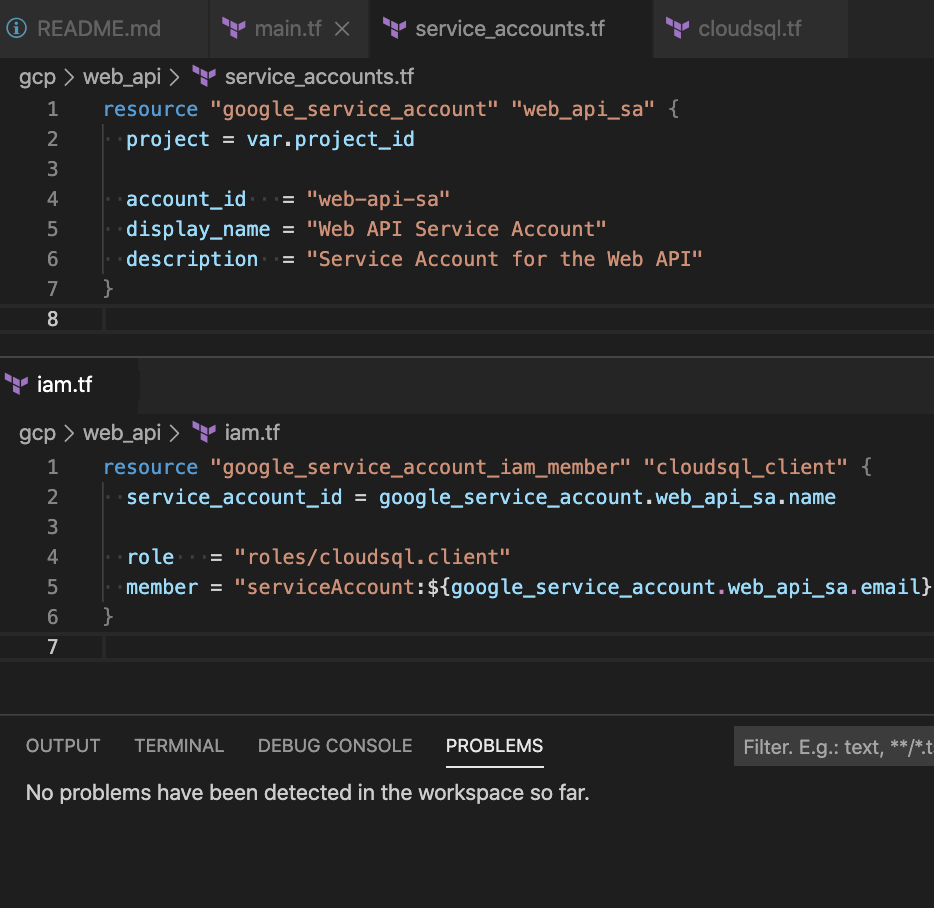
Works fine across files for me too 🤷♂. Perhaps this is specific to the Provider
conanza
on 27 Mar 2020
I have the same issue on my Windows install of VSCode, but on my OS X install, it seems to traverse files just fine.
All of my code is checked into a git repo, so it is the same across both comptuers (multiple .tf fles). On the Windows VSCode (using just updated language server and VSCode) it throws errors on resources contained in different files. On my OS X install, I don't see the same behaviour, it seems to work fine.
 ubenmackin
on 27 Mar 2020
ubenmackin
on 27 Mar 2020
Is that the case specifically when you create Azure resource groups in one file and refer to them in another?
shcrouch
on 27 Mar 2020
This isn't related specifically to azure. I was having the issue with aws providers. Am also running on windows vs code.
codephobia
on 27 Mar 2020
Does the error present as "There is no variable named ...
shcrouch
on 27 Mar 2020
@shcrouch Yep. For example: "There is no variable named "aws_subnet"."
codephobia
on 27 Mar 2020
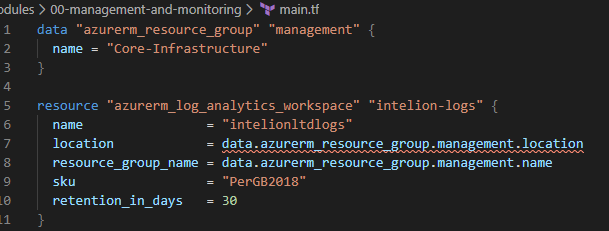
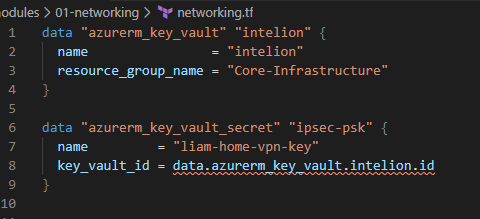
Just an update (putting here as it seems these issues are related). If I reference a data source (data source in same tf file) the first reference has an error, yet the subsequent references are fine:
liamfoneill
on 30 Mar 2020
I had the same error with the packet provider. I then realized I hadn't done terraform init in the folder. So, I then did a terraform init, disabled the terraform language server, updated the language server, and then enabled it again. After doing that everything worked properly.
NOTE: if you get a file is busy error from vscode you can run this command:
rm ~/.vscode/extensions/mauve.terraform-1.4.0/lspbin/terraform-lsp{,.tar.gz}
got command from here, but shortened it.
 elreydetoda
on 4 Apr 2020
elreydetoda
on 4 Apr 2020
Hey @elreydetoda , (A propósito - me gusta tu nombre de usuario! ;) )
I tried this but for me it didn't seem to have the same affect, I've tried all kinds of combinations of uninstall \ reinstall \ tried on multiple OS instances, but it's the same every time.
Thanks anyway
sdcscripts
on 4 Apr 2020
(muchas gracias :grin: )
Dang, sorry :cry: . I thought if it worked for me it would work for other.
elreydetoda
on 4 Apr 2020
I'm also getting this for aws provider:
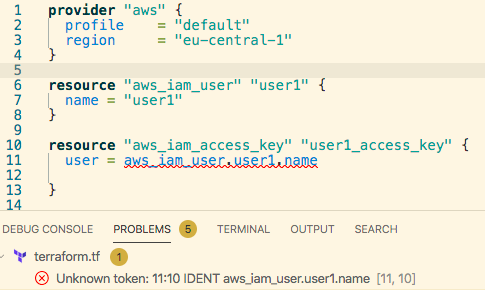
with the following log:
2020-04-06T12:47:50.018+0200 [INFO]  plugin: configuring client automatic mTLS
2020-04-06T12:47:50.063+0200 [DEBUG] plugin: starting plugin: path=/home/USER/.vscode-server/extensions/mauve.terraform-1.4.0/lspbin/terraform-provider-aws_v2.56.0_x4 args=[/home/USER/.vscode-server/extensions/mauve.terraform-1.4.0/lspbin/terraform-provider-aws_v2.56.0_x4]
2020-04-06T12:47:50.065+0200 [DEBUG] plugin: plugin started: path=/home/USER/.vscode-server/extensions/mauve.terraform-1.4.0/lspbin/terraform-provider-aws_v2.56.0_x4 pid=31294
2020-04-06T12:47:50.065+0200 [DEBUG] plugin: waiting for RPC address: path=/home/USER/.vscode-server/extensions/mauve.terraform-1.4.0/lspbin/terraform-provider-aws_v2.56.0_x4
2020-04-06T12:47:50.093+0200 [INFO]  plugin.terraform-provider-aws_v2.56.0_x4: configuring server automatic mTLS: timestamp=2020-04-06T12:47:50.093+0200
2020-04-06T12:47:50.139+0200 [DEBUG] plugin.terraform-provider-aws_v2.56.0_x4: plugin address: address=/tmp/plugin141250327 network=unix timestamp=2020-04-06T12:47:50.139+0200
2020-04-06T12:47:50.139+0200 [DEBUG] plugin: using plugin: version=5
2020-04-06T12:47:50.334+0200 [DEBUG] plugin: plugin process exited: path=/home/USER/.vscode-server/extensions/mauve.terraform-1.4.0/lspbin/terraform-provider-aws_v2.56.0_x4 pid=31294
2020-04-06T12:47:50.334+0200 [DEBUG] plugin: plugin exited
 pmalek
on 6 Apr 2020
pmalek
on 6 Apr 2020
I'm getting this issue too... I'm using an older provider... azurerm 1.41... could this be related?
 AndrewNao
on 2 Jun 2020
AndrewNao
on 2 Jun 2020
We just released v2.0.0-rc.1 of the extension. The main features include:
- Added syntax support for 0.12
- Added terraform-ls usage by default (currently on 0.3.0, which offers basic provider code completion)
You can find additional information and specifics in the release notes and CHANGELOG.
With this release we expect that many of the prior issues and PRs are no longer relevant or have been addressed, and are therefore being closed. If you feel the action taken on an issue or PR is in error, please comment as such and we can figure out the appropriate way to address it.
We plan to add the final 2.0.0 release to the marketplace soon, but are actively seeking your feedback now on the release candidates. You can download the .vsix from the releases page and manually install it in VS Code to try it out.
 paultyng
on 4 Jun 2020
paultyng
on 4 Jun 2020
I'm going to lock this issue because it has been closed for _30 days_ ⏳. This helps our maintainers find and focus on the active issues.
If you have found a problem that seems similar to this, please open a new issue and complete the issue template so we can capture all the context necessary to investigate further.
![hashibot[bot] picture](https://avatars.githubusercontent.com/in/8332?v=4&s=40) hashibot[bot]
on 4 Jul 2020
hashibot[bot]
on 4 Jul 2020
Related issues
 meysholdt
·
5Comments
meysholdt
·
5Comments
 NeckBeardPrince
·
4Comments
NeckBeardPrince
·
4Comments
 fcatacut
·
5Comments
fcatacut
·
5Comments
 brodster2
·
5Comments
brodster2
·
5Comments
 chrisgallivan
·
4Comments
chrisgallivan
·
4Comments
Most helpful comment
Same issue. My resource group is in a file called "resourcegroup.tf". I have a virtual network in a file called "virtual-network-spoke2.tf". The VNET is deployed into the resource group but because the resource group is in a different file it gives me this syntax error:
Paging @juliosueiras as this seems to be a bug in the language server.