Vscode-terraform: Terraform v0.12.3 - Syntax check broken: Unknown token IDENT
Throughout our Terraform catalog of modules we are seeing syntax errors for "unknown token IDENT".
Examples:


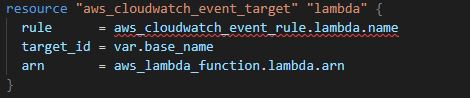
It's not just local to my machine. Our entire team is experiencing it. We are on TF version v0.12.3.
 BB-7
BB-7
All 29 comments
This is because of unfinished support for TF 0.12
157
 Danktified
on 3 Jul 2019
Danktified
on 3 Jul 2019
Same here for me for a valid syntax according to v0.12 -

 sujaypillai
on 4 Jul 2019
sujaypillai
on 4 Jul 2019
The only IDE I know that supports TF 0.12+ HCL syntax is Intellij IDEA with the Terraform plugin
 davisford
on 16 Jul 2019
davisford
on 16 Jul 2019
This bug still happens in version 1.4.0 with lsp server
 Itiho
on 27 Aug 2019
Itiho
on 27 Aug 2019
Any update on syntax for v.12?
 fluffy-cakes
on 9 Sep 2019
fluffy-cakes
on 9 Sep 2019
have the same probem
 simonmaass
on 12 Sep 2019
simonmaass
on 12 Sep 2019
Its really annoying! any fixes or workarounds?
 karthiksadhasivam
on 13 Sep 2019
karthiksadhasivam
on 13 Sep 2019
Enable the experimental Terraform language server, which has support for Terraform 0.12...
settings.json
"terraform.languageServer": {
        "enabled": true,
        "args": []
    }
 HighwayofLife
on 27 Sep 2019
HighwayofLife
on 27 Sep 2019
Enable the experimental Terraform language server, which has support for Terraform 0.12...
settings.json"terraform.languageServer": { "enabled": true, "args": [] }
@HighwayofLife This looks like it conflicts with this add-in. How do you have yours configured?
fluffy-cakes
on 29 Sep 2019
Enable the experimental Terraform language server, which has support for Terraform 0.12...
settings.json"terraform.languageServer": { "enabled": true, "args": [] }
Seems to have worked.
karthiksadhasivam
on 30 Sep 2019
@fluffy-cakes
@HighwayofLife This looks like it conflicts with this add-in. How do you have yours configured?
That is how I have mine configured. You need vscode-terraform 1.4, which added support for Terraform 0.12 via a language server.
HighwayofLife
on 2 Oct 2019
Enable the experimental Terraform language server, which has support for Terraform 0.12...
settings.json"terraform.languageServer": { "enabled": true, "args": [] }Seems to have worked.
It brought another set of errors when using the "count" value in my TF files unfortunately :(
 rnsc
on 2 Oct 2019
rnsc
on 2 Oct 2019
Language server didn't fix all of these for me. And brought some others. Is there any way to toggle language checking entirely?
 skupjoe
on 18 Oct 2019
skupjoe
on 18 Oct 2019
Language server didn't fix all of these for me. And brought some others. Is there any way to toggle language checking entirely?
@skupjoe add this bad boy to your settings.json file. I had the same thing going on and decided i was sick of the red in my editor.
"terraform.indexing": {
    "enabled": false,
    "liveIndexing": false
  }
 eponymz
on 18 Oct 2019
eponymz
on 18 Oct 2019
Worked with a reload thanks!
Shame to leave the indexing support, but I can wait for now. Thanks for the great plugin!
skupjoe
on 19 Oct 2019
Yep _terraform.languageServer_ and _terraform.indexing_ to false blocks did "green out" my code with terraform 0.12.x syntax features.
 cima
on 24 Oct 2019
cima
on 24 Oct 2019
@cima How did you get rid of count.index errors?
 MRostanski
on 1 Nov 2019
MRostanski
on 1 Nov 2019
The problem is still happening. How much time will we have to live with the workaround?
 epomatti
on 15 Jan 2020
epomatti
on 15 Jan 2020
The workaround described actually created more issues than I had originally. Any updates on this would be most appreciated!
 robguinness
on 16 Jan 2020
robguinness
on 16 Jan 2020
For those who are struggling to make this work a summary of the above:
Adding the following to your settings.json file:
    "terraform.languageServer": {
        "enabled": true,
        "args": []
    }
and
  "terraform.indexing": {
    "enabled": false,
    "liveIndexing": false
  }
This tells VSCode to turn off the old extension's system and on the new language server system.
Restart VSCode once and it will prompt to download the language server.
Restart again after the install completes (if necessary)
Not saying this is OK or a good dev experience, but the solution in this thread does work. Looking forward to the language server becoming a mainstay :+1:
 Mentioum
on 24 Jan 2020
Mentioum
on 24 Jan 2020
Thank you Mentioum, Issue has been resolved. :-)
 gowrishcv
on 11 Feb 2020
gowrishcv
on 11 Feb 2020
Not sure if it's really a good idea. Currently working on gcp provider 3.x versions and I've seen language server latest version install gcp 2.x.
Warnings removed anyway.
 lpzdvd-packlink
on 20 Feb 2020
lpzdvd-packlink
on 20 Feb 2020
I think we all appreciate the effort for basically un-breaking the IDE, but it is true that a lot of "nice" features have been lost. For example, references don't work anymore, there is no link to the documentation anymore, ...
This is not to complain about the work already done (linked to https://github.com/mauve/vscode-terraform/issues/157), but just maybe a reminder...? To be honest, I would gladly help but I'm afraid I don't even know where to look
 oceaneLonneux
on 6 Mar 2020
oceaneLonneux
on 6 Mar 2020
Last contribution 1 Oct 2019. Is it dead? :(
 Pijuli
on 12 Mar 2020
Pijuli
on 12 Mar 2020
yea, so I guess we should look for another plugin since this one didn't receive any updates on Terraform syntax since last issue was reported on June 2019...
 dminca
on 16 Mar 2020
dminca
on 16 Mar 2020
Enable the experimental Terraform language server, which has support for Terraform 0.12...
settings.json"terraform.languageServer": { "enabled": true, "args": [] }@HighwayofLife This looks like it conflicts with this add-in. How do you have yours configured?
Thank you. VS Code suggested I do this, but the information on how was not readily available.
 BenjaminMtDew
on 30 Mar 2020
BenjaminMtDew
on 30 Mar 2020
We just released v2.0.0-rc.1 of the extension. The main features include:
- Added syntax support for 0.12
- Added terraform-ls usage by default (currently on 0.3.0, which offers basic provider code completion)
You can find additional information and specifics in the release notes and CHANGELOG.
With this release we expect that many of the prior issues and PRs are no longer relevant or have been addressed, and are therefore being closed. If you feel the action taken on an issue or PR is in error, please comment as such and we can figure out the appropriate way to address it.
We plan to add the final 2.0.0 release to the marketplace soon, but are actively seeking your feedback now on the release candidates. You can download the .vsix from the releases page and manually install it in VS Code to try it out.
 paultyng
on 4 Jun 2020
paultyng
on 4 Jun 2020
What a fanastic time on my part to check if there's any progress on this. I just installed the extension manually as mentioned above and the annoyance with faulty syntax highlighting has indeed gone. Thanks for all the hard work @paultyng, @aeschright et al. Looking forward to this becoming mainline in the future.
 triwats
on 5 Jun 2020
triwats
on 5 Jun 2020
I'm going to lock this issue because it has been closed for _30 days_ ⏳. This helps our maintainers find and focus on the active issues.
If you have found a problem that seems similar to this, please open a new issue and complete the issue template so we can capture all the context necessary to investigate further.
![hashibot[bot] picture](https://avatars.githubusercontent.com/in/8332?v=4&s=40) hashibot[bot]
on 4 Jul 2020
hashibot[bot]
on 4 Jul 2020
Related issues
 okgolove
·
4Comments
okgolove
·
4Comments
 kagarlickij
·
5Comments
kagarlickij
·
5Comments
 sugarraysam
·
4Comments
sugarraysam
·
4Comments
 chrisgallivan
·
4Comments
chrisgallivan
·
4Comments
 brodster2
·
5Comments
brodster2
·
5Comments
Most helpful comment
For those who are struggling to make this work a summary of the above:
Adding the following to your
settings.jsonfile:and
This tells VSCode to turn off the old extension's system and on the new language server system.
Restart VSCode once and it will prompt to download the language server.
Restart again after the install completes (if necessary)
Not saying this is OK or a good dev experience, but the solution in this thread does work. Looking forward to the language server becoming a mainstay :+1: