Vscode-sqltools: Unable to view schema for Redshift
Describe the bug
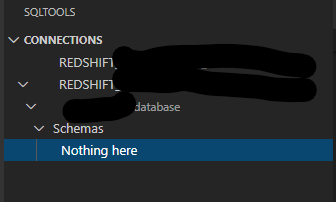
Prior to latest release of VS Code/SQLTools I was able to view the schema of my Redshift database. Since the upgrade this is longer visible in the SQLTools menu - "Nothing here" text is displayed - see below.
To Reproduce
Steps to reproduce the behavior:
- create Redshift connection
- connect to Redshift instance using the SQLTools
Connectionsmenu - expand database within connection
- expand
Schemawithin connection - "Nothing here" is displayed instead of a list of tables.
Expected behavior
Expanding the Schema option within a db connection allows users to see tables within the schema
Desktop (please complete the following information):
- SQLTools Version 0.22.3 (issue first appeared on 0.22.2)
- VSCode Version: 1.45.1
- Driver Used/Version: SQLTools PostgresSQL/Redshift Driver 0.0.3
- OS: Windows
 rjshanahan
All 15 comments
@rjshanahan can you try to manually run this query:
Of course, changing to valid values, let me know if you get any errors
 mtxr
on 3 Jun 2020
mtxr
on 3 Jun 2020
No errors @mtxr ; however, no data returned either.
That said, no results are returned from information_schema.schemata ie. select * from information_schema.schemata limit 10;
rjshanahan
on 4 Jun 2020
what's your postgres version and whats the name of schema?
mtxr
on 4 Jun 2020
Here's the version info: PostgreSQL 8.0.2 on i686-pc-linux-gnu, compiled by GCC gcc (GCC) 3.4.2 20041017 (Red Hat 3.4.2-6.fc3), Redshift 1.0.15896.
There's nothing weird in the schema name, eg. abcdef.
rjshanahan
on 5 Jun 2020
Do you still have this issue on recent releases of the driver and the extension?
mtxr
on 26 Jun 2020
Hello!
I didn't use the plugin for some time and the driver just got updated. Now I see way less schemas than before.
The data engineer told me that it looks like I only see schemas that the user I'm connected with is owner, even though I'm supposed to see all. Maybe you can check in here?
 Meyfarth
on 6 Aug 2020
Meyfarth
on 6 Aug 2020
I'm also experiencing this issue - the schemas listed are only those owned by the current user. I would expect to see all of the schemas shown when running \dn on a psql client logged in as the same user.
 JunkMyFunk
on 13 Aug 2020
JunkMyFunk
on 13 Aug 2020
Any resolutions to this ?
 aniruddha-pe
on 14 Oct 2020
aniruddha-pe
on 14 Oct 2020
I'm getting this error as well
 italodamato
on 21 Oct 2020
italodamato
on 21 Oct 2020
The same problem!
 cacrespo
on 28 Oct 2020
cacrespo
on 28 Oct 2020
Im having the same issue
 ashish10alex
on 6 Nov 2020
ashish10alex
on 6 Nov 2020
Same issue here.
Version
Redshift:
PostgreSQL 8.0.2 on i686-pc-linux-gnu, compiled by GCC gcc (GCC) 3.4.2 20041017 (Red Hat 3.4.2-6.fc3), Redshift 1.0.21262
VSCode:
1.51.1
SQLTools:
0.23.0
 andrewf13tcher
on 19 Nov 2020
andrewf13tcher
on 19 Nov 2020
Have we got a fix for this problem? I'm experiencing the same problem.
 DCToddM
on 1 Dec 2020
DCToddM
on 1 Dec 2020
seeing same issue. Is there a fix or workaround for this?
 sgottipati-cuda
on 27 Dec 2020
sgottipati-cuda
on 27 Dec 2020
having same issue,
 longhowlam
on 29 Dec 2020
longhowlam
on 29 Dec 2020
Related issues
 BrendanSimon
·
3Comments
BrendanSimon
·
3Comments
 ntt2k
·
4Comments
ntt2k
·
4Comments
 sstirlin
·
7Comments
sstirlin
·
7Comments
 xenoterracide
·
5Comments
xenoterracide
·
5Comments
 ransagy
·
7Comments
ransagy
·
7Comments