Vscode-sqltools: Write docs about settings options and add missing settings descriptions.
Wondering where I can find purpose and available options for each setting.
For example, what does "sqltools.format" do, and what values will it accept?
I apologize if this is readily available somewhere, or not the most appropriate way to ask. Tried finding docs on it and tried finding another way to submit a question, with no success
 jim256
All 9 comments
We don't have it for now.
But you can still use VSCode Ui to see the descriptions.

I See format is missing a description, but it I'll write it up here for you, sorry:
"sqltools.format": {
    "indentSize": 2, // changes indentation size when formatting queries
    "reservedWordCase": "upper" // allowed null 'upper' | 'lower'
  }
 mtxr
on 12 Apr 2019
mtxr
on 12 Apr 2019
Also you can edit the setting file using vscode default autocomplete as follow:
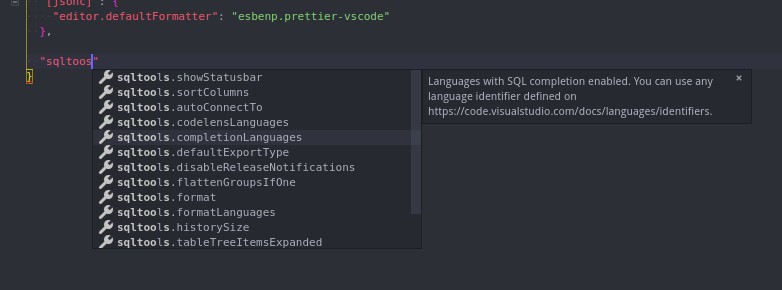
I really need to spend more time writing the docs, I'll rename this issue achieve this purpose, ok?
Thanks @jim256
mtxr
on 12 Apr 2019
I updated the docs with a few more info, but still have a lot to do.
Take a look there.
Thanks!
mtxr
on 15 Apr 2019
@mtxr Thank you so much!! Very helpful. Awesome how responsive you are.
I also have to say that I absolutely love how frequently you push updates and go after adding new features. Kind of refreshing. I love SQL Tools! Really looking forward to seeing the auto-complete feature move forward to be contextual. I think I'll be moving entirely to VS Code / SQL Tools soon :)
jim256
on 15 Apr 2019
Nice! Thanks!
If you like the extension, consider a donation, marketplace review or star here in github. That you help the extension to keep evolving!
Thanks!
mtxr
on 16 Apr 2019
@mtxr
Off topic question:
I've been lurking a bit on sql tools cause it seems awesome and I don't have any side projects right now.
What skills/competencies would be necessary to be a productive contributor to vscode-sqltools? I'm assuming getting fully comfortable with nodejs and the "hello world" for vscodes plug-in development, but I'm wondering what I could focus my at home learning with an end goal of being able to offer assistance in anything from documenting code to trying to tackle new functionality.
 BrettMoan
on 16 Apr 2019
BrettMoan
on 16 Apr 2019
HI @BrettMoan ,
You are welcome to contribute in any way you feel comfortable, the project has a lot of stuff in need of contributions, from docs to the core code, and I can provide guidance whenever you need.
The hello-world is a great beginning, I'm not kidding, sometimes we have issues/fixes that require just some debugging and 2~3 line changes, I'm trying to mark them with the label good first issue.
Those issue are a good starting point, because when debugging, you will understand patterns and flow we are using, so it helps learning faster. See https://github.com/mtxr/vscode-sqltools/issues?q=is%3Aopen+is%3Aissue+label%3A%22good+first+issue%22.
About the techs we use, everything is written in Typescript, I try to keep it most up-to-date with latest version as possible. Here is a list of what SQLTools uses:
- Typescript
- React + Sass + CSS
- Jest, for testing. Still in the beginning.
- Markdown for docs
- SVG for images, PNG if SVG cannot be used.
If you want my suggestion of what to learn to help you contribute, Typescript I'd say since ~90% of the code is TS.
If you are familiar with React and Typescript, try issue #185, I believe it's a great start. Want to understand better how the extension works? Try to write some docs about a feature that is missing in the docs. It's up to you.
Anyway, as said, feel free to jump in whatever you feel comfortable. If you need anything, don't hesitate to reach me.
Thank you very much!
Glad to have you on board!
mtxr
on 16 Apr 2019
@mtxr Thank you so much!! Very helpful. Awesome how responsive you are.
I also have to say that I absolutely love how frequently you push updates and go after adding new features. Kind of refreshing. I love SQL Tools! Really looking forward to seeing the auto-complete feature move forward to be contextual. I think I'll be moving entirely to VS Code / SQL Tools soon :)
Maybe consider helping via patreon monthly just for cup of coffee is great. Just $5 dollar :)
see https://www.patreon.com/mteixeira/posts :) Help @mtxr so his wife can let him work more in this tools :)
 benyaminl
on 1 May 2019
benyaminl
on 1 May 2019
Closing since the purpose of this issue was achieved. But docs is an on going work that will be done more often now.
mtxr
on 2 May 2019
Related issues
 ntt2k
·
4Comments
ntt2k
·
4Comments
 abenhamdine
·
6Comments
abenhamdine
·
6Comments
 cstyve
·
3Comments
cstyve
·
3Comments
 Maransatto
·
3Comments
Maransatto
·
3Comments
 xenoterracide
·
5Comments
xenoterracide
·
5Comments
Most helpful comment
@mtxr
Off topic question:
I've been lurking a bit on sql tools cause it seems awesome and I don't have any side projects right now.
What skills/competencies would be necessary to be a productive contributor to vscode-sqltools? I'm assuming getting fully comfortable with nodejs and the "hello world" for vscodes plug-in development, but I'm wondering what I could focus my at home learning with an end goal of being able to offer assistance in anything from documenting code to trying to tackle new functionality.