Vscode-spell-checker: Managing Lorem Ipsum better
Hi All,
Great plugin, just want to throw the idea out of a possible new feature.
Problem
At the moment any lorem ipsum gets returned as an error. However I would like to ignore this, but still be reminded its presence in my file.
In my example below there are only 2 guinue errors in my file to address. I want to be aware that there are lorem ipsum in document (this could be behind a default flag showWarnings: true.)
I am suggesting a warning icon based on line number if the string / template literal contains any ipsum only, then grouping all the lorem instances.
Example
This is an example of when I want spell checker to catch some errors.
<div class="wrapper">
    <h1 class="heading">Heading</h1>

    <h2 class="intro">This is a defalt heading!</h2>

    <p>My listed data:</p>

    <ul class="list">
        <li class="list-item">Lorem ipsum dolor sit.</li>
        <li class="list-item">Atque soluta quis consequatur.</li>
        <li class="list-item">Beatae commodi nemo nisi.</li>
        <li class="list-item">Tempore nam neque pariatur.</li>
    </ul>

    <p>This is a paragrah test, that contains some text.</p>
</div>
Returning problems:
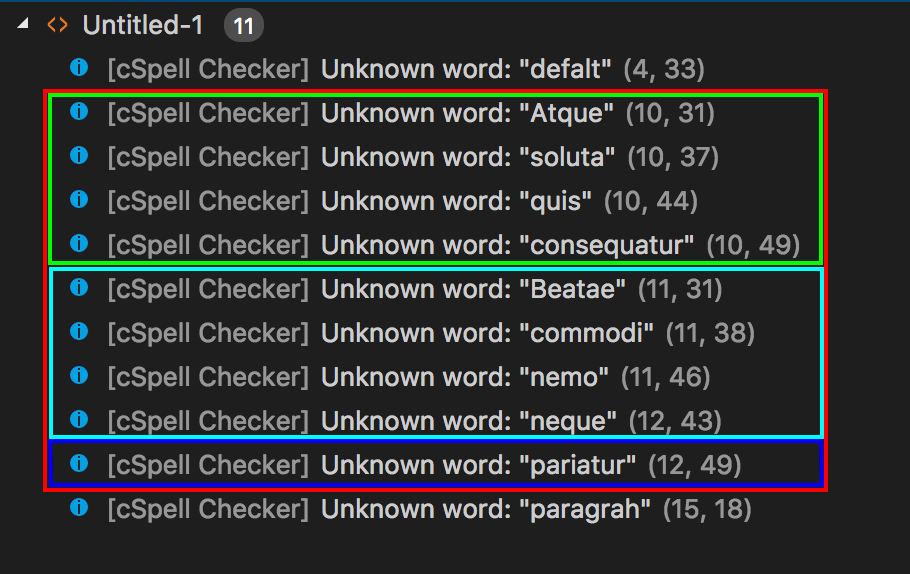
As you can see there are 3 sections in the middle. These are due to the lorem ipsum.
Solution
If there were just 3 lorem lines shows a warning state, you could save a lot of overhead in the problems tab. The end result would be a warning icon follow by the text:
Singular
Lorem Ipsumn - ${lorem_instance} is present. (Row, Column)
or
Multiple
Lorem Ipsumn - ${count} instances found. (Row, Column)
Thoughts?
 Ne-Ne
Ne-Ne
All 9 comments
Thank you for the feedback. I can see how this might be useful.
There are actually several feature requests in this ticket.
- Lorem Ipsum support
- Grouping of issue reporting
- Multi-severity of issues
At the moment, extensions do not have a lot of control over how issues are reported, this is controlled by VS Code.
But Lorem Ipusm support is easy enough. The words just need to be added to a dictionary.
 Jason3S
on 13 Jun 2018
Jason3S
on 13 Jun 2018
Hi everyone,
Since this issue was opened for a better managing of Lorem Ipsum and you did an update of the words into the cspell-dicts, this issue should be resolve.
But for I keep having lorem-ipsum errors and I don't understand why.
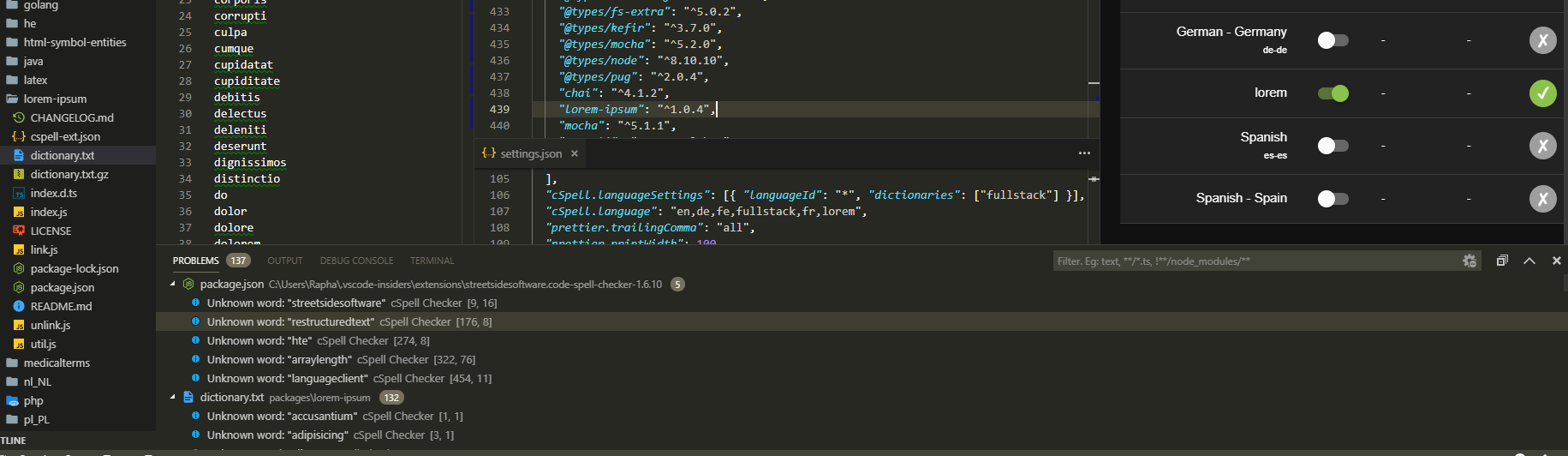
There we can see that lorem is activated with the right lorem version (1.0.4) which have the last words but are still not recognize.
So, I don't now if I have a bad configuration (if this is the case, this issues should be close) or if this is a bug from the vscode extension.
 rbalet
on 18 Feb 2019
rbalet
on 18 Feb 2019
@rbalet It is not so obvious how to turn on the dictionary.
There are two ways:
Enable the language:
"cSpell.language": "en,lorem"
Enable the dictionary:
"cSpell.dictionaries": [
    "lorem-ipsum"
]
I'm struggling to get the lorem-ipsum to work - I've installed this extension and updated the settings.json as @Jason3S has suggested ... however certain words are still flagging up:
adipiscing
nullam
facilisis
metus
eleifend
varius
augue
vehicula
metus
tristique
...
Is there just a certain subset of lorem ipsum you support?
 leepowelldev
on 20 Aug 2019
leepowelldev
on 20 Aug 2019
The list of words is found here: cspell-dicts: lorem-ipsum/dictionary.txt
Please feel free to do a pull request with new words if you think they apply.
Jason3S
on 24 Aug 2019
I was looking for that information and found the solution working. Only one word was not recognized ("adipisci", which should be "adipisici", according to wikipedia).
So, I think this issue can be closed. Thanks a lot for creating this very useful extension!
 mike-lischke
on 10 Nov 2020
mike-lischke
on 10 Nov 2020
I've just checked v1.9.4 which seems to have the list of words I added to the dictionary and doesn't highlight any of the words mentioned in this issue so I agree that it should be closed 🙂
 markgaze
on 19 Nov 2020
markgaze
on 19 Nov 2020
@mike-lischke, you have to enable the dictionary. See https://github.com/streetsidesoftware/cspell-dicts/pull/214#issuecomment-730623538
Jason3S
on 19 Nov 2020
I know, Jason, how could I know it works otherwise ;-)
mike-lischke
on 19 Nov 2020
Related issues
 jose-a-sa
·
6Comments
jose-a-sa
·
6Comments
 Deilan
·
3Comments
Deilan
·
3Comments
 eamodio
·
6Comments
eamodio
·
6Comments
 ghost
·
6Comments
ghost
·
6Comments
 honghui-qiao
·
3Comments
honghui-qiao
·
3Comments
Most helpful comment
@rbalet It is not so obvious how to turn on the dictionary.
There are two ways:
Enable the language:
Enable the dictionary: