Vscode-spell-checker: Add native words used by languages to the built-in dictionary
This is a really nice extension and I want to run it all the time to pick up typos in natural-language strings in my applications, comments, variable, etc. HOWEVER, it's kind of a major pain that my user list has to be clogged with a myriad of words that are used by the underlying language e.g. stdlibs in C, attribute names in HTML etc.
I understand the necessity to add sets of tech-related words like modal or mixins but I would really expect this extension, considering it can spellcheck JSX out-of-the-box to know words like colspan, thead, checkbox, etc. instead of what appears to be strictly natural language English words.
Thoughts?
 peabnuts123
All 10 comments
You make a good point about HTML keywords missing from .jsx file types. That is an easy one to add. I'll include a fix for that in the next release.
You can try it yourself by adding the following lines to your VS Code user settings.
"cSpell.languageSettings": [
        { "languageId": "typescriptreact,javascriptreact", "dictionaries": ["html"] }
]
At the moment it is not possible to have different dictionaries used for different sections of a document. I have considered it. Maybe a later enhancement.
 Jason3S
on 2 Aug 2017
Jason3S
on 2 Aug 2017
One enhancement I am definitely considering is to be able to add dictionary words for specific file types.
For example, when you want to add a word, you can choose which list it belongs to.
Jason3S
on 3 Aug 2017
That sounds like a good step going forward, as people could then author wordlists that cover standard words within certain frameworks. I am actually facing painpoints using Handlebars templates (in EmberJS) so lacking words like colspan are technically not supported by the scope of the extension. But, adding per-language wordlists might be a good way to remediate this. Is there a way I can add a language setting like the one you mentioned above to pull across the "html" disctionary into Handlebars?
Something like
"cSpell.languageSettings": [
        { "languageId": "handlebars", "dictionaries": ["html"] }
]
Yes, exactly.
This might work a bit better:
"cSpell.languageSettings": [
        { "languageId": "handlebars", "dictionaries": ["html", "css", "fonts"] }
]
The extension already supports per language word lists. The default configuration is here: cspell-default.json. I will add handlebars the next time I update the library.
Jason3S
on 8 Aug 2017
Ah very nice… thanks for your support!
peabnuts123
on 8 Aug 2017
With today's release of 1.3.6 of the spell checker, handlebars support should be in.
Jason3S
on 9 Aug 2017
I have 1.3.6 but I still have the following in the default settings:
  // Specify file types to spell check.
  "cSpell.enabledLanguageIds": [
    "c",
    "cpp",
    "csharp",
    "go",
    "javascript",
    "javascriptreact",
    "json",
    "latex",
    "markdown",
    "php",
    "plaintext",
    "python",
    "text",
    "typescript",
    "typescriptreact",
    "yml"
  ],
is that correct?
peabnuts123
on 11 Aug 2017
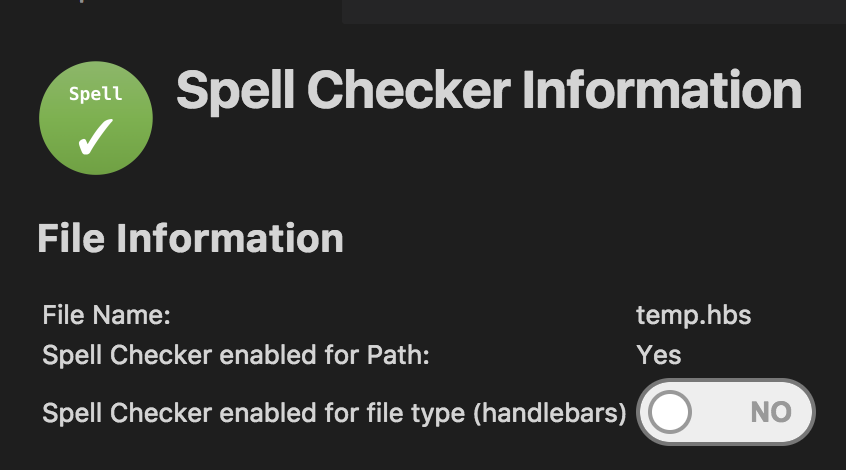
Your right, I forgot to turn it on by default.
It is easy to turn on:
F1 Enable Spell Checking Document Language
short cut:
F1 Enable Language
or
Click:

Then Enable it:
Jason3S
on 11 Aug 2017
handlebars is now turned on by default. I'm going to close this issue for now. If you think there is more to be done, please let me know.
Jason3S
on 24 Aug 2017
Whoops this thread got away from me. Thanks so much for your help 🙂
peabnuts123
on 27 Aug 2017
Related issues
 gandalfsaxe
·
3Comments
gandalfsaxe
·
3Comments
 jose-a-sa
·
6Comments
jose-a-sa
·
6Comments
 fgarcia
·
3Comments
fgarcia
·
3Comments
 lucamartinetti
·
3Comments
gandalfsaxe
·
6Comments
lucamartinetti
·
3Comments
gandalfsaxe
·
6Comments
Most helpful comment
One enhancement I am definitely considering is to be able to add dictionary words for specific file types.
For example, when you want to add a word, you can choose which list it belongs to.