Vscode-spell-checker: Not working before document is saved
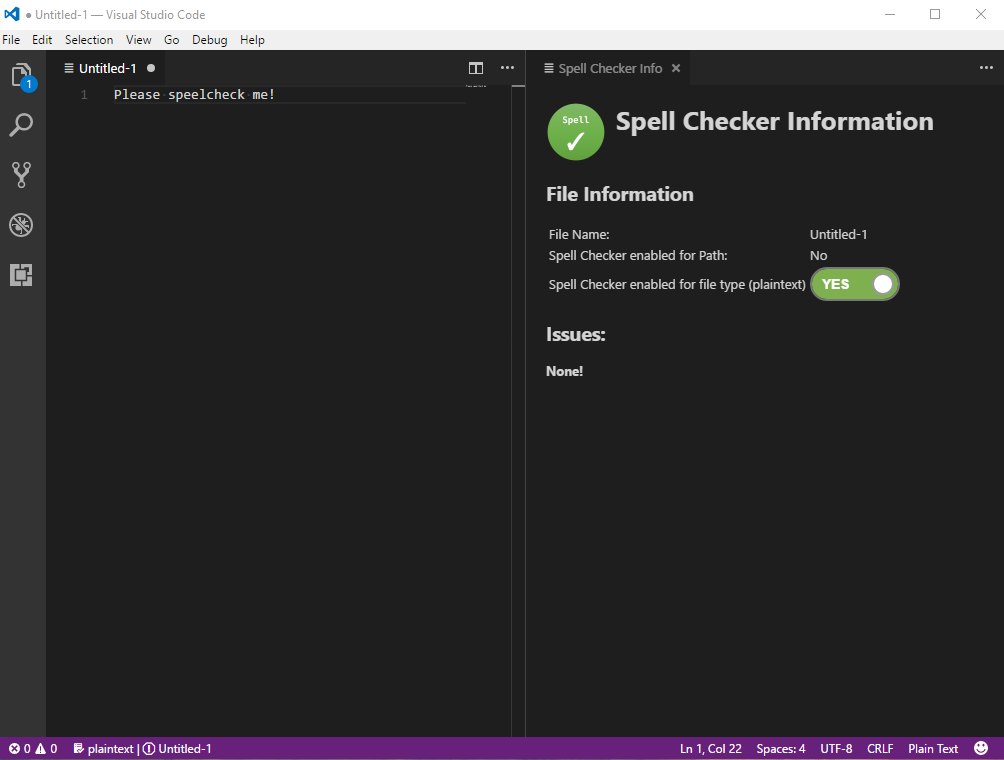
When creating new document but not saving it spell checker doesn't work.
 iddan
iddan
All 7 comments
Thank you.
Until the document is saved, we do not know what type of file it is. It is a sort of special temporary file in VS Code. As a rule, we do not spell check temporary scratch files created by VS Code (it creates a lot of them).
 Jason3S
on 15 Jun 2017
Jason3S
on 15 Jun 2017
I often set a language for temporary files, when set I think it can start spell checking
iddan
on 15 Jun 2017
@Jason3S Would it be possible to reconsider this behavior? I often open VS Code directly and start typing into the default "Untitled-1" plaintext file with no intention of saving it. Not having these files spellchecked is very annoying.
I used to use Sublime Text for this exact thing, and the spell check there works in this case. I'd love to be able to use this same workflow in VS Code!
 bording
on 1 Jul 2017
bording
on 1 Jul 2017
Thank you for the up-vote. I need to investigate how to distinguish between temporary documents created by VS Code and other plugins from newly created documents.
Jason3S
on 2 Jul 2017
In Windows, it creates unsaved file at below location:
C:\Users*{WindowsUserName}*\AppData\Roaming\Code\Backups\
Any way to exclude this path?
 nilact
on 14 Jul 2017
nilact
on 14 Jul 2017
I believe this is now working with 1.3.6 version of the spell checker. Please re-open if it is not.
Jason3S
on 9 Aug 2017
WORKS!
iddan
on 10 Aug 2017
Related issues
 jose-a-sa
·
6Comments
jose-a-sa
·
6Comments
 floatingpurr
·
5Comments
floatingpurr
·
5Comments
 xwang233
·
4Comments
xwang233
·
4Comments
 ghost
·
6Comments
ghost
·
6Comments
 gandalfsaxe
·
3Comments
gandalfsaxe
·
3Comments
Most helpful comment
@Jason3S Would it be possible to reconsider this behavior? I often open VS Code directly and start typing into the default "Untitled-1" plaintext file with no intention of saving it. Not having these files spellchecked is very annoying.
I used to use Sublime Text for this exact thing, and the spell check there works in this case. I'd love to be able to use this same workflow in VS Code!