Vscode-rust: Intellisense not working at all
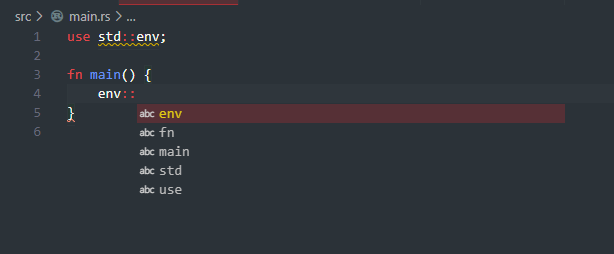
I am currently using VSCode version 1.48.0 and the rust-lang/rust extension from the marketplace version 0.7.8 and I can't seem the intellisense to work at all, not even for the standard library. Here is a screenshot of me trying to use intellisense for the env module in the standard library.
 TheDrone7
All 15 comments
Same issue here on 1.49.0 insider. Errors and warnings do show up, just no autocompletion.
I've found this error in the logs, I don't know if it's related or not:
[2020-08-26 10:36:58.365] [exthost] [error] [rust-lang.rust] provider FAILED
[2020-08-26 10:36:58.366] [exthost] [error] TypeError: Cannot read property 'value' of undefined
    at SignatureHelpProvider.hoverToSignatureHelp (c:\Users\<user>\.vscode-insiders\extensions\rust-lang.rust-0.7.8\out\src\providers\signatureHelpProvider.js:75:41)
    at c:\Users\<user>\.vscode-insiders\extensions\rust-lang.rust-0.7.8\out\src\providers\signatureHelpProvider.js:15:105
 nistvan86
on 26 Aug 2020
nistvan86
on 26 Aug 2020
I'm getting the same error.
Did you find a workaround?
Is there any way to roll back to an older version of the VSCode extension?
 mleonhard
on 7 Sep 2020
mleonhard
on 7 Sep 2020
To see the extension error log, type CTRL/CMD-SHIFT-P to open the command window. Type developer show logs and hit ENTER, select Extension Host from the list and hit ENTER. A pane will appear with the log output of the extension host process.
VSCode's Extensions page has a little gear icon next to each installed extension. Click it and choose "Install Another Version".
The broken extension is 0.7.8. I installed 0.7.7 and restarted. Code completion is still broken. I used the settings page to switch Rust-client: Engine from rls to rust-analyzer. A popup appeared asking to download rust-analyzer. I clicked the Download button but it did nothing. I restarted VSCode several times and clicked the download button each time. The download prompt appeared every time. My computer's network monitor showed no downloads.
I switched back to rls and code completion worked! I changed back to 0.7.8 and completion still works.
I uninstalled the rust extension and reinstalled it at the latest version (0.7.8). Code completion works.
This looks like a heisenbug.
mleonhard
on 7 Sep 2020
I found a solution, it was to install the additional rust-analyzer extension - https://rust-analyzer.github.io/
TheDrone7
on 13 Sep 2020
I have no errors in logs and also couldn't install the rust-analyzer extension since they don't have arm64 binary. I even tried building it from source but took too long so left it. So I'm left with my only option as rls and that too is not giving any auto-complete. Any ideas?
 dhushyanth-s
on 8 Nov 2020
dhushyanth-s
on 8 Nov 2020
For me the issue was working through the rustlings exercises, the default directory where rust code is (./src) has its rust files getting the autocomplete, type hints and other features working but for the the directory where the exercises are(./exercises) nothing is working. It took me almost 3 hours to figure this out
 muse254
on 11 Nov 2020
muse254
on 11 Nov 2020
I don't have a ./exercises directory. I am just having.folder with cargo template folder. I am still not having any intellisense at all. I finally got intellisense after installing rust-analyzer through rustup component add rust-analyzer-preview which had prebuilt arm64 binary.
dhushyanth-s
on 11 Nov 2020
For me the issue was working through the rustlings exercises, the default directory where rust code is (./src) has its rust files getting the autocomplete, type hints and other features working but for the the directory where the exercises are(./exercises) nothing workings. It took me almost 3 hours to figure this out
Thank you so much I was wondering what the hell was wrong. It's no fix but at least I understand why it didn't work on the rustlings exercises now !
 ZFLloyd
on 15 Nov 2020
ZFLloyd
on 15 Nov 2020
I can't believe I got anything done without intellisense. It was broken. No wonder. Now that I got rust-analyzer, things are a million times better
 cherryleafroad
on 1 Jan 2021
cherryleafroad
on 1 Jan 2021
I am currently using VSCode version 1.48.0 and the rust-lang/rust extension from the marketplace version 0.7.8 and I can't seem the intellisense to work at all, not even for the standard library. Here is a screenshot of me trying to use intellisense for the
envmodule in the standard library.
First time you open a rust project it should ask you if you agree to install some dependencies
This is the output of the script
Executing task: rustup component add rust-analysis --toolchain stable-x86_64-unknown-linux-gnu <
info: downloading component 'rust-analysis'
info: installing component 'rust-analysis'
info: using up to 500.0 MiB of RAM to unpack componentsTerminal will be reused by tasks, press any key to close it.
Executing task: rustup component add rust-src --toolchain stable-x86_64-unknown-linux-gnu <
info: component 'rust-src' is up to date
Terminal will be reused by tasks, press any key to close it.
Executing task: rustup component add rls --toolchain stable-x86_64-unknown-linux-gnu <
info: downloading component 'rls'
info: installing component 'rls'
info: using up to 500.0 MiB of RAM to unpack componentsTerminal will be reused by tasks, press any key to close it.
So you should run those script
rustup component add rust-analysis --toolchain stable-x86_64-unknown-linux-gnu
rustup component add rust-src --toolchain stable-x86_64-unknown-linux-gnu
rustup component add rls --toolchain stable-x86_64-unknown-linux-gnu
 FilipLaurentiu
on 6 Jan 2021
FilipLaurentiu
on 6 Jan 2021
I'm using windows and I've already run those commands. I already had that installed, and it never worked properly for me. Maybe it works fine on Linux. I vote to re-open this. _*Proceeds to use rust-analyzer again_
cherryleafroad
on 6 Jan 2021
So basically the "Rust" extension for vscode is useless and its better to use the non-official "rust-analyzer" extension.
 SupremeDeity
on 14 Feb 2021
SupremeDeity
on 14 Feb 2021
@SupremeDeity - I'm _very_ new to Rust, so absolutely do _not_ take this as gospel!
I closed and re-opened my project in VS Code to get the prompts that @FilipLaurentiu mentioned. I already had both extensions installed, so I disabled the rust-analyzer extension and experimented with what the official Rust extension provided in the way of intellisense. Then I disabled the official extension, re-enabled the rust-analyzer extension, and experimented some more. In my _very, very novice opinion_, rust-analyzer provides _significantly_ more assistance!
Interestingly, @matklad, rust-analyzer's publisher and primary contributor, is the number 2 contributor for the official extension. Since rust-analyzer is marked as an experimental preview, hopefully he will be able to incorporate into the official extension soon. Until then, I'm personally going to use rust-analyzer, until there's a compelling reason to move back to the official extension (e.g. no known conflicts between them, they're integrated).
 metasean
on 15 Feb 2021
metasean
on 15 Feb 2021
@metasean Yes, i have disabled the Rust-lang extension and have been using the rust-analyzer extension. It works like a charm, seems to be providing more features and has the intellisense working correctly.
SupremeDeity
on 22 Feb 2021
So basically the "Rust" extension for vscode is useless and its better to use the non-official "rust-analyzer" extension.
That's it !!! I had both installed and after uninstalling the Rust extension, rust-analyzer now works like a charm.
Thanks a lot
 jmevel
on 14 May 2021
jmevel
on 14 May 2021
Related issues
 hpesoj
·
5Comments
hpesoj
·
5Comments
 tYYGH
·
3Comments
tYYGH
·
3Comments
 kjeremy
·
5Comments
kjeremy
·
5Comments
 sfackler
·
6Comments
sfackler
·
6Comments
 iBeizsley
·
3Comments
iBeizsley
·
3Comments
Most helpful comment
I found a solution, it was to install the additional rust-analyzer extension - https://rust-analyzer.github.io/