Vscode-rust: Auto formatting dropping use statements
I'm going to apologize in advance because this issue is probably not terribly helpful. All I can say is what I'm seeing, not what the specific circumstances are, but if there are ways I can help track that down I am super-willing to do legwork. If you just want to close this as providing not enough info then that's fine too.
I've been using this extension for a couple of weeks and have things set to format the code on save. Initially this seemed fine, but recently "use" statements have been getting removed from the source without me doing it. I don't know for sure that it is the rls extension but that is the only thing I can think of that is modifying the source frequently.
Worth noting that I am running with VSCode insider builds (currently 1.35.0-insider (1.35.0-insider)), RLS is at 0.6.1.
 Mossop
All 13 comments
I've also noted (just now in fact) that despite the file being saved before, making some changes to a comment and saving again changed the use statements, in this case it didn't remove any but it did add an extra newline between some.
Mossop
on 5 Jun 2019
I managed to reproduce this. I've confirmed that RLS is dropping use statements, in the case I am seeing here when trying to reorder them. rustfmt from the command line shows the correct changes to apply, RLS makes a different change. This happens whether I format on save or run Format Document from the command palette.
Here is the file and the diff applied by rustfmt and the diff that RLS applied: https://gist.github.com/Mossop/58b8bd28e0be52440124ac78f819e933
Mossop
on 5 Jun 2019
Updated the gist with a comment, I set rls to use the rustfmt from my path and it didn't drop a use statement but it didn't quite apply the same diff.
Mossop
on 5 Jun 2019
I've seen this as well since the 1.35 release.
 sfackler
on 9 Jun 2019
sfackler
on 9 Jun 2019
I have a pretty minimal example:
use B::BA;
use self::A::AA;
use B::{BB, BC};

mod A {
    pub struct AA;
}

mod B {
    pub struct BA;
    pub struct BB;
    pub struct BC;
}
If you try to format these use statements using the latest stable RLS (with Format Document or Ctrl+Shift+i in Vs Code), this happens:
// Empty line remains here.
use self::A::AA;
use B::BA;
 nikonthethird
on 9 Jun 2019
nikonthethird
on 9 Jun 2019
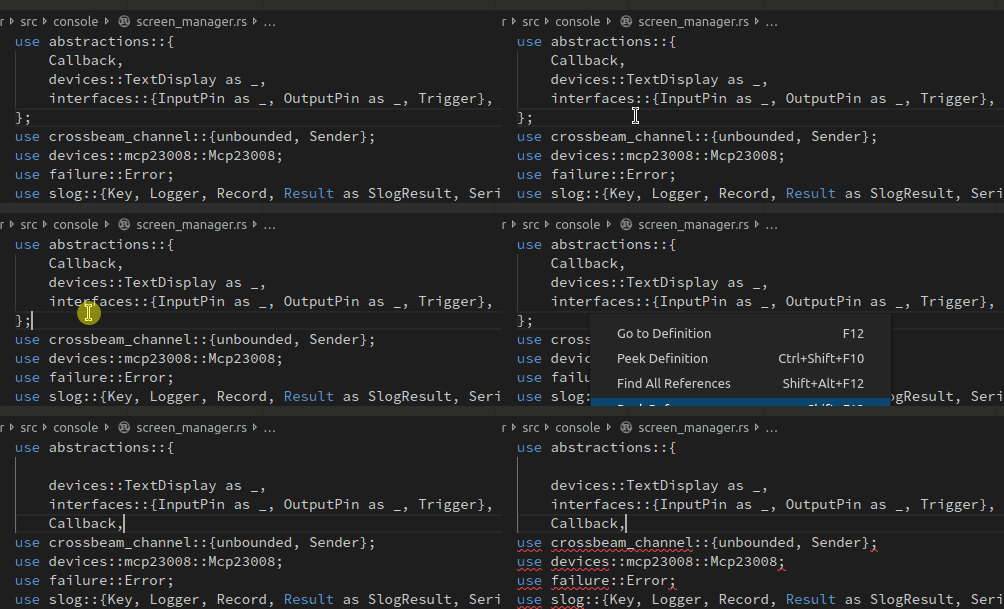
I now found a case where the closing }; of a use block has been overwritten.
nikonthethird
on 9 Jun 2019
Same issue here. Is there any approach to temporarily avoid this?
 hsfzxjy
on 10 Jun 2019
hsfzxjy
on 10 Jun 2019
I'm also experiencing destructive changes on uses and can provide more info if required. Downgrading the toolchain to 1.34.2 "fixes" the issue for me for now.
 dpetrick
on 11 Jun 2019
dpetrick
on 11 Jun 2019
I am also experiencing this issue.
 crsmithdev
on 15 Jun 2019
crsmithdev
on 15 Jun 2019
Same issue here. Is there any approach to temporarily avoid this?
You can create a rustfmt.toml file with reorder_imports = false in your project root.
 Celeo
on 16 Jun 2019
Celeo
on 16 Jun 2019
I've noticed that if you reorder the imports by hand, it won't drop use statements unexpectedly. Takes a little time, but you can avoid adding a rustfmt.toml file until this issue is resolved
 mike-engel
on 16 Jun 2019
mike-engel
on 16 Jun 2019
Duplicate of #576
 viktorku
on 16 Jun 2019
viktorku
on 16 Jun 2019
This is confirmed and fixed in Rust 1.36 (now in beta, will be released in a week), please try using 1.36 and reopen if that still occurs using that channel. Thanks for reporting this and sorry for the hassle!
 Xanewok
on 27 Jun 2019
Xanewok
on 27 Jun 2019
Related issues
 simobiggs
·
4Comments
simobiggs
·
4Comments
 fzzr-
·
4Comments
fzzr-
·
4Comments
 willparsons
·
5Comments
willparsons
·
5Comments
 views63
·
5Comments
views63
·
5Comments
 japert
·
4Comments
japert
·
4Comments
Most helpful comment
This is confirmed and fixed in Rust 1.36 (now in beta, will be released in a week), please try using 1.36 and reopen if that still occurs using that channel. Thanks for reporting this and sorry for the hassle!