Vscode-rust: statusBar "RLS: working" all the time, spinning continuously
While I'm with VS Code open in any Rust code, even when I'm not typing, the "RLS: working" status is permanent and never changes to "RLS: Done".

I've installed this extension in another computer (linux, same distro and configs), and this problem didn't occur.
Is it normal?
 gubasso
All 25 comments
It is not normal and shouldn't happen. It should only spin intermittently as your code is building. Could try turning on some logging to get some more info please? How to do that is described in debugging.md.
 nrc
on 6 Nov 2017
nrc
on 6 Nov 2017
nrc
on 6 Nov 2017
nrc
on 6 Nov 2017
Thanks!
Although I couldn't enable th vscode logging (as in your describing).
I tried to set those options:

The message was that the property rust-client.showStdErr did not exists.
Also, the OUTPUT tab didn't show any message.
Am I doing something wrong?
gubasso
on 7 Nov 2017
I'm running into the same continuous spinning of "RLS: working." Looking at the User Settings auto-completions, rust-client.showStdErr doesn't seem to be a known option (like @gubasso was saying):
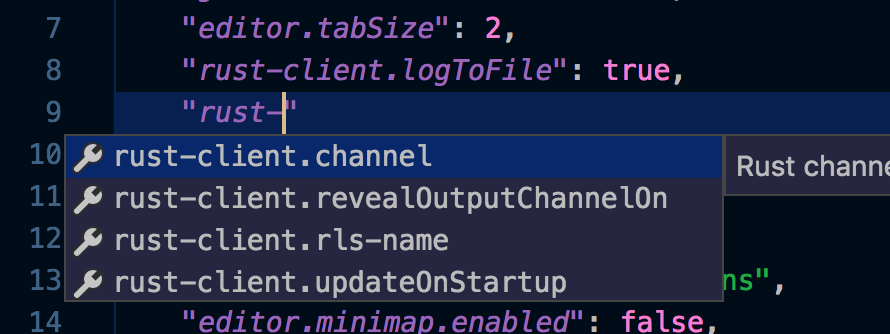
I did set the other option though: "rust-client.logToFile": true. After restarting VSCode and reopening a .rs file, a log file was created in the root of the workspace with the following output:
thread '<unnamed>' panicked at 'need to specify SYSROOT or RUSTC env vars, or rustc must be in PATH', src/libcore/option.rs:839:4
note: Run with `RUST_BACKTRACE=1` for a backtrace.
Re-running with RUST_BACKTRACE=1 outputs:
thread '<unnamed>' panicked at 'need to specify SYSROOT or RUSTC env vars, or rustc must be in PATH', src/libcore/option.rs:839:4
note: Some details are omitted, run with `RUST_BACKTRACE=full` for a verbose backtrace.
stack backtrace:
   0: std::sys::imp::backtrace::tracing::imp::unwind_backtrace
   1: std::sys_common::backtrace::_print
   2: std::panicking::default_hook::{{closure}}
   3: std::panicking::default_hook
   4: std::panicking::rust_panic_with_hook
   5: std::panicking::begin_panic
   6: std::panicking::begin_panic_fmt
   7: rust_begin_unwind
   8: core::panicking::panic_fmt
   9: core::option::expect_failed
  10: <rls_analysis::loader::CargoAnalysisLoader as rls_analysis::loader::AnalysisLoader>::search_directories
  11: rls_analysis::raw::read_analysis_from_files
  12: <rls_analysis::AnalysisHost<L>>::reload_with_blacklist
  13: <rls_analysis::AnalysisHost<L>>::reload_from_analysis
  14: <rls::actions::post_build::PostBuildHandler<O>>::reload_analysis_from_memory
AFAIK, rustc is on my PATH; a quick call via Terminal tells me so:
$ rustc --version
rustc 1.21.0 (3b72af97e 2017-10-09)
I'm also running VSCode from this same Terminal via code ..
EDIT: I also enabled RUST_LOG=rls=debug and got two lines above the output I pasted above:
DEBUG:rls::server: Language Server starting up. Version: 0.123.0-nightly (9ad92e1 2017-11-06)
DEBUG:rls::actions::post_build: reload analysis: "/Volumes/CaseSensitive/dev/tuts/rust/tcpserver"
...
RUST_LOG=rls_analysis=debug didn't give me anything new.
 akappel
on 7 Nov 2017
akappel
on 7 Nov 2017
I ran again only with "rust-client.logToFile": true (and not with rust-client.showStdErr) and got the folowing log files output:
thread '<unnamed>' panicked at 'need to specify SYSROOT or RUSTC env vars, or rustc must be in PATH', /checkout/src/libcore/option.rs:839:4
note: Run with `RUST_BACKTRACE=1` for a backtrace.
I believe it is the same message as @akappel .
The funny thing is that I think the extension is working, but not 100%. Sometimes it takes a while to show the linter. When I first installed this extensions in another computer, I didn't had this kind of delay, neither this continuous spinning. Maybe these could be relate, but not the case right now.
gubasso
on 7 Nov 2017
Useful info, thanks. I'll try to investigate. Is the project you're trying to build public? Could you link to it please?
nrc
on 7 Nov 2017
It's just an exercise I'm doing from "The Book". This is the repo: https://github.com/gubasso/closures-workout
gubasso
on 7 Nov 2017
For the sake of facilitating some cross communication, I believe this exact same error has also been reported in rls proper, both rust-lang-nursery/rls#548 and rust-lang-nursery/rls#544 appear to be tackling the same bug as reported here.
 oceanusxiv
on 7 Nov 2017
oceanusxiv
on 7 Nov 2017
Thanks @eric1221bday. It looks like, based on what @Xanewok posted in https://github.com/rust-lang-nursery/rls/issues/544, that it may be a change in semantics in rls-analysis.
https://github.com/nrc/rls-analysis/commit/37508aefbf359780c872fe5e6e37739e368ae18b
The weird thing is that this commit is almost a month old, and it seems like the oldest reported issue didn't start until 4 days ago.
EDIT: Never mind, it might actually have been experienced by others for a longer time period, based on https://github.com/rust-lang-nursery/rls/issues/450.
akappel
on 7 Nov 2017
As a side note it would nice if extension could report panic instead of continuously working.
 DoumanAsh
on 7 Nov 2017
DoumanAsh
on 7 Nov 2017
I forked and pulled down the https://github.com/nrc/rls-analysis code and wrote the following test in the loader.rs/tests module (https://github.com/akappel/rls-analysis/commit/2f8dd9a5ce191b60f90eb76a475819663e3e5962):
...
...

use std::panic;
use std::env;

#[test]
fn it_should_find_rustc_via_path() {
    // ensure that the env. vars aren't set (restore later if they are)
    let key_sysroot = "SYSROOT";
    let env_sysroot = match env::var_os(&key_sysroot) {
        Some(val) => {
            env::remove_var(&key_sysroot);
            val.to_str().unwrap().to_owned()
        },
        None => {String::new()}
    };

    let key_rustc = "RUSTC";
    let env_rustc = match env::var_os(&key_rustc) {
        Some(val) => {
            env::remove_var(&key_rustc);
            val.to_str().unwrap().to_owned()
        },
        None => {String::new()}
    };

    // run test
    let result = panic::catch_unwind(|| {
        sys_root_path();
    });

    // restore env vars if they were set (in case other tests rely on them)
    env::set_var(key_sysroot, env_sysroot);
    env::set_var(key_rustc, env_rustc);

    assert!(result.is_ok(), "sys_root_path() did not find rustc when it should");
}

...
...
(Sorry for the verbose env. var setup; I'm still getting used to idiomatic Rust)
This test case runs successfully, since my rustc binary is on the PATH. If you want to try it out yourself, I ran the following command:
rustup run nightly-x86_64-apple-darwin cargo test rustc
Doing some further digging, I noticed that a portion of the extension code I'm hitting doesn't actually set the SYSROOT to the result of getSysroot like the log says it does:
https://github.com/rust-lang-nursery/rls-vscode/blob/a7fe0312cac6cb99b21e551be2788f348f86e5f7/src/extension.ts#L68-L77
What this means is that my env still has SYSROOT set to stable when it kicks off the RLS child_process spawn. I pulled down the code locally and added a env.SYSROOT = result; line...:
if (typeof result === 'string') {
    console.info(`Setting sysroot to`, result);
    env.SYSROOT = result;
    if ( ! process.env.RUST_SRC_PATH) {
        env.RUST_SRC_PATH = result + '/lib/rustlib/src/rust/src';
    }
    if (setLibPath) {
        env.DYLD_LIBRARY_PATH = result + '/lib';
        env.LD_LIBRARY_PATH = result + '/lib';
    }
}
...and reran the extension via VSCode debugger (using the resulting VSCode editor window to open a simple hello-world project I have) and still got the same log result:
thread '<unnamed>' panicked at 'need to specify SYSROOT or RUSTC env vars, or rustc must be in PATH', src/libcore/option.rs:839:4
note: Some details are omitted, run with `RUST_BACKTRACE=full` for a verbose backtrace.
stack backtrace:
   0: std::sys::imp::backtrace::tracing::imp::unwind_backtrace
   1: std::sys_common::backtrace::_print
   2: std::panicking::default_hook::{{closure}}
   3: std::panicking::default_hook
   4: std::panicking::rust_panic_with_hook
   5: std::panicking::begin_panic
   6: std::panicking::begin_panic_fmt
   7: rust_begin_unwind
   8: core::panicking::panic_fmt
   9: core::option::expect_failed
  10: <rls_analysis::loader::CargoAnalysisLoader as rls_analysis::loader::AnalysisLoader>::search_directories
  11: rls_analysis::raw::read_analysis_from_files
  12: <rls_analysis::AnalysisHost<L>>::reload_with_blacklist
  13: <rls_analysis::AnalysisHost<L>>::reload_from_analysis
  14: <rls::actions::post_build::PostBuildHandler<O>>::reload_analysis_from_memory
One thing I did notice, though, was that when I opened the rls-analysis repo in the debugging VSCode editor window instead, I got some extra ERROR output before hitting the above output:
ERROR:rustc_save_analysis::dump_visitor: unexpected definition kind when processing collected idents: VariantCtor(DefId { krate: CrateNum(2), index: DefIndex(1:12020) => core[1797]::option[0]::Option[0]::None[0] }, Const)
ERROR:rustc_save_analysis::dump_visitor: unexpected definition kind when processing collected idents: VariantCtor(DefId { krate: CrateNum(2), index: DefIndex(1:2766) => core[1797]::num[0]::FpCategory[0]::Zero[0] }, Const)
ERROR:rustc_save_analysis::dump_visitor: unexpected definition kind when processing collected idents: VariantCtor(DefId { krate: CrateNum(2), index: DefIndex(1:2767) => core[1797]::num[0]::FpCategory[0]::Subnormal[0] }, Const)
ERROR:rustc_save_analysis::dump_visitor: unexpected definition kind when processing collected idents: VariantCtor(DefId { krate: CrateNum(2), index: DefIndex(1:2768) => core[1797]::num[0]::FpCategory[0]::Normal[0] }, Const)
ERROR:rustc_save_analysis::dump_visitor: unexpected definition kind when processing collected idents: VariantCtor(DefId { krate: CrateNum(2), index: DefIndex(1:2764) => core[1797]::num[0]::FpCategory[0]::Nan[0] }, Const)
ERROR:rustc_save_analysis::dump_visitor: unexpected definition kind when processing collected idents: VariantCtor(DefId { krate: CrateNum(2), index: DefIndex(1:2765) => core[1797]::num[0]::FpCategory[0]::Infinite[0] }, Const)
ERROR:rustc_save_analysis::dump_visitor: unexpected definition kind when processing collected idents: VariantCtor(DefId { krate: CrateNum(2), index: DefIndex(1:2766) => core[1797]::num[0]::FpCategory[0]::Zero[0] }, Const)
ERROR:rustc_save_analysis::dump_visitor: unexpected definition kind when processing collected idents: VariantCtor(DefId { krate: CrateNum(2), index: DefIndex(1:2767) => core[1797]::num[0]::FpCategory[0]::Subnormal[0] }, Const)
ERROR:rustc_save_analysis::dump_visitor: unexpected definition kind when processing collected idents: VariantCtor(DefId { krate: CrateNum(2), index: DefIndex(1:2768) => core[1797]::num[0]::FpCategory[0]::Normal[0] }, Const)
...
...
ERROR:rustc_save_analysis::dump_visitor: unexpected definition kind when processing collected idents: VariantCtor(DefId { krate: CrateNum(2), index: DefIndex(1:12020) => core[1797]::option[0]::Option[0]::None[0] }, Const)
ERROR:rustc_save_analysis::dump_visitor: unexpected definition kind when processing collected idents: VariantCtor(DefId { krate: CrateNum(2), index: DefIndex(1:12020) => core[1797]::option[0]::Option[0]::None[0] }, Const)
thread '<unnamed>' panicked at 'need to specify SYSROOT or RUSTC env vars, or rustc must be in PATH', src/libcore/option.rs:839:4
note: Run with `RUST_BACKTRACE=1` for a backtrace.
Sadly, after removing my env.SYSROOT = result; addition, rebuilding the extension, re-adding the line, rebuilding the extension, and re-opening rls-analysis as the repo for the debugger window, I can't seem to replicate that output.
Sorry if that was a bit of a rabbit-hole but my thought process was that if the other VSCode Rust extension can start the RLS server and this extension can't, it may have to do with how we're setting up the environment variables when it's started through child_process.
akappel
on 9 Nov 2017
I tried a dummy approach... uninstalled and installed rust and vscode, tried to began all over again :)
First, installed rust, then vscode, and for last, the extension rust-rls...
And then I got the warn message: "RLS could not set RUST_SRC_PATH for Racer because it could not read the Rust sysroot."
Everything else ran accordingly, but this message kept on even after installing all the extension.
And the issue continued (continuous spinning).
Could this message be related with this issue?
gubasso
on 10 Nov 2017
@gubasso it looks as though the fix has been made via https://github.com/nrc/rls-analysis/issues/119. I'm not entirely sure when to expect it to be released so we can pull it down. @nrc is there a time table on when we should issue a rustup update command to test it out?
akappel
on 10 Nov 2017
Many thanks @akappel !
gubasso
on 10 Nov 2017
is there a time table on when we should issue a rustup update command to test it out?
It's in the bors queue right now (https://github.com/rust-lang/rust/pull/45902), so when that PR hits nightly you'll be good to go. I hope that happens in the next few days, but being more exact is difficult.
nrc
on 10 Nov 2017
for anyone following this issue, rustup update now appears to solve this issue (I get RLS: done).
(My rls still isn't working in different ways but I'm going to make sure that it's not user error)
 MaxBittker
on 12 Nov 2017
MaxBittker
on 12 Nov 2017
@MaxBittker , just tried now and the problem persists...
gubasso
on 12 Nov 2017
I figured it’ll go out tomorrow. If you look at @nrc’s comment above, the PR he referenced was merged 9 hours ago. Hopefully it rolls out with the next nightly.
Sent with GitHawk
akappel
on 13 Nov 2017
It is in the nightly now, if rustup update, then restart VSCode, it should be fixed (it's possible there are other things still wrong of course).
nrc
on 13 Nov 2017
@nrc Tried and there are no problems with RLS any longer. So seems to be working just fine.
DoumanAsh
on 13 Nov 2017
Rust nightly (79cfce3d3 2017-11-12) landed. The spinner now returns from „working“ to „done“. So I think this bug can now be closed. 🎉
 senden9
on 13 Nov 2017
senden9
on 13 Nov 2017
Performed a rustup update and rls --version now shows:
rls-preview 0.123.0-nightly (015073b 2017-11-10)
Starting up VSCode gives the fabled "RLS: done" 👍 .
akappel
on 13 Nov 2017
Thanks for the reports all!
nrc
on 13 Nov 2017
Worked for me too! Thanks guys!!!
gubasso
on 13 Nov 2017
Related issues
 willparsons
·
5Comments
willparsons
·
5Comments
 simobiggs
·
4Comments
simobiggs
·
4Comments
 japert
·
4Comments
japert
·
4Comments
 harrier-lcc
·
4Comments
harrier-lcc
·
4Comments
 booyaa
·
4Comments
booyaa
·
4Comments
Most helpful comment
@MaxBittker , just tried now and the problem persists...