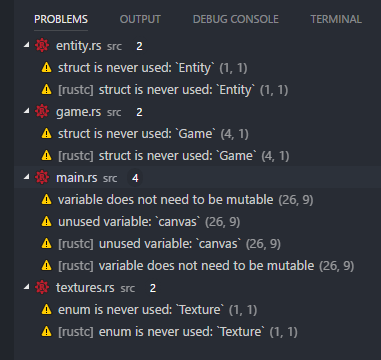
Vscode-rust: Duplicate output in the "Problems" panel
 LordZane
All 9 comments
Was this after doing a cargo build? (I.e., with a task, rather than just the normal checks as you type). I expect in that case we might show both sources of errors.
If this is the case, we could:
- not show errors from cargo tasks (we do show the console output, or could)
- try and be clever and match errors, and elide them in this case. For now, that would be easy, but if we modify the way the RLS presents errors, the duplication would return.
 nrc
on 25 Aug 2017
nrc
on 25 Aug 2017
I think this was due to me using unimplemented!() and then running the cargo run task, as now that my program compiles, I only see the [rustc] errors
Edit: using unimplemented!() again and then running causes duplicate errors that dont seem to go away until you run cargo clean, and then rerun
LordZane
on 28 Aug 2017
I am also experiencing this issue. Not a deal breaker, but it is a bit annoying.

 kanerogers
on 29 Nov 2017
kanerogers
on 29 Nov 2017
It happens because the plugin has a problem matcher for tasks (like cargo run), so these are published by the tasks but don't go away unless they disappear when running the task again, with no errors/warnings this time.
I'm somewhat torn about what to do with this. I think that since the analysis keeps getting better and supporting more use cases is on it's way, we might drop the problem matchers. They are good, however, when one doesn't want to have a constantly running background check (to save battery?) and runs cargo run from time to time himself.
 Xanewok
on 29 Nov 2017
Xanewok
on 29 Nov 2017
I wonder if we could explicitly remove the errors from a task run? Either when we do the next RLS build or after five minutes or something?
nrc
on 29 Nov 2017
I would vote for removing them when RLS is run again. What can get quite annoying is when RLS and cargo errors get out of sync.
For example: let’s say I have an error on line 5, and run cargo build. I then add another line, which moves the error to line 6. RLS tells me that the error is on line 6, but the stale error from the last cargo build erroneously tells me I have an error on line 5. I now have two errors, but one error is incorrect.
Hope this makes sense. I haven’t had any experience with vscode extensions, but I’d be happy to take a look if somebody has an idea of where to get started/how to test.
Thanks,
Kane
On 30 Nov 2017, 7:02 AM +1100, Nick Cameron notifications@github.com, wrote:
I wonder if we could explicitly remove the errors from a task run? Either when we do the next RLS build or after five minutes or something?
—
You are receiving this because you commented.
Reply to this email directly, view it on GitHub, or mute the thread.
kanerogers
on 30 Nov 2017
I'm not sure if vscode allows extensions to mess with problems reported by tasks.json. I tried to dig around the vscode codebase for that, but couldn't find an API to access/modify the problems, only to report them.
Xanewok
on 1 Dec 2017
Did you ever figure this one out? Could this be a fix for it: https://github.com/Microsoft/vscode-go/issues/2100
 nurpax
on 10 Nov 2018
nurpax
on 10 Nov 2018
A cursory glance at the fix (https://github.com/Microsoft/vscode-go/pull/2109) from the linked issue looks like it involves manually deduplicating the reported diagnostics. Might be something worth doing on our side.
Xanewok
on 17 Mar 2019
Related issues
 kjeremy
·
5Comments
kjeremy
·
5Comments
 iBeizsley
·
3Comments
iBeizsley
·
3Comments
 booyaa
·
4Comments
booyaa
·
4Comments
 willparsons
·
5Comments
willparsons
·
5Comments
 sfackler
·
6Comments
sfackler
·
6Comments
Most helpful comment
I would vote for removing them when RLS is run again. What can get quite annoying is when RLS and cargo errors get out of sync.
For example: let’s say I have an error on line 5, and run
cargo build. I then add another line, which moves the error to line 6. RLS tells me that the error is on line 6, but the stale error from the lastcargo builderroneously tells me I have an error on line 5. I now have two errors, but one error is incorrect.Hope this makes sense. I haven’t had any experience with vscode extensions, but I’d be happy to take a look if somebody has an idea of where to get started/how to test.
Thanks,
Kane
On 30 Nov 2017, 7:02 AM +1100, Nick Cameron notifications@github.com, wrote: