Vscode-restclient: Cannot copy data from response
- REST Client Version: 0.24.1
- VSCode Version: 1.47.2
- OS Version: Win_NT x64 10.0.18362
Steps to Reproduce:
Sorry I know this is vague, but its hard to make it repeatable. Some responses seem to have become impossible to copy data from. Others still are fine.
I can repeat it with bearer tokens, from an authorization endpoint, from one API every time.
Make the auth request, tokens are returned to the response editor (as exepected). But if I select the token (or any part of it) in the response and hit CTRL-C and attempt to paste it into my working editor all I get is an empty line. Also this used to work fine, I've been doing this for a couple of years with your plugin, which is awesome by the way.
As a feature suggestion it would be really convenient to have the response as a normal editor window, or at least an option for that.
 codermrrob
All 8 comments
- REST Client 0.24.1
- VS Code 1.47.2
- OS Windows_NT x64 10.0.19041
Can't use Ctrl+C in the Result tab anymore.
It was working until earlier today, when I restarted VS Code.
I updated both my REST Client and my VS Code (from 1.30...) today so maybe one of those has something to do with it.
More details:
The behavior is not that straightforward. If you select the full body of the request you can copy. Also if you select 6 or more rows from the Body you can copy. But if you select lines only from the Headers or less than 6 from the body you can't copy. Very odd.
(And annoying.)
 CharlieScarver
on 18 Jul 2020
CharlieScarver
on 18 Jul 2020
As a feature suggestion it would be really convenient to have the response as a normal editor window, or at least an option for that.
Normal document view is supported by set the setting rest-client.previewResponseInUntitledDocument to true
 Huachao
on 18 Jul 2020
Huachao
on 18 Jul 2020
@CharlieScarver @codermrrob this seems to be related with the VS Code update in 1.47.2, issues already reported by others in the VS Code repository microsoft/vscode#102736
Huachao
on 18 Jul 2020
Thanks - just switching views in the response. Can't believe I missed that :/
Thanks again, great tool, its so much more convenient than Postman, etc
codermrrob
on 21 Jul 2020
Same problem!
vscode version: 1.47.2
 matiasg77
on 22 Jul 2020
matiasg77
on 22 Jul 2020
@CharlieScarver @matiasg77 @codermrrob @DonatasBrazionis @stanb-quali @Hawken94 @ytrinh @rodolphocastro According to the microsoft/vscode#102736, it has been fixed in the latest insider build, could you please confirm it is available. Thanks in advance.
Huachao
on 24 Jul 2020
[...] According to the microsoft/vscode#102736, it has been fixed in the latest insider build, could you please confirm it is available. Thanks in advance.
I can confirm it's working like a charm on Insiders:
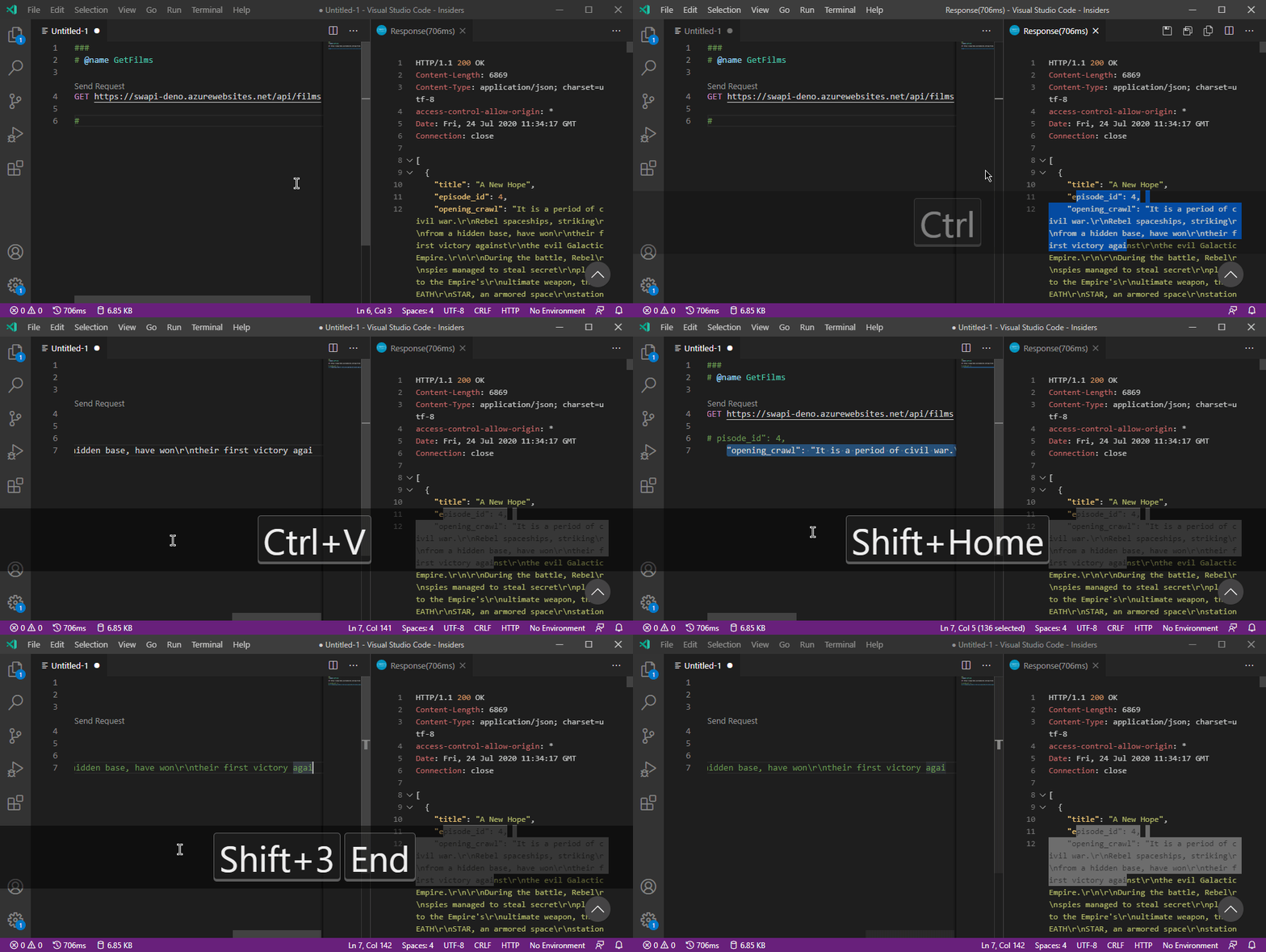
Env. Info:
Visual Studio Code - Insiders

Version: 1.48.0-insider (user setup)
Commit: 8c426f9f3b6b18935cc6c2ec8aa6d45ccd88021e
Date: 2020-07-23T05:50:56.947Z (1 day ago)
Electron: 9.1.0
Chrome: 83.0.4103.122
Node.js: 12.14.1
V8: 8.3.110.13-electron.0
OS: Windows_NT x64 10.0.19042
 rodolphocastro
on 24 Jul 2020
rodolphocastro
on 24 Jul 2020
@CharlieScarver @codermrrob this seems to be related with the VS Code update in 1.47.2, issues already reported by others in the VS Code repository microsoft/vscode#102736
This change has fixed the issues for me, thank you @Huachao it was really bugging me
 Joeboyc2
on 13 Aug 2020
Joeboyc2
on 13 Aug 2020
Related issues
 jianwu
·
13Comments
jianwu
·
13Comments
 Fed29
·
13Comments
Fed29
·
13Comments
 agjs
·
31Comments
agjs
·
31Comments
 heneds
·
32Comments
heneds
·
32Comments
 wboyle-erwin
·
43Comments
wboyle-erwin
·
43Comments
Most helpful comment
Normal document view is supported by set the setting
rest-client.previewResponseInUntitledDocumenttotrue