Vscode-restclient: "click the Send Request link above the request" doesn't work (anymore)
- VSCode Version: 1.17.2
- OS Version: Win10
- REST Client Version: 0.15.3
Steps to Reproduce:
- Install the extension
- paste from docs into new document (or save as .rest/.http and activate HTTP mode, doesn't matter)
POST https://example.com/comments HTTP/1.1
content-type: application/json
{
"name": "sample",
"time": "Wed, 21 Oct 2015 18:27:50 GMT"
}
- a link to click above the HTTP POST line doesn't occur (even if line is of course not first but second/third), it seems the extension can't generate these clickable links anymore
it worked a few days ago, is the nice new VS code versionb with the orange logo breaking it?
 HKochniss
All 10 comments
also, I'm not sure if it first worked at home or at work, in one of those I had a deinstall extension hickup with a VS code update running in between, so I supposed it was corrupted install. But after reinstalling VS code and extension it still remains, and the installer race was onbly on one of these systems
HKochniss
on 25 Oct 2017
btw, the workspace is completely empty, i try to just a have a folder with a .rest file (and later on a .vscode folder with workspace settings file) as aa Postman collection replacement.
HKochniss
on 25 Oct 2017
nevermind: I had the "editor.codeLens" feature set to false in my work environment. I still dunno what it is at home, I'll check therte, but it would be good to add a hint that for the clickable links this (default-on, I know) feature has to be enabled.
HKochniss
on 25 Oct 2017
@HKochniss in my test, even I set this setting to false, the request can still be sent. Can you try the keyboard shortcut (ctrl+alt+r) to send the request to test if it works? Thanks in advance
 Huachao
on 26 Oct 2017
Huachao
on 26 Oct 2017
Sure, shortcut always worked.
If you set the "editor.codeLens" in the respective workspace settings to false and restart VS Code, it wouldn't work.
But maybe there's another issue.
I don't know if that's intended, but you see the clikable button only on the _first_ request in a group that started with a ###
Meaning, subsequent request in that segment don't have the button, don't know if that's intended, but it's unexpected. That my be the reason, without some ### at the start of the file the first request doesn't have the clickable button.
But if that's meant as "a group of request that get executed by this button" it won't work, as the button still just executes the first request
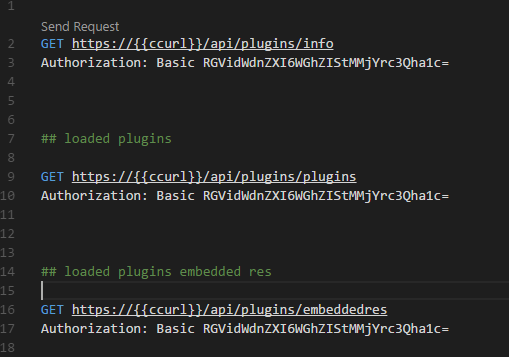
Probably a seperate issue, just wanted to mention that.
Thanks for all the work, will show this awesome extension today as an alternative to Postman in a dev meeting of ours.. (and created a converter script)
HKochniss
on 26 Oct 2017
To be clear:
this issue is about the clickable button only, the shortcut always worked. It's probably more the "CodeLense has to be activated" that was surprising to me, as I turned it off beforehand.
HKochniss
on 26 Oct 2017
@HKochniss Use three consecutive # as a delimiter, we use ### to start a new request block
Like
GET https://localhost/api/users/1

###

GET https://localhost/api/users/

###

POST https://localhost/api/users/
Content-Type: application/json

{
   "name": "test"
}
I know. It's just that if you don't, then only the first request gets the button. But this button doesn't then execute alle the requests below, but just the first one. The current behavior seems inconsistent (there should be a button above every request, or if not, for a good reason, like executing all requests in a block).
Maybe I'm missing something
HKochniss
on 26 Oct 2017
@HKochniss sorry, you didn't miss anything 😢 It's my current design that ### is a request block separator that lines inside it will be identified and parsed as a single request.
Huachao
on 27 Oct 2017
FWIW, @HKochniss found the fix for my situation, which was to enable codeLens. Without that enabled, I didn't get the Send Request button anywhere
Thanks, @Huachao for this awesome tool, and thanks @HKochniss for sharing the solution to that particular problem.
 WellspringCS
on 6 Mar 2020
WellspringCS
on 6 Mar 2020
Related issues
 lldata
·
13Comments
lldata
·
13Comments
 wboyle-erwin
·
43Comments
wboyle-erwin
·
43Comments
 symbioticKid
·
28Comments
symbioticKid
·
28Comments
 SimonDever
·
15Comments
SimonDever
·
15Comments
 olivier-voutat
·
23Comments
olivier-voutat
·
23Comments
Most helpful comment
nevermind: I had the "editor.codeLens" feature set to false in my work environment. I still dunno what it is at home, I'll check therte, but it would be good to add a hint that for the clickable links this (default-on, I know) feature has to be enabled.