Vscode-remote-release: Config: Set executable for compose (podman-compose)
- VSCode Version: 1.50.1
- Local OS Version: Ubuntu 20.04
- Remote OS Version: Alpine/Ubuntu
- Remote Extension/Connection Type: Docker/Podman
Steps to Reproduce:
- Set the executable for containers to
podman - Attempt to launch a dev container with only Podman installed on the local system where a
docker-compose.ymlfile is used in a repo's dev container. (e.g. Requarks/wiki )
Does this issue occur when you try this locally?: N/A
Does this issue occur when you try this locally and all extensions are disabled?: N/A
Desired Behavior:
- Set the executable for containers to
podman - Set the executable for compose to path of podman-compose
- Run
.devcontainer's docker-compose.yml file with the path/executable provided.
Continuation of #116
 josh-hemphill
All 27 comments
This feature request is now a candidate for our backlog. The community has 60 days to upvote the issue. If it receives 10 upvotes we will move it to our backlog. If not, we will close it. To learn more about how we handle feature requests, please see our documentation.
Happy Coding!
 vscode-triage-bot
on 23 Oct 2020
vscode-triage-bot
on 23 Oct 2020
There is no podman-compose exist! It doesn't exist and meaningless [Moving from docker-compose to podman pod]
(https://www.redhat.com/sysadmin/compose-podman-pods) . Imagine deployment of Cloud application to Kubernetes using resource files.
To run Podman user needs Ubuntu or, better choice CentOS 8, 8.2
Unfortunately, Podman for WSL2 is the topic "under construction" yet and Available more or less only for Ubuntu 20.04 () Kube project) with many restrictions.
Other problems:
Podman remote is an optional feature. podman is both CLI and executor, no podmand daemon.
Requires Linux Kernel 4.9 at least
Requires systemd support in WSL2 but MS team resists to provide it.
Requires nft support by CNI instead of iptables, .....................
 PavelSosin-320
on 23 Oct 2020
PavelSosin-320
on 23 Oct 2020
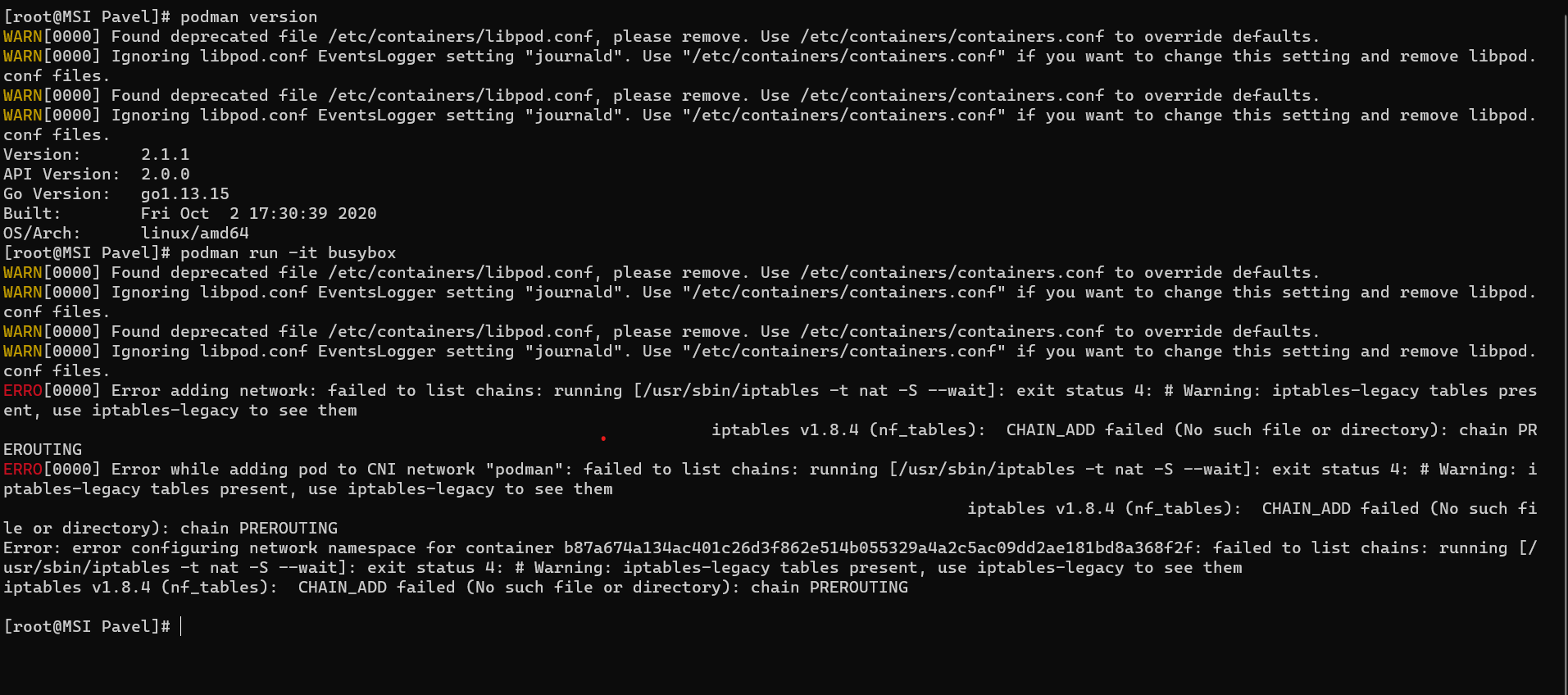
The current state on my machine Podman on CentOS8 distro:
PavelSosin-320
on 23 Oct 2020
@PavelSosin-320 This implementation of podman-compose seems to work well. https://github.com/containers/podman-compose
There are still some missing or incomplete features, but it's had all I need to run the devcontainers I've seen.
I'm not sure what your other point is about, if podman is already supported by vscode-remote, why would podman system compatibilities affect whether it's compose counterpart should also be made configurable?
josh-hemphill
on 23 Oct 2020
@josh-hemphill Thanks, but I failed to install meanwhile. This project may be obsolete:
I installed CentOS8.1 WSL distro, which has been upgraded by RH to 8.2, (Fedora) which assumes Podman 2.1.1.
The GitHub project documentation doesn't mention in which DNF repo I can find it. It can be also the issue of dnf repo optimization - it always finds the mirror in the distance of a few blocks from me. I will communicate with the authors.
I made my choice of CentOS version after reading about Podman roadmap.
PavelSosin-320
on 23 Oct 2020
I've looked under the hood of podman-compose and was disappointed. This is Python script which is not posted to regular DNF repositories. I am afraid it will never be posted. the real thing is Kompose utility which converts docker-compose file into Kubernetes resource file with all Kubernetes capabilities including abilities to deploy it using regular Cloud infrastructure maintenance tools, from Redhat f course. Kompose.
I though in which scenario podman-compose ca help me and didn't find any:
- Run standalone container without networking - thanks, podman run is OK
- The same with networking - don't help without podman pod create, podman network create definitions in the docker-compose. network definition in the compose file is insufficient to create podman network correctly.
- Deploy and up the stack - Docker stack deploy does it better without any changes in the compose-file.
- Start container as a service to debug it like in the real-life - Docker service create works an OK for me - minimal changes in the command are needed.
- Deploy to orchestration engine providing Docker service - I will use Kompose due to better flexibility. Kompose docker-compose file to the Resource yaml file is not so bad as I saw. Simple Helm file created using VSCode plugin - and my stack runs.
- Deploy to remote server or cluster - this is not the strongest thing in the Podman.
Bottom line: I have better candidates for backlog requiring less effort.
PavelSosin-320
on 23 Oct 2020
@PavelSosin-320 If the executable for "compose" functionality is configurable wouldn't you be able to use Kompose too?
josh-hemphill
on 23 Oct 2020
Podman is the product developed by RedHat community and RedHat with the purpose to provide new Container runtime for Cloud applications which doesn't require the creation and maintenance of Linux service. Ubuntu adopted this runtime for the same purpose. Podman-compose is not mentioned in the official RedHat Podman documentation. I didn't succeed to install Podman-compose in the standard way from the general package repositories neither in Ubuntu 20.04 using apt-get nor in CentOS 8.2 using dnf (RedHat + community!!!) - it is missed.
In the podman-compose GitHub repository is explcitely marked that it is the project in construction and has no official release.
Podman has not necessarily must have the same deployment utility as docker taking into account that the preferable way to deploy application stack is Docker stack deploy command which has zero dependencies and included in CLI executive - the dependency will be always satisfied. The situation with docker build and Buildah is exactly the same - it is always a part of Podman.
Podman compose, in the opposite is not a part of EPEL repository, i.e. not yet experimental feature.
RedHat makes its decisions very carefully because its install base is not a few thousands of developers which deploy application releases once a year. There are also a few dozens of thousands of developers which use RedHat software as a platform for the Development environment as a Cloud service with full Development pipeline.
PavelSosin-320
on 24 Oct 2020
Unlike podman-compose buildah is stable dependency - installed in 2 seconds
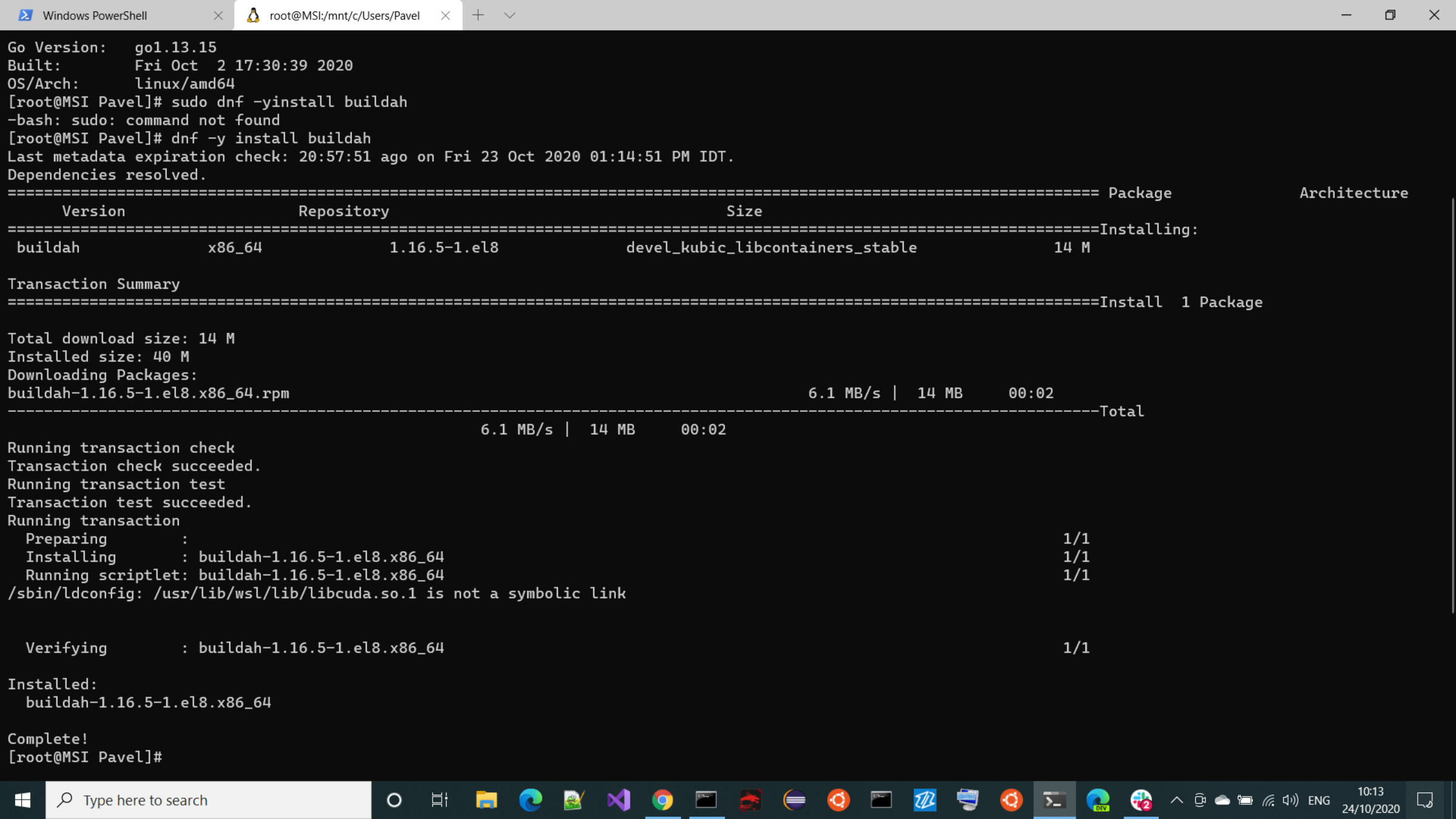
can be used by VSCode plugin with no risk for user.
PavelSosin-320
on 24 Oct 2020
@josh-hemphill I don't like the configuration of executables names unless this is absolutely common executable in the concept because it assumes that the person who makes configuration is able to install the corresponding utility and test that it works in the same short time as change configuration. It also doesn't help in the case when the CLI name is the same but the command is different Docker container create vs Docker service create. How a user can know that the command exists and valid in a certain context?
See the picture of podman run busybox above what happens when CentOS is upgraded from 8.0 to 8.2 by RedHat.
The issue iptables vs nft last already 1 year.
PavelSosin-320
on 24 Oct 2020
@PavelSosin-320 I'm not sure what relevance any of that has to the configurability of the "compose" functionality...
You can use whatever you want, this is not a proposal to change the default.
You can already set the path/name of of the docker service to whatever executable you want, if I wanted I could set it to something non-existent, and break it, I can; why shouldn't I be able to do the same with the compose functionality. This is just consistency with the options already available.
josh-hemphill
on 24 Oct 2020
@josh-hemphill I agree. From the Building containers using buildah. I think this thread can be closed. Kubernetes Kompose also does something very different from docker-compose.
PavelSosin-320
on 25 Oct 2020
@PavelSosin-320 If you have a problem with users being able to set an executable in settings, you should create a separate issue challenging the setting that lets you set the executable for docker to anything, as this thread is requesting consistency with that setting.
josh-hemphill
on 25 Oct 2020
@josh-hemphill I have no problems with the ability to create an alias for executable but I see other very simple ways how to solve the problem for most users, like bash alias, without changing VSCode behavior. On another hand, users will have issues if your PR will be fulfilled and it has some drawbacks already discussed in the Linux community. It is not "safe" feature for users.
PavelSosin-320
on 25 Oct 2020
@PavelSosin-320 The problem is that bash aliasing does not work for the extension. Just like when aliasing docker itself with podman, vscode-remote complains about the version, preventing you from using it until you change the executable, thus giving it confirmation that you don't want version checks.
If it's not safe, then why can we do it for docker itself in the extension settings, that's why I'm saying if you have an issue with users being able to change arbitrary executables, that's a separate issue. If it's not safe, then neither is the configurability of the docker executable that already exists.
josh-hemphill
on 25 Oct 2020
I tried to find the benefits of
Podman-compose to me as a user but find only that the features provided by it either redundant or insufficient to deploy Application onto the Podman stack.
Docker and Podman are not different implementations of the same spec but really different concepts.
Kubernetes' Kompose creates Kubernetes-specific deployment descriptor used by Kubernetes deployment managers from compose-file as a template to be enriched manually.
Docker stack deploy uses existing compose-file of v4 spec. containing Docker service properties needed for deployment onto Orchestration engine and never does build because Builder is not a part of Orchestration engine - possible thanks to merging Docker spec and Orchestration engine spec.
The compose-file spec has to be extended to be useful for deployment onto Podman stack by Buildah and Skopeo sections before the development of utility. Otherwise, it will be another name of Docker / Podman run with a very different set of options.
Aliasing never solves this problem.
Docker as dependency is safe today because docker CLI executable has the same name and its implementations conform with certain Specification's version. This spec also includes Compose-file format It is delivered via well-known repositories that guaranty spec conformance and very good quality in the case of Microsoft, RedHat, and Ubuntu LTE. For example, Docker Desktop dependency can be resolved using WINGET today.
Podman-compose is not mentioned in the Podman RedHat site as a part of Podman, not a part of standard package repositories, and not certified for 4.0 standard. This is only project-in-construction.
PavelSosin-320
on 26 Oct 2020
Vote for it with edition assign VSCode task for Container Build and deploy
PavelSosin-320
on 26 Oct 2020
Finally, I found why Podman doesn't need Podman-compose.
The Docker's compose-file can be converted into Kubernetes Pod definition using Kompose -> MyPodDefinition.yaml.
Then Podman command Podman-play-kube MyPodDefinition.yaml will run it as Podman Pod.
Don't expect any podman-compose appearance. It will never happen!
This simple flow replaces docker-compose. Aliasing Docker-compose will help nobody. Use-case for Podman-compose doesn't exist.
PavelSosin-320
on 27 Oct 2020
You can waste as much time as you have on the unification of Docker and Podman but development for Podman will never work as for Docker. Podman needs Pod resource definition and it starts from Kube template creation - see attachment
PodmanGenerateKubeHelp.txt
.
PavelSosin-320
on 28 Oct 2020
The full podman development cycle can be implemented without using any docker utilities! The Resource YAML create using from my test nginx Pod using:
podman run -dt --pod new:nginx -p 32597:80 quay.io/libpod/alpine_nginx:latest
podman generate kube nginx8080 > nginx.yaml
playable on podman and kubernetes is here:# Generation of Kubernetes YAML is still under development!
#
Save the output of this file and use kubectl create -f to import
it into Kubernetes.
#
Created with podman-2.1.1
apiVersion: v1
kind: Pod
metadata:
creationTimestamp: "2020-11-01T07:47:05Z"
labels:
app: nginx8080
name: nginx8080
spec:
containers:
- command:
- nginx
- -g
- daemon off;
env: - name: PATH
value: /usr/local/sbin:/usr/local/bin:/usr/sbin:/usr/bin:/sbin:/bin - name: TERM
value: xterm - name: container
value: podman - name: containers
value: podman - name: HOSTNAME
value: nginx8080
image: quay.io/libpod/alpine_nginx:latest
name: vibrantbhabha
ports: - containerPort: 80
hostPort: 8080
protocol: TCP
resources: {}
securityContext:
allowPrivilegeEscalation: true
capabilities: {}
privileged: false
readOnlyRootFilesystem: false
seLinuxOptions: {}
tty: true
workingDir: /
restartPolicy: Never
status: {}
metadata:
creationTimestamp: null
spec: {}
status:
loadBalancer: {}
In other words, DevContainer development can go straight to full Podman suport skipping Podman-Docker compatibility step
Done using Podman on WSL Ubuntu20.04 TLS distro only
PavelSosin-320
on 1 Nov 2020
Assuming podman-compose is CLI-compatible with docker-compose, having a setting to point Remote-Containers at it makes sense. (Kubernetes support is tracked with #12.)
 chrmarti
on 2 Nov 2020
chrmarti
on 2 Nov 2020
@chrmarti No it is not compatible. Podman creates Kubernetes application pod and exports its playable definition as a Kubernetes resource yaml for artifact type Pod. I tried it and it works perfectly in WSL.
Created with podman-2.1.1
From
sudo podman run -dt --pod new:devcontainerfocal mcr.microsoft.com/vscode/devcontainers/base
sudo podman create -dt --pod devcontainerfocal docker.io/python:latest_
I.e. Application Pod definition containing dev-container base and phyton tools container
creates:
apiVersion: v1
kind: Pod
metadata:
creationTimestamp: "2020-11-02T09:37:23Z"
labels:
app: devcontainerfocal
name: devcontainerfocal
spec:
containers:
- command:
.
.............
The result YAML can be "played" using Podman or deployed to Kubernetes.
The podman is actually anti-docker because assumes scalability and administration done by Kubernetes but doesn't run as a server.
Podman as a product is made by RedHat - the provider of Software infra and management tools for Kubernetes used by all Cloud providers. No-Cloud, No-Enterprise Linux and No-Kubernetes are out-of-the-scope for them. CentOS is RHEL desktop.
PavelSosin-320
on 2 Nov 2020
@PavelSosin-320 Podman is also a container engine: https://podman.io/
chrmarti
on 2 Nov 2020
I'm not so sure what all the resistance is to providing a similar setting to the Docker executable path.
I've tried making a symlink to podman-compose, but it just says "Docker-Compose Required" as an error message, which I'm pretty sure is just a version check, but I'm not completely sure. I use Fedora, and I use podman-compose every day. It's largely CLI compatible with docker-compose. I generally know what I'm doing and know that it's not always gonna be a 1:1 replacement for docker-compose (especially networking), but it works pretty well most of the time, which is good enough for me.
For the record, podman-compose is perfectly well maintained, and it's in the fedora repos.
 awensaunders
on 17 Nov 2020
awensaunders
on 17 Nov 2020
Sorry, I revise my opinion but I found that there are many official alternatives for OCI image builder:
Docker-compose build
Docker build, can use buildx since Docker 19.03
Docker buildx - uses buildkit buildx
Podman build - uses Buildah
Podman Buildah bud, it can use Docker image repositories.
and all these alternatives are easily integrated ALREADY. All of them build OCI container image in v2 format.
Docker-compose up as deployment tool has several official alternatives too:
Docker stack deploy to Swarm and Kubernetes. It doesn't do a build but creates services using compose file definition, i.e. ALREADY integrated with docker-compose.
Podman kube play and Podman generate systemd unit.
Unfortunately, dev-container extension simply ignores all these alternatives. It knows to build only Docker image using devcontainer.json properties and run standalone container.
I agree that the developer has the right to choose builder and deployment tools. But the choice is not Docker or Podman. All these tools accept different options and require additional configuration. The container image repository list configuration is done differently. A simple executable switch will not be enough and will break existing integration.
PavelSosin-320
on 22 Nov 2020
@PavelSosin-320 It can't break anything for existing users if the default doesn't change.
For podman-compose, just an executable switch is enough; that's the whole point of it, it's supposed to be a binary replacement that just substitutes podman for docker. There's a few exceptions where it doesn't have feature parity, but for most docker-compose files, it works just fine. For people who have Podman installed, having podman-compose take care of 80-90% of the dev containers you'll use is good enough.
josh-hemphill
on 22 Nov 2020
@josh-hemphill Maybe, it comes from my personal experience, but I hate program name aliasing because for people working in 4th line support such easy switching without the explicit disclaimer "for all problems related to podman-compose open issue in... and attach podman version, python version... etc. " it makes their life like a hell. The bug correction backlog has a length above life expectancy. If a choice between docker-compose and podman-compose is required it has to be enabled as a configuration parameter and documented. The availability of the corresponding utility has to be done manually or automatically.
PavelSosin-320
on 23 Nov 2020
Related issues
 kzawad1
·
3Comments
kzawad1
·
3Comments
 robertlugg
·
3Comments
robertlugg
·
3Comments
 peterkappelt
·
3Comments
peterkappelt
·
3Comments
 nphmuller
·
3Comments
nphmuller
·
3Comments
 jkoritzinsky
·
3Comments
jkoritzinsky
·
3Comments