Vscode-remote-release: Remote-Containers: git clone no such device or address
- VSCode Version: 1.40.2
- OS Version: Windows 7
Summary:
git cloning a private repository using GIT_TOKEN env var doesn't work when used inside "postCreateCommand" property
Steps to Reproduce:
- Create a private repository in Github
- Create PAT and put it in .env file as GIT_TOKEN=token_value
- Pass the env file to docker in the runArgs
- Build the container from within vscode
Additional information:
Output of Dev Containers terminal:

Opening a bash terminal in the container, works without making any change, or defining any additional env var:
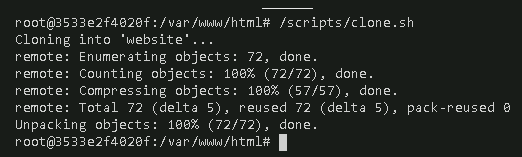
clone.sh code:
#!/bin/bash
git config --global user.name "$GIT_USER"
git config --global user.email "$GIT_MAIL"
git clone https://github.com/KevinGuancheDarias/test-private.git website
devcontainer.json
{
  "name": "Website dev test",
  "dockerFile": "Dockerfile",
  "settings": {
    "terminal.integrated.shell.linux": "/bin/bash"
  },
  "appPort": [
    "0.0.0.0:3232:3232"
  ],
  "runArgs": [
    "--env-file",
    ".devcontainer/devcontainer.env"
  ],
  "workspaceMount": "src=kgdw_volume,dst=/var/www/html,type=volume,volume-driver=local",
  "workspaceFolder": "/var/www/html",
  "postCreateCommand": "/scripts/clone.sh",
  "extensions": []
}
Best regards!
 KevinGuancheDarias
All 9 comments
Is GIT_TOKEN a variable supported by Git? I think this might work from the integrated terminal because we register a credentials helper in the container's Git config.
 chrmarti
on 5 Dec 2019
chrmarti
on 5 Dec 2019
Hello, yes, as far as I know, it's a supported variable, I have been using it in my projects for CI cloning, running commands like $ GIT_TOKEN=token git clone https://github.com/owner/repo.git .
Update: Seems it doesn't work in a clean git install... maybe I had a custom git implementation, or maybe it was a CI env-var, and not a Git env-var
Using git clone https://[email protected]/owner/repo.git works correctly, in a clean install of git`.
Anyway, if VSCode is passing the git credentials to the container, would be nice if possible to have those credentials available in the postCreateCommand
Thanks in advance for your time @chrmarti !
KevinGuancheDarias
on 5 Dec 2019
@chrmarti could you post verification steps if verification is needed for this issue?
 connor4312
on 29 Jan 2020
connor4312
on 29 Jan 2020
To verify:
- Add
git clone ...for a private repository (HTTPS or SSH) to"postCreateCommand"in the devcontainer.json. Since there is no keyboard interaction at that point:
- HTTPS: Make sure the local Git credentials manager has the credentials stored (try
git clone ...locally - if that doesn't ask for credentials you're good). - SSH: Make sure you have the SSH key registered with the local SSH agent (
ssh-add ...).
- HTTPS: Make sure the local Git credentials manager has the credentials stored (try
- Rebuild the container and verify the private repository is successfully cloned.
See https://github.com/microsoft/vscode-remote-containers/blob/master/CONTRIBUTING.md#testing-remote-containers for instructions on getting a devcontainer (use a "single container").
chrmarti
on 30 Jan 2020
I was able to clone via HTTPS using the git osxkeychain credential store, but SSH gave me the error:
[3472 ms] Start: Run: docker exec -w /workspaces/empty-dev -u root -e SSH_AUTH_SOCK=/tmp/vscode-ssh-auth-aa202fbe75484d2cf5cea5fe8574daa05c978dce.sock -e REMOTE_CONTAINERS_IPC=/tmp/vscode-remote-containers-ipc-aa202fbe75484d2cf5cea5fe8574daa05c978dce.sock 4fca50ecaad6268e070a69bf3775917b578d6515337855fe5c0d5d8b2054906b /bin/sh -c git clone [email protected]:JacksonKearl/test-private.git
[3724 ms] Cloning into 'test-private'...
[3852 ms] Host key verification failed.
[3853 ms] f
[3854 ms] atal:
[3854 ms] C
[3855 ms] ould not read from remote repository.

Please make sure you have the correct access rights
and the repository exists.
I am able to clone over HTTPS and SSH without any keyboard input locally.
 JacksonKearl
on 30 Jan 2020
JacksonKearl
on 30 Jan 2020
I forgot: You either need to use -oStrictHostKeyChecking=no or somehow get the known_hosts file in the container, e.g.:
"mounts": [
    "type=bind,source=${env:HOME}${env:USERPROFILE}/.ssh,target=/root/.ssh"
],
Please retry with that. Thanks.
chrmarti
on 31 Jan 2020
Worked with
"mounts": [
 "type=bind,source=${env:HOME}${env:USERPROFILE}/.ssh/known_hosts,target=/root/.ssh/known_hosts"
],
Any way we could add that by default? Needing to mount ~/.ssh isnt great for usability. And mounting ~/.ssh/id_rsa seems dangerous.
JacksonKearl
on 31 Jan 2020
@JacksonKearl @chrmarti Mounting the .ssh folder actually doesn't work on Windows because the permissions are set wrong - SSH will bomb complaining about it. You end up having to mount to an alternate location and copy. This is why SSH agent forwarding was implemented. Bind mounts also do not work with remote containers, so it would actually cause errors in those cases.
We could implement a separate feature that is about known_hosts and ssh config specifically if we wanted to, but it would have to be a copy rather than a mount.
 Chuxel
on 31 Jan 2020
Chuxel
on 31 Jan 2020
Following up in #2285.
chrmarti
on 3 Feb 2020
Related issues
 mxdmedia
·
3Comments
mxdmedia
·
3Comments
 abdullahiabdirahman
·
3Comments
abdullahiabdirahman
·
3Comments
 Yvand
·
3Comments
Yvand
·
3Comments
 6XAM
·
3Comments
6XAM
·
3Comments
 asyncx
·
3Comments
asyncx
·
3Comments