Vscode-remote-release: Containers running on new Docker WSL2 Backend throwing error when trying to attach VS Code
Issue Type: Bug
After the newest Docker Desktop update (2019-11-05), which replaced WSL2 Tech Preview for WSL2 Backend, I'm no longer able to attach VS Code to containers.
Expected result:
Using Docker extension, from the container listing, attach VS Code to the container.
Actual result:
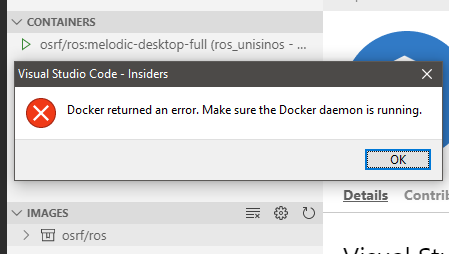
When trying to attach to the container in the containers list, VS throw the following error: "Docker returned an error. Make sure the Docker daemon is running."
Docker Desktop version: 2.1.5.0 (40323)
Extension version: 0.83.0
VS Code version: Code - Insiders 1.40.0-insider (d39e6b396c3ea364584126316a0fcf30f9cb378e, 2019-11-05T02:01:04.347Z)
OS version: Windows_NT x64 10.0.19013
 fadlio
All 2 comments
@fadlio A few things here with 2.1.5.0 and updates to the Docker extension.
- I noticed you were using the docker extension in the screen shot above. Does it work if you use the Remote Explorer to attach instead? I am able to successfully attach using this method.
- Did you have VS Code connected to WSL at the time? The Docker extension recently updated to a
workspaceextension which may break its ability to use this command when connected to WSL (see #1826). We're generally recommending using remote explorer which will never have this problem. - One thing I noticed about this Docker update is that it actually seemed to break the WSL context since they now updated the default context. So if you had it set to WSL before, and then upgraded, anything that pays attention to the Docker context like Remote - Containers would stop working. Did you run
docker context use defaultbefore attempting this?
 Chuxel
on 13 Nov 2019
Chuxel
on 13 Nov 2019
@Chuxel 3. did the trick! Thank you so much!
fadlio
on 13 Nov 2019
Related issues
 jkoritzinsky
·
3Comments
jkoritzinsky
·
3Comments
 mxdmedia
·
3Comments
mxdmedia
·
3Comments
 kieferrm
·
3Comments
kieferrm
·
3Comments
 nphmuller
·
3Comments
nphmuller
·
3Comments
 gulshan
·
3Comments
gulshan
·
3Comments