Vscode-remote-release: Panel "check remote" keeps popping out and interrupting my work
- VSCode Version: 1.39.2 (system setup)
- Local OS Version: Windows_NT x64 6.1.7601
- Remote OS Version: Ubuntu 18.04 LTS
- Remote Extension/Connection Type: SSH
Steps to Reproduce:
- Connect a remote host using unstable network like LTE
- Pannel "Check remote" constantly pop up, and get focus.
- THAT! IS! ANNOYED! I have to move my mouse and let my hands leave the keyboard.
- Some one please tell me how to fix....
Does this issue occur when you try this locally?: No
Does this issue occur when you try this locally and all extensions are disabled?: No
 Hypnoes
All 107 comments
Not sure exactly what you're referring to. I assume you are seeing the "Reconnecting" dialog. Since your connection is unstable, we might lose the connection and have to set it up again.
 roblourens
on 11 Nov 2019
roblourens
on 11 Nov 2019
This is what the symptoms look like:

I've not figured out what the rhyme or reason this pops up is. No text ever appears in the terminal window.
Normally, I don't my terminal view open at all. This usually happens a few times per day to me. Sometimes it seems it's in rapid succession (several times in 10 minutes) and sometimes it hours in between.
 RobertBlackhart
on 12 Nov 2019
RobertBlackhart
on 12 Nov 2019
Can you share the log from the Remote-SSH extension after this happens?
roblourens
on 12 Nov 2019
I just had it happen this morning, almost right away after I reloaded the window after reconnecting to the network, then again just as I was trying to gather your log.
This is the text from the output window titled "Remote - SSH":
[05:51:08.152] [email protected]
[05:51:08.152] win32 x64
[05:51:08.157] SSH Resolver called for "ssh-remote+vscode_remote", attempt 1
[05:51:08.158] SSH Resolver called for host: vscode_remote
[05:51:08.158] Setting up SSH remote "vscode_remote"
[05:51:08.266] Using commit id "213bdddb72ff7a6c8eed071420de8ddac4293cb1" and quality "insider" for server
[05:51:08.269] Testing ssh with ssh -V
[05:51:08.738] ssh exited with code: 0
[05:51:08.738] Got stderr from ssh: OpenSSH_for_Windows_7.7p1, LibreSSL 2.6.5
[05:51:08.753] Running script with connection command: ssh -T -D 60812 vscode_remote bash
[05:51:08.764] Install and start server if needed
[05:51:08.770] Terminal shell path: C:\WINDOWS\System32\cmd.exe
[05:51:09.332] >
[05:51:09.333] Got some output, clearing connection timeout
[05:51:10.611] > stty: standard input: Inappropriate ioctl for device
> 0660133aa2c7: running
> Acquiring lock on /u/mcdermor/.vscode-server-insiders/bin/213bdddb72ff7a6c8eed07
> 1420de8ddac4293cb1/vscode-remote-lock.213bdddb72ff7a6c8eed071420de8ddac4293cb1
> Found old VS Code install 31f577ec88dc96ad2028699fb597b19022224b46, attempting t
> o clean up
> Install still has running processes, not deleting: 31f577ec88dc96ad2028699fb597b
> 19022224b46
> Found old VS Code install b53811e67e65c6a564a80e1c412ca2b13de02907, attempting t
> o clean up
> Failed to acquire lock for install, not deleting: b53811e67e65c6a564a80e1c412ca2
> b13de02907
> Found existing installation at /u/mcdermor/.vscode-server-insiders/bin/213bdddb7
> 2ff7a6c8eed071420de8ddac4293cb1...
> Found running server...
>
> *
> * Reminder: You may only use this software with Visual Studio family products,
> * as described in the license (https://go.microsoft.com/fwlink/?linkid=2077057)
> *
>
>
[05:51:10.638] > Checking server status on port 39710 with wget
> 0660133aa2c7: start
> sshAuthSock====
> agentPort==39710==
> webViewServerPort====
> osReleaseId==rhel==
> arch==x86_64==
> webUiAccessToken====
> 0660133aa2c7: end
>
[05:51:10.639] Received install output:
sshAuthSock====
agentPort==39710==
webViewServerPort====
osReleaseId==rhel==
arch==x86_64==
webUiAccessToken====

[05:51:10.640] Remote server is listening on port 39710
[05:51:10.640] Parsed server configuration: {"agentPort":39710,"osReleaseId":"rhel","arch":"x86_64","webUiAccessToken":"","sshAuthSock":""}
[05:51:10.653] Starting forwarding server. localPort 60818 -> socksPort 60812 -> remotePort 39710
[05:51:10.655] Forwarding server listening on 60818
[05:51:10.656] Waiting for ssh tunnel to be ready
[05:51:10.663] Tunneled remote port 39710 to local port 60818
[05:51:10.663] Resolved "ssh-remote+vscode_remote" to "127.0.0.1:60818"
[05:51:10.668] ------


[05:51:10.669] [Forwarding server 60818] Got connection 0
[05:51:10.735] [Forwarding server 60818] Got connection 1
[05:51:10.737] [Forwarding server 60818] Got connection 2
[05:51:11.680] [Forwarding server 60818] Got connection 3
[05:54:10.658] >
[05:57:10.665] >
That was the output right after I saw the window appear the first time. As I was writing this, like I mentioned above, it appeared again. When I checked the Remote - SSH output after that, this was the only additional line:
[06:00:10.658] >
Again, while writing this, it happened two more times and again all I see are blank lines added:
[06:03:10.668] >
[06:06:10.667] >
None of the other logs are getting updated (by looking at their timestamps), but if any of the others would be useful, let me know.
RobertBlackhart
on 13 Nov 2019
@Tyriar any idea why this would happen when I set hideFromUser on this terminal?
roblourens
on 17 Nov 2019
They're on Windows 7 so my guess is it's this problem https://github.com/microsoft/vscode/issues/43169
 Tyriar
on 17 Nov 2019
Tyriar
on 17 Nov 2019
I'm using Windows 10 1809 (OS Build 17763.805) currently, not 7.
RobertBlackhart
on 18 Nov 2019
Oh OK, I saw this and assumed it was talking about Windows 7:
[05:51:08.738] Got stderr from ssh: OpenSSH_for_Windows_7.7p1, LibreSSL 2.6.5
So it works on the initial connection and all reconnects from the same window fail? Or just some?
17763.805
This is definitely on winpty so it could be https://github.com/Microsoft/vscode/issues/57803. @RobertBlackhart were you on v1.40.0 when seeing this? Does updating to 1.40.1 help?
Tyriar
on 18 Nov 2019
I'm not sure what you mean by "all reconnects from the same window fail". I haven't experienced a lot of reconnect failures that I would currently pin on VSCode. This symptoms of this bug don't seem to be related to reconnects. It seems to happen even without them.
I just updated to 1.41.0 today so I will have to let you know how it goes.
RobertBlackhart
on 18 Nov 2019
@Tyriar I mean the problem is, the terminal is never supposed to be shown to the user at all because I set that flag and never try to reveal it.
roblourens
on 19 Nov 2019
As of version 1.41.0, this is still occurring for me.
RobertBlackhart
on 19 Nov 2019
I don't have any good way to measure this, but I do feel like it hasn't been happening nearly as often as it was when I first started watching this thread.
RobertBlackhart
on 19 Nov 2019
I don't have any good way to measure this, but I do feel like it hasn't been happening nearly as often as it was when I first started watching this thread.
Yes, same as I met.
Hypnoes
on 26 Nov 2019
I haven't seen this error in any recent times. Some update must have fixed it at or around 1.41.0. This issue can be closed.
RobertBlackhart
on 6 Dec 2019
Thanks for following up!
roblourens
on 6 Dec 2019
Hmm, bad news. I just saw this pop up again. I'm currently running this version:
Version: 1.41.0-insider (user setup)
Commit: 87c2e0be5d7359ce110c4c9ec9f6df71be996f8a
Date: 2019-12-06T21:36:11.793Z
Electron: 6.1.5
Chrome: 76.0.3809.146
Node.js: 12.4.0
V8: 7.6.303.31-electron.0
OS: Windows_NT x64 10.0.18362
Something new I've noticed. It used to be that the "Check Remote" window was blank. Now when it appears, it has the text "source
This text is not always present. Sometimes when the window appears it's still blank, but I've seen it more than once.
RobertBlackhart
on 10 Dec 2019
Something new I've noticed. It used to be that the "Check Remote" window was blank. Now when it appears, it has the text "source
" in it. Could this window be related to something in the Python extension? This text is not always present. Sometimes when the window appears it's still blank, but I've seen it more than once.
Same
Hypnoes
on 12 Dec 2019
Are you sure it's the terminal that says "check remote" and not a terminal related to the python extension?
roblourens
on 12 Dec 2019

I'm writing a scala project and i got this problem too.
Hypnoes
on 12 Dec 2019
Can you share your settings?
roblourens
on 13 Dec 2019
settings.json
{
    "git.enableSmartCommit": true,
    "editor.cursorBlinking": "phase",
    "editor.fontFamily": "'Cascadia Code', 'PingFang SC Regular'",
    "editor.fontLigatures": true,
    "editor.minimap.enabled": false,
    "editor.mouseWheelZoom": true,
    "editor.rulers": [
        80,
        100,
        120
    ],
    "zenMode.centerLayout": false,
    "zenMode.hideTabs": false,
    "explorer.confirmDelete": false,
    "git.confirmSync": false,
    "git.autofetch": true,
    "workbench.iconTheme": "vscode-icons",
    "terminal.integrated.shell.windows": "C:\\Windows\\System32\\WindowsPowerShell\\v1.0\\powershell.exe",
    "workbench.startupEditor": "newUntitledFile",
    "terminal.integrated.enableBell": true,
    "remote.SSH.showLoginTerminal": true,
    "remote.SSH.enableDynamicForwarding": true,
    "remote.SSH.allowLocalServerDownload": true,
    "editor.suggestSelection": "first",
    "vsintellicode.modify.editor.suggestSelection": "automaticallyOverrodeDefaultValue",
    "python.jediEnabled": false,
    "files.exclude": {
        "**/.classpath": true,
        "**/.project": true,
        "**/.settings": true,
        "**/.factorypath": true
    },
    "files.autoGuessEncoding": false
}
Does it still happen if you disable remote.SSH.showLoginTerminal?
roblourens
on 13 Dec 2019
Here is my settings.json. I don't have the remote.SSH.showLoginTerminal set. I think the default is false though (because that's what the editor fills in for me when I put that key name in). I will set it to false explicitly and see what happens.
{
    "editor.rulers": [80],
    "editor.multiCursorModifier": "ctrlCmd",
    "files.eol": "\n",
    "window.zoomLevel": 0,
    "editor.renderWhitespace": "none",
    "workbench.colorCustomizations": {
        "statusBar.background": "#666666"
    },
    "search.exclude": {
        "**/node_modules": true,
        "**/bower_components": true,
        "**/bedrock": true
    },
    "workbench.iconTheme": "vscode-icons",
    "vsicons.projectDetection.disableDetect": true,
    "editor.suggestSelection": "first",
    "files.watcherExclude": {
        "**/bedrock/**": true
    },
    "files.associations": {
        "*.thpl": "perl",
        "*.ut": "cpp"
    },
    "python.insidersChannel": "off",
    "trailing-spaces.trimOnSave": true,
    "vsicons.dontShowNewVersionMessage": true,
    "extensions.ignoreRecommendations": false,
    "remote.SSH.allowLocalServerDownload": true,
    "python.testing.pytestEnabled": true,
    "python.analysis.memory.keepLibraryAst": true,
    "python.analysis.memory.keepLibraryLocalVariables": true,
    "python.linting.pylintUseMinimalCheckers": false,
    "python.analysis.openFilesOnly": false,
    "python.dataScience.sendSelectionToInteractiveWindow": false,
    "trailing-spaces.deleteModifiedLinesOnly": true,
    "git.autofetch": true
}
Just an update that even after setting remote.SSH.showLoginTerminal to false, I still see this window pop up sometimes. Today, it was right after I reconnected to the network and did a reload of the window so that VSCode would reconnect.
I looked through the logs and there still doesn't appear to be anything interesting to me, but attaching in case I missed something.
Remote - SSH:
[06:06:37.563] Log Level: 3
[06:06:37.567] [email protected]
[06:06:37.567] win32 x64
[06:06:37.576] SSH Resolver called for "ssh-remote+vscode_remote", attempt 1
[06:06:37.577] SSH Resolver called for host: vscode_remote
[06:06:37.577] Setting up SSH remote "vscode_remote"
[06:06:37.719] Using commit id "241d4048aabc31db0baed66bb3d58cf3210d981d" and quality "insider" for server
[06:06:37.725] Testing ssh with ssh -V
[06:06:38.246] ssh exited with code: 0
[06:06:38.247] Got stderr from ssh: OpenSSH_for_Windows_7.7p1, LibreSSL 2.6.5
[06:06:38.263] Running script with connection command: ssh -T -D 62505 vscode_remote bash
[06:06:38.270] Install and start server if needed
[06:06:38.280] Terminal shell path: C:\WINDOWS\System32\cmd.exe
[06:06:38.728] >
>
>
>
>
>
>
>
>
>
>
>
>
>
>
>
>
>
>
>
>
>
>
> ]0;C:\WINDOWS\System32\cmd.exe
[06:06:38.730] Got some output, clearing connection timeout
[06:06:39.015] >
>
>
>
>
>
>
>
>
>
>
>
>
>
>
>
>
>
>
>
>
>
>
>
[06:06:39.993] > stty: standard input: Inappropriate ioctl for device
>
[06:06:39.998] > 44c9677dc00b: running
>
[06:06:40.015] > Acquiring lock on /u/mcdermor/.vscode-server-insiders/bin/241d4048aabc31db0baed6
> 6bb3d58cf3210d981d/vscode-remote-lock.241d4048aabc31db0baed66bb3d58cf3210d981d
>
[06:06:40.032] > Found old VS Code install 93ee2fc3121b7f66ddf568c051f3bfff7db8d618, attempting t
> o clean up
>
[06:06:40.042] > Deleting old install from /u/mcdermor/.vscode-server-insiders/bin/93ee2fc3121b7f
> 66ddf568c051f3bfff7db8d618
>
[06:06:40.052] > rm: cannot remove `/u/mcdermor/.vscode-server-insiders/bin/93ee2fc3121b7f66ddf56
> 8c051f3bfff7db8d618/.nfs000000000cc7442b00000065': Device or resource busy
> rm: cannot remove `/u/mcdermor/.vscode-server-insiders/bin/93ee2fc3121b7f66ddf56
> 8c051f3bfff7db8d618/.nfs000000000cc7442d00000037': Device or resource busy
>
[06:06:40.067] > Deleting old log file from /u/mcdermor/.vscode-server-insiders/.93ee2fc3121b7f66
> ddf568c051f3bfff7db8d618.log
> Found old VS Code install 31f577ec88dc96ad2028699fb597b19022224b46, attempting t
> o clean up
> rm: cannot remove `/u/mcdermor/.vscode-server-insiders/.93ee2fc3121b7f66ddf568c0
> 51f3bfff7db8d618.log': No such file or directory
> Install still has running processes, not deleting: 31f577ec88dc96ad2028699fb597b
> 19022224b46
> Found old VS Code install b53811e67e65c6a564a80e1c412ca2b13de02907, attempting t
> o clean up
> Failed to acquire lock for install, not deleting: b53811e67e65c6a564a80e1c412ca2
> b13de02907
[06:06:40.075] >
> Found existing installation at /u/mcdermor/.vscode-server-insiders/bin/241d4048a
> abc31db0baed66bb3d58cf3210d981d...
> Found running server...
>
[06:06:40.082] >
> *
>
[06:06:40.089] > * Reminder: You may only use this software with Visual Studio family products,
> * as described in the license (https://go.microsoft.com/fwlink/?linkid=2077057)
> *
>
[06:06:40.094] >
>
[06:06:40.644] > Checking server status on port 35488 with wget
>
[06:06:40.818] > 44c9677dc00b: start
> sshAuthSock====
> agentPort==35488==
[06:06:40.847] >
> webViewServerPort====
> osReleaseId==rhel==
> arch==x86_64==
> webUiAccessToken====
> 44c9677dc00b: end
[06:06:40.848] Received install output:
sshAuthSock====
agentPort==35488==
webViewServerPort====
osReleaseId==rhel==
arch==x86_64==
webUiAccessToken====

[06:06:40.850] Remote server is listening on port 35488
[06:06:40.850] Parsed server configuration: {"agentPort":35488,"osReleaseId":"rhel","arch":"x86_64","webUiAccessToken":"","sshAuthSock":""}
[06:06:40.859] Starting forwarding server. localPort 62508 -> socksPort 62505 -> remotePort 35488
[06:06:40.867] Forwarding server listening on 62508
[06:06:40.868] Waiting for ssh tunnel to be ready
[06:06:40.874] Tunneled remote port 35488 to local port 62508
[06:06:40.875] Resolved "ssh-remote+vscode_remote" to "127.0.0.1:62508"
[06:06:40.883] ------


[06:06:40.884] >
>
[06:06:40.886] [Forwarding server 62508] Got connection 0
[06:06:40.944] [Forwarding server 62508] Got connection 1
[06:06:40.946] [Forwarding server 62508] Got connection 2
[06:06:42.417] [Forwarding server 62508] Got connection 3
[06:06:48.545] [Forwarding server 62508] Got connection 4
I also see this random switch to the "Check remote" tab. Some days I don't see it at all, sometimes I can barely keep it suppressed. I am on OSx (Mojave), but I am also primarily doing python development when I see the issue. I often get the single line "source /../bin/activate" printed out as well.
My settings.json
{
    "editor.fontFamily": "'Hack Nerd Font Mono',Menlo, Monaco, 'Courier New', monospace",
    "editor.fontSize": 14,
    "terminal.integrated.fontSize": 13,
    "terminal.integrated.fontWeightBold": "normal",
    "remote.SSH.lockfilesInTmp": true,
    "workbench.startupEditor": "newUntitledFile",
    "editor.fontLigatures": true,
    "terminal.external.osxExec": "iTerm.app",
    "workbench.colorCustomizations":{
        "terminal.ansiBlue": "#ADADAD",
        "terminal.ansiBlack": "#000000",
        "terminal.background": "#121212",
        "terminal.foreground": "#DEDEDE"
    },
    "python.formatting.provider": "yapf",
    "git.autofetch": true,
    "workbench.colorTheme": "An Old Hope",
    "workbench.iconTheme": "material-icon-theme",
    "window.zoomLevel": 0,
    "remote.SSH.useLocalServer": true,
    "terminal.integrated.fontFamily": "'FuraCode Nerd Font'",
    "terminal.integrated.scrollback": 10000,
    "workbench.panel.defaultLocation": "right",
    "workbench.fontAliasing": "auto",
    "python.linting.mypyEnabled": true,
    "terminal.integrated.macOptionClickForcesSelection": true,
    "autoDocstring.docstringFormat": "google",
    "files.trimTrailingWhitespace": true,
    "python.venvPath": "/Users/awallis/Library/Caches/pypoetry/virtualenvs/",
    "python.linting.mypyPath": "~/bin/mypy",
    "python.linting.flake8Path": "~/bin/flake8",
    "python.linting.pylintEnabled": false,
    "latex-workshop.view.pdf.viewer": "tab",
    "terminal.integrated.shell.linux": "/usr/bin/byobu",
    "terminal.integrated.macOptionIsMeta": true
}
One thing of note, although I am using byobu as my login shell at the moment, the same thing happened when used zsh directly as well
 adawalli
on 19 Dec 2019
adawalli
on 19 Dec 2019
I also see this random switch to the "Check remote" tab. Some days I don't see it at all, sometimes I can barely keep it suppressed. I am on OSx (Mojave), but I am also primarily doing python development when I see the issue. I often get the single line "source /../bin/activate" printed out as well.
My settings.json
{
    "editor.fontFamily": "'Hack Nerd Font Mono',Menlo, Monaco, 'Courier New', monospace",
    "editor.fontSize": 14,
    "terminal.integrated.fontSize": 13,
    "terminal.integrated.fontWeightBold": "normal",
    "remote.SSH.lockfilesInTmp": true,
    "workbench.startupEditor": "newUntitledFile",
    "editor.fontLigatures": true,
    "terminal.external.osxExec": "iTerm.app",
    "workbench.colorCustomizations":{
        "terminal.ansiBlue": "#ADADAD",
        "terminal.ansiBlack": "#000000",
        "terminal.background": "#121212",
        "terminal.foreground": "#DEDEDE"
    },
    "python.formatting.provider": "yapf",
    "git.autofetch": true,
    "workbench.colorTheme": "An Old Hope",
    "workbench.iconTheme": "material-icon-theme",
    "window.zoomLevel": 0,
    "remote.SSH.useLocalServer": true,
    "terminal.integrated.fontFamily": "'FuraCode Nerd Font'",
    "terminal.integrated.scrollback": 10000,
    "workbench.panel.defaultLocation": "right",
    "workbench.fontAliasing": "auto",
    "python.linting.mypyEnabled": true,
    "terminal.integrated.macOptionClickForcesSelection": true,
    "autoDocstring.docstringFormat": "google",
    "files.trimTrailingWhitespace": true,
    "python.venvPath": "/Users/awallis/Library/Caches/pypoetry/virtualenvs/",
    "python.linting.mypyPath": "~/bin/mypy",
    "python.linting.flake8Path": "~/bin/flake8",
    "python.linting.pylintEnabled": false,
    "latex-workshop.view.pdf.viewer": "tab",
    "terminal.integrated.shell.linux": "/usr/bin/byobu",
    "terminal.integrated.macOptionIsMeta": true
}
One thing of note, although I am using byobu as my login shell at the moment, the same thing happened when used zsh directly as well
same for me in windows10, ssh, vscode 1.41.1
 ychechik
on 23 Dec 2019
ychechik
on 23 Dec 2019
Does changing any of the settings work, like remote.SSH.useLocalServer?
roblourens
on 23 Dec 2019
Hi all, I am also experiencing this issue. Windows 10, ssh, vscode 1.41.1.
More detail:
Version: 1.41.1 (user setup)
Commit: 26076a4de974ead31f97692a0d32f90d735645c0
Date: 2019-12-18T14:58:56.166Z
Electron: 6.1.5
Chrome: 76.0.3809.146
Node.js: 12.4.0
V8: 7.6.303.31-electron.0
OS: Windows_NT x64 10.0.17134
 ZachNew
on 23 Dec 2019
ZachNew
on 23 Dec 2019
I'am also annoyed by this problem. It always pops out a "Check remote" panel and interrupt my work.
Environment:
Version: 1.41.1 (system setup)
Electron: 6.1.5
Chrome: 76.0.3809.146
Node.js: 12.4.0
V8: 7.6.303.31-electron.0
OS: Windows_NT x64 10.0.19041
 hoshinomahiro
on 30 Dec 2019
hoshinomahiro
on 30 Dec 2019
I pushed a fix to prevent the showLoginTerminal setting from affecting this terminal. I know that's not the case for all of you but lets see if it helps. Will be in the next nightly build tomorrow.
roblourens
on 30 Dec 2019
Does changing any of the settings work, like
remote.SSH.useLocalServer?
I tried setting to false - I then restarted VSCode, but I unfortunately, still get the same behavior.
adawalli
on 3 Jan 2020
I'm having the same issue, and it seems to only happen when I'm using a Python Virtual Environment, as the "Check remote" shell always shows the activate code:
source /var/www/flask_server/venv/bin/activate
It only started happening recently, probably within the last two VSCode versions or so. If i set my Python version to a non-venv version, the issue seems to stop. I have not been able to identify a pattern as to when the shell appears, it seems to be random.
- VSCode Version: 1.41.1 (user setup)
- Local OS Version: Windows_NT x64 10.0.18363
- Remote OS Version: Debian 10 (buster)
- Remote Extension/Connection Type: SSH
 bhughes339
on 4 Jan 2020
bhughes339
on 4 Jan 2020
I see 2 other people in this thread using Python/virtualenv, that's interesting. Also that source command is not part of the terminal that I spawn. @Tyriar is it possible that the Python extension is creating these terminals but they are getting the wrong title, from my terminals?
roblourens
on 6 Jan 2020
I can confirm it's happening with me too. And yes, also Python in a virtual environment
 Pakbon
on 6 Jan 2020
Pakbon
on 6 Jan 2020
@roblourens - I can't remember where I picked up this trick, but I have had the following in my ~/.zshenv for quite a long time
if [[ -n $VIRTUAL_ENV && -e "${VIRTUAL_ENV}/bin/activate" ]]; then
  source "${VIRTUAL_ENV}/bin/activate"
fi
This worked fine in VSCode (+python) for quite a long time. I will comment it out for now to make sure it's merely a symptom and not the culprit.
adawalli
on 6 Jan 2020
@roblourens - I can't remember where I picked up this trick, but I have had the following in my
~/.zshenvfor quite a long timeif [[ -n $VIRTUAL_ENV && -e "${VIRTUAL_ENV}/bin/activate" ]]; then source "${VIRTUAL_ENV}/bin/activate" fiThis worked fine in VSCode (+python) for quite a long time. I will comment it out for now to make sure it's merely a symptom and not the culprit.
Sorry for updating so close to my original post, but I have already had a popup since I removed that from my environment file. I think that the source command is coming from VSCode initializing the virtual environment.
adawalli
on 6 Jan 2020
Python extension user here with conda virtual environments. Tried insider version from today and still seeing the issue.
I have a few behaviors to note. Primarily the same new terminal Check remote which intermittently runs the activate command for python. The python environment activate command is visible when a python file is open and missing when I am editing a different file type. This is the same behavior as manually opening a new terminal, so I suspect that it is not triggered by the python extension but uses the python extension logic for a new terminal.
I have also seen a terminal named Install that is often followed by another new terminal named Check remote. The Install terminal always has a lot of logic listed but I don't have an example ready to share (will edit if this happens again). Sometimes dozens of Install terminals are created back-to-back.
In both cases it looks like this new terminal does not have an active prompt. I can give it input from the keyboard but nothing happens.
- VSCode Version: 1.42.0-insider (also appears on older versions)
- Local OS Version: MacOS Catalina 10.15.2 (19C57)
- Remote OS Version: Ubuntu 16.04.5 LTS (Xenial Xerus)
- Remote Extension/Connection Type: SSH
 quartox
on 6 Jan 2020
quartox
on 6 Jan 2020
@Tyriar is it possible that the Python extension is creating these terminals but they are getting the wrong title, from my terminals?
but I am also primarily doing python development when I see the issue. I often get the single line "source /../bin/activate" printed out as well.
I think the Python extension tries to activate the venv regardless of the type of terminal which should certainly not be happening with the SSH connection ones. https://github.com/microsoft/vscode/issues/63052 was done to help the Python extension know when it should and shouldn't be activating the env. @DonJayamanne
Tyriar
on 6 Jan 2020
While this is not a solution, it might help you alleviate the symptom of this a bit
If you update your keybinding for workbench.action.terminal.focusAtIndex1 to a keyboard shortcut, you can at least toggle back to your working terminally very quickly when this issue crops up. For me, this is a huge improvement, since grabbing the mouse and having to click through really disrupts my workflow
adawalli
on 8 Jan 2020
The issue also goes away for me I when set
"python.terminal.activateEnvironment": false
This makes sense as I was constantly seeing that source <venv>/bin/activate output message. This is also confirmed by the documentation
Indicates whether to automatically activate the environment you select using the Python: Select Interpreter command. For example, when this setting is true and you select a virtual environment, the extension automatically runs the environment's activate command (source env/bin/activate on macOS/Linux; env\scriptsactivate on Windows).
I don't know why the remote plugin is so actively trying to re-run this source command or why it started up recently.
If you really need to be in that virtual environment, it's just as easy as manually sourcing that activate script in your env. or run pipenv shell or poetry shell or however your workflow allows
_Please Note: This does not affect VSCode's ability to resolve symbols, this only affects the instantiation of the Virt Env in your terminal shell_
adawalli
on 9 Jan 2020
@adawalli Your solution really did the trick. I would rather manually activate conda environment than let that panel keeps annoying. Thank you so much <3
 terminalh2t3
on 10 Jan 2020
terminalh2t3
on 10 Jan 2020
Filed upstream: https://github.com/microsoft/vscode-python/issues/9503
roblourens
on 10 Jan 2020
This works for me:
"remote.SSH.enableDynamicForwarding": false
 ngolin
on 17 Jan 2020
ngolin
on 17 Jan 2020
I'm a PHP dev working on Laravel apps and it's constantly popping up and distracting me - I'd switch to another IDE but we rely on Remote SSH because of our ISO standpoint. I don't have anything unusual in .zshrc except a ton of exports and the NVM initialisation code. Any ideas?
It's relentless 😢 like multiple times an hour over multiple windows.
 jessicaplant
on 17 Jan 2020
jessicaplant
on 17 Jan 2020
@jessicaplant - did you try the suggestion by @ngolin ? This is the first I have heard of this happening outside of python dev
adawalli
on 17 Jan 2020
I was having the same problem, and @ngolin's suggestion fixed it for me, but that means I now have to retype my password constantly.
My dev environment consists of Javascript and Go, so I think the problem is unrelated to Python.
 negorath
on 23 Jan 2020
negorath
on 23 Jan 2020
I have this issue too, it doesn't seem related to the language although I do use python
 errietta
on 17 Feb 2020
errietta
on 17 Feb 2020
I meet the same issue too, and I try to terminate it but I failed.
 jhliu17
on 29 Feb 2020
jhliu17
on 29 Feb 2020
Also affected by this. (also using Python's built-in venv)
 julien-c
on 13 Mar 2020
julien-c
on 13 Mar 2020
Same issue. Seems the remote part will establish a new console when reconnecting to the remote while the remote server still has some progresses for vscode.
 HsunGong
on 19 Mar 2020
HsunGong
on 19 Mar 2020
Same issue. I am using pyenv. Check remote panel just keep popping out. Really annoying.
 zzhou612
on 21 Mar 2020
zzhou612
on 21 Mar 2020
Using pipenv, getting this as well:
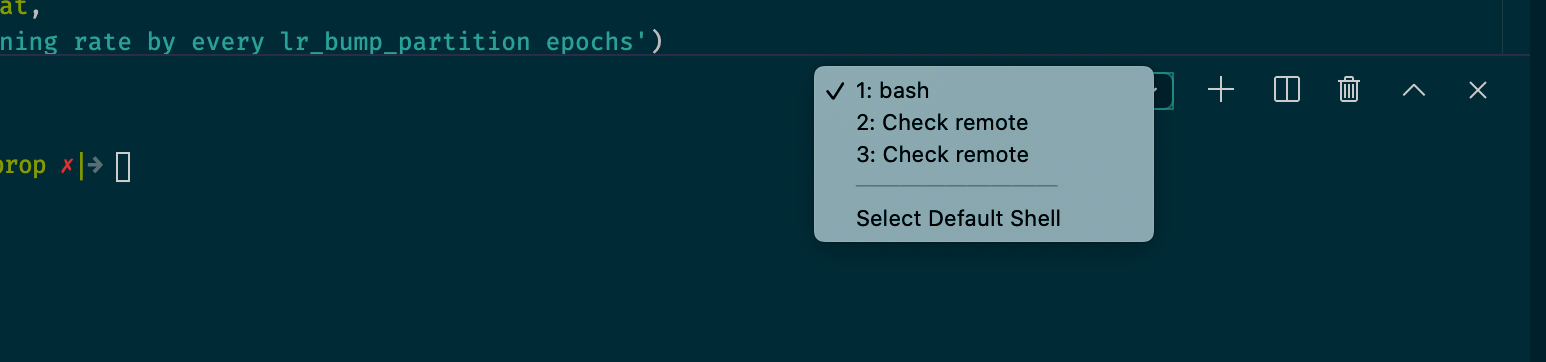
Version: 1.43.1
Commit: fe22a9645b44368865c0ba92e2fb881ff1afce94
Date: 2020-03-18T07:01:41.240Z
Electron: 7.1.11
Chrome: 78.0.3904.130
Node.js: 12.8.1
V8: 7.8.279.23-electron.0
OS: Darwin x64 19.3.0
 shamoons
on 22 Mar 2020
shamoons
on 22 Mar 2020
Same issue here, crazy annoying, also I notice that when using virtualenv there are two tabs.
1: bash
2: Check remote
On the first one (bash) my virtualenv is not auto activated if I open another (3: bash) New Terminal it is auto activated. It is quicker for me to activate a new one, than to use the default 1:bash.
 telemmaite
on 22 Mar 2020
telemmaite
on 22 Mar 2020
Ngolin's fix worked great for me. Just popped it in settings, closed and reopened VS Code and bash loads correctly with no check remote screen.
 ceejwalker
on 26 Mar 2020
ceejwalker
on 26 Mar 2020
I am also still experiencing this issue. The fix suggested by @ngolin does not solve the problem for me. Sometimes after a while working there are 10+ "check remote" tabs open in the output window in the bottom of the screen. I am running VSCode 1.43.2 on my Mac and connecting to a Linux machine with a virtualenv.
 tomrunia
on 30 Mar 2020
tomrunia
on 30 Mar 2020
I had expected that this would be fixed upstream by now. Anyone still seeing it, please check that you have the latest version of the Python extension, and if so, could you follow up on the Python extension's repo? https://github.com/microsoft/vscode-python/issues/9503
roblourens
on 30 Mar 2020
@roblourens
Experiencing the same issue, still, with latest VS Code and Python extension. Will check out the issue you linked.
 hoechenberger
on 31 Mar 2020
hoechenberger
on 31 Mar 2020
I also encountered this problem. Has it been solved?
 wangxianrui
on 3 Apr 2020
wangxianrui
on 3 Apr 2020
I also have the problem on Windows 10, ver 1.44.0
 liziwl
on 10 Apr 2020
liziwl
on 10 Apr 2020
This works for me:
"remote.SSH.enableDynamicForwarding": false
this really works for me
liziwl
on 10 Apr 2020
So people are seeing this in 2020.3.71113 or newer?
roblourens
on 11 Apr 2020
@roblourens Seeing it still on 2020-04-10
 munael
on 13 Apr 2020
munael
on 13 Apr 2020
I'm asking about the Python extension version
roblourens
on 13 Apr 2020
I'm asking about the Python extension version
Yes, problem occurs here with Python extension 2020.3.71659 and VSCode 1.44.0
tomrunia
on 13 Apr 2020
+1 Same problem with the issuer. Is there any solution or methods to close the check remote tab?
 jkryanchou
on 14 Apr 2020
jkryanchou
on 14 Apr 2020
Version: 1.44.0 (user setup)
Commit: 2aae1f26c72891c399f860409176fe435a154b13
Date: 2020-04-07T23:31:18.860Z
Electron: 7.1.11
Chrome: 78.0.3904.130
Node.js: 12.8.1
V8: 7.8.279.23-electron.0
OS: Windows_NT x64 10.0.18363
Same problem. Python extension version: 2020.3.71659
Screenshot

Expand (Remote ssh log)
[09:44:50.964] Log Level: 2
[09:44:50.969] [email protected]
[09:44:50.969] win32 x64
[09:44:50.971] SSH Resolver called for "ssh-remote+work-ubu", attempt 1
[09:44:50.971] SSH Resolver called for host: work-ubu
[09:44:50.972] Setting up SSH remote "work-ubu"
[09:44:51.028] Using commit id "2aae1f26c72891c399f860409176fe435a154b13" and quality "stable" for server
[09:44:51.031] Install and start server if needed
[09:44:51.038] Checking ssh with "ssh -V"
[09:44:51.098] > OpenSSH_for_Windows_7.7p1, LibreSSL 2.6.5
[09:44:51.101] Running script with connection command: ssh -T -o ClearAllForwardings=true work-ubu bash
[09:44:51.108] Terminal shell path: C:\WINDOWS\System32\cmd.exe
[09:44:51.174] >
>
>
>
>
>
>
>
>
>
>
>
>
>
>
>
>
>
>
>
>
>
>
> ]0;C:\WINDOWS\System32\cmd.exe
[09:44:51.175] Got some output, clearing connection timeout
[09:44:51.181] >
>
>
>
>
>
>
>
>
>
>
>
>
>
>
>
>
>
>
>
>
>
>
>
[09:44:56.640] > 862b642af7ac: running
>
[09:44:56.779] > Acquiring lock on /home/anderson/.vscode-server/bin/2aae1f26c72891c399f860409176
> fe435a154b13/vscode-remote-lock.anderson.2aae1f26c72891c399f860409176fe435a154b1
> 3
>
[09:44:56.805] > \ln /home/anderson/.vscode-server/bin/2aae1f26c72891c399f860409176fe435a154b13/v
> scode-remote-lock.anderson.2aae1f26c72891c399f860409176fe435a154b13.target /home
> /anderson/.vscode-server/bin/2aae1f26c72891c399f860409176fe435a154b13/vscode-rem
> ote-lock.anderson.2aae1f26c72891c399f860409176fe435a154b13
>
[09:44:56.859] > Found existing installation at /home/anderson/.vscode-server/bin/2aae1f26c72891c
> 399f860409176fe435a154b13...
>
[09:44:56.910] > Found running server...
>
[09:44:56.922] >
> *
> * Reminder: You may only use this software with Visual Studio family products,
> * as described in the license (https://go.microsoft.com/fwlink/?linkid=2077057)
> *
>
>
[09:44:56.970] > Checking server status on port 33315 with wget
>
[09:44:57.054] > 862b642af7ac: start
> agentPort==33315==
> osReleaseId==ubuntu==
> arch==x86_64==
> webUiAccessToken====
> tmpDir==/run/user/1000==
> platform==linux==
> 862b642af7ac: end
>
[09:44:57.055] Received install output:
agentPort==33315==
osReleaseId==ubuntu==
arch==x86_64==
webUiAccessToken====
tmpDir==/run/user/1000==
platform==linux==

[09:44:57.057] Remote server is listening on port 33315
[09:44:57.057] Parsed server configuration: {"agentPort":33315,"osReleaseId":"ubuntu","arch":"x86_64","webUiAccessToken":"","tmpDir":"/run/user/1000","platform":"linux"}
[09:44:57.070] Running script with connection command: ssh -T -L 127.0.0.1:60942:127.0.0.1:33315 work-ubu bash
[09:44:57.072] Spawning tunnel with: type "C:\Users\ander\AppData\Local\Temp\vscode-linux-multi-line-command-work-ubu-219092226.sh" | ssh -T -L 127.0.0.1:60942:127.0.0.1:33315 work-ubu bash
[09:44:57.073] Terminal shell path: C:\WINDOWS\System32\cmd.exe
[09:44:57.154] >
>
>
>
>
>
>
>
>
>
>
>
>
>
>
>
>
>
>
>
>
>
>
> ]0;C:\WINDOWS\System32\cmd.exe
[09:44:57.171] >
>
>
>
>
>
>
>
>
>
>
>
>
>
>
>
>
>
>
>
>
>
>
>
[09:44:57.425] "install" terminal command done
[09:44:57.426] Install terminal quit with output:
[09:45:01.930] > SSH_AUTH_SOCK=
>
[09:45:01.945] > Connected to SSH Host - Please do not close this terminal
>
[09:45:01.945] Spawned SSH tunnel between local port 60942 and remote port 33315
[09:45:01.945] Waiting for ssh tunnel to be ready
[09:45:01.951] Tunneled remote port 33315 to local port 60942
[09:45:01.954] Resolved "ssh-remote+work-ubu" to "127.0.0.1:60942"
[09:45:01.962] ------
 catexis
on 14 Apr 2020
catexis
on 14 Apr 2020
This problem will always occur when I choose a python interpreter created by virtual environment, say conda, and then close the remote connection with a python script active. The next time I reconnect the server, it pops out.
Both VSCode version and Python extension version are the latest as mentioned above.
 ryanfwy
on 15 Apr 2020
ryanfwy
on 15 Apr 2020
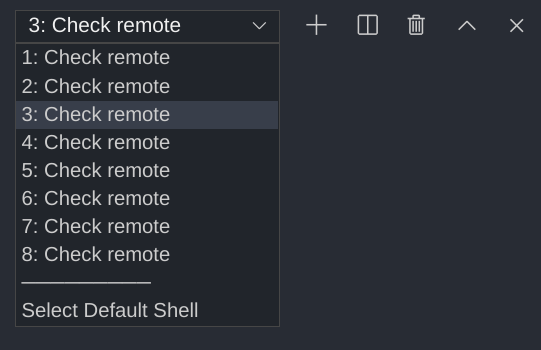
This is getting out of hand.
This happens on all operating systems I use VSCode on. ChromeOS (deb package install), MacOS, and Windows.
Version: 1.43.0
Commit: 78a4c91400152c0f27ba4d363eb56d2835f9903a
Date: 2020-03-09T19:44:52.965Z
Electron: 7.1.11
Chrome: 78.0.3904.130
Node.js: 12.8.1
V8: 7.8.279.23-electron.0
OS: Linux x64 4.19.87-07826-g55ab70aff690
 binchick-in
on 18 Apr 2020
binchick-in
on 18 Apr 2020
I was still seeing this error for several weeks after the fix had been pushed. The other day, my VS Code Insiders was failing to connect to my remote due to an Insiders bug (fixed by 44c51853). Before realizing it was a bug, I uninstalled VS Code Server on the remote several times while trying to get it to work again. Once the fix was pushed and the new Insiders release was installed on my local machine, my remote connection worked and the "Check remote" issue was finally gone.
_TL;DR_: Try uninstalling VS Code Server on the remote and reconnect to let VS Code reinstall it.
 plwalsh
on 18 Apr 2020
plwalsh
on 18 Apr 2020
I have tried uninstalling and reinstalling it as mentioned by plwalsh, but nothing changed. Problem still occurs when I close the connection with a python script active in the front and reconnect it.
ryanfwy
on 19 Apr 2020
Thanks for the feedback, @ryanfwy. Was worth a shot. Not sure what else it could've been then, since all my extensions were already up to date before that happened.
plwalsh
on 19 Apr 2020
Same problem here:
VSCode Version: 1.44.2
Local OS Version: macOS Catalina 10.15.4
Remote OS Version: Ubuntu 18.04.3 LTS
Remote Extension/Connection Type: SSH
 pedrodallav
on 21 Apr 2020
pedrodallav
on 21 Apr 2020
Same here:
VSCode Version: 1.44.2
Local OS Version: macOS Catalina 10.15.4
Remote OS Version: Ubuntu 18.04.3 LTS
Remote Extension/Connection Type: SSH
 belskikh
on 22 Apr 2020
belskikh
on 22 Apr 2020
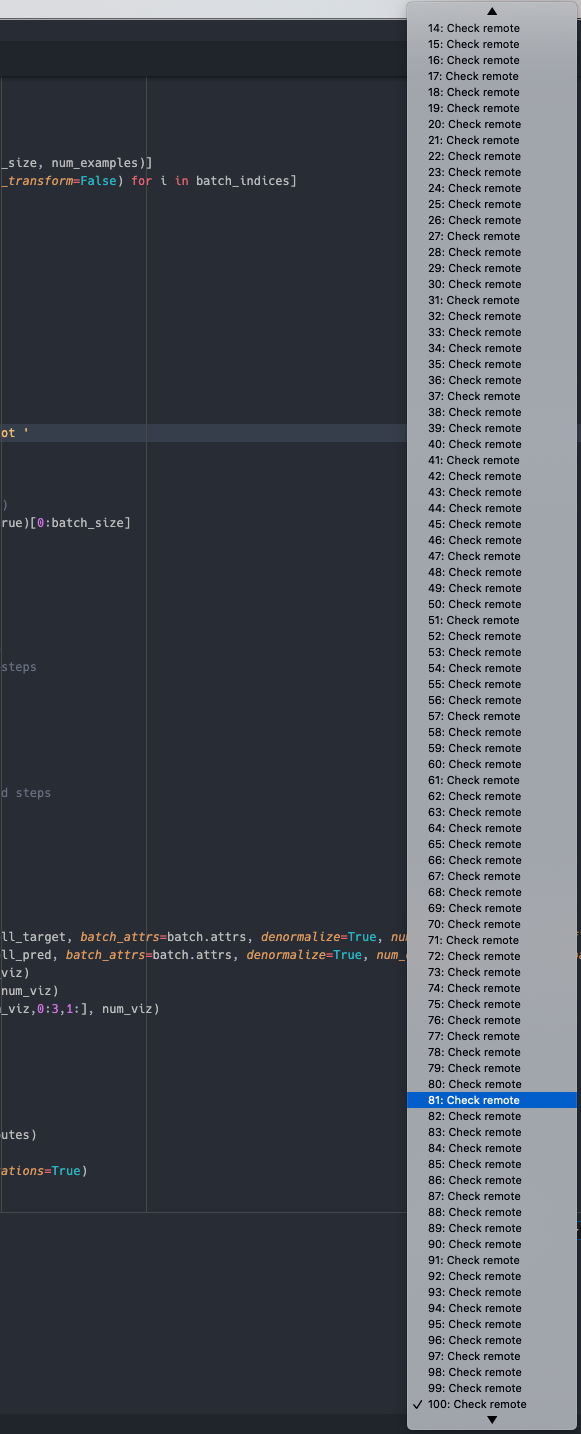
This is getting out of hand :(
tomrunia
on 25 Apr 2020
Same here. But looks like if I uninstall the "Python" extension, it will not pop up again.
 tbright17
on 26 Apr 2020
tbright17
on 26 Apr 2020
~Ngolin's fix as mentioned by ceejwalker worked for me for now too. We'll see if it keeps working and if it has any consequences down the line.~
Nope, that didn't last long. The next time there was a disconnect/reconnect this happened again.
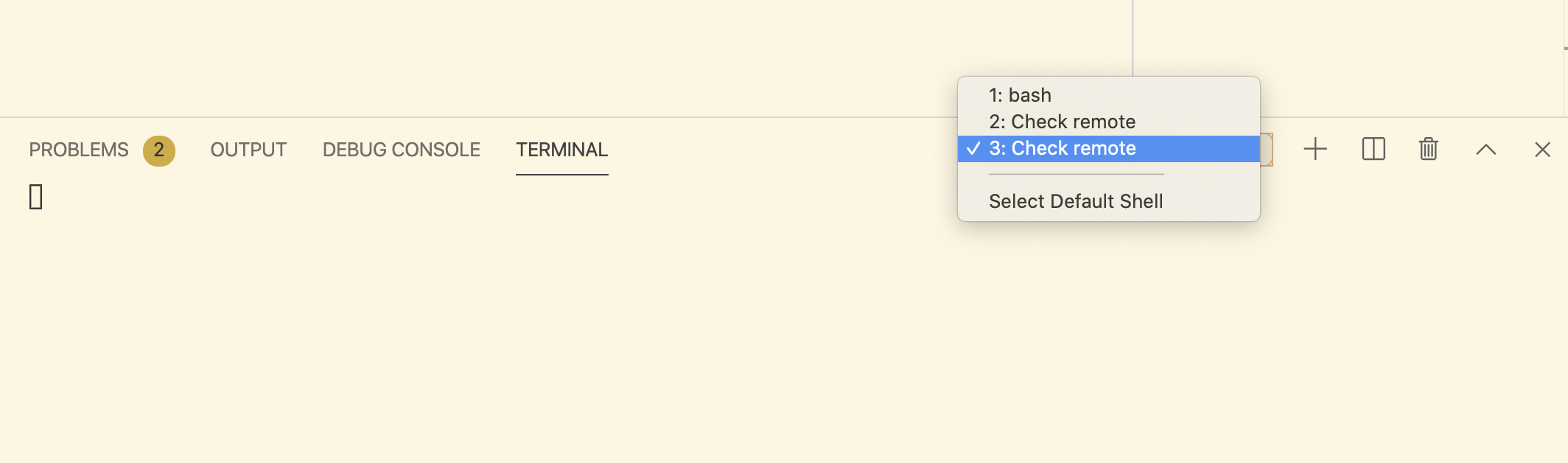
Next attempt: plwalsh's suggestion of uninstalling the remote extension on the remote machine. I didn't see the remote extension on the remote machine, but I uninstalled all extensions on the remote machine, including Python, as well as the remote extension installed locally. I reinstalled everything, including python on the remote machine, and triggered a disconnect by turning wifi on and off. I saw the "Check Remote" screen pop up temporarily in the terminal window but it went away by itself. We'll see how this one goes.
UPDATE
Problem still exists.
 benlindsay
on 27 Apr 2020
benlindsay
on 27 Apr 2020
I see a lot of people having this problem, but is anyone actually working on a solution? Seems a bit quiet on the VSCode remote team side. @roblourens any updates on this?
tomrunia
on 28 Apr 2020
I filed https://github.com/microsoft/vscode-python/issues/11122 on the python extension. Earlier I was able to reproduce it, now I am not able to. Can someone check whether setting "python.terminal.activateEnvironment": false still fixes it?
roblourens
on 28 Apr 2020
still fixes it
Nope
catexis
on 28 Apr 2020
@roblourens I added that setting a few days ago, and I don't think I've run into the problem since, but I'll update you if it happens again. Given the above comment though it seems like that doesn't fix it for everyone
benlindsay
on 3 May 2020
I'm running into this, with the latest 1.45.0 version. Happy to provide my configs if helpful.
 mswiatlo
on 12 May 2020
mswiatlo
on 12 May 2020
this is still happening after I uninstall all the extensions except the remote-ssh
@roblourens does anyone working on this ?or do we have any work-around?
VSCode Version: 1.45.0
Local OS Version: windows 10
Remote OS Version: Ubuntu 18.04.3 LTS
Remote Extension/Connection Type: SSH
 David-Dawei
on 14 May 2020
David-Dawei
on 14 May 2020
this is still happening after I uninstall all the extensions except the remote-ssh
@roblourens does anyone working on this ?or do we have any work-around?VSCode Version: 1.45.0
Local OS Version: windows 10
Remote OS Version: Ubuntu 18.04.3 LTS
Remote Extension/Connection Type: SSH
finally
this is still happening after I uninstall all the extensions except the remote-ssh
@roblourens does anyone working on this ?or do we have any work-around?VSCode Version: 1.45.0
Local OS Version: windows 10
Remote OS Version: Ubuntu 18.04.3 LTS
Remote Extension/Connection Type: SSH
disable ipv6 is the reason in my case.
so I enabled IPV6 and then reboot, it get working again.
David-Dawei
on 14 May 2020
I hit a personal record.
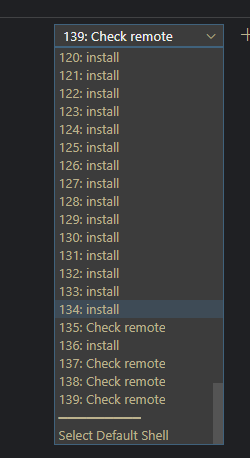
 antonwnk
on 15 May 2020
antonwnk
on 15 May 2020
I am encountering the same issue constantly, and I found that adding a shortcut to switch focus of terminals can mitigate this issue a bit.
Create shortcut key to switch between terminals in vs code. · Issue #37937 · microsoft/vscode
https://github.com/microsoft/vscode/issues/37937
 ikariwing
on 28 May 2020
ikariwing
on 28 May 2020
I'm (almost) getting used to this:

 carlthome
on 3 Jun 2020
carlthome
on 3 Jun 2020
Can someone check whether setting
"python.terminal.activateEnvironment": falsestill fixes it?
Yes this does fix it for me.

I don't have the issue with this setting. Once I set "python.terminal.activateEnvironment": true, the issue resurfaces.
hoechenberger
on 5 Jun 2020
The problem appeared to me this morning, whereas I have been working in remote SSH for weeks now (and on the same remote computer). Maybe a new version of the Python extension has made it appear?
Anyway the above fix worked on the remote version of the extension.
My VSCode info :
Version: 1.46.1
Commit: cd9ea6488829f560dc949a8b2fb789f3cdc05f5d
Date: 2020-06-17T21:17:14.222Z
Electron: 7.3.1
Chrome: 78.0.3904.130
Node.js: 12.8.1
V8: 7.8.279.23-electron.0
OS: Darwin x64 17.7.0
My local OS is macOS 10.13.6 and my remote OS is Linux x64 4.15.0-1065-aws. I have the Python extension v2020.6.90262 installed on both.
 durandg12
on 29 Jun 2020
durandg12
on 29 Jun 2020
Also happens on Mac 10.14.1, causes hundreds of open terminals.
Version: 1.46.1
Commit: cd9ea6488829f560dc949a8b2fb789f3cdc05f5d
Date: 2020-06-17T21:17:14.222Z (1 wk ago)
Electron: 7.3.1
Chrome: 78.0.3904.130
Node.js: 12.8.1
V8: 7.8.279.23-electron.0
OS: Darwin x64 18.2.0

 jamt9000
on 30 Jun 2020
jamt9000
on 30 Jun 2020
still...
 qizhangli
on 2 Jul 2020
qizhangli
on 2 Jul 2020
I don't have the issue with this setting. Once I set
"python.terminal.activateEnvironment": true, the issue resurfaces.
This works as an interim solution for me.
 MurphyPone
on 2 Jul 2020
MurphyPone
on 2 Jul 2020
I don't have the issue with this setting. Once I set
"python.terminal.activateEnvironment": true, the issue resurfaces.This works as an interim solution for me.
The same here. It looks like that vscode terminal automatically activating python envs will spawn it.
 Suida
on 3 Jul 2020
Suida
on 3 Jul 2020
I don't have the issue with this setting. Once I set
"python.terminal.activateEnvironment": true, the issue resurfaces.This works as an interim solution for me.
Thanks!
qizhangli
on 3 Jul 2020
Is there any workarounds without setting python.terminal.activateEnvironment to false?
 glebarez
on 5 Jul 2020
glebarez
on 5 Jul 2020
Having the same issue here on VSCode 1.47.0
 cyrlop
on 13 Jul 2020
cyrlop
on 13 Jul 2020
same here, newest osx on host accessing ubuntu 1804 remote and using conda as env manager.
 neuronflow
on 14 Jul 2020
neuronflow
on 14 Jul 2020
Having the same issue here.
 bonfire62
on 17 Jul 2020
bonfire62
on 17 Jul 2020
The Python team has released a fix in the latest build of the extension. Could someone check that you are on at least 2020.7.94776 and verify that it is fixed?
roblourens
on 21 Jul 2020
I am on VSCode 1.47.2 with Python 2020.7.94776 and I'm still getting a Check remote terminal, even after a full restart of VScode. I do have "python.terminal.activateEnvironment": true.
 brbecker
on 21 Jul 2020
brbecker
on 21 Jul 2020
Same experience as @brbecker. I'm on the latest version, and when I have "python.terminal.activateEnvironment": true, I get the multiple "Check remote" terminals. Setting "python.terminal.activateEnvironment": false fixes it, but that's frustrating because it is really nice to have the terminal automatically activate the environment
benlindsay
on 21 Jul 2020
I have a similar issue on VSCode 1.47.2 with an OSX Host, Ubuntu 18.04 remote. 2020.7.96456 python extension.
Edit: actually, it just asked me to reload vscode -- that's the python extension version it just installed, not sure what the old version was anymore. We'll see if this goes away....
 virtuald
on 24 Jul 2020
virtuald
on 24 Jul 2020
We can confirm it's not been fixed yet. We have identified the issue and will be releasing the fix soon. Thanks for cooperating.
 karrtikr
on 24 Jul 2020
karrtikr
on 24 Jul 2020
This should be fixed with the latest VS Code Insiders https://code.visualstudio.com/insiders and the latest version of the Python extension. Can anyone confirm?
roblourens
on 1 Aug 2020
I can confirm I no longer see the issue.
karrtikr
on 1 Aug 2020
@roblourens when would this be merged with the non-insiders version?
 Aetherbase
on 9 Aug 2020
Aetherbase
on 9 Aug 2020
This week - Wednesday or Thursday.
roblourens
on 10 Aug 2020
Related issues
 6XAM
·
3Comments
6XAM
·
3Comments
 robertlugg
·
3Comments
robertlugg
·
3Comments
 peterkappelt
·
3Comments
peterkappelt
·
3Comments
 jkoritzinsky
·
3Comments
jkoritzinsky
·
3Comments
 gulshan
·
3Comments
gulshan
·
3Comments
Most helpful comment
This is what the symptoms look like:

I've not figured out what the rhyme or reason this pops up is. No text ever appears in the terminal window.
Normally, I don't my terminal view open at all. This usually happens a few times per day to me. Sometimes it seems it's in rapid succession (several times in 10 minutes) and sometimes it hours in between.