Vscode-remote-release: remote-ssh: Add possibility to invoke a login shell
Currently (vscode 1.38.1), a remote bash terminal only sources .bashrc, like an interactive shell that is not a login shell would do.
This breaks existing conda installations on the remote system, which rely on code in /etc/profile.d. I'd like to have the possibility to start an interactive shell with the --login option on the remote system. This way, profiles from /etc/profile and .profile would be sourced as well.
Please see the bash man page for how different files are sourced on bash invocation.
See #83 for reference as well.
 jenzopr
All 25 comments
@roblourens two ways we could solve this:
- Allow users to specify they want a login shell and the ext host can be launched inside a shell using
-l. - Call
getUnixShellEnvironmentin the ext host just like we do for the main process, normally the ex host inherits this "dev env" from the renderer but in remote-ssh it's inherited from the barebones ssh env which does not run as a login shell.
I'm leaning towards the former as the solution is inside the ssh ext and won't affect anything else. It could probably be called in a similar way to this how we use $SHELL:
There is of course then the problem of $SHELL potentially not POSIX-compliant and causing other issues.
 Tyriar
on 16 Oct 2019
Tyriar
on 16 Oct 2019
Option 1 sounds find to me. :) IMO from a user's point of view, it seems like a login shell should be the default though -- just to mirror how local VS Code behaves. I realize that would be a change at this point, but it seems like it would solve more random issues than it would create. (e.g. PATH isn't as expected so scripts fail, etc) But either way 👍
 Codelica
on 16 Oct 2019
Codelica
on 16 Oct 2019
@Codelica I think we reason we didn't do that is because a regular ssh session does not run a login shell, so currently it's very similar to a regular ssh setup (unless you run bash -l inside the ssh session or something).
Tyriar
on 16 Oct 2019
By "regular ssh session", do you mean invoking a typical remote ssh connection from a terminal shell like:
As that seems to always provide a login shell from what I've seen.
Codelica
on 16 Oct 2019
@Codelica yes, based on my testing it didn't. That's also the reason you're seeing this behavior, if it was a login shell I don't think this issue should exist.
Tyriar
on 16 Oct 2019
@Tyriar @Codelica I've also run into this problem when trying to get my team set up with the remote-ssh extension. We have a lot of environment that's set up in .profile rather than in .bashrc, and we rely fairly heavily on nested shells in our dev environment, so setting PATH etc. in .bashrc would be tricky to get right. Either of the proposed fixes would be very helpful.
 peter-b
on 16 Oct 2019
peter-b
on 16 Oct 2019
@peter-b yeah you're doing it right. We can consider change this to be the default but we would need to do some thinking on what might break as a result of that.
Tyriar
on 16 Oct 2019
@Tyriar I believe any new SSH connection/session should give you an interactive login shell _to start_. But if you begin another shell _in an existing session_ you then get an interactive non-login shell, which is what is at work here. I think. :)
When the Remote SSH plugin initially connects (to form the session, install what's needed, etc) I can see it is given a login shell sourcing .profile, etc. (which it may appreciate :) ). However any interactive VS Code terminal that the user brings up (once connected) just uses that established session, and is not a login shell. At least I think that's the case based on what I've seen.
While that technically may be "correct" behavior for bringing up an additional shell in an established remote session, it's different from how the VS Code terminal behaves when working locally -- which brings up a login shell each time. So I guess if the intent of the Remote SSH plugin is to "work on a remote host as if it's local", that feels like a disconnect.
That got long, but the answer here has more information if you're interested.
https://unix.stackexchange.com/questions/38175/difference-between-login-shell-and-non-login-shell
Thanks for considering this!
Codelica
on 16 Oct 2019
I'm a little confused - we do already set up the extension host environment based on a login shell. Essentially we spawn bash -ilc "node command to print environment" and that is the intial environment of the extension host, and terminals will inherit that environment. This is option 1 that @Tyriar describes and this is what I see in my testing.
So if you are setting PATH or other environment variables in your .profile, they should end up in the terminal environment as well. I am not familiar with conda so I wonder if you can give me a concrete example of what you are seeing.
In my case, I have export DOTPROFILE=yes in my .profile and I can run echo $DOTPROFILE in the vscode terminal and see that it is "yes".
Side note, since I had forgotten this: We only discover the environment once then cache it for the rest of the server's session. If you change your dot scripts and want to see that change reflected when you open a new vscode window, you will have to restart the remote server with the command "Kill VS Code Server on Host".
 roblourens
on 16 Oct 2019
roblourens
on 16 Oct 2019
Side note, since I had forgotten this: We only discover the environment once then cache it for the rest of the server's session. If you change your dot scripts and want to see that change reflected when you open a new vscode window, you will have to restart the remote server with the command "Kill VS Code Server on Host".
Hi @roblourens, this is the part that I was missing. It isn't at all obvious that this is the behaviour; it comes as a big surprise to me that VS Code continues to run on the remote server after the last window connected to it has been closed. Are you sure this behaviour is desirable?
peter-b
on 17 Oct 2019
So restarting the server fixes it for your case?
Are you sure this behaviour is desirable?
No, not at all. However, connecting to the remote is kind of slow already and I'm hesitatant to do anything that could make it slower, like starting a process to check the environment that won't change 99% of the time. Not sure what to do.
roblourens
on 18 Oct 2019
In my case, I have
export DOTPROFILE=yesin my.profileand I can runecho $DOTPROFILEin the vscode terminal and see that it is "yes".
Hi @roblourens, I do not have a conda environment or any similar setup. I still cannot see changes which sourcing .profile should reflect. The terminals open a non-login shell for me. Restarting the server does not fix anything.
 jatin-code777
on 22 Oct 2019
jatin-code777
on 22 Oct 2019
Can you give more details about what "changes" you have so I can reproduce it?
roblourens
on 23 Oct 2019
UPDATE:
Apologies. All of my tests below comply with what you have written here. I was a little confused.
So if you are setting PATH or other environment variables in your .profile, they should end up in the terminal environment as well. I am not familiar with conda so I wonder if you can give me a concrete example of what you are seeing.
In my case, I have export DOTPROFILE=yes in my .profile and I can run echo $DOTPROFILE in the vscode terminal and see that it is "yes".
Side note, since I had forgotten this: We only discover the environment once then cache it for the rest of the server's session. If you change your dot scripts and want to see that change reflected when you open a new vscode window, you will have to restart the remote server with the command "Kill VS Code Server on Host".
Either way, as it stands, The terminal given is not a login shell.
And as the issue name indicates, if possible, please provide a feature to automatically invoke a login shell in the terminal.
Thank you
@roblourens Okay, so I tried retesting and I'll tell you what occurred. Let me know if I should open another issue for this.
Test1
- Add line to .profile:
export vartest101="hello" - Have a local folder open in vscode
- Connect to the host using the button on the bottom-left "Open a remote Window"
- Open any folder on remote
- Open terminal using
Ctrl+`. - Run
echo $vartest101
Output :hello
Test2 (Run directly after Test1)
- Changes to .profile (using external terminal ssh instance):
Removeexport vartest101="hello"
Addvartest1="hello"
Addexport vartest2="hello" - Close former remote window
- Connect to host using "Open a remote window" button
- Open any folder on remote
- Run commands on bash:
echo $vartest101Output:hello
echo $vartest1Output:(var isn't set)
echo $vartest2Output:(var isn't set)
Test3
- Close local vscode window
- Open new vscode window
- Run Test2 (without Test1)
Output:
echo $vartest101Output:(var isn't set)
echo $vartest1Output:(var isn't set)
echo $vartest2Output:hello
Implies .profile was sourced and the current terminal is a child process of a login shell.
Test4
- Open a remote Window
- Open any folder on remote
- Open Terminal
- Run:
shopt -q login_shell && echo 'Login shell' || echo 'Not login shell'
Output:Not login shell
jatin-code777
on 25 Oct 2019
We have established that the .profile is sourced once but not again for each connection, and that it isn't a login shell. That is what your testing shows. But to me it still doesn't establish that there is a real problem here.
roblourens
on 27 Oct 2019
Yes, I agree. There is no _bug_ here, as I mentioned in the UPDATE section, all the tests comply with expected behavior.
Please consider this as a feature request to "Add possibility to invoke a login shell". Perhaps in the "Select Default Shell", there can be two options, one for plain bash and another for bash -l
Also, adding "terminal.integrated.shellArgs.linux": ["-l"] to the .vscode settings in the remote server folder does not affect the integrated terminal.
jatin-code777
on 28 Oct 2019
Is there any way to make terminals work as login shell? I'm a Ruby dev, without it RVM does not work.
 alextakitani
on 20 Nov 2019
alextakitani
on 20 Nov 2019
Same if you are using a virtualenv or pyenv or really anything that relies on having a login shell session. Which is the case for a lot of development scenarios.
 megakoresh
on 7 Dec 2019
megakoresh
on 7 Dec 2019
I'm experiencing the same (.profile not being sourced in Integrated Terminal) but using Docker (not remote SSH connection).
I always use "bash -l" as the command to execute when I want an interactive shell on a Docker container.
So in my case following doc and adding:
"settings": {
   // Run interactive bash shell in VSCode Integrated Terminal
   "terminal.integrated.shellArgs.linux": ["-l"]
}
in devcontainer.json made the trick.
 rubensa
on 7 Dec 2019
rubensa
on 7 Dec 2019
So in my case following doc and adding:
"settings": {
   // Run interactive bash shell in VSCode Integrated Terminal
   "terminal.integrated.shellArgs.linux": ["-l"]
}
THAT'S the answer. I was having the same problems with the non-login shell terminals. This fixed it!
 easyas314
on 30 Dec 2019
easyas314
on 30 Dec 2019
I'm experiencing the same (.profile not being sourced in Integrated Terminal) but using Docker (not remote SSH connection).
I always use "bash -l" as the command to execute when I want an interactive shell on a Docker container.
So in my case following doc and adding:
"settings": { // Run interactive bash shell in VSCode Integrated Terminal "terminal.integrated.shellArgs.linux": ["-l"] }in devcontainer.json made the trick.
This unfortunately didn't work for me. I tried adding the bash flag to the user, workspace, and server settings (and their combinations) to no avail. Additionally, doing this caused my terminal to crash.
Would love to see this feature implemented as it would be very useful. Regardless, sending my thanks to the vscode dev team for such an outstanding dev experience ❤️
 thinkjrs
on 30 Dec 2019
thinkjrs
on 30 Dec 2019
I ended up here trying to get a working Go environment in remote-ssh with gimme. I run Visual Studio Code on Windows 10, and have source code and my Go environment in a remote Linux VM.
When I was connecting, I would get a message that go wasn't found. That's because I manage my Go environments with a tool called gimme which is sort of like virtualenv or rvm, but for Go.
When I started, I had eval $(gimme stable) in .profile. Visual Studio Code couldn't find go, so the plugin would fail to initialize.
Here's what i had to do to fix it.
- Move gimme from
~/.profileto~/.bash_profile - Close existing instances of vscode server. This is the non-obvious step. Just closing VSCode isn't enough.
ps -aux | grep codethenkillwhat you find. - Connect again from the remote.
 PatrickLang
on 3 Jan 2020
PatrickLang
on 3 Jan 2020
Thank you, PatrickLang. Some clarity! I think your post illustrates the problem best. If I change my .profile or .bash_profile, then open a new terminal in the context of a remote-ssh workspace, I should see the consequences. Period. Please fix this dis-functional aspect of this otherwise awesome tool.
EDIT: additionally, I'm seeing all of the elements in my PATH, from .bash_profile, twice. More or less benign, but hacky looking.
 dstjohn-at-viasat
on 14 Apr 2020
dstjohn-at-viasat
on 14 Apr 2020
I'm experiencing the same (.profile not being sourced in Integrated Terminal) but using Docker (not remote SSH connection).
I always use "bash -l" as the command to execute when I want an interactive shell on a Docker container.
So in my case following doc and adding:
"settings": {
   // Run interactive bash shell in VSCode Integrated Terminal
   "terminal.integrated.shellArgs.linux": ["-l"]
}
in devcontainer.json made the trick.
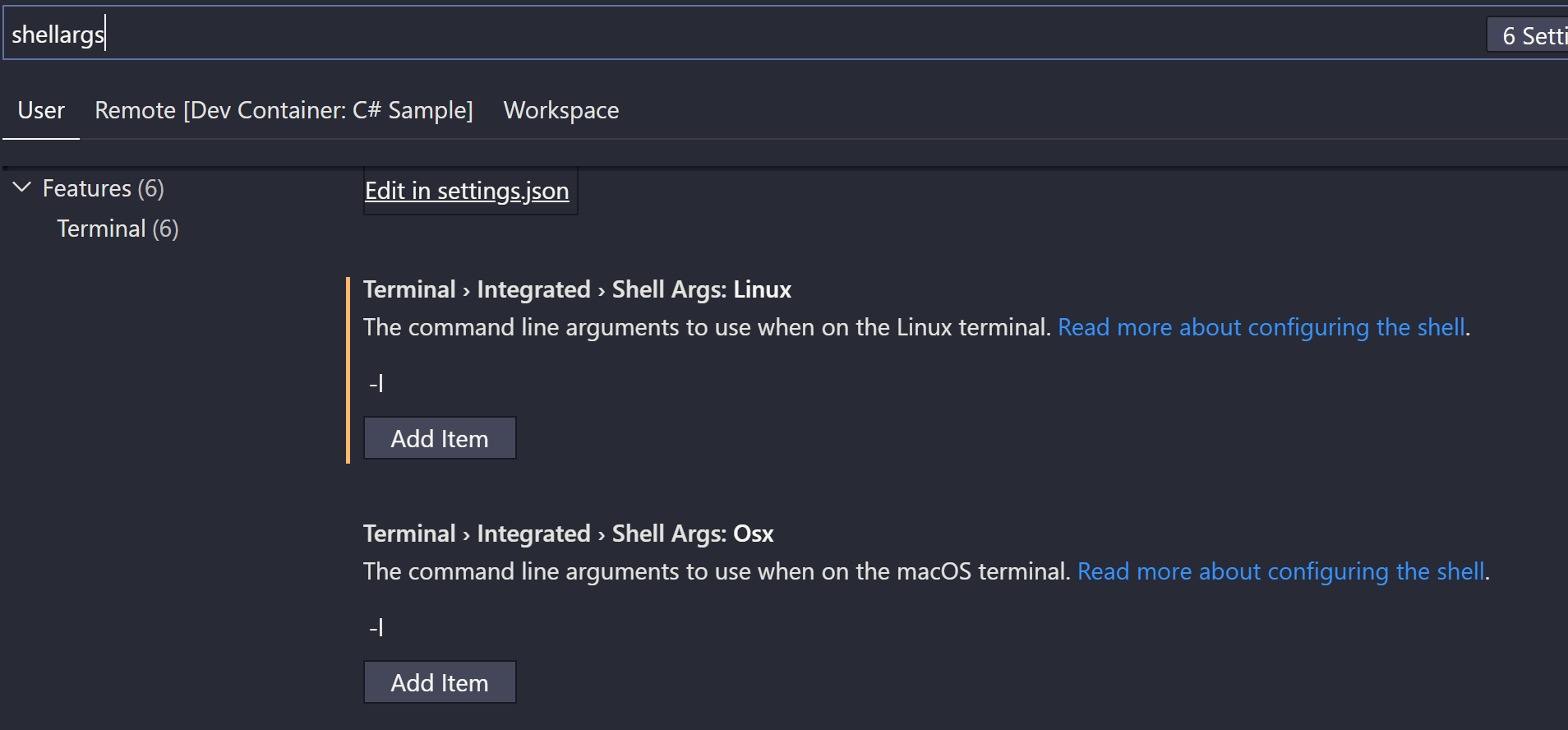
This works in remote container and remote wsl. Change it in your "User" settings and not workspace. In this way it will work for all devcontainers and remote terminals.
Make sure it is lower case -l (first character in word linux) not upper case -i (second character in word linux) and not number -1 (one). Osx for some reason has this set by default.
 ankitbko
on 27 May 2020
ankitbko
on 27 May 2020
We have established that the
.profileis sourced once but not again for each connection, and that it isn't a login shell. That is what your testing shows. But to me it still doesn't establish that there is a real problem here.
@roblourens Prehaps you could explain to us the reasons for not invoking a login shell when a terminal is opened? Its clear form the responses that many of us see it as violating the principle of least astonishment. Please do not read any animus into this question, I've read through several of the issues that have been opened around the fact that a terminal is not invoking a login shell. Its quite clear that this is currently the intended behavior, but what is not clear is why this is the behavior and what issues would be caused if, as most folks seem to consider correct, a login shell was invoked by default when opening a remote terminal?
 ilude
on 23 Sep 2020
ilude
on 23 Sep 2020
Related issues
 asyncx
·
3Comments
asyncx
·
3Comments
 6XAM
·
3Comments
6XAM
·
3Comments
 kieferrm
·
3Comments
kieferrm
·
3Comments
 JacksonKearl
·
3Comments
JacksonKearl
·
3Comments
 Arunselvan-AS
·
3Comments
Arunselvan-AS
·
3Comments
Most helpful comment
I'm experiencing the same (.profile not being sourced in Integrated Terminal) but using Docker (not remote SSH connection).
I always use "bash -l" as the command to execute when I want an interactive shell on a Docker container.
So in my case following doc and adding:
in devcontainer.json made the trick.