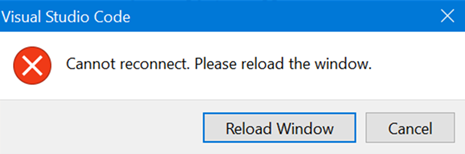
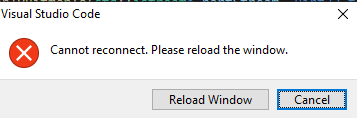
Vscode-remote-release: wsl2 fails to reconnect after hibernate
VSCode Version:
Version: 1.38.1 (user setup)
Commit: b37e54c98e1a74ba89e03073e5a3761284e3ffb0
Date: 2019-09-11T13:35:15.005Z
Electron: 4.2.10
Chrome: 69.0.3497.128
Node.js: 10.11.0
V8: 6.9.427.31-electron.0
OS: Windows_NT x64 10.0.18995Local OS Version:
18995.1001.amd64fre.vb_release_base.190927-1603Remote OS Version:
Ubuntu 18.04 (WSL2)
Remote Extension/Connection Type: SSH/Docker/WSL
WSL
Steps to Reproduce:
- connect to WSL2 via VSCode remote
- launch WSL2 terminal set some environment variables.
- Leave session open and let machine hibernate ( on laptop close lid and leave it in that state for ~10 minutes)
- log on to machine
- look at VSCode , you should be connected to WSL2 remote
Does this issue occur when you try this locally?: Yes/No
Does this issue occur when you try this locally and all extensions are disabled?: Yes/No
 pasoni
All 12 comments
This is the same issue reported here:
https://github.com/microsoft/vscode-remote-release/issues/1637
https://github.com/microsoft/vscode-remote-release/issues/1646
If it helps with diagnostics, I've verified that WSL works on 1.40 Insiders.
 ahernandez-allegion
on 10 Oct 2019
ahernandez-allegion
on 10 Oct 2019
Is there any progress on this issue? I am seeing this issue every day.
 mrawdon
on 10 Jun 2020
mrawdon
on 10 Jun 2020
@dbaeumer Do you also still see this?
 aeschli
on 10 Jun 2020
aeschli
on 10 Jun 2020
@aeschli I do see a reconnect dialog after hibernate but it doesn't fail.
 dbaeumer
on 10 Jun 2020
dbaeumer
on 10 Jun 2020
I can't reproduce now when I click hibernate. When it occurred before it was when my laptop battery was drained and it shutdown and hibernated on me, not sure if that makes a difference. I'll try to reproduce it later today
mrawdon
on 10 Jun 2020
I have this issue ~ every houre or more often
 vladimirschneider
on 22 Jun 2020
vladimirschneider
on 22 Jun 2020
I saw it again today when my machine returned from hibernate, I think this is the third time I've seen it since I posted.
I attached my console log here, I don't know if there is anything else that would be useful.
-1592913275950.log
mrawdon
on 23 Jun 2020
Thanks @mrawdon , that's good input.
@alexdima Can you have a look at at the log ?
aeschli
on 23 Jun 2020
running into this daily :(
 badstreff
on 21 Jul 2020
badstreff
on 21 Jul 2020
Hey! It's work great in vscode insider preview, it is solved a trouble of a dialog of reload windows. I hope this help you.
vladimirschneider
on 4 Aug 2020
I fixed this issue by disabling "python for vscode" extension surprisingly.
 ShengdingHu
on 28 Aug 2020
ShengdingHu
on 28 Aug 2020
I looked at the log, and it shows a story of two connections, ea1f0… and 58317….
It is hard to say how long this took, because timestamps are not in the log, but ea1f0 was an extension host connection and it got disconnected 7 times and was able to reconnect 7 times. 58317 was a management connection and it got disconnected 5 times and was able to reconnect only 4 times.
In the end it looks to me that the server did not wait for the client to reconnect, so that's why 58317 finally failed with Unknown reconnection token. It would be interesting to learn what the server saw on its side.
@aeschli Is it possible to extract somehow the server logs?
 alexdima
on 4 Sep 2020
alexdima
on 4 Sep 2020
Related issues
 kzawad1
·
3Comments
kzawad1
·
3Comments
 Yvand
·
3Comments
Yvand
·
3Comments
 JacksonKearl
·
3Comments
JacksonKearl
·
3Comments
 asyncx
·
3Comments
asyncx
·
3Comments
 abdullahiabdirahman
·
3Comments
abdullahiabdirahman
·
3Comments