Vscode-remote-release: 'Remote-WSL: New Window' does not work behind company proxy
- VSCode Version: 1.38.1
- Local OS Version: Window 10
- Remote OS Version: Ubuntu 18.04
- Remote Extension/Connection Type: Remote-WSL 0.39.5
In our company we work behind a company proxy server.
Steps to Reproduce:
Execute 'Remote-WSL: New Window' or Execute 'Remote-WSL: New Window using Distro...'
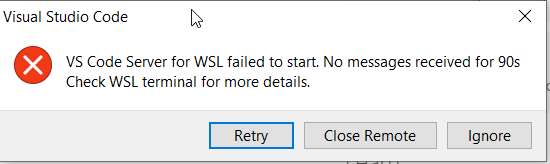
VS Code times out and shows:
Terminal log is:
Starting VS Code Server inside WSL (Ubuntu-18.04)
Extension version: 0.39.5, Windows build: 18362. Multi distro support: enabled. WSL path support: enabled
Probing if server is already installed: C:\WINDOWS\System32\wsl.exe -d Ubuntu-18.04 -e sh -c "[ -d ~/.vscode-server/bin/b37e54c98e1a74ba89e03073e5a3761284e3ffb0 ] && echo found || echo missing"
No server install found on WSL, downloading server on client side: C:\Users\daldrich\AppData\Local\Temp\vscode-remote-wsl\b37e54c98e1a74ba89e03073e5a3761284e3ffb0\vscode-server-linux-x64.tar.gz
Unable to detect if server is already installed: Error: connect ETIMEDOUT 51.144.164.215:443
Launching C:\WINDOWS\System32\wsl.exe -d Ubuntu-18.04 sh -c '"$VSCODE_WSL_EXT_LOCATION/scripts/wslServer.sh" b37e54c98e1a74ba89e03073e5a3761284e3ffb0 stable .vscode-server 0  ' in c:\Users\daldrich\.vscode\extensions\ms-vscode-remote.remote-wsl-0.39.5
WSL version: 4.4.0-18362-Microsoft Ubuntu-18.04
Updating server...
Updating VS Code Server to version b37e54c98e1a74ba89e03073e5a3761284e3ffb0
Removing previous installation...
Downloading:
VS Code Server for WSL failed to start. No messages received for 90s
For help with startup problems, go to
https://code.visualstudio.com/docs/remote/troubleshooting#_wsl-tips
 DavidA2014
All 32 comments
The download failed on the Windows side. ETIMEDOUT 51.144.164.215:443
Does accessing the marketplace from the extensions viewlet work?
 aeschli
on 4 Oct 2019
aeschli
on 4 Oct 2019
Yes:
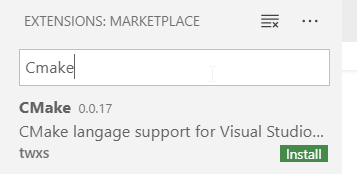
VS Code updates and extension updates also work.
DavidA2014
on 4 Oct 2019
@chrmarti The WSL extension uses https.get and doesn't seem to use the Chromium settings.
Any suggestions?
aeschli
on 4 Oct 2019
@chrmarti The WSL extension uses
https.getand doesn't seem to use the Chromium settings.
Any suggestions?
Did you try to set the proxy in the vs code settings for WSL?
 Lahiri
on 4 Oct 2019
Lahiri
on 4 Oct 2019
@Lahiri No, please point me to instructions for what to do. I can't see any appropriate Remote-WSL settings in Code.
DavidA2014
on 4 Oct 2019
@Lahiri No, please point me to instructions for what to do. I can't see any appropriate Remote-WSL settings in Code.
Open the vscode settings, select the Remote-WSL tab (top of the page) and search for proxy.
Edit: you have to connect to the wsl first. It will fail the download of the server, but it doesn't matter, you can try again after setting the proxy.
Lahiri
on 4 Oct 2019
https.get in extensions should use the same proxy settings Chromium is using with the limitation that it does not support proxy authentication.
@DavidA2014 Is your company proxy using authentication? If so, you could try setting the HTTP Proxy in VS Code's settings. (You don't need to connect to WSL first.) Just open the user settings (File > Preferences > Settings), search for "http proxy" and set it to the proxy's URL including username and password. Format: http://username:[email protected]:8080/
 chrmarti
on 5 Oct 2019
chrmarti
on 5 Oct 2019
@chrmarti Our company proxy doesn't use authentication. My settings look like this:

DavidA2014
on 7 Oct 2019
@Lahiri In the remote session (that timed out) I hit Ignore and specified the proxy in the Remote-WSL settings as I think you instructed (the setting was empty) but the setting is not saved. I see:

DavidA2014
on 7 Oct 2019
@Lahiri Do you have any more thoughts about this problem?
DavidA2014
on 8 Oct 2019
This issue is tagged 'Needs more info'. I think I have provided the requested info now. Can anyone help me further please?
DavidA2014
on 9 Oct 2019
I have the same problem,
- http proxy in settings set to local unauthenticated proxy (CNTLM)
- Strict SSL disabled
- Proxy Support Override
- Extension catalog and installing extensions works
- C# Extension can download all additional dependencies
- WSL Remote on windows side does not use the proxy (I checked all requests in CNTLM)
- Can no longer use WSL Remote
 PaulFreund
on 11 Oct 2019
PaulFreund
on 11 Oct 2019
I am also experiencing the issue after upgrading to 0.39.9 and it is no longer able to download vscode-server. Currently running VS Code user install 1.39.1 using a local Cntlm proxy behind a corporate proxy that uses NTLMv2 authentication. Before upgrading VS code I was on extension version 0.39.5 and it was working without issue. I looked at the wslDownload.sh in the extension folder and figured out the URL that it's trying to use and confirmed that I can manually download the .tar.gz from inside WSL with wget:
https://update.code.visualstudio.com/commit:88f15d17dca836346e787762685a40bb5cce75a8/server-linux-x64/stable
Settings.json looks like this:
"http.proxy": "http://localhost:3128",
"http.proxySupport": "override",
"http.proxyStrictSSL": false,
All other functions that are using Cntlm are still working correctly (apt, pip, wget, curl, extension installs via cli)
I have tested previous versions of the Remote-WSL extension with these results (deleting .vscode-server directory and the tar.gz between each test):
- 0.39.5 - Pass
- 0.39.6 - Pass
- 0.39.7 - Fail
- 0.39.8 - Fail
- 0.39.9 - Fail
Here is the WSL log when I try with 0.39.9:
[2019-10-15 18:04:35.212] Starting VS Code Server inside WSL (default distro)
[2019-10-15 18:04:35.212] Extension version: 0.39.9, Windows build: 17134. Multi distro support: disabled. WSL path support: enabled
[2019-10-15 18:04:35.608] Probing if server is already installed: C:WINDOWSSystem32wsl.exe [ -d ~/.vscode-server/bin/88f15d17dca836346e787762685a40bb5cce75a8 ] && echo found || ([ -f /etc/alpine-release ] && echo alpine || echo x64)
[2019-10-15 18:04:35.955] No server install found in WSL, needs x64
[2019-10-15 18:04:35.956] Downloading server on client side: C:UsersusernameAppDataLocalTempvscode-remote-wsl88f15d17dca836346e787762685a40bb5cce75a8vscode-server-linux-x64.tar.gz
[2019-10-15 18:04:57.035] (node:25260) UnhandledPromiseRejectionWarning: Error: connect ETIMEDOUT 104.42.78.153:443
[2019-10-15 18:04:57.035] at TCPConnectWrap.afterConnect [as oncomplete] (net.js:1113:14)
[2019-10-15 18:04:57.035] (node:25260) UnhandledPromiseRejectionWarning: Unhandled promise rejection. This error originated either by throwing inside of an async function without a catch block, or by rejecting a promise which was not handled with .catch(). (rejection id: 1)
[2019-10-15 18:04:57.035] (node:25260) [DEP0018] DeprecationWarning: Unhandled promise rejections are deprecated. In the future, promise rejections that are not handled will terminate the Node.js process with a non-zero exit code.
[2019-10-15 18:06:06.094] VS Code Server for WSL failed to start. No messages received for 90s
[2019-10-15 18:06:06.094] For help with startup problems, go to
[2019-10-15 18:06:06.094] https://code.visualstudio.com/docs/remote/troubleshooting#_wsl-tips
I also noticed in the 0.39.6 release notes they mentioned that it was going to try downloading the extension on the windows side:
The WSL extension now downloads the VS Code server build on the Windows side instead of from WSL. This fixes issues with missing proxy settings or certificates in WSL.
However I don't see it ever successfully download them while behind my corporate proxy. It just creates a 0KB file in the %temp%\vscode-remote-wsl\88f15d17dca836346e787762685a40bb5cce75a8 directory. If I manually download the tar.gz and drop it in that directory then it sees and unpacks it and I'm able to connect to WSL
 SpaceWrangler616
on 15 Oct 2019
SpaceWrangler616
on 15 Oct 2019
If code command is available in WSL, try executing code . in any directory.
It works for me!
(I set proxy information in http_proxy and https_proxy environment variables)
 chiseya
on 16 Oct 2019
chiseya
on 16 Oct 2019
@SpaceWrangler616 The log shows that the download on the Windows side fails. It seems since 0.39.7 Remote-WSL no longer tries to download on the WSL side instead, which worked for you, as I guess. I'll try to fix the Remote-WSL extension so it behaves as before.
But ideally, you get to configure the Windows side with the right proxy settings.
Window side proxy configuration:
- inherited from the OS settings
- or manually as described in https://code.visualstudio.com/docs/setup/network for more information and by the
httpsettings in the User Settings.
WSL side proxy settings:
For the initial server download:
- Use the wget proxy settings: https://stackoverflow.com/questions/11211705/how-to-set-proxy-for-wget
- or use the new server setup script: https://code.visualstudio.com/docs/remote/wsl#_advanced-environment-setup-script
Once the server is up and running:
- The proxy settings on the Remote tab
In a future version of the remote extension, I will try to simplify that by also using the remote proxy settings for the download.
aeschli
on 16 Oct 2019
@chiseya42 Using code . worked! I have the environment variables set in WSL, but I don't have them set on the Windows side because I was trying to limit unintended consequences from routing too much stuff through Cntlm. I'll give that a try next and see if that works for downloading them from Windows.
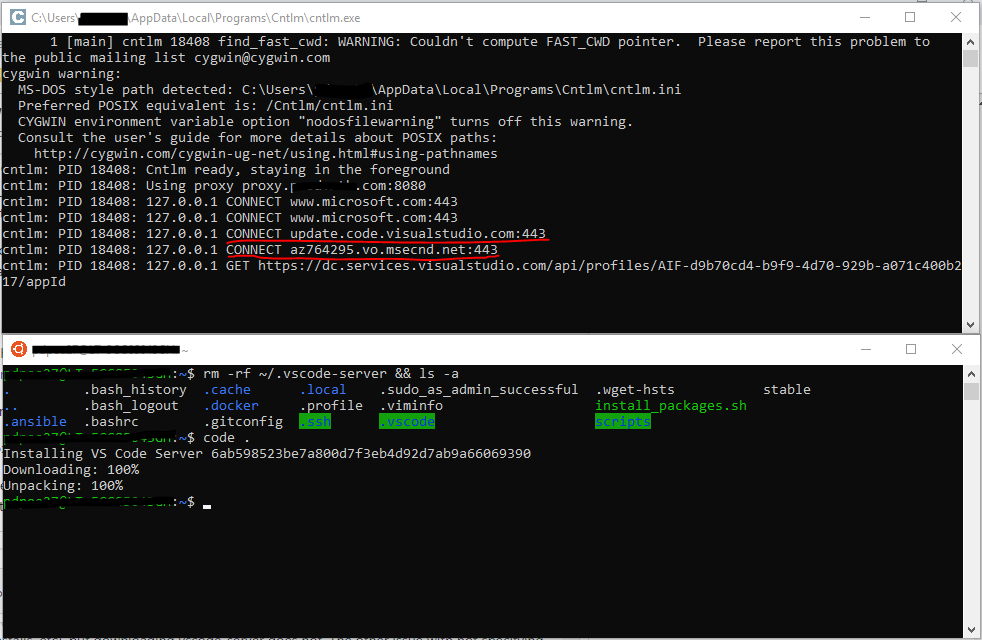
@aeschli Thanks for the reply, I'll keep trying to get the download working from Windows. I've been referencing that network setup doc a lot while trying to get this working and haven't had any luck. When I try specifying no proxy settings most things work just fine through the GUI (updates, extension installs, etc), but downloading vscode-server does not. The other issue with not specifying proxy settings is that I'm using the CLI to automatically install a few core extensions for folks. As the network doc said under legacy support I wasn't able to do that without configuring the http settings.
To echo what @PaulFreund said, when WSL downloads vscode-server I see entries in my Cntlm window that reflect that (see screenshot above). When I try to do it from Windows with the http.proxy setting configured I don't see any Cntlm traffic so I agree that it doesn't seem to be using the user level setting.
Edit: I did try setting the http_proxy and https_proxy environment variables in Windows and was still unable to use Remote-WSL: New Window for the initial connection. The vscode-server download times out and there are no requests listed in Cntlm.
SpaceWrangler616
on 16 Oct 2019
@DavidA2014 I was looking at your settings screenshot, if your proxy is replacing a website's SSL certificate with one from your domain you'll probably have to uncheck the box that says Http: Proxy Strict SSL. (this is typically done to inspect/filter encrypted traffic) https://stackoverflow.com/questions/36506539/how-do-i-get-visual-studio-code-to-trust-our-self-signed-proxy-certificate
You can tell if you bring up an https site in your browser, view the certificate, and look at the issuer. For me https://google.com says it's issued by my corporate proxy server instead of whoever normally does it
SpaceWrangler616
on 16 Oct 2019
@SpaceWrangler616 Thanks for your suggestion. I think our proxy does not replace the SSL certificate. The certificate for https://google.com is shown as issued by 'GTS CA 101' to www.google.com.
I unticked the box that says Http: Proxy Strict SSL but my problem is not fixed.
DavidA2014
on 17 Oct 2019
@DavidA2014 - If you double check your Ubuntu proxy configs you can use the code . method that @chiseya42 recommended to do the initial download. After vscode-server is installed you should be able to use the Remote-WSL: New Window feature again. Unfortunately I am guessing that when a new version of vscode-server is released it will break again, so I'm probably going to steer them to launching Ubuntu first and using code . until they're able to find a long term fix.
Here is how I have my WSL setup to use the proxy (Obviously swap localhost for your proxy since you're not running cntlm)
I added this to my [/etc/environment] file:
http_proxy=http://localhost:3128
https_proxy=http://localhost:3128
This to my [/etc/bash.bashrc] (user's .bashrc would also work):
export http_proxy=http://localhost:3128
export https_proxy=http://localhost:3128
This to my [/etc/apt/apt.conf.d/proxy.conf] file:
Acquire::http::Proxy "http://localhost:3128";
Acquire::https::Proxy "http://localhost:3128";
And this to my [/etc/wgetrc] file (you won't need the 'ca-certificate' line):
use_proxy = on
http_proxy = http://localhost:3128
https_proxy = http://localhost:3128
ca-certificate = /etc/ssl/certs/ca-certificates.crt
@SpaceWrangler616 Thanks, I used the method suggested by @chiseya42 and it worked for me.
DavidA2014
on 18 Oct 2019
@aeschli Just checking in, is there anything else I can do (logs, etc...) to help troubleshoot why the extension is not using the proxy settings in VS Code?
SpaceWrangler616
on 23 Oct 2019
@chrmarti worked on the proxy support for extensions: Any tips on how we can debug this?
aeschli
on 23 Oct 2019
I pushed Remote - WSL version 0.40.0 that improves the download on the Windows side: Correct error handling and verify the download with a checksum. Note, 0.40.0 requires the latest VSCode insiders build.
aeschli
on 24 Oct 2019
You can enable trace logging:
F1>Developer: Set Log Level...>Trace- Open the new WSL window
F1>View: Toggle Output- Switch to
Log (Extension Host)channel - Search for
ProxyResolver#in that channel
There should be 2 entries from the download, append these here:

chrmarti
on 28 Oct 2019
This issue has been closed automatically because it needs more information and has not had recent activity. See also our issue reporting guidelines.
Happy Coding!
![vscodebot[bot] picture](https://avatars2.githubusercontent.com/in/2406?v=4&s=40) vscodebot[bot]
on 4 Nov 2019
vscodebot[bot]
on 4 Nov 2019
This issue has been closed automatically because it needs more information and has not had recent activity. See also our issue reporting guidelines.
Happy Coding!
vscodebot[bot]
on 15 Nov 2019
I think I found the problem.
I wrote that when downloading on the Host (Windows) side, we do this on the extension host side which uses the hosts proxy configuration. It turns out the downloaded happend in it's own process and did not profit from any of that support.
This is now fixed with Remote-WSL 0.41.0. It's available for VSCode Insiders 1.41.
@DavidA2014 @SpaceWrangler616 Can you give it a try?
To force a download,
- delete
%TEMP%\vscode-remote-wslon the Windows side - delete
~/.vscode-server-insiders/binon the WSL side - open a new WSL window, check the log what happens
If it doesn't work, please enable trace logging:
F1>Developer: Set Log Level...>Trace- Open the new WSL window
F1>View: Toggle Output- Switch to
Log (Extension Host)channel - Search for
ProxyResolver#in that channel
aeschli
on 27 Nov 2019
@aeschli Thanks for looking at this. I deleted:
~/.vscode-server-insiders/bin on the WSL side
but couldn't find:
%TEMP%vscode-remote-wsl on the Windows side
I then did a remote connection to WSL and it worked fine. 👍
DavidA2014
on 27 Nov 2019
Marking as fixed. Please speak up if you still see issues.
aeschli
on 2 Dec 2019
I have faced the same issue. Removing %TEMP%\vscode-remote-wsl and ~/.vscode-server-insiders/bin did not help. Here are the only two matches in logs for ProxyResolver# in output:
[2019-12-07 08:46:58.233] [exthost] [debug] ProxyResolver#resolveProxy https://dc.services.visualstudio.com/api/profiles/AIF-d9b70cd4-b9f9-4d70-929b-a071c400b217/appId DIRECT
[2019-12-07 08:47:13.438] [exthost] [debug] ProxyResolver#resolveProxy https://vortex.data.microsoft.com/collect/v1 DIRECT
 Flygrounder
on 7 Dec 2019
Flygrounder
on 7 Dec 2019
@Flygrounder Is that with the latest version of Remote-WSL running on insiders 1.41?
aeschli
on 9 Dec 2019
Sorry, it was not. Fixed after update
Flygrounder
on 9 Dec 2019
Related issues
 Yvand
·
3Comments
Yvand
·
3Comments
 kieferrm
·
3Comments
kieferrm
·
3Comments
 tianomagdaong
·
3Comments
tianomagdaong
·
3Comments
 kzawad1
·
3Comments
kzawad1
·
3Comments
 JacksonKearl
·
3Comments
JacksonKearl
·
3Comments
Most helpful comment
If
codecommand is available in WSL, try executingcode .in any directory.It works for me!
(I set proxy information in
http_proxyandhttps_proxyenvironment variables)