Vscode-remote-release: File not showing up with same name but different case
- VSCode Version: 1.38.1
- Local OS Version: Windows 10 1903
- Remote OS Version: Ubuntu 19.04
- Remote Extension/Connection Type: SSH
Steps to Reproduce:
- Open a remote folder.
- On the remote machine, run
touch aandtouch Ain the project folder. - Only the first one will show up in vscode file explorer. Same for one file and one folder, and two folders.
Does this issue occur when you try this locally?: No
Does this issue occur when you try this locally and all extensions are disabled?: No
 zzh1996
All 8 comments
I can confirm this. Same version, same issue.
When I ls the files in terminal you can see 2 of them: makefile and Makefile, but in the tree only the makefile is visible.

 foreignmeloman
on 30 Sep 2019
foreignmeloman
on 30 Sep 2019
I believe we always had this issue. Let me know if this was working in previous versions, and if yes please specify which.
Same name different case has issues across the workbench, not sure if this is explorer specific @bpasero fyi
 isidorn
on 30 Sep 2019
isidorn
on 30 Sep 2019
🤷♂️
 bpasero
on 30 Sep 2019
bpasero
on 30 Sep 2019
I thought it is a very special case to have files with the same name but different case, but in fact it is not so rare.
If you have a folder called Program and a file called program inside it, and you want to move the file outside the folder in vscode, you will end up finding the file disappeared
zzh1996
on 30 Sep 2019
I have same issue with folder name, where it is important.
Executing a composer install on a Laravel project, some libraries where originally registered with lowercase vendor name, and some other with uppercase.
Right now all the libraries in the uppercase vendor folder are invisible for us. It is not just one file missing, is a whole set of libraries.
Workaround is use the "add folder to workspace" menu option, and there you can see and correctly select the uppercase folder name to be added in the root of the workspace. At least that way we can see them.
 vicenteherrera
on 1 Oct 2019
vicenteherrera
on 1 Oct 2019
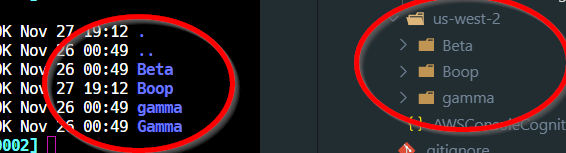
Windows 10 supports case sensitivity per directory [1], I believe Visual Studio Code and Remote SSH should default to a case sensitive workspace on Windows 10 whenever possible. I just got bit by this in a deployment. To make matters worse, I can't rename 'gamma' to 'Gamma' if the 'Gamma' folder already exists but is not shown inside of Visual Studio Code:
[1] https://devblogs.microsoft.com/commandline/per-directory-case-sensitivity-and-wsl/
 awarmfastbear
on 27 Nov 2019
awarmfastbear
on 27 Nov 2019
Should be fixed via https://github.com/microsoft/vscode/issues/48258
Please try out vscode insiders from tomorrow
isidorn
on 17 Dec 2019
Does this work now as expected with vscode insiders?
Thanks!
isidorn
on 21 Jan 2020
Related issues
 gulshan
·
3Comments
gulshan
·
3Comments
 Arunselvan-AS
·
3Comments
Arunselvan-AS
·
3Comments
 gurdevrana
·
3Comments
gurdevrana
·
3Comments
 grzegorz-silarski
·
3Comments
grzegorz-silarski
·
3Comments
 kzawad1
·
3Comments
kzawad1
·
3Comments